
This page is not an official page of the app or its developer, but an independent editorial publication created for informational and commentary purposes. Unless expressly stated otherwise, neither the app nor its developer is affiliated with, endorsed by, sponsored by, authorized by, or otherwise officially connected with MWM, Apple, Google Play, the app publisher, or the app's developer, and nothing on this page implies that the app was developed using MWM's services. Any trademarks, logos, screenshots, and other content remain the property of their respective owners.


File Managers
Stop drowning in digital clutter. The app makes you the master of your device's data, offering precision control over every file.
Downloads
250k+User Rating
Total Ratings
4.5KPublisher
Category
UtilitiesLocales
17Latest Version
1.0.30Size
89.3 MBFirst Released
Jul 13, 2021An in-depth evaluation highlighting the app's strengths for advanced file organization and digital asset management.
Comprehensive Analysis of 'File Managers' Key Capabilities
Multi-Storage Integration
The app provides seamless access and management of files across internal storage, network-attached storage (NAS), and popular cloud services like iCloud and Google Drive, simplifying organization for users with diverse storage locations.
Comprehensive File Management Operations
This tool features a full suite of essential file operations, including copying, pasting, cutting, deleting, renaming, compressing, decompressing, transferring, downloading, and sharing, ensuring users can handle any file task efficiently.
Advanced File Search Capabilities
It allows users to quickly locate files using powerful search criteria such as file name, type, date, or even content within files, significantly reducing the time spent searching through large datasets.
Batch Processing for Efficiency
The app supports batch operations, enabling users to perform actions like renaming, deleting, or moving multiple files simultaneously, which streamlines file management tasks and saves considerable time.
Extensive Media File Support with Previews
This tool features robust support for various media files including images, audio, and videos, complemented by image preview functionality, making it easy for users to manage and interact with their multimedia content.
Enhanced Security and Privacy
It allows users to protect sensitive data with features like an app passcode and private folders, ensuring that personal and confidential files remain secure from unauthorized access.
Integrated Device Optimization Tools
The app provides bonus utilities such as a Process Manager and Backup Manager, extending its functionality beyond file management to offer device optimization and data safeguarding capabilities.
Intuitive Storage Overview
This tool features an at-a-glance overview of files and applications on the device immediately upon opening, helping users quickly assess their storage usage and manage resources effectively.
Frequently Asked Questions
Everything you need to know about File Managers
What is File Managers?
File Managers is a free, fast, and full-featured application for managing files and folders across your device, network-attached storage, and cloud storages like iCloud and Google Drive.
Does File Managers allow organizing files by categories?
Yes, File Managers organizes all your files by categories including Photos, Video, Audio, Documents, Vault, Archives, Downloads, and Cloud Drive for efficient management.
What basic file management actions are available in File Managers?
File Managers supports basic actions like open, search, navigate directory, copy, paste, cut, delete, rename, compress, decompress, transfer, and download for various file types.
Can File Managers handle different media files and formats?
Yes, File Managers supports managing image, audio, and video files, along with major file formats. It includes image previews and dedicated sections for media.
What features are included with a File Manager Pro Unlimited subscription?
A File Manager Pro Unlimited subscription grants access to all features, App Passcode protection, private folders, and automatically removes all advertisements from the app.
How often is the File Manager Pro subscription billed?
The File Manager Pro subscription is billed weekly, monthly, or annually, corresponding to the selected plan. A one-time payment option is also available if needed.
Does the File Manager Pro subscription automatically renew?
Yes, the File Manager Pro subscription automatically renews unless auto-renewal is turned off at least 24 hours before the end of the current billing period.
Can I password protect files and folders using File Managers?
Yes, File Managers allows users to protect photos and videos with a password using the Vault feature. This functionality is included with the Pro Unlimited subscription.
How do I find files within the File Managers app?
File Managers offers powerful search capabilities, allowing you to quickly find files by name, type, date, or even by content within the files themselves.
Does File Managers support performing actions on multiple files at once?
Yes, File Managers supports batch operations, enabling you to save time by batch renaming, deleting, or moving multiple files simultaneously to streamline management tasks.
The following screenshots and description are sourced directly from the app's official store listing and are the property of the app developer.
App Store
Screenshots

Discover the app's intuitive interface for rapid file organization and comprehensive features, as highlighted by the 'Full-Featured' banner.
Quick File Organization
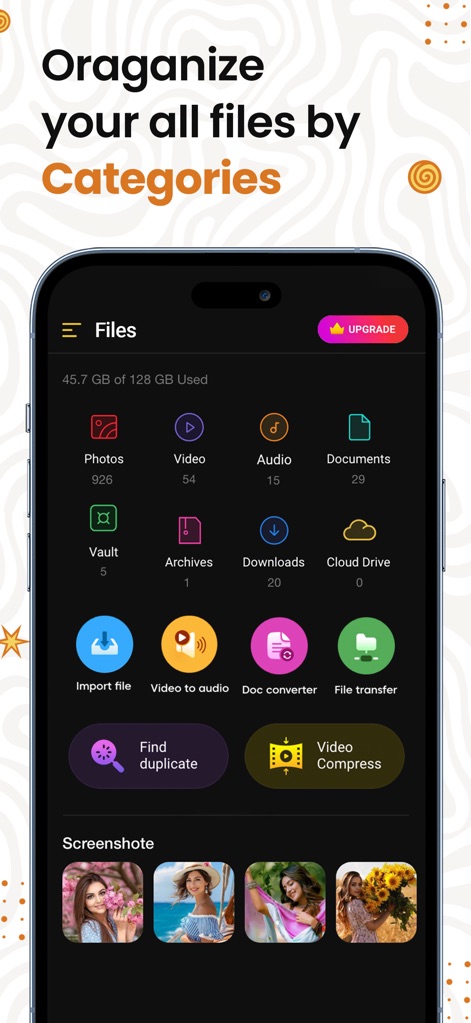
Explore how the app organizes files into distinct categories like 'Photos' and 'Documents', complemented by utility features such as 'Video to audio' conversion and 'Find duplicate'.
Categorized File Views

See the app's capability to manage all music and sound files, featuring a detailed audio file list and an integrated playback interface with skip controls.
Dedicated Audio Management
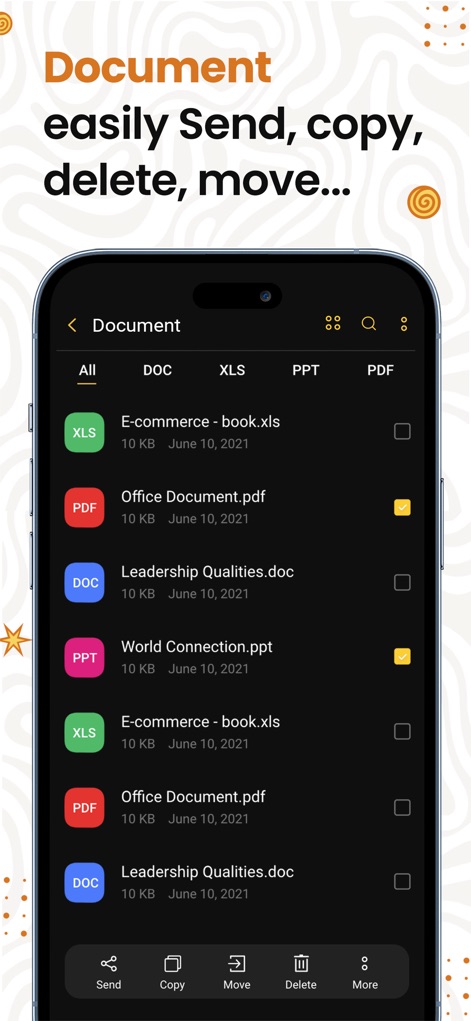
Observe seamless document management with the ability to list various file types like 'XLS' and 'PDF', and perform quick actions such as 'Send', 'Copy', and 'Move' from the bottom bar.
Efficient Document Handling

Uncover the app's built-in image editor, allowing users to 'Decorate' photos with a wide array of 'Stickers' and apply 'Filters' for creative enhancements.
Creative Image Editor

Witness how the app secures sensitive media, offering password protection for 'Photo' and 'Video' files within a dedicated 'Vault' accessible via a numeric password entry.
Secure File Vault
Description
Download
More Like This
Apps with similar features and user experience

Video Save : Video Saver
Mason Hertial

トルミル
ULTIMATE, Y.K.

FE File Explorer Pro
Skyjos Co., Ltd.

FileBrowser: Documents Manager
Stratospherix

Total files pro
App Ideas S.r.l.

Photo Manager Pro
Skyjos Co., Ltd.

FTPManager Pro
Skyjos Co., Ltd.

Owlfiles - File Manager
Skyjos Co., Ltd.

File Master - document manager
俊杰 阮
This page is not an official page of the app or its developer, but an independent editorial publication created for informational and commentary purposes. Unless expressly stated otherwise, neither the app nor its developer is affiliated with, endorsed by, sponsored by, authorized by, or otherwise officially connected with MWM, Apple, Google Play, the app publisher, or the app's developer, and nothing on this page implies that the app was developed using MWM's services. Any trademarks, logos, screenshots, and other content remain the property of their respective owners.