
This page is not an official page of the app or its developer, but an independent editorial publication created for informational and commentary purposes. Unless expressly stated otherwise, neither the app nor its developer is affiliated with, endorsed by, sponsored by, authorized by, or otherwise officially connected with MWM, Apple, Google Play, the app publisher, or the app's developer, and nothing on this page implies that the app was developed using MWM's services. Any trademarks, logos, screenshots, and other content remain the property of their respective owners.


FlipStudio: Draw & Animate App
Unleash your inner animator. The app transforms static ideas into dynamic stories.
Downloads
1M+User Rating
Total Ratings
22.3KPublisher
Category
GamesLocales
2Latest Version
1.47Size
383.0 MBFirst Released
Nov 16, 2020An evaluation of core functionalities for aspiring animators and digital artists.
Key Features Analysis: FlipStudio
Advanced Frame-by-Frame Animation
It provides robust frame-by-frame animation tools, including onion skinning and a frames viewer, simplifying the creation of smooth, traditional animations.
Collaborative Material System
The app features a unique material system that enables users to share animation project files, learn from expert works, and utilize shared resources in their own creations.
Multi-Layer Drawing Capabilities
It supports multi-layer drawing with up to 6 free layers, offering flexibility and control for complex illustrations and animations.
Comprehensive Audio Tools
This tool allows users to easily add and edit audio clips across up to eight free tracks, including recording sounds, importing files, and applying voice/pitch effects.
Integrated Tracing Function
It includes a tracing function that assists artists in refining their drawings and achieving consistency across animation frames.
Deformation and Effect Tools
The app offers deformation and effect functions to manipulate artwork, enabling more dynamic and creative visual outcomes.
Apple Pencil Support
It provides full support for Apple Pencil, ensuring a precise and natural drawing experience for artists using compatible devices.
Illustration Process Video Creator
The app includes a feature to easily create time-lapse videos of the illustration drawing process, perfect for sharing creative workflows.
Community World Gallery
The app features a world gallery where users can explore and enjoy animations created by others, fostering inspiration and community engagement.
Precise Lasso Tool
It includes a lasso tool for precise selection of elements within drawings, facilitating easier editing and manipulation.
Frequently Asked Questions
Everything you need to know about FlipStudio: Draw & Animate App
What is FlipStudio used for?
FlipStudio is a drawing application designed for creating flipbooks and high-quality animations. It provides powerful tools for sketching, drawing, and bringing creations to life.
Does FlipStudio support multiple layers for drawing?
Yes, FlipStudio supports up to 6 layers for free. It includes features like a favorite frame, layer function, and a frames viewer for efficient drawing.
Can I add sound effects and music to my animations in FlipStudio?
Yes, FlipStudio allows users to add and edit audio clips with up to eight free tracks. It supports recording sounds, special effects, and importing audio files.
What is the 'material system' in FlipStudio?
The 'material system' in FlipStudio allows users to share animation project files. This system enables learning animation skills and tips from expert works.
What benefits does FlipStudio Premium Membership offer?
Premium Membership offers no ads, unlocks Character Studio, two canvas types, removes material system limits, and increases the maximum frame count to 999.
How do I restore my FlipStudio purchases on a new device?
To restore FlipStudio purchases, click the "Restore purchase" button within the app. You must log in using the same Apple ID used for the initial purchase.
Where can I find FlipStudio's privacy policy?
The privacy policy for FlipStudio is available online at https://flipstudio-1.jimdosite.com/terms-of-service/. This link also includes the terms of service.
The following screenshots and description are sourced directly from the app's official store listing and are the property of the app developer.
App Store
Screenshots

Explore the app's intuitive interface, showcasing flexible layer management and a streamlined frames viewer for effortless animation creation.
Creative Workspace Overview
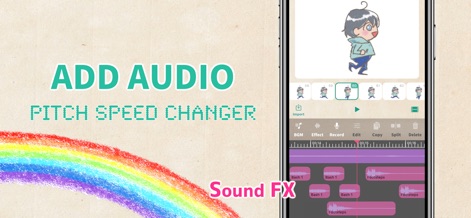
Discover how this tool empowers users to enhance animations with multi-track audio integration and a versatile pitch/speed changer for dynamic sound design.
Dynamic Audio Integration

Browse the app's vibrant World Gallery feed, showcasing user creations and facilitating learning through its integrated material system for shared resources.
Community Showcase
Description
Download
More Like This
Top-ranked apps in the same category

Block Blast!
ARETIS LIMITED

Heartopia
XD Entertainment Co., Ltd.

Solitaire Associations Journey
Hitapps Games LTD

Roblox
Roblox Corporation

Gossip Harbor®: Merge & Story
Microfun Limited

Arrows – Puzzle Escape
Lessmore UG haftungsbeschraenkt

Township
PLR Worldwide Sales Limited

Last War:Survival
FUNFLY PTE. LTD.

Vita Mahjong
VITA STUDIO PTE. LTD.
This page is not an official page of the app or its developer, but an independent editorial publication created for informational and commentary purposes. Unless expressly stated otherwise, neither the app nor its developer is affiliated with, endorsed by, sponsored by, authorized by, or otherwise officially connected with MWM, Apple, Google Play, the app publisher, or the app's developer, and nothing on this page implies that the app was developed using MWM's services. Any trademarks, logos, screenshots, and other content remain the property of their respective owners.