
This page is not an official page of the app or its developer, but an independent editorial publication created for informational and commentary purposes. Unless expressly stated otherwise, neither the app nor its developer is affiliated with, endorsed by, sponsored by, authorized by, or otherwise officially connected with MWM, Apple, Google Play, the app publisher, or the app's developer, and nothing on this page implies that the app was developed using MWM's services. Any trademarks, logos, screenshots, and other content remain the property of their respective owners.


Floating Clock
Precision matters. The app delivers a millisecond edge, transforming 'missed out' into 'secured'.
Downloads
7.5M+User Rating
Total Ratings
256.9KPublisher
Category
ProductivityLocales
11Latest Version
5.1.0Size
117.9 MBFirst Released
Mar 15, 2021An in-depth evaluation of key features designed for high-stakes online acquisitions.
Floating Clock: Flash Sale Advantage Analysis
Millisecond Floating Clock
The app provides millisecond-level precise timing, crucial for securing time-sensitive, limited-edition items.
Multi-Platform Time Synchronization
It ensures synchronized timing across various platforms, eliminating discrepancies that could cost users a sale.
Scheduled Auto-Jump
It allows users to schedule automatic navigation to the sale page at the precise start time, minimizing manual intervention and reaction time.
Real-Time Device Monitoring
This tool features real-time monitoring of internet speed and CPU usage, helping users optimize their device performance for critical flash sale moments.
Free Core Features
This tool features access to its most critical functionalities, like the millisecond clock, without any cost, lowering the barrier to entry for competitive shoppers.
Broad Device Compatibility
The app provides full compatibility across iPhone, iPad, and Apple Watch, leveraging the latest iOS features for a seamless experience across multiple devices.
Cross-Screen AI Translation
It offers AI-powered translation across screens, useful for international flash sales or foreign language sites.
Data Usage Monitoring
The app allows users to monitor their data consumption, which can be useful for managing mobile data during flash sales.
Frequently Asked Questions
Everything you need to know about Floating Clock
What is Floating Clock - Flash Sale Assistant?
Floating Clock - Flash Sale Assistant is an app designed for flash sales, providing millisecond-precision timing. It helps users secure limited-edition items, train tickets, and other time-sensitive purchases.
What key features does the Floating Clock app offer?
The Floating Clock app offers a millisecond floating clock, multi-platform time sync, scheduled auto-jump to sales, and real-time device monitoring. It also includes cross-screen AI translation and data usage monitoring.
Is Floating Clock - Flash Sale Assistant free to use?
Yes, Floating Clock - Flash Sale Assistant is free to use. Core features, including the millisecond clock, floating window, and Dynamic Island functionality, require no payment.
Which devices are compatible with the Floating Clock app?
The Floating Clock app is compatible with iPhone, iPad, and Apple Watch. It is fully adapted to the latest iOS features across these devices.
Does the Floating Clock app support Dynamic Island?
Yes, the Floating Clock app supports Apple's Dynamic Island feature. It integrates to display information, such as countdowns, directly within the Dynamic Island.
Can Floating Clock display widgets on the Lock Screen?
Yes, Floating Clock provides Lock Screen and Desktop Widgets. Users can select from multiple skins to display flash sale countdowns directly on their lock screen or desktop.
Can I customize the colors in the Floating Clock app?
Yes, users can customize the colors in the Floating Clock app. It offers personalized settings to choose colors for background, text, and milliseconds in Picture in Picture and Dynamic Island modes.
How does Floating Clock assist with flash sales?
Floating Clock assists with flash sales by providing millisecond-precision timing and scheduled auto-jump functionality. It helps users secure popular items, tickets, and participate in time-limited shopping events.
Does Floating Clock offer Picture-in-Picture mode?
Yes, Floating Clock offers a Picture-in-Picture mode. Users enable this feature through the app's settings for enhanced display flexibility, showing time and internet speed while multitasking.
The following screenshots and description are sourced directly from the app's official store listing and are the property of the app developer.
App Store
Screenshots

Observe the millisecond-accurate floating clock, complete with real-time internet speed monitoring, alongside the intuitive app interface detailing flash sale countdowns and display settings.
Precision Timing Display
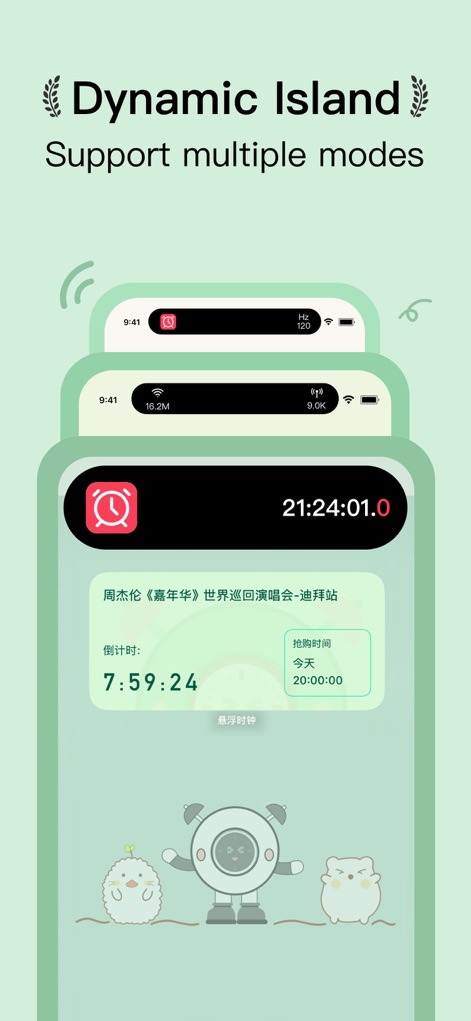
See how the app leverages the Dynamic Island for immediate countdowns, while its detailed interface provides specific flash sale reminders for crucial events like concert tickets.
Dynamic Island Integration

Explore the versatile lock screen and desktop widgets, showcasing flash sale countdowns, and discover the extensive built-in and custom skin options for personalized aesthetics.
Flexible Widget Customization
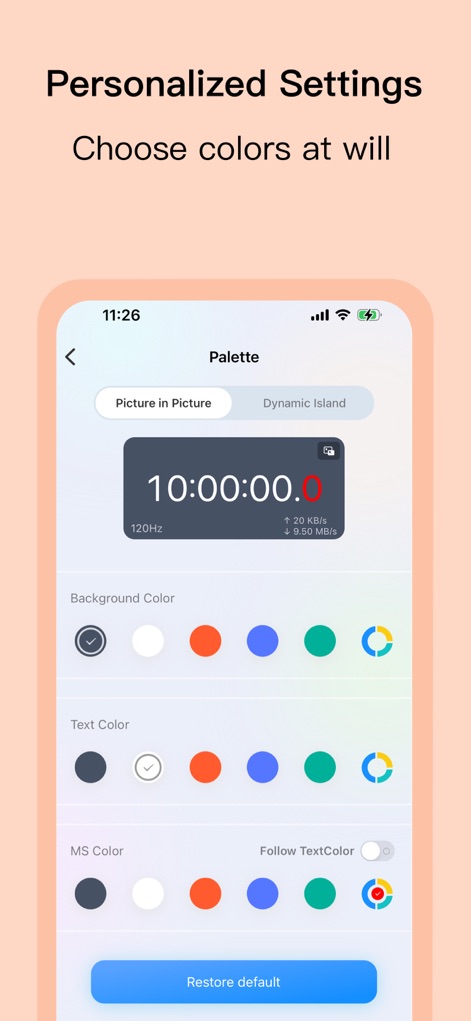
Users can customize the floating clock's appearance through extensive color palette options for background, text, and millisecond elements, with immediate visual feedback in the live preview.
Personalized Visual Control
Description
Download
More Like This
Apps with similar features and user experience

ZK助手
文雪 程

Freebie Alerts: Free Stuff App
RoMa LLC

Sniper for ebay bid auctions
THINKLAB GmbH

Gixen eBay Auction Sniper
Mario Vodopivec

悬浮时间-悬浮秒表悬浮窗控时助手
Xiamen Infinity Starway Technology Co., Ltd.

HotStock - in-stock alerts
Litebox Ltd
BayWatch - Alerts for eBay
Progress Concepts Limited

Scout for Marketplace
Mattijs Verschuren

Rentbird - Find rental houses
RB Global BV
This page is not an official page of the app or its developer, but an independent editorial publication created for informational and commentary purposes. Unless expressly stated otherwise, neither the app nor its developer is affiliated with, endorsed by, sponsored by, authorized by, or otherwise officially connected with MWM, Apple, Google Play, the app publisher, or the app's developer, and nothing on this page implies that the app was developed using MWM's services. Any trademarks, logos, screenshots, and other content remain the property of their respective owners.