
This page is not an official page of the app or its developer, but an independent editorial publication created for informational and commentary purposes. Unless expressly stated otherwise, neither the app nor its developer is affiliated with, endorsed by, sponsored by, authorized by, or otherwise officially connected with MWM, Apple, Google Play, the app publisher, or the app's developer, and nothing on this page implies that the app was developed using MWM's services. Any trademarks, logos, screenshots, and other content remain the property of their respective owners.

GPS Live Navigation & Live Map
Traffic and bad directions become problems of the past. The app delivers a real-time command center for your journey.
Downloads
1M+User Rating
Total Ratings
389Publisher
Category
NavigationLocales
21Latest Version
4.8Size
136.3 MBFirst Released
Feb 17, 2022An evaluation of core functionalities for optimal navigation and user experience.
Key Features Analysis
Real-time Traffic Alerts
The app provides real-time updates on traffic congestion, accidents, and road hazards, enabling users to avoid delays and optimize their travel time.
Voice Navigation
It offers clear, spoken turn-by-turn directions, allowing drivers to focus on the road without needing to look at their screen.
Optimized Route Planning
This tool features advanced route optimization capabilities, calculating the quickest and most efficient paths to destinations based on live data.
Offline Map Access
The app allows users to download maps for offline use, ensuring continuous navigation without an internet connection and reducing data consumption.
POI Finder
It enables users to easily discover nearby gas stations, restaurants, parking, businesses, and other essential points of interest along their route.
Hazard & Speed Trap Alerts
This tool alerts drivers to upcoming speed cameras, radar traps, and other potential road hazards, promoting safer driving habits.
Visual Map Views
The app offers detailed satellite and street view maps, giving users a realistic perspective of their surroundings and destinations.
Live GPS Tracking
It provides real-time GPS tracking and location sharing functionalities, enhancing safety and coordination for users.
Frequently Asked Questions
Everything you need to know about GPS Live Navigation & Live Map
What are the main features of GPS Live Navigation & Live Map?
GPS Live Navigation & Live Map provides real-time GPS navigation, live maps, voice navigation, traffic alerts, street view, and offline map capabilities. It also helps find nearby places.
Does GPS Live Navigation & Live Map offer real-time traffic updates?
Yes, GPS Live Navigation & Live Map provides real-time traffic updates. This feature helps users overcome traffic and avoid delays by showing low, medium, and heavy traffic conditions.
Can I use GPS Live Navigation & Live Map to explore nearby places?
Yes, GPS Live Navigation & Live Map allows users to explore nearby places. It offers categories such as Accounting, Airport, Amusement Park, ATM, Bakery, Bank, and Bar.
What map view options are available in GPS Live Navigation & Live Map?
GPS Live Navigation & Live Map offers various map views. Users can choose between Terrain Mode, Typical Mode, and Satellite Mode to customize their viewing experience.
Does GPS Live Navigation & Live Map include voice navigation?
Yes, GPS Live Navigation & Live Map features voice navigation. It provides directions and guides users with spoken instructions for an enhanced driving experience.
How does GPS Live Navigation & Live Map help with route planning?
GPS Live Navigation & Live Map assists with route planning by providing GPS, maps, voice navigation, and directions. It can also find the shortest path for traveling and offers real-time route updates.
Does GPS Live Navigation & Live Map support offline maps?
Yes, GPS Live Navigation & Live Map supports offline maps. This feature allows users to access mapping and navigation information even without an active internet connection.
What is the renewal policy for GPS Live Navigation & Live Map subscriptions?
GPS Live Navigation & Live Map subscriptions automatically renew unless auto-renew is turned off at least 24 hours before the current period ends. Payment is charged to the iTunes Account.
Where can I access the privacy policy for GPS Live Navigation & Live Map?
The privacy policy for GPS Live Navigation & Live Map is accessible at https://privacypolicycenter.com/new/view/id1610276914. This link provides information on data handling practices.
The following screenshots and description are sourced directly from the app's official store listing and are the property of the app developer.
App Store
Screenshots
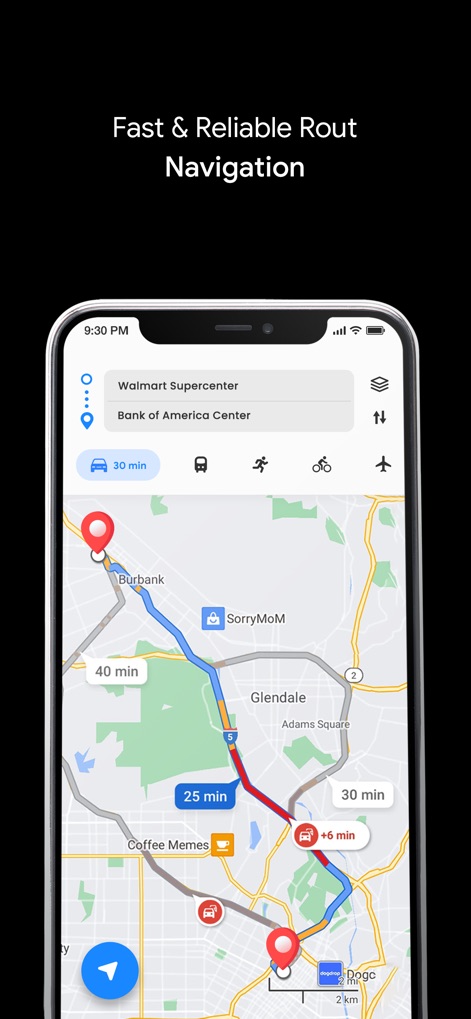
The app displays optimized routes with estimated travel times and offers options for various transportation modes like driving and public transit.
Smart Route Planning

This tool provides intuitive 3D navigation with clear turn-by-turn directions and real-time speed indicators for a smooth journey.
Dynamic 3D Navigation

Users can navigate efficiently with real-time traffic updates, featuring color-coded congestion displays and traffic filter options to optimize routes.
Live Traffic Avoidance

The app helps users explore nearby points of interest through a dedicated search bar and categorized icons for easy discovery of services and attractions.
Discover Local Points

This tool offers versatile map customization, allowing users to switch between different views like Terrain Mode and Satellite Mode for varied perspectives.
Customizable Map Views
Description
Download
More Like This
Apps with similar features and user experience

Waze Navigation & Live Traffic
waze

即時路況影像
DoItWell Application Ltd

LeisecaMaps
Alan Costa

MapXplorer: Map Radar Navigate
GOLDLAB APPLICATIONS YAZILIM VE BILISIM ANONIM SIRKETI

Radarbot: Speed Cameras | GPS
Iteration Mobile S.L

Yandex Navi – navigation, maps
DIRECT CURSUS COMPUTER SYSTEMS TRADING LLC

TomTom - Maps & Traffic
TomTom

ASFINAG
ASFINAG MAUT SERVICE GMBH

導航王 TM
KingwayTek Technology Co., Ltd.
This page is not an official page of the app or its developer, but an independent editorial publication created for informational and commentary purposes. Unless expressly stated otherwise, neither the app nor its developer is affiliated with, endorsed by, sponsored by, authorized by, or otherwise officially connected with MWM, Apple, Google Play, the app publisher, or the app's developer, and nothing on this page implies that the app was developed using MWM's services. Any trademarks, logos, screenshots, and other content remain the property of their respective owners.