
This page is not an official page of the app or its developer, but an independent editorial publication created for informational and commentary purposes. Unless expressly stated otherwise, neither the app nor its developer is affiliated with, endorsed by, sponsored by, authorized by, or otherwise officially connected with MWM, Apple, Google Play, the app publisher, or the app's developer, and nothing on this page implies that the app was developed using MWM's services. Any trademarks, logos, screenshots, and other content remain the property of their respective owners.


HGS - Fast-Pass System
Toll queues are dead. The app delivers instant HGS control, putting an end to branch visits and wasted time.
Downloads
2.5M+User Rating
Total Ratings
178.1KPublisher
Category
TravelLocales
1Latest Version
6.5.7Size
52.8 MBFirst Released
Sep 26, 2013An evaluation of core functionalities designed for efficient HGS management and vehicle-related inquiries for Turkish drivers.
HGS - Fast-Pass System: Key Features Analysis
Seamless HGS Top-Up
The app provides users with the ability to easily and quickly top up their HGS balance using a credit card, eliminating the need to visit physical PTT branches.
Comprehensive HGS Balance Inquiry
It allows users to view the current balance of all their HGS products, helping to prevent penalties from insufficient funds.
Secure Credit Card Payments
This tool features a secure method for topping up HGS balance directly within the application using a credit card, facilitating quick and trusted transactions.
Flexible Account Access
The app enables users to access and manage their HGS products using various identification methods, including plate number, T.C. ID number, tax number, or HGS ticket number.
Vehicle Inspection Inquiry
It includes a newly added feature that allows users to perform Highway Vehicle Inspection Inquiries, consolidating vehicle management tasks within one platform.
PttAVM Account Integration
The app facilitates convenient login for users who already have a PttAVM account, streamlining the access process for existing customers.
Frequently Asked Questions
Everything you need to know about HGS - Fast-Pass System
How can users load their HGS balance with the HGS - Fast-Pass System app?
Users can easily load credits to their HGS balance using a credit card directly within the HGS - Fast-Pass System application. This eliminates the need to visit PTT branches.
What information is required to view HGS balance in the HGS app?
To view the balance of all HGS products, users need to provide their plate number, T.C. ID number, tax number, or HGS ticket number in the HGS app.
Does the HGS app offer a free first load for new users?
Yes, the HGS - Fast-Pass System app offers a free first load for PttAVM customers. Users log in with their existing PttAVM account to receive this benefit.
Can users check vehicle inspection information through the HGS - Fast-Pass System app?
Yes, the HGS app includes a newly added feature for Highway Vehicle Inspection Inquiry. Users can query inspection records for vehicles, including KM information.
What payment methods does the HGS app accept for balance top-ups?
The HGS - Fast-Pass System app primarily accepts credit card payments for topping up the HGS balance. Users input their credit card details directly into the app.
Can I manage multiple HGS tags within the HGS - Fast-Pass System app?
Yes, the HGS - Fast-Pass System app allows users to manage multiple HGS tags. The app displays a list of defined HGS tags with their individual balances.
Is there a fee for using the Highway Vehicle Inspection Inquiry feature in the HGS app?
Yes, there is a fee for the Highway Vehicle Inspection Inquiry feature. The service charges 9.0 ₺ from the user's card for the KM query service.
Can I view my HGS passages and violations in the HGS - Fast-Pass System app?
Yes, users can view their HGS passage history, including 'İhlalli Geçişler' (Violated Passages) and regular 'Geçişler' (Passages), within the HGS - Fast-Pass System app.
How do I contact customer support for the HGS - Fast-Pass System app?
Users can contact customer support for the HGS - Fast-Pass System app by calling 444 1 788 for opinions and suggestions. The app also features a 'Canlı Destek' (Live Support) option.
The following screenshots and description are sourced directly from the app's official store listing and are the property of the app developer.
App Store
Screenshots

The app offers a user-friendly login interface, displaying clear email and password fields for secure account access.
Secure Access Portal

Users can effortlessly check vehicle details by entering the Plate Number or Chassis Number, directly from the dedicated inquiry screen.
Vehicle Detail Inquiry

This tool provides a concise overview of HGS tags and their current balance, alongside a detailed list of recent top-up transactions.
Balance & History

The app allows users to manage pass history with a convenient search bar and displays a clear message if no violation passes are found.
Pass History Management

Users can view their registered HGS tags and securely managed defined credit card information within the personal account section.
Account & Payments

This tool simplifies balance top-ups, offering clear credit card input fields and predefined amount buttons for quick transactions.
Convenient Top-Up

The app efficiently manages multiple HGS tags, showing individual plate numbers and current balances for each registered tag.
Multi-Tag Overview
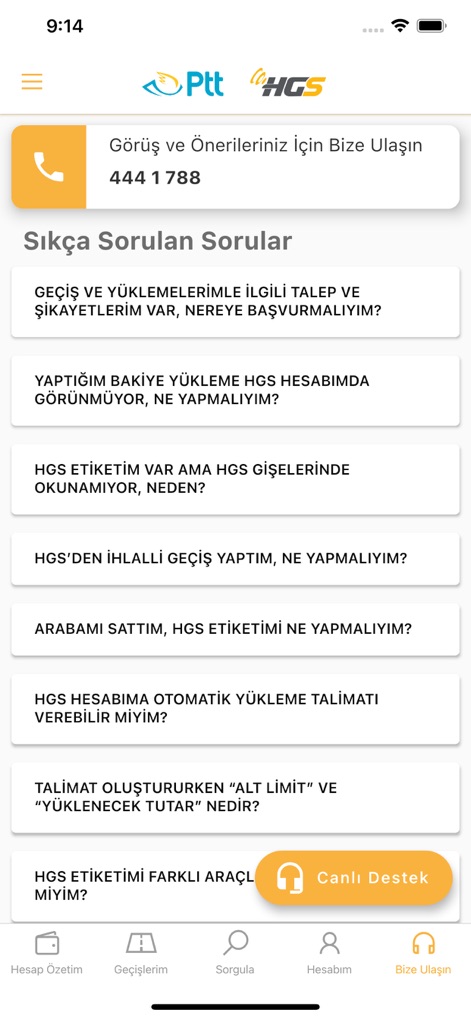
Users have access to comprehensive support, featuring a dedicated contact number and a list of frequently asked questions for common queries.
Support & Assistance
Description
Download
More Like This
Apps with similar features and user experience

Tolls NY
Conduent Inc.

E-PASS Toll App
Central Florida Expressway Authority

ConectCar: Tag, benefícios e +
Conectcar Solucoes de Mobilidade Eletronica S.A.

M11 Transponder
SZKK, OOO (Moscow)

粤通卡
GUANGDONG UNITOLL COLLECTION INC

Linkt
TRANSURBAN LIMITED

DARB
Q Mobility LLC

Ulys by VINCI Autoroutes
VINCI AUTOROUTES

407 ETR
Canadian Tolling Company International Inc.
This page is not an official page of the app or its developer, but an independent editorial publication created for informational and commentary purposes. Unless expressly stated otherwise, neither the app nor its developer is affiliated with, endorsed by, sponsored by, authorized by, or otherwise officially connected with MWM, Apple, Google Play, the app publisher, or the app's developer, and nothing on this page implies that the app was developed using MWM's services. Any trademarks, logos, screenshots, and other content remain the property of their respective owners.