
This page is not an official page of the app or its developer, but an independent editorial publication created for informational and commentary purposes. Unless expressly stated otherwise, neither the app nor its developer is affiliated with, endorsed by, sponsored by, authorized by, or otherwise officially connected with MWM, Apple, Google Play, the app publisher, or the app's developer, and nothing on this page implies that the app was developed using MWM's services. Any trademarks, logos, screenshots, and other content remain the property of their respective owners.


House building for Minecraft
Stop grinding, start building. This app hands you instant architectural mastery.
Downloads
1M+User Rating
Total Ratings
2.1KPublisher
Category
ReferenceLocales
1Latest Version
2.9.11Size
128.7 MBFirst Released
Feb 27, 2020An Analytical Overview of its Capabilities for Minecraft Players
Key Features of House Building for Minecraft
Extensive Library of Pre-built Structures
The app offers an extensive and regularly updated library of pre-built structures, categorized by size and style, including houses, castles, and temples, catering to diverse architectural preferences.
Intuitive 3D Preview and Placement Tools
This tool features intuitive 3D visual previews for structures, chests, mob spawners, and pixel art, along with menu-driven selection, auto-spawning by biome, and precise coordinate placement for easy world enhancement.
Multiple Deployment Methods
The app offers flexible deployment options, including menu-based selection after block placement, automatic biome-specific spawning, and advanced command-based functions, catering to various user preferences.
Custom Pixel Art Creation
This tool features the ability to convert any picture from a user's mobile phone into Minecraft pixel art, complete with 3D preview and adjustable positioning within the game world.
Customizable Chests for Structures
It allows users to add chests filled with various entities like furniture, armor, weapons, or food directly into their imported structures, enhancing gameplay and convenience.
Integrated Mob Spawner Placement
The app provides the functionality to seamlessly integrate customizable mob spawners into structures, allowing users to select and place specific mob types to add dynamic elements to their worlds.
Frequently Asked Questions
Everything you need to know about House building for Minecraft
What is House Building for Minecraft?
House Building for Minecraft is an application designed to construct houses and structures in Minecraft 1.20 and 1.21+. It offers various building types, from modern houses to castles, and facilitates importing, exporting, and editing builds.
Does House Building for Minecraft support current Minecraft versions like 1.20 and 1.21+?
Yes, House Building for Minecraft supports Minecraft versions 1.20 and 1.21+. It provides structures and addons compatible with these game versions, ensuring broad utility for users.
How does House Building for Minecraft help build structures easily?
House Building for Minecraft simplifies building by offering three methods: placing blocks from a menu, activating auto-spawning in biomes, and using '/function' commands. It also provides a 3D visual preview for clarity.
Can I add chests and mob spawners to my Minecraft creations with House Building for Minecraft?
Yes, users can add chests and mob spawners with any mobs to their Minecraft structures using House Building for Minecraft. The app allows adding entities like furniture or weapons to chests.
Does House Building for Minecraft include a pixel art creation feature?
Yes, House Building for Minecraft allows users to create pixel art. They can use any picture from their mobile phone to generate pixel art directly within the application.
What is the price for the Premium Monthly subscription of House Building for Minecraft?
The Premium Monthly subscription for House Building for Minecraft costs $2.99 per month after an initial 3-day free trial. Charges apply automatically once the trial period ends.
How do I cancel my House Building for Minecraft Premium subscription?
Users can cancel their House Building for Minecraft subscription by navigating to their Account Settings after purchase. Auto-renewal must be turned off at least 24 hours before the current period ends.
Is House Building for Minecraft an official app from Mojang AB?
No, House Building for Minecraft is an unofficial application for Minecraft Pocket Edition. It is not affiliated with Mojang AB, the owners of the Minecraft Name and Brand.
Does House Building for Minecraft provide a building guide for users?
Yes, House Building for Minecraft provides a building guide. This guide is accessible within the application's settings, offering comprehensive instructions for users.
Can I import and export my creations from House Building for Minecraft to other games?
Yes, House Building for Minecraft allows direct import and export into Minecraft games. It also supports importing ideas into other third-party enabled games like Crafting and Building.
The following screenshots and description are sourced directly from the app's official store listing and are the property of the app developer.
App Store
Screenshots

This tool showcases a variety of pre-built structures, from a Tree House to an Ultimate Storage House, allowing users to effortlessly integrate them into their Minecraft worlds.
One-Click Wonders

The app's Feature Rules Editor streamlines building, enabling users to generate structures based on specific biomes and add custom mobs directly into their creations.
Automated Construction

Users can easily manage and export add-ons, utilizing specific function commands to spawn intricate structures like the 'hitechhouse' into their game world.
Command Line Control
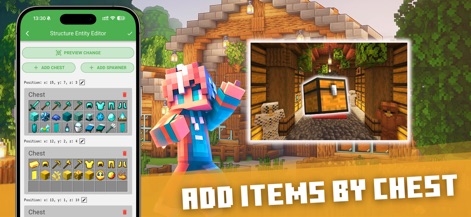
The Structure Entity Editor provides comprehensive control, allowing users to pre-fill chests with essential items such as tools and armor before placing structures.
Custom Inventory Loading
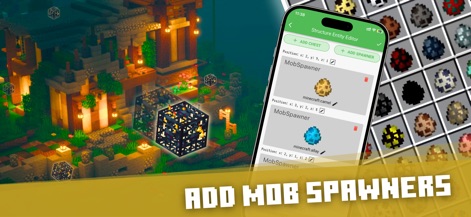
This feature allows precise placement of mob spawners, offering customization for various creatures like the camel and allay within newly built structures.
Dynamic Mob Spawners
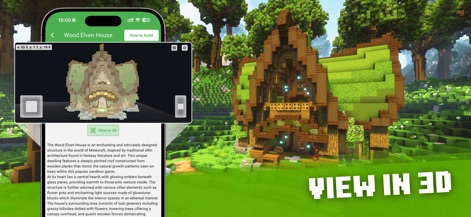
The app offers an interactive 3D viewer for detailed inspection of structures like the Wood Elven House, complete with descriptive text providing architectural context.
Immersive 3D Previews

Users can unleash their creativity by transforming mobile phone pictures into intricate pixel art, generating large-scale designs such as a pig or rabbit in their game.
Pixel Art Generation

The app empowers players to craft stunning, detailed homes and landscapes, fostering a rich environment perfect for sharing and enjoying with friends.
Collaborative Creations
Description
Download
More Like This
Apps with similar features and user experience



This page is not an official page of the app or its developer, but an independent editorial publication created for informational and commentary purposes. Unless expressly stated otherwise, neither the app nor its developer is affiliated with, endorsed by, sponsored by, authorized by, or otherwise officially connected with MWM, Apple, Google Play, the app publisher, or the app's developer, and nothing on this page implies that the app was developed using MWM's services. Any trademarks, logos, screenshots, and other content remain the property of their respective owners.