
VA Video Connect



Skip the travel and join your virtual medical appointments from home with secure video calls designed specifically for the Veteran community.
Publisher
Category
MedicalDownloads
1M+User Rating
Total Ratings
1K+Locales
1Discover the interface used by 1M+ users.
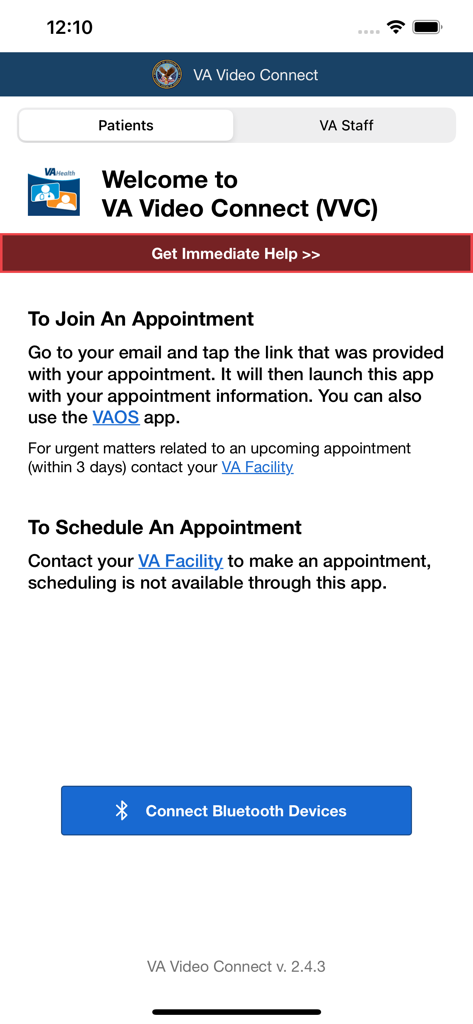
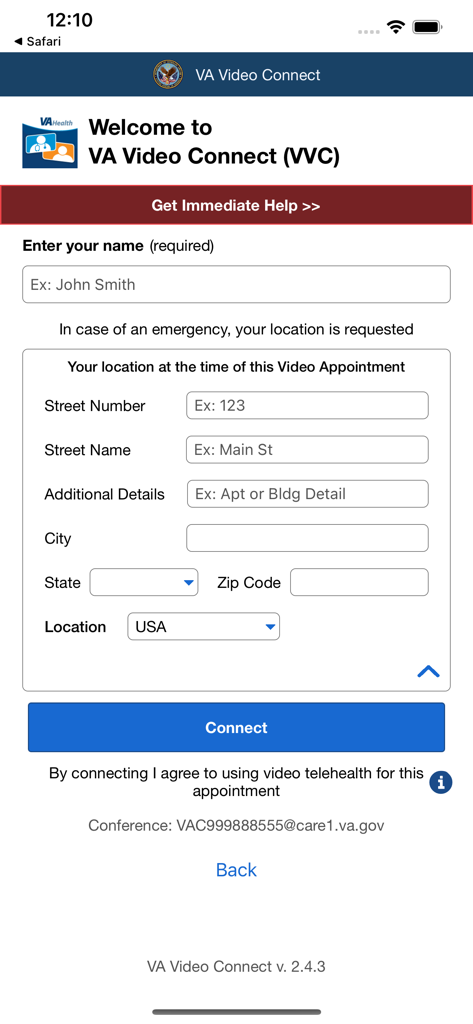
The tools that make this app stand out, trusted by 1M+ users.
Skip the long drives to VA centers and receive quality care from the comfort and safety of your own home.
Your health information is private. Experience encrypted video sessions designed specifically for the VA's high security standards.
Perfect for routine check-ups, mental health sessions, and follow-up care with the providers who know your history best.
Insights from user reviews.
Sentiment Score
Summary
This mobile app receives predominantly negative feedback due to critical functionality issues. The most common complaints include links failing to open the app, instead redirecting to web browsers, and persistent problems with camera, microphone, and audio functionality. Many users report poor reliability, frequent connection drops, and general instability, often leading to missed or rescheduled appointments. Specific compatibility issues were noted across various iOS versions (including 18.2.1, 17.6, and 17.7), Mac devices, and certain browsers like Chrome. While some users appreciate the convenience of remote appointments and the ability to avoid travel, this positive aspect is largely overshadowed by widespread technical failures and a perceived lack of effective customer support.
Common Themes
Everything you need to know about VA Video Connect.
Description
Latest Version
2.12.4
Size
83.2 MB
First Released
Mar 12, 2018
Securely connect with your healthcare team from the comfort of your home. Download VA Video Connect on your iPhone or iPad and bring the VA to you.
Everything you need to know about VA Video Connect
Yes, the VA Video Connect application requires a camera to facilitate video conference services for virtual medical appointments.
No, the VA Video Connect application does not support Apple Watch. It is designed for use on Apple mobile devices like iPhone and iPad.
The VA Video Connect application provides video conference services. It connects Veteran patients with their VA medical providers for virtual appointments on Apple mobile devices.
To join an appointment, tap the link from your email. This action launches the VA Video Connect app with your appointment details. The VAOS app is also an option.
No, scheduling medical appointments is not available directly through the VA Video Connect app. Users must contact their VA Facility to make an appointment.
The VA Video Connect app requests your location at the time of a video appointment. This information is needed to assist in case of an emergency during the virtual visit.
Yes, the VA Video Connect app includes functionality to connect Bluetooth devices. A dedicated "Connect Bluetooth Devices" option is present in the application interface.
To connect, the VA Video Connect app requires your full name and current location details, including street number, name, city, state, and zip code.
Apps with similar features and user experience

SimplePractice LLC

athenahealth, Inc.

Kaiser Permanente

One Medical Group, Inc.

Saudi German Hospital

LeapFroggr Inc.

PROVIDENCE HEALTH & SERVICES - WASHINGTON

MEDICLINIC MIDDLE EAST MANAGEMENT SERVICES FZ LLC

NMC HEALTHCARE LTD
App information, icons, screenshots, and descriptions displayed on this page are sourced from the Apple App Store and are the property of their respective developers. Download estimates and rankings are based on MWM's proprietary models and may not reflect actual figures. This page is provided for informational and analytical purposes only.
Believe this page infringes your intellectual property? File a dispute
