
This page is not an official page of the app or its developer, but an independent editorial publication created for informational and commentary purposes. Unless expressly stated otherwise, neither the app nor its developer is affiliated with, endorsed by, sponsored by, authorized by, or otherwise officially connected with MWM, Apple, Google Play, the app publisher, or the app's developer, and nothing on this page implies that the app was developed using MWM's services. Any trademarks, logos, screenshots, and other content remain the property of their respective owners.


iFont: find, install any font
Unleash your design freedom: The app puts the power of limitless typography directly in your hands, on any iOS device.
Downloads
10M+User Rating
Total Ratings
47.1KPublisher
Category
UtilitiesLocales
1Latest Version
11.8.1Size
121.6 MBFirst Released
Nov 7, 2016An analytical overview of iFont's essential features for advanced typography management on iOS.
iFont: Core Capabilities for Creative Professionals
Custom Font Installation
The app allows users to easily install custom fonts (TTF, OTF, TTC, ZIP) directly onto their iOS devices, enabling their use in compatible content creation applications like Pages, Keynote, and Numbers for professional projects.
In-App Font Library Access
It provides integrated access to extensive online font libraries such as Google Fonts and Dafont, allowing users to discover, download, and install new typefaces directly within the application without external browsing.
Advanced Font Comparison Tool
This tool features a dedicated comparison function that enables users to side-by-side evaluate multiple typefaces, assisting in the selection of the most suitable font for specific design requirements and aesthetic preferences.
Live Font Preview & Testing
The app offers advanced preview functionalities, including a live Notepad to test fonts with custom text and a Waterfall view to observe how typefaces render across various point sizes, ensuring optimal legibility and visual impact.
Detailed Font Metadata & Glyph Inspection
It provides comprehensive technical details for each font, including designer information, spacing metrics, and licensing data, alongside a powerful zoom feature (up to 500%) for meticulous examination of individual glyphs and their intricate design elements.
Batch Font Installation & Management
The app streamlines the font management workflow by supporting the installation of multiple fonts simultaneously, which saves significant time and enhances the organization of extensive font libraries.
Font Export & Sharing Capabilities
It allows users to export installed fonts or share installation profiles with colleagues and collaborators, facilitating consistent font usage across teams and ensuring brand guidelines are maintained.
Optimized iPad Experience
The app is fully optimized for iPad, offering a seamless split-view experience and comprehensive keyboard shortcuts, which significantly boost productivity and user efficiency on Apple's tablet devices.
Frequently Asked Questions
Everything you need to know about iFont: find, install any font
Can iFont install new fonts for use in other apps?
Yes, iFont allows users to install new fonts on their iOS devices. These fonts are compatible with content creation apps such as Pages, Keynote, and Numbers, enabling custom typeface use within those applications.
Does iFont change the system font on an iPhone or iPad?
No, iFont cannot change the system font on your device. Its functionality focuses on installing fonts for specific apps and does not extend to modifying the device's overall system typography or keyboard fonts.
What font file formats does iFont support for installation?
iFont supports custom font files in .ttf, .ttc, and .otf formats. It also accommodates these formats when they are compressed within a .zip archive, allowing for easy import and installation.
Can I download new fonts directly within the iFont app?
Yes, iFont lets users download and install a range of fonts directly from popular libraries like Google Fonts and Dafont within the app. It also supports integrating fonts from custom online sources.
Does iFont offer a feature to compare different fonts?
Yes, iFont includes a 'Compare' feature. This tool allows users to analyze and contrast multiple typefaces to determine which one best suits their design or content creation needs.
Can I preview how a font looks with custom text using iFont?
Yes, iFont provides a 'Notepad' feature under each font's details. Users can type and test messages with the selected font, then export the result as an image for sharing in other applications.
Does iFont display technical information about fonts?
iFont provides comprehensive technical details for each font. This includes information about the designer, trademark data, and spacing specifics like ascents and descents, aiding in informed font selection.
Can iFont import font files downloaded from the internet?
Yes, iFont supports importing font files directly from the web. Users can download a font in a web browser, open it in iFont, and follow simple instructions to install it on their device.
Does iFont display individual font glyphs and offer customization?
Yes, iFont allows users to view all individual glyphs within a font. It also offers customization options, including changing glyph and background colors, and is compatible with Dark Mode settings.
Is the iFont app optimized for use on an iPad?
Yes, iFont is fully optimized for iPad. It features a split-view experience for enhanced multitasking and supports a range of keyboard shortcuts, ensuring a productive workflow on the device.
What font file types are not supported by iFont?
iFont does not currently support .suit or .dfont files. Users must ensure their font files are in compatible formats like .ttf, .ttc, or .otf for successful installation within the application.
The following screenshots and description are sourced directly from the app's official store listing and are the property of the app developer.
App Store
Screenshots
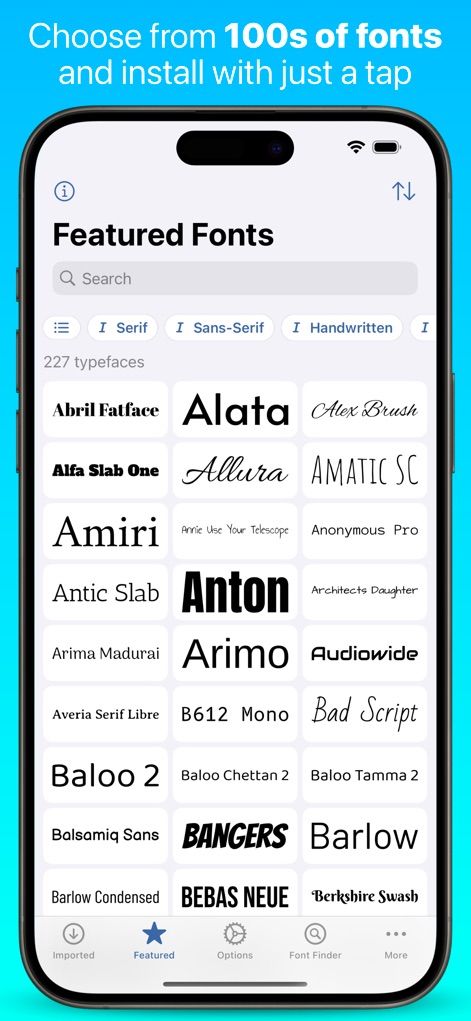
Users can browse an extensive library of fonts through the 'Featured Fonts' section, easily filtering by categories like Serif and Sans-Serif.
Explore Vast Libraries
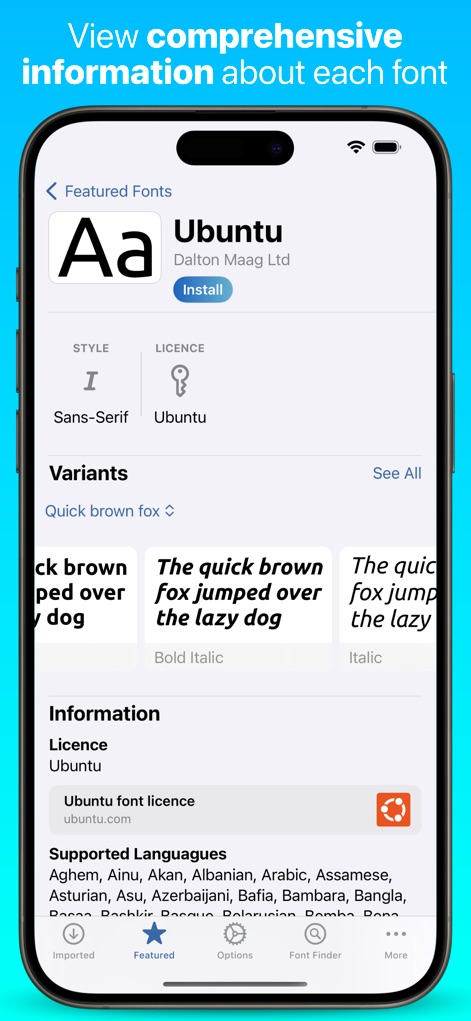
This tool provides comprehensive details for each typeface, showcasing its style and license information, and presenting visual 'Variants' to aid selection.
Typography Deep Dive

Users can effortlessly import custom font files from web downloads through the 'Open Zip Archive' interface, handling formats like '.ttf' and associated documents.
Seamless Custom Fonts
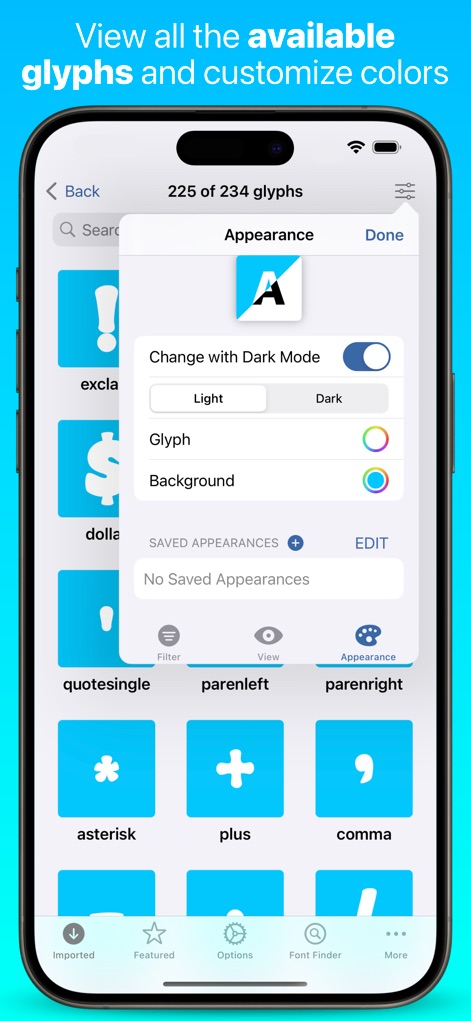
View all available font 'Glyphs' and customize their presentation through the 'Appearance' settings, including options for color adjustments and 'Dark Mode' integration.
Visual Character Control

This tool offers robust font management capabilities, including quick actions like 'Share' and 'Compare', alongside specialized features such as 'Notepad' and 'Waterfall' for in-depth font exploration.
Font Management Hub
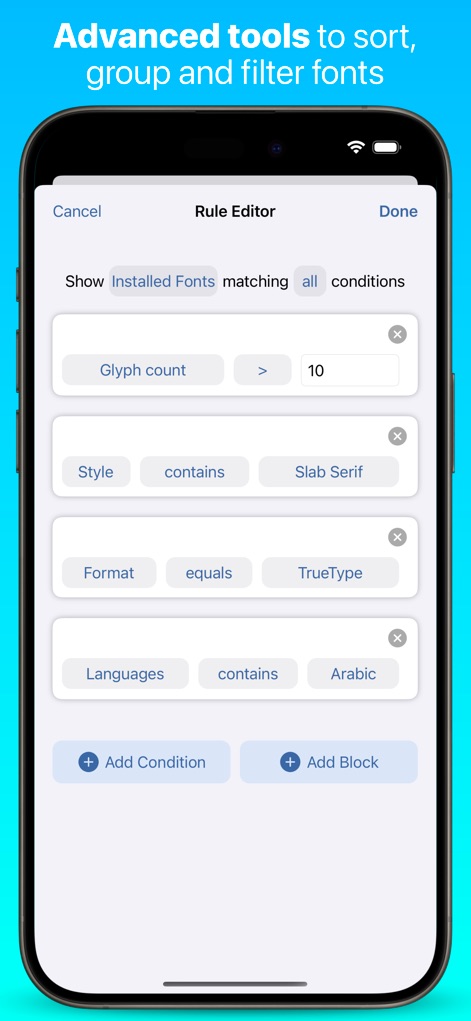
Leverage advanced sorting and filtering through the 'Rule Editor', allowing users to define precise conditions based on attributes like 'Glyph count' and desired 'Languages'.
Precision Search Tools
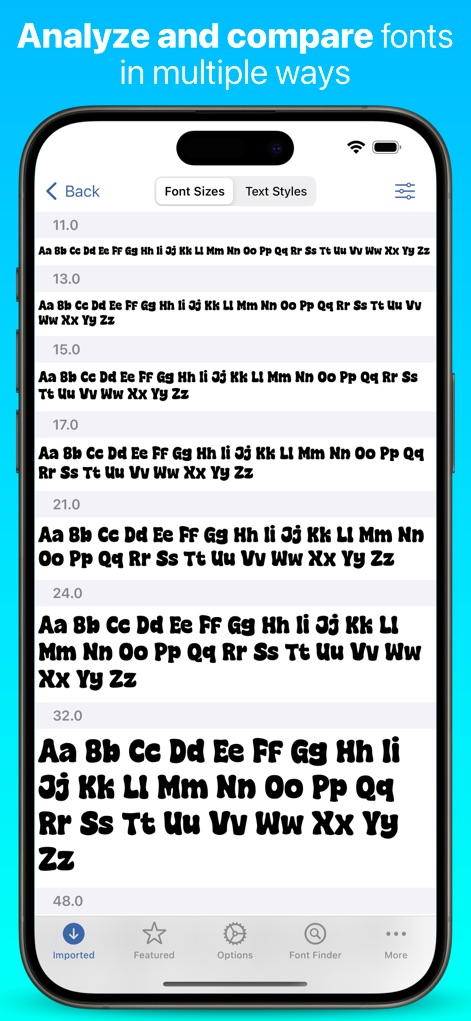
Analyze and compare fonts using the 'Font Sizes' view, presenting text samples at various point sizes to help users evaluate readability and visual impact.
Comparative Font Analysis
Description
Download
More Like This
Apps with similar features and user experience

Bakey: fonts market
Sandoll Inc.

Fonts - Install Font
OneCutOne Technology Co. Ltd.
Fonts –
璞 王

AnyFont
Pepperbit Online GmbH

Fonts for DIY Space
Country Road App Software LLC
Fonts - Fonts Aesthetic
梓峰 戴
خطوط - خطوط عربية · خط عربي
雨双 柯

手机字体大全-主题字体美化大师&下载安装管家
晖 孟

Fontcase - Manage Your Type
manolo Sanudo
This page is not an official page of the app or its developer, but an independent editorial publication created for informational and commentary purposes. Unless expressly stated otherwise, neither the app nor its developer is affiliated with, endorsed by, sponsored by, authorized by, or otherwise officially connected with MWM, Apple, Google Play, the app publisher, or the app's developer, and nothing on this page implies that the app was developed using MWM's services. Any trademarks, logos, screenshots, and other content remain the property of their respective owners.