
This page is not an official page of the app or its developer, but an independent editorial publication created for informational and commentary purposes. Unless expressly stated otherwise, neither the app nor its developer is affiliated with, endorsed by, sponsored by, authorized by, or otherwise officially connected with MWM, Apple, Google Play, the app publisher, or the app's developer, and nothing on this page implies that the app was developed using MWM's services. Any trademarks, logos, screenshots, and other content remain the property of their respective owners.


Inside - App Lock Manager
Your phone, locked down. It gives users iron-clad control over digital boundaries, protecting privacy and enforcing screen discipline.
Downloads
250k+User Rating
Total Ratings
158Publisher
Category
UtilitiesLocales
2Latest Version
1.2.0Size
17.0 MBFirst Released
Sep 30, 2024An in-depth analysis of functionalities for digital well-being and security.
Inside - App Lock Manager: Key Feature Evaluation
Comprehensive Parental Controls
The app provides extensive parental control functionalities, enabling users to manage minors' screen time, restrict access to specific apps and content, and prohibit actions like app installation/deletion or in-app purchases.
Advanced Privacy Protection
This tool features robust privacy safeguards, allowing users to lock any application to prevent unauthorized access and protect sensitive data. It offers enhanced security with a startup password and an optional camouflage mode.
Scheduled & Location-Based Restrictions
It allows users to configure automatic app restrictions based on predefined schedules, time durations, or specific geographical locations, ensuring consistent enforcement without constant manual oversight.
System-Level Access Restriction
The app offers system-level controls to prevent unauthorized actions such as app installations, deletions, in-app purchases, or modifications to account information, bolstering overall device security.
Intruder Selfie Capture
This tool features an intrusion protection mechanism that automatically captures a photo of anyone attempting to access the device by entering an incorrect PIN code, providing evidence of unauthorized attempts.
Discreet Camouflage Mode
It allows users to discreetly hide the app by transforming its interface into a functional calculator with a single tap, effectively masking its true purpose from curious eyes.
Frequently Asked Questions
Everything you need to know about Inside - App Lock Manager
What parental control features does Inside - App Lock Manager provide?
Inside - App Lock Manager helps with parental control by restricting minors' screen time, limiting game and entertainment apps, and prohibiting app installation, in-app purchases, or access to adult websites.
How does Inside - App Lock Manager ensure my privacy?
Inside - App Lock Manager protects privacy by restricting access to any app, preventing others from looking through your phone, requiring a startup password, and offering a camouflage mode.
Can Inside - App Lock Manager control system settings?
Yes, Inside - App Lock Manager supports system-level controls such as prohibiting app installation/deletion, in-app purchases, and modification of account information.
Does Inside - App Lock Manager support automatic app restriction?
Yes, Inside - App Lock Manager offers automatic restriction. Users can pre-set duration, schedules, or location ranges to automatically restrict applications when triggered.
What is the camouflage mode in Inside - App Lock Manager?
The camouflage mode in Inside - App Lock Manager allows the app to instantly change its appearance into a calculator with a single tap, providing an extra layer of privacy protection.
How does Inside - App Lock Manager handle intrusion protection?
Inside - App Lock Manager protects against intruders by automatically capturing their images when an incorrect PIN code is entered.
Which applications can Inside - App Lock Manager secure?
Inside - App Lock Manager can protect a wide range of applications, including WhatsApp, Instagram, Facebook, TikTok, YouTube, Netflix, and other social and entertainment apps.
Does Inside - App Lock Manager utilize password protection?
Yes, Inside - App Lock Manager employs digital password protection. Users must enter a PIN to unlock applications.
Does my Inside - App Lock Manager membership auto-renew?
Yes, membership for Inside - App Lock Manager automatically renews upon expiration. Users must cancel their subscription at least 24 hours before the expiration date to prevent renewal.
What quick operations are available in Inside - App Lock Manager?
Inside - App Lock Manager supports quick operations, including shaking or flipping the phone screen to immediately return to the desktop.
The following screenshots and description are sourced directly from the app's official store listing and are the property of the app developer.
App Store
Screenshots

This visual demonstrates how the app provides robust privacy protection by displaying a clear lock overlay on popular social media and entertainment apps, securing sensitive information from prying eyes.
Secure Your Apps
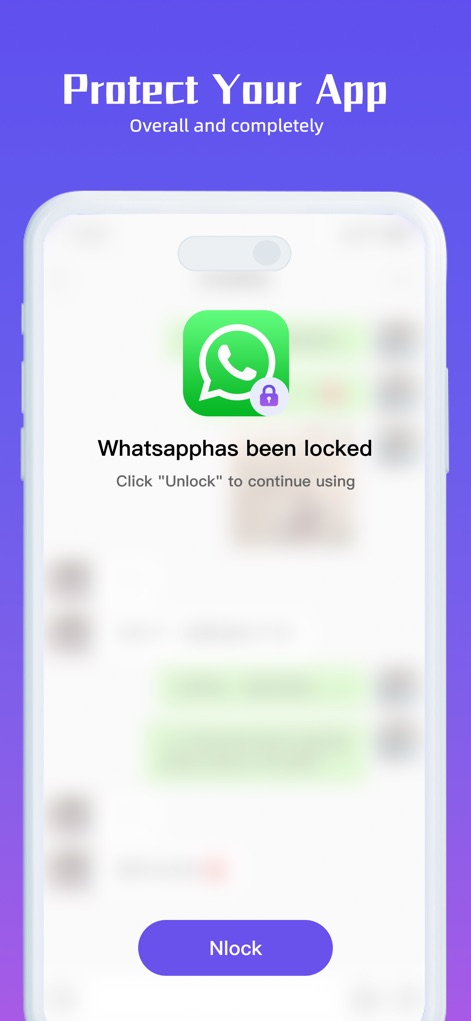
Observe the app's immediate action when an unauthorized user attempts to access a protected application, clearly showing the 'Whatsapphas been locked' message and the prominent unlock button.
Instant App Lockdown

This screenshot highlights the app's essential password locking feature, presenting a clean numeric input interface for users to enter their PIN and the visual representation of a digital shield emphasizing robust protection.
PIN Code Security
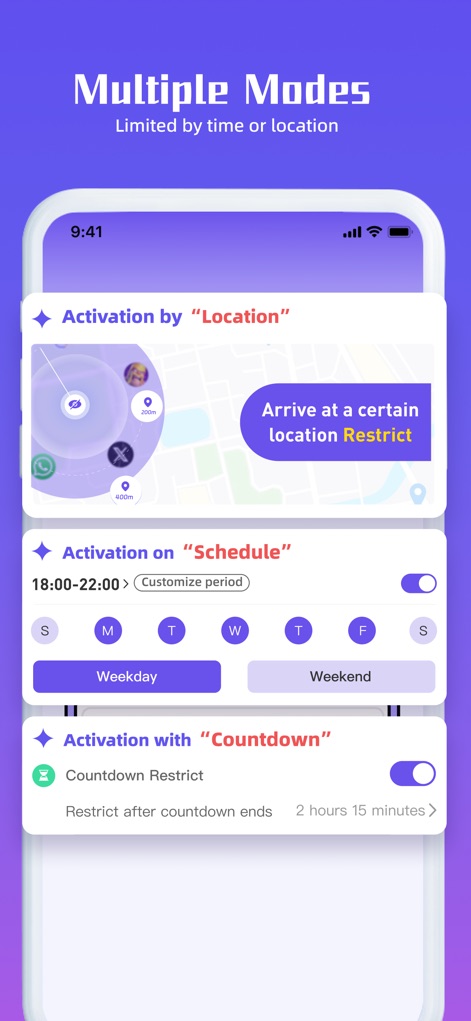
Discover the app's advanced automatic restriction capabilities, showcasing flexible options like location-based activation using a map interface and scheduled time restrictions with specific weekday/weekend toggles.
Intelligent Restriction Modes

Explore the app's unique privacy features, including the ability to change the app icon to blend in with other utilities like a calculator and toggles for advanced security settings such as 'Take Pictures of Intruders'.
Stealth and Customization
Description
Download
More Like This
Apps with similar features and user experience

This page is not an official page of the app or its developer, but an independent editorial publication created for informational and commentary purposes. Unless expressly stated otherwise, neither the app nor its developer is affiliated with, endorsed by, sponsored by, authorized by, or otherwise officially connected with MWM, Apple, Google Play, the app publisher, or the app's developer, and nothing on this page implies that the app was developed using MWM's services. Any trademarks, logos, screenshots, and other content remain the property of their respective owners.