Invoice Pro. Invoice on the go
Download on App Store

This page is not an official page of the app or its developer, but an independent editorial publication created for informational and commentary purposes. Unless expressly stated otherwise, neither the app nor its developer is affiliated with, endorsed by, sponsored by, authorized by, or otherwise officially connected with MWM, Apple, Google Play, the app publisher, or the app's developer, and nothing on this page implies that the app was developed using MWM's services. Any trademarks, logos, screenshots, and other content remain the property of their respective owners.

Logo of Invoice Pro. Invoice on the go
Download on App Store

Invoice Pro. Invoice on the go

Stop wasting your weekends on paperwork. Create branded PDF invoices, manage inventory, and get paid faster with instant PayPal integration—all directly from the job site.

Key Figures

Downloads

8K+

User Rating

4.1/5

Total Ratings

200

Publisher

Anurag Bhartia

Category

Business

Locales

9

Latest Version

5.8

Size

53.1 MB

First Released

Aug 9, 2016
Features

Run Your Business from the Palm of Your Hand

The all-in-one toolkit designed for mobile professionals to create professional invoices, track stock, and get paid faster—wherever work takes you.

Professional Invoices in Seconds

Convert estimates to branded PDF invoices with your logo and signature, and send them before you even leave the job site.

Get Paid 2x Faster

Include a PayPal "Pay Now" button directly on your PDFs so clients can settle bills instantly via credit card or PayPal.

The following screenshots and description are sourced directly from the app's official store listing and are the property of the app developer.

App Store

Screenshots
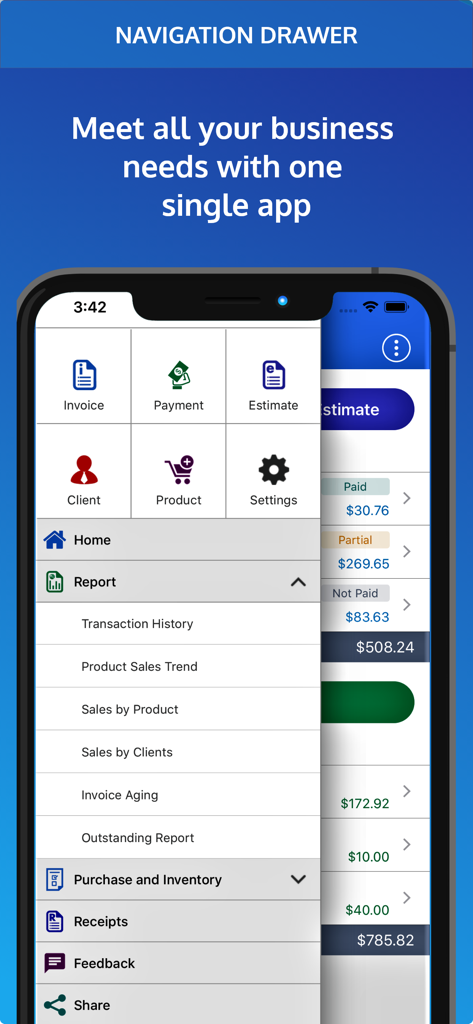
Invoice Pro. Invoice on the go - Navigation menu of the Invoice Pro mobile app showing business tools for invoices payments and business reports
Navigation menu of the Invoice Pro mobile app showing business tools for invoices payments and business reports

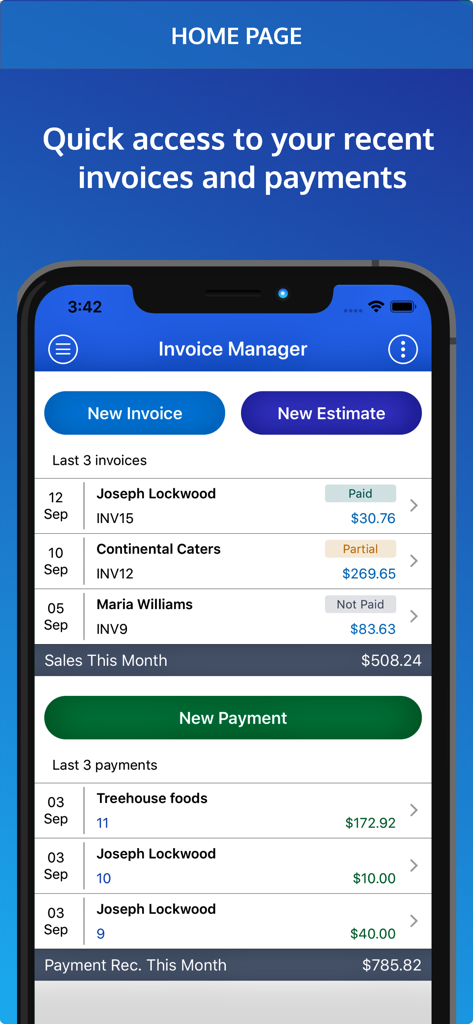
Invoice Pro. Invoice on the go - Dashboard of the Invoice Pro app showing recent invoices and payments on a mobile phone
Dashboard of the Invoice Pro app showing recent invoices and payments on a mobile phone

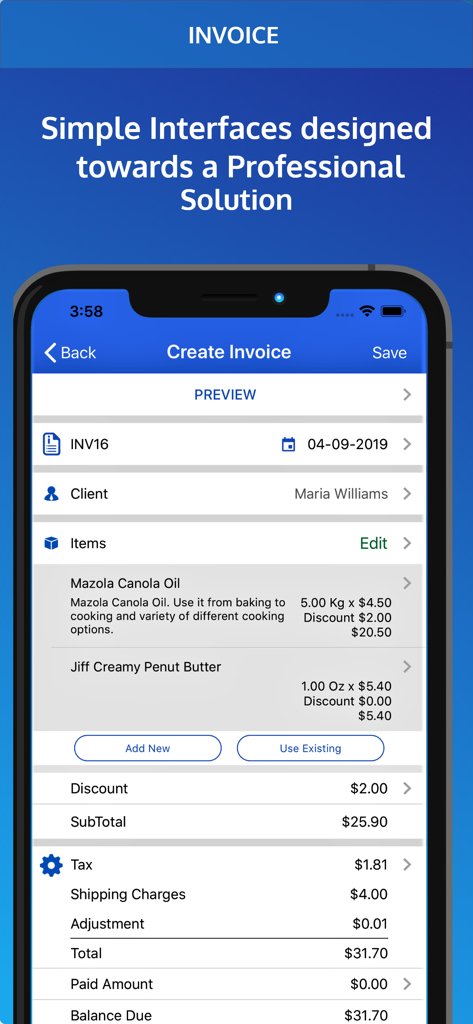
Invoice Pro. Invoice on the go - Mobile interface of Invoice Pro app showing the create invoice screen with itemized charges and total amount
Mobile interface of Invoice Pro app showing the create invoice screen with itemized charges and total amount

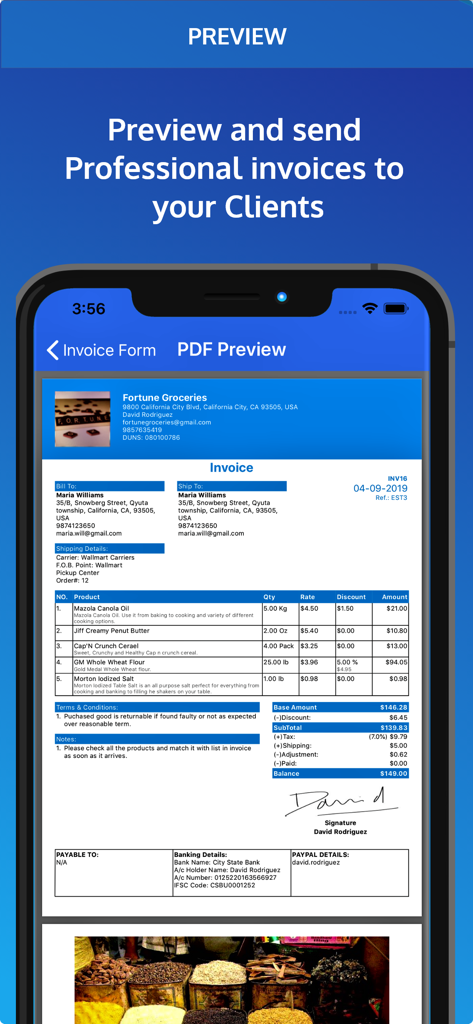
Invoice Pro. Invoice on the go - A mobile phone screen showing a professional invoice preview with itemized charges and a digital signature.
A mobile phone screen showing a professional invoice preview with itemized charges and a digital signature.

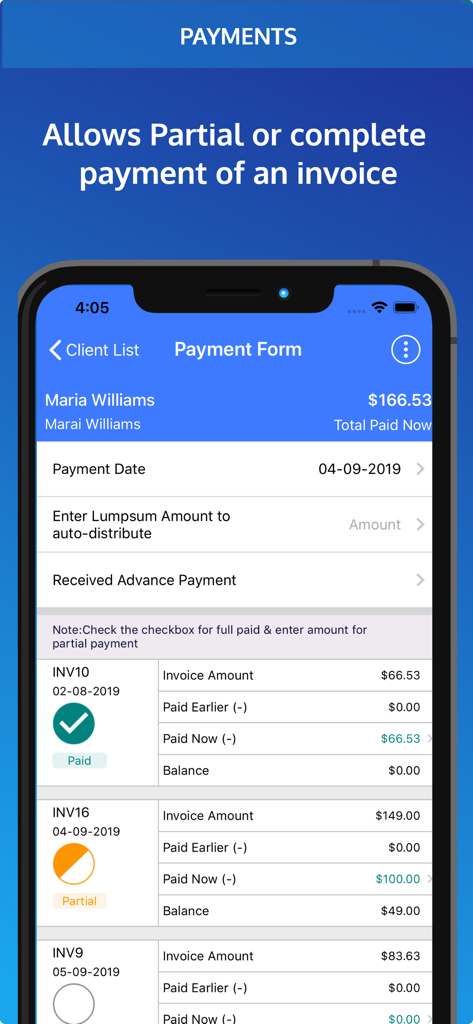
Invoice Pro. Invoice on the go - Mobile app screen showing payment form with options for recording full and partial invoice payments
Mobile app screen showing payment form with options for recording full and partial invoice payments

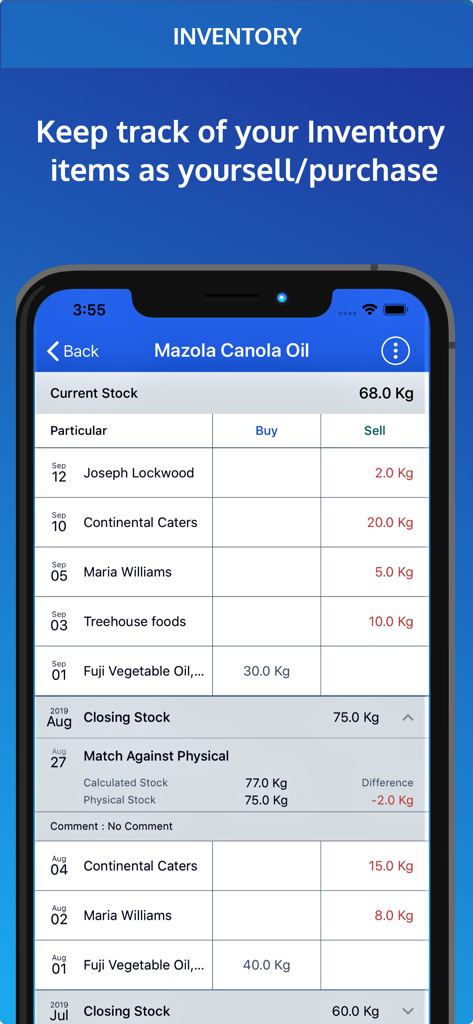
Invoice Pro. Invoice on the go - Invoice Pro app interface showing inventory management and stock level tracking for business items

Invoice Pro app interface showing inventory management and stock level tracking for business items
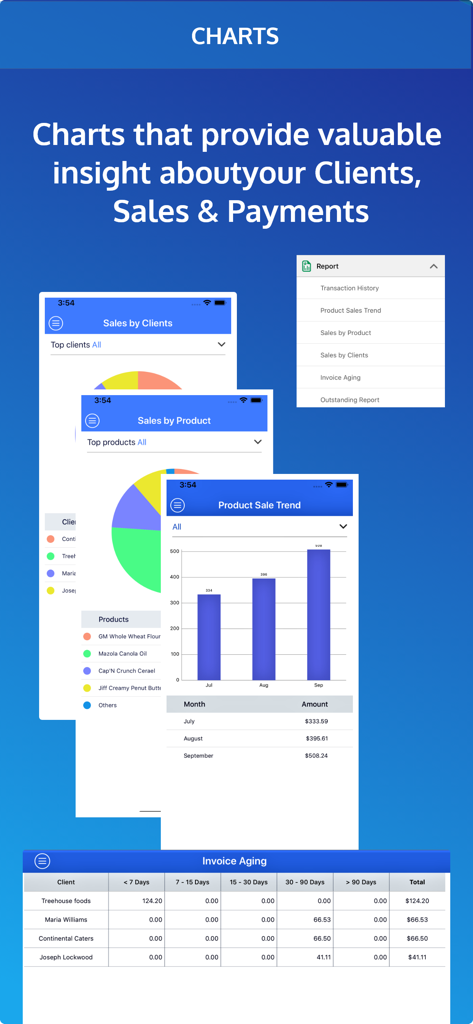
Invoice Pro. Invoice on the go - Business analytics dashboard in the Invoice Pro app showing sales pie charts and product sale trend bar graphs

Business analytics dashboard in the Invoice Pro app showing sales pie charts and product sale trend bar graphs

Description

Invoice Manager is a complete app for managing invoices and Bills. Invoice manager app helps you right from raising an invoice to recording payment up to providing a receipt for the invoice. Generating invoice is simple and fast and you can create and send invoices immediately, track overdue invoices and make sure to get paid for your invoice on time. ESTIMATE / QUOTATION : You prepare and send an Estimate INVOICE : Convert that Estimate to an Invoice (or create a new one) PAYMENT : Record the payment received for that invoice Some Exclusive Features: ( Optional) INVENTORY: Inventory is automatically deducted as you create invoices RECEIPT : Send signed Receipts for the payment received PURCHASE: Manage your purchases. Add them to inventory. Keep track of payments to your vendors/ suppliers ADVANCE PAYMENT: Record Advance payments. Adjust them when invoicing Application Features - Generate PDF Invoice and mail to your clients directly. - Add Logo and Signature to your invoice - Set Due Dates on Invoice - Inventory tables automatically reflect current stock levels Payments and Receipts - Support for Lump sum Payments, Partial Payments and Combined Payment for multiple Invoices - Graphs show your cash-flow and your sales and payment cycle. Taxes and Discounts - Taxes and Discounts at Total Bill level or Item level - Discount in % or fixed amount Charts and Graphs - Analyse Invoice & Payment data - Client Receivable History over past few weeks / months - Which Products / Services & Clients generate maximum revenue - Invoice Aging Report helps analyse payments which are long overdue Purchase & Inventory - You can record your purchases and payments made to your suppliers - Manual entries are permitted to manage stock levels - Match your calculated stock levels against physical levels and correct discrepancies (e.g wastage, lost or defective items) Backup and Restore - Link your Dropbox account to Invoice Manager & Backup your data on Dropbox Export Invoice Data - Export details of invoice and payments as CSV and open it in Microsoft Excel Duplicate Invoices - Create duplicate of an existing invoice with a single tap - Say if similar invoice is to be generated again but with minor edits this new feature will save you some time and efforts - Invoices, Estimates and Purchase Entries all can be duplicated Advance Payments - Now you can enter the details of Advance Payments made to you or made by you. - Adjust these advance payments when you generate invoices Custom Fields - With this feature you can set customized name of fields on your PDF. PayPal.me - You can now take payments from your client via Paypal.me - Just provide us with your PayPal.me ID and there will be a Pay Now button on your PDF. - Payment is transferred by the client directly to your Paypal account. We DO NOT CHARGE anything to you or your client Draft - Create an Invoice,Purchase Order or Estimate and save it as draft for later use Shipping & Banking Details - Shipping Details : Order Number, Carrier Details & F.O.B Point. - Banking Details : Bank Name, Account number etc. In-App Details - All the features are free to try for 1 month - After one month you can subscribe for monthly or yearly packages - This app has auto-renewable subscription. - Subscription Details are as follows : 1. Monthly subscription: $3.99 2. Yearly subscription: $27.99 - Subscription will automatically renew itself unless auto-renew is turned off at least 24-hours before the end of the current period. Links to the privacy policy : http://www.simpleinvoicemanager.com/privacy Link to Terms of Service / Terms of Use: https://www.simpleinvoicemanager.com/tos.html

Download

Download on App Store

This page is not an official page of the app or its developer, but an independent editorial publication created for informational and commentary purposes. Unless expressly stated otherwise, neither the app nor its developer is affiliated with, endorsed by, sponsored by, authorized by, or otherwise officially connected with MWM, Apple, Google Play, the app publisher, or the app's developer, and nothing on this page implies that the app was developed using MWM's services. Any trademarks, logos, screenshots, and other content remain the property of their respective owners.