
This page is not an official page of the app or its developer, but an independent editorial publication created for informational and commentary purposes. Unless expressly stated otherwise, neither the app nor its developer is affiliated with, endorsed by, sponsored by, authorized by, or otherwise officially connected with MWM, Apple, Google Play, the app publisher, or the app's developer, and nothing on this page implies that the app was developed using MWM's services. Any trademarks, logos, screenshots, and other content remain the property of their respective owners.


KakaoStory
It grants users total command over their digital narrative, from public broadcasts to private musings.
Downloads
2.5M+User Rating
Total Ratings
19.4KPublisher
Category
Social NetworkingLocales
2Latest Version
7.2.4Size
92.1 MBFirst Released
Mar 20, 2012An in-depth analysis of key functionalities catering to personal sharing and community engagement.
KakaoStory: A Comprehensive Social Narrative Platform
Flexible Content Privacy
It allows users to manage the visibility of their posts, offering options for public sharing, exclusive sharing with close friends, or private journaling ("Only Me"), catering to diverse personal boundaries.
Personalized Activity Feed
The app provides a dynamic feed that aggregates stories from friends and content from followed channels, ensuring users stay updated with their personalized network and interests.
Real-time Engagement Notifications
It keeps users informed about activities from friends, updates from StoryChannels, and important announcements, fostering continuous engagement and timely interaction.
Visual Content Creation & Sharing
This tool features direct in-app capabilities for capturing photos and videos, alongside seamless uploading of existing media from the user's device, facilitating rich visual storytelling.
Trending Content Discovery
It enables users to explore trending stories, popular content, and discover new friends and communities, expanding their social circles and content consumption beyond their immediate network.
Enhanced App Security
The app supports biometric authentication (e.g., Face ID) for enhanced in-app security, providing users with a secure and convenient way to protect their personal content and account.
Frequently Asked Questions
Everything you need to know about KakaoStory
What is KakaoStory?
KakaoStory is a personal story-sharing application. It allows users to share daily life moments, follow friends' stories, and discover trending content.
How does the Feed feature work in KakaoStory?
The KakaoStory Feed provides a quick glance at channel information and friends' stories. Users can add friends and follow channels to see their content on the Feed.
Can KakaoStory users find new content and friends?
Yes, KakaoStory's Discover section facilitates finding popular stories, trending videos, and new friends. It showcases content favored by other users.
What privacy options are available for stories on KakaoStory?
KakaoStory offers three privacy settings for stories: Public for all, Close Friends Only for specific contacts, and Only Me to keep stories private.
What optional permissions does the KakaoStory app request?
KakaoStory requests optional permissions for Camera, Mic, Photos, Location, Notifications, and Face ID. Users can use basic services without granting these.
Does KakaoStory support sharing photos and videos?
Yes, KakaoStory supports sharing photos and videos. The app requires Camera, Mic, and Photos permissions to enable users to capture and upload media.
How do I create a new story in KakaoStory?
Users create a new story in KakaoStory using the "+" (plus) icon within the app's interface. This action opens the story creation functionality.
The following screenshots and description are sourced directly from the app's official store listing and are the property of the app developer.
App Store
Screenshots

Observe the dynamic content display with varied visual stories and the app's minimalist branding evident in the status bar.
Dynamic Content Display

See how the app presents engaging feed elements, including video previews with hashtags, and clearly displays engagement metrics like likes and comments.
Engaging Feed Elements

Explore the unified friend feed showcasing sequential posts and the intuitive bottom navigation bar centered around the prominent 'add' button.
Unified Friend Feed
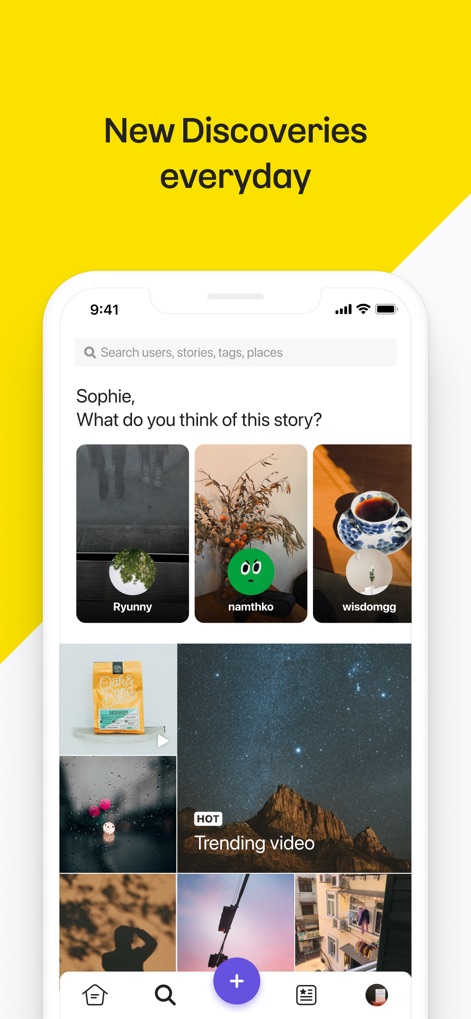
This view highlights the comprehensive search bar for exploring content and the curated grid showcasing trending videos and new stories.
Discover New Content

Users can manage their personal profile view, featuring a customizable profile header, and browse their own content in a visual grid gallery.
Personal Profile View

The app streamlines content creation with a prominent 'add story' button and a clean, focused interface, encouraging users to share.
Create New Stories
Description
Download
More Like This
Apps with similar features and user experience






This page is not an official page of the app or its developer, but an independent editorial publication created for informational and commentary purposes. Unless expressly stated otherwise, neither the app nor its developer is affiliated with, endorsed by, sponsored by, authorized by, or otherwise officially connected with MWM, Apple, Google Play, the app publisher, or the app's developer, and nothing on this page implies that the app was developed using MWM's services. Any trademarks, logos, screenshots, and other content remain the property of their respective owners.