
This page is not an official page of the app or its developer, but an independent editorial publication created for informational and commentary purposes. Unless expressly stated otherwise, neither the app nor its developer is affiliated with, endorsed by, sponsored by, authorized by, or otherwise officially connected with MWM, Apple, Google Play, the app publisher, or the app's developer, and nothing on this page implies that the app was developed using MWM's services. Any trademarks, logos, screenshots, and other content remain the property of their respective owners.


练字大师 - 硬笔书法练字帖 & 毛笔书写画画板
Unleash precision: The app delivers total control over your digital canvas, transforming casual strokes into masterful calligraphy. No more paper, just pure practice.
Downloads
2.5M+User Rating
Total Ratings
255.8KPublisher
Category
UtilitiesLocales
1Latest Version
4.8.0Size
34.2 MBFirst Released
Jul 27, 2021An Analytical Overview for Handwriting Improvement and Calligraphy Practice
Key Features of 'Calligraphy Master'
Multi-language and Multi-style Copybook Generation
The app provides automatic generation of electronic copybooks for multiple languages, including Chinese, English, Japanese, and Korean, encompassing a vast array of calligraphy styles such as Kaishu, Xingshu, Caoshu, and various historical scripts, eliminating the need for physical practice books.
Digital Tracing and Stylus Practice Support
It offers an interactive digital platform for tracing and practicing calligraphy directly on a device, with perfect support for styluses like the iPad Pencil, enabling users to refine their strokes repeatedly without consuming paper.
Customizable Copybook Layout and Appearance
This tool features extensive customization options for copybook layout and appearance, including various grid types (e.g., grid, field, rice, pinyin field), customizable text, background, and grid colors, adapting to diverse learning preferences.
Export and Print Functionality
It allows users to export their generated copybooks as PDF files or images and supports direct printing, providing flexibility for both digital practice and traditional paper-based learning.
Rich Built-in Text Content Library
The app includes a rich library of built-in text content, such as classic Tang poems, Song lyrics, ancient prose, Buddhist scriptures, and common characters, offering authentic and varied material for meaningful calligraphy practice.
Adjustable Text Properties and Arrangement
Users can fine-tune text properties, including character size, boldness, and position, and have control over punctuation inclusion/exclusion, as well as horizontal or vertical text arrangement, essential for mastering different calligraphic forms.
Frequently Asked Questions
Everything you need to know about 练字大师 - 硬笔书法练字帖 & 毛笔书写画画板
What is the 练字大师 (Calligraphy Master) app?
练字大师 (Calligraphy Master) is an app that automatically generates electronic calligraphy copybooks for iPhone and iPad. It supports printing and eliminates the need for physical copybooks, offering various languages and calligraphy styles.
Does 练字大师 support multiple languages for calligraphy practice?
Yes, 练字大师 supports generating calligraphy copybooks in multiple languages, including Chinese, English, Japanese, and Korean.
Can I print copybooks from the 练字大师 app?
Yes, the 练字大师 app allows users to export and print copybooks for free. Members can also connect directly to a printer.
What types of calligraphy styles does 练字大师 offer?
练字大师 offers a wide range of calligraphy styles, including over 100 Chinese styles (e.g., Regular, Running, Cursive), 9 English styles, 4 Japanese styles, and 3 Korean styles.
Is 练字大师 compatible with Apple Pencil for tracing?
Yes, 练字大师 perfectly supports iPad with Apple Pencil for tracing and redrawing on the copybooks.
How can I customize copybooks in 练字大师?
Yes, 练字大师 allows extensive customization of copybooks, including text color, grid color, background color, grid quantity, character position, text size, and boldness.
What are the export options for copybooks in 练字大师?
练字大师 allows users to export copybooks as PDF or image files. This feature is free for all users and enhanced for members.
Does 练字大师 offer free features?
Yes, 练字大师 offers free features, including exporting and printing copybooks. Additional customization options and content are available with a membership.
What paper types are available in 练字大师?
练字大师 provides various copybook paper types, such as square grids, 'tian' grids, 'mi' grids, Pinyin 'tian' grids, and several English templates. All types are available to members.
Does 练字大师 have subscription features?
Yes, 练字大师 offers a membership that provides access to all copybook paper types, custom import functions, full customization options, all in-app copybooks, and direct printing.
How do I manage my 练字大师 subscription?
Subscriptions for 练字大师 are managed through iTunes account settings. Auto-renewal can be turned off there after purchase, and payments are charged to the iTunes account.
The following screenshots and description are sourced directly from the app's official store listing and are the property of the app developer.
App Store
Screenshots

Users can explore an extensive library of calligraphy styles, easily searchable via the integrated search bar, and browse through categories like '楷书' (regular script) or '英文' (English).
Calligraphy Style Library
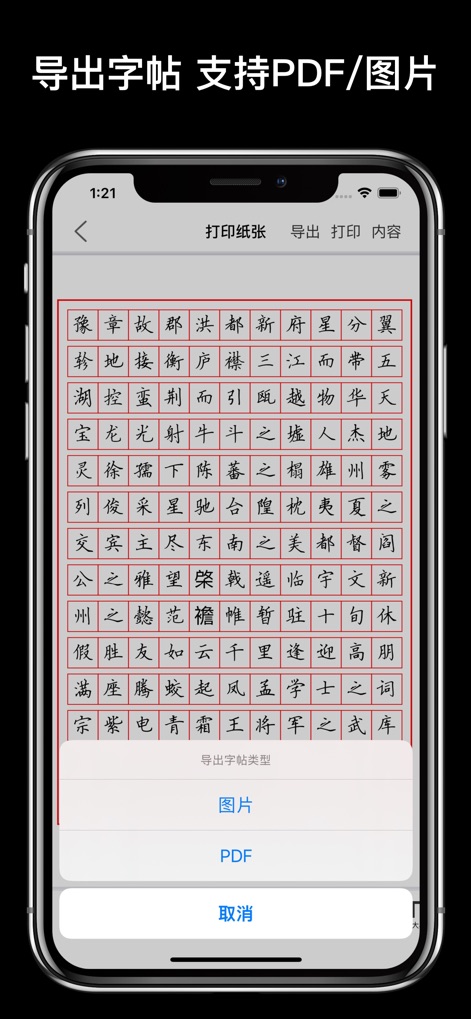
The app allows users to easily export their generated copybooks, offering options to save them as high-quality '图片' (images) or print-ready 'PDF' files.
Export Your Masterpiece

Users can personalize their practice with elegant layouts, adjusting '文字颜色' (text color) to vibrant red against a dark background, and fine-tuning '位置' (character position) for optimal readability.
Dynamic Layout Customization

This tool provides a wide array of '纸张样式' (paper styles), including various '英文帖' (English copybook grids) and traditional '方格帖' (square grids), all ready for direct printing.
Versatile Paper Formats

The app extends its versatility to English calligraphy, featuring popular styles like 'HengShui Handwrite' and 'Cursive Handwriting', easily accessible through the style selection interface.
English Calligraphy Options

Users gain precise control over their practice environment with various '格子类型' (grid types) for character guides, and an intuitive customization bar to adjust '格子数量' (grid quantity).
Grid Layout Precision

This tool offers guided practice for English text, displaying classic literature like 'The Road Not Taken' within a structured '英文字帖' (English copybook layout) with clear red guidelines.
Guided English Practice

Users can engage in interactive '临摹' (tracing) practice directly on screen, adjusting brush '粗细' (thickness) and '透明度' (opacity) for a realistic and customizable writing experience.
Interactive Tracing Experience
Description
Download
More Like This
Apps with similar features and user experience

MARU: Learn Japanese Hiragana
Overdreamer, LLC

MOJisho: Japanese Dictionary
Krosea (Guangzhou) Co.,Ltd

识日 - 日语学习、日语词典、大家的日语、日语翻译
Hangzhou Jingque Network Technology Co., Ltd.

renshuu - Japanese learning
Michael Hominick
Kana - Hiragana and Katakana
App to Learn Pte. Ltd.

Shirabe Jisho
Blazej Stanek

Todaii: Learn Japanese N5-N1
Ghi Nguyen

Learn Korean, Hangul: HeyKorea
Linh Nguyen

Learn Japanese Kanji and Kana
Olena Bachurina
This page is not an official page of the app or its developer, but an independent editorial publication created for informational and commentary purposes. Unless expressly stated otherwise, neither the app nor its developer is affiliated with, endorsed by, sponsored by, authorized by, or otherwise officially connected with MWM, Apple, Google Play, the app publisher, or the app's developer, and nothing on this page implies that the app was developed using MWM's services. Any trademarks, logos, screenshots, and other content remain the property of their respective owners.