
This page is not an official page of the app or its developer, but an independent editorial publication created for informational and commentary purposes. Unless expressly stated otherwise, neither the app nor its developer is affiliated with, endorsed by, sponsored by, authorized by, or otherwise officially connected with MWM, Apple, Google Play, the app publisher, or the app's developer, and nothing on this page implies that the app was developed using MWM's services. Any trademarks, logos, screenshots, and other content remain the property of their respective owners.


Lightbox draw - tracing paper
Stop fighting the paper. This app projects your vision directly onto it.
Downloads
50k+User Rating
Total Ratings
419Publisher
Category
Graphics & DesignLocales
52Latest Version
1.0.30Size
93.2 MBFirst Released
Jul 23, 2025An analysis of key features enhancing the digital tracing experience for artists and learners.
Lightbox Draw - Tracing Paper: Core Capabilities
Trace Any Image
The app allows users to import their own photos or select from a pre-defined image library, providing versatile content for tracing.
Lock Display
This tool features a display lock function, which ensures the tracing image remains steady on the screen, preventing accidental movement during the creative process.
Overlay Grid
The app provides an overlay grid feature, which is customizable and helps in precise image positioning and accurate drawing.
Outline Conversion
It allows users to instantly convert photos into clear line art, which significantly simplifies the tracing process and enhances precision.
Frequently Asked Questions
Everything you need to know about Lightbox draw - tracing paper
What is Lightbox Draw - Tracing Paper?
Lightbox Draw - Tracing Paper transforms your phone or tablet into a powerful lightbox and tracing tool. It allows users to effortlessly trace any image onto paper for drawing and creative projects.
Can users trace their own photos using Lightbox Draw?
Yes, Lightbox Draw enables users to import their own photos for tracing. The app also provides a library of predefined images for selection, offering flexibility for various creative needs.
How does Lightbox Draw prevent accidental image movement during tracing?
Lightbox Draw features a "Lock Display" function. This feature keeps the tracing image steady on the screen, preventing accidental movement or interference during the tracing process.
Does Lightbox Draw convert photos into line art for easier tracing?
Yes, Lightbox Draw offers an "Outline Conversion" feature. This instantly transforms photos into clear line art, facilitating easier and more precise tracing for users.
Can users add a grid overlay in Lightbox Draw for precision?
Yes, Lightbox Draw allows users to activate a customizable "Overlay Grid." This feature aids in positioning images accurately and drawing with pinpoint precision on the device screen.
Who is Lightbox Draw - Tracing Paper designed for?
Lightbox Draw - Tracing Paper is designed for sketch artists, illustrators, students, designers, and hobbyists. It is ideal for improving art skills, calligraphy practice, stencil creation, and various DIY projects.
What are the basic steps to use Lightbox Draw - Tracing Paper?
To use Lightbox Draw, select an image, adjust its position, and lock the display. Then, place paper over your device screen and trace the image that shines through, drawing with confidence.
The following screenshots and description are sourced directly from the app's official store listing and are the property of the app developer.
App Store
Screenshots

Witness how Lightbox Draw transforms your device into a powerful tracing tool, enabling users to place paper over the screen and draw precisely from the image shining through.
Effortless Tracing
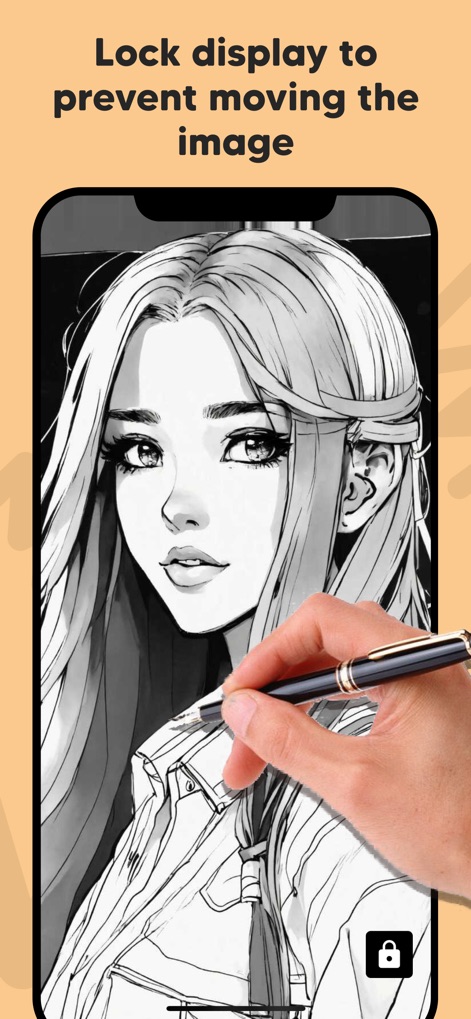
Discover the display lock feature, which prevents accidental screen movement while tracing and ensures a stable surface for precise artwork.
Secure Your Trace
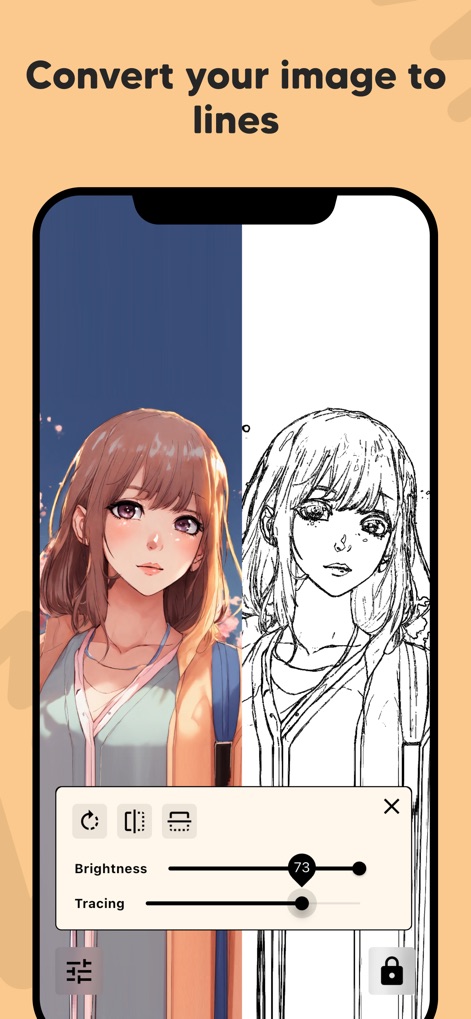
Explore the app's capability to instantly convert original photos into clear line art, with adjustable brightness and tracing sensitivity for optimal clarity.
Outline Conversion
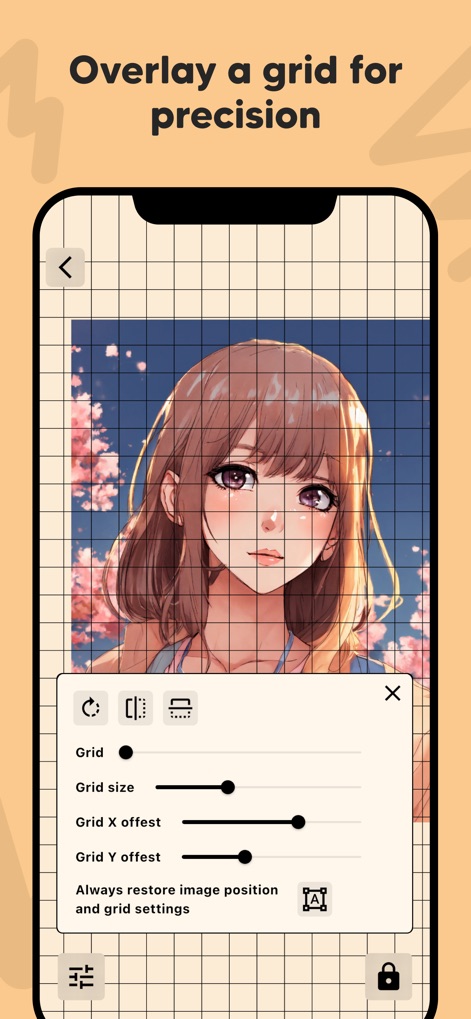
Utilize the customizable overlay grid feature to achieve pinpoint accuracy in image positioning, complete with adjustable grid size and offset settings.
Precision Grids
Description
Download
More Like This
Apps with similar features and user experience

This page is not an official page of the app or its developer, but an independent editorial publication created for informational and commentary purposes. Unless expressly stated otherwise, neither the app nor its developer is affiliated with, endorsed by, sponsored by, authorized by, or otherwise officially connected with MWM, Apple, Google Play, the app publisher, or the app's developer, and nothing on this page implies that the app was developed using MWM's services. Any trademarks, logos, screenshots, and other content remain the property of their respective owners.