
This page is not an official page of the app or its developer, but an independent editorial publication created for informational and commentary purposes. Unless expressly stated otherwise, neither the app nor its developer is affiliated with, endorsed by, sponsored by, authorized by, or otherwise officially connected with MWM, Apple, Google Play, the app publisher, or the app's developer, and nothing on this page implies that the app was developed using MWM's services. Any trademarks, logos, screenshots, and other content remain the property of their respective owners.


LVM GEO Mobile
Master the terrain with high-resolution LIDAR, cadastral boundaries, and offline forest layers designed for landowners, professional foresters, and backcountry explorers.
Downloads
50k+User Rating
Total Ratings
80Publisher
Category
TravelLocales
1Latest Version
5.2.0Size
35.4 MBFirst Released
Dec 9, 2015Master Every Acre of the Latvian Landscape
Access professional-grade GIS data, from cadastral boundaries to LIDAR terrain models, designed for landowners, researchers, and backcountry explorers.
Precise Property Boundaries
Identify official cadastral lines and land ownership layers to manage inherited property or navigate with legal certainty.
Professional Terrain Insights
Analyze the landscape with LIDAR-derived slope models, vegetation density, and infrared orthophotos for a deeper understanding of the forest.
Frequently Asked Questions
Everything you need to know about LVM GEO Mobile
What is LVM GEO Mobile?
LVM GEO Mobile is an application developed by AS "Latvijas valsts meži" that provides a comprehensive range of maps and data layers. It offers geospatial information for forestry workers and extensive map data for the territory of Latvia.
Can forestry workers use the LVM GEO Mobile app?
Yes, LVM GEO Mobile is designed to support forestry workers. The application enables them to receive work assignments and access all associated geospatial information relevant to their tasks.
What kinds of maps are available in LVM GEO Mobile?
LVM GEO Mobile features numerous map types, including LVM forest map, orthophoto map, infrared orthophoto, OpenStreetMap, terrain models, vegetation models, ESRI satellite map, and LĢIA Topo map 1:50 000.
Does LVM GEO Mobile offer offline map functionality?
Yes, LVM GEO Mobile supports offline map usage. Users can download LVM forest maps at scales such as 1:150 000, 1:75 000, and 1:35 000 for the entire Latvian territory, and specific areas at 1:20 000 and 1:10 000.
Can I measure areas and distances within the LVM GEO Mobile application?
Yes, LVM GEO Mobile provides tools to measure areas and distances. Users can draw polygons on the map, and the app automatically calculates the area in hectares and distances in meters.
What cadastral and environmental data are available in LVM GEO Mobile?
LVM GEO Mobile includes various cadastral data layers such as VZD cadastre, ZMNĪ melioration cadastre, and LAD field register. It also provides data on DAP environmental protection territories and contour lines.
Does LVM GEO Mobile display geographic coordinates?
Yes, LVM GEO Mobile displays geographic coordinates. The app shows latitude and longitude in DD (decimal degrees) and WGS84 DMS (degrees, minutes, seconds), alongside LKS92 TM coordinates.
Does LVM GEO Mobile identify forest areas by their managing entity?
LVM GEO Mobile's forest map highlights areas owned and managed by different forest managers. Various colors differentiate these specific forest segments, providing clear visual distinctions.
The following screenshots and description are sourced directly from the app's official store listing and are the property of the app developer.
App Store
Screenshots

lvm-geo-mobile-map-layers-menu
List of background map options in the LVM GEO Mobile app including forest and terrain models

lvm-geo-mobile-offline-maps
Download screen for offline forest maps in the LVM GEO Mobile app.

lvm-geo-mobile-tourist-site-details
Detail view of a tourist destination in the LVM GEO Mobile app showing forest photos and location description.
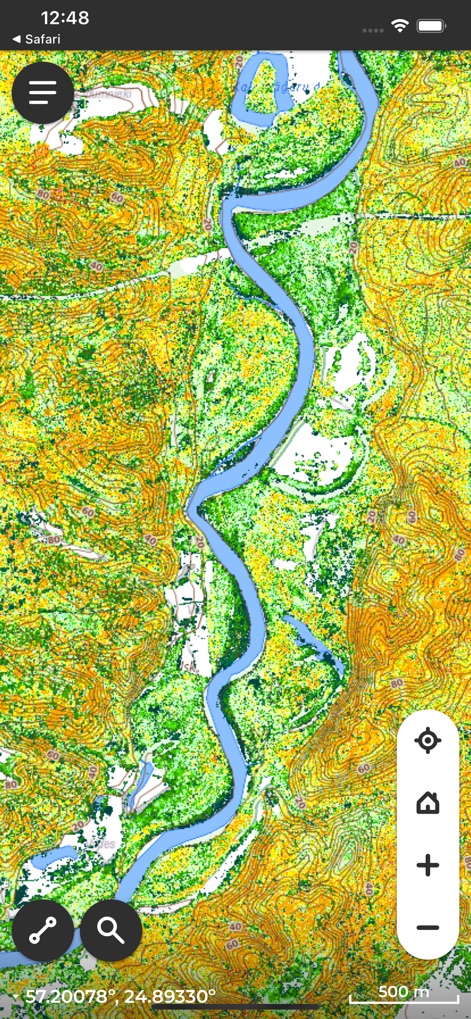
lvm-geo-mobile-topographic-map
LVM GEO Mobile app screen displaying a topographic map with a river and vegetation density data

lvm-geo-mobile-search-protected-areas
Search interface in the LVM GEO Mobile app displaying environmental protection areas and nature reserves in Latvia.

lvm-geo-mobile-area-measurement
LVM GEO Mobile app interface showing a land area measurement tool with a polygon drawn on a map.

lvm-geo-data-entry-form
Data entry form in the LVM GEO Mobile app for forestry management reporting.

lvm-geo-mobile-map-measurement
A screenshot of the LVM GEO Mobile app showing a cadastral map with a highlighted area measuring 0.26 hectares and a perimeter of 230 meters.

lvm-geo-mobile-coordinate-display
LVM GEO Mobile app interface showing geographic coordinates in WGS84 and LKS92 formats

lvm-geo-mobile-map-coordinates
LVM GEO Mobile app showing GPS coordinates and land parcel information on a map.
Description
Download
More Like This
Top-ranked apps in the same category

Uber - Request a ride
Uber Technologies, Inc.

Airbnb
Airbnb, Inc.

铁路12306
ACADEMY OF RAILWAY SCIENCES CO., ltd.

Booking.com: Hotels & Travel
Booking.com B.V.

Grab: Taxi Ride, Food Delivery
GRABTAXI HOLDINGS PTE. LTD.

Trip.com: Book Flights, Hotels
Trip.com Travel Singapore Pte. Ltd.

DiDi China: Ride Hailing
Didi Chuxing (Beijing) Network Platform Technology Co., Ltd

去哪儿旅行-订酒店机票火车票
Beijing Qunar Information Technology Company Limit

Bolt: Request a Ride
BOLT TECHNOLOGY OU
This page is not an official page of the app or its developer, but an independent editorial publication created for informational and commentary purposes. Unless expressly stated otherwise, neither the app nor its developer is affiliated with, endorsed by, sponsored by, authorized by, or otherwise officially connected with MWM, Apple, Google Play, the app publisher, or the app's developer, and nothing on this page implies that the app was developed using MWM's services. Any trademarks, logos, screenshots, and other content remain the property of their respective owners.