
This page is not an official page of the app or its developer, but an independent editorial publication created for informational and commentary purposes. Unless expressly stated otherwise, neither the app nor its developer is affiliated with, endorsed by, sponsored by, authorized by, or otherwise officially connected with MWM, Apple, Google Play, the app publisher, or the app's developer, and nothing on this page implies that the app was developed using MWM's services. Any trademarks, logos, screenshots, and other content remain the property of their respective owners.

MacrosFirst - Macro Tracker
Take total control of your nutrition with the high-performance tool built for accuracy. Auto-calculate serving sizes to hit your targets, reconcile label 'Macro Math,' and sync your data for professional-grade progress tracking.
Downloads
986K+User Rating
Total Ratings
11K+Publisher
Category
Health & FitnessLocales
1Latest Version
2.1.384Size
169.1 MBFirst Released
Jul 19, 2017Precision Tracking for Peak Performance
The ultimate toolkit for data-driven athletes who demand accuracy, efficiency, and full control over their nutrition data.
Auto-Calculate Serving Sizes
Stop the guesswork. Automatically calculate exactly how much food to eat to hit your specific macro targets with mathematical precision.
Ultra-Fast Nutrition Logging
Engineered for busy professionals. Log meals in seconds with barcode scanning, AI-powered food search, and an instant nutrition label scanner.
Frequently Asked Questions
Everything you need to know about MacrosFirst - Macro Tracker
What is MacrosFirst?
MacrosFirst is a powerful macro tracker, food logger, calorie counter, and meal planner designed to help users achieve health and fitness goals across various diets.
Can I set custom macro goals with MacrosFirst?
Yes, MacrosFirst allows users to create custom daily and meal-level macro goals. This includes unlimited custom meals to fit any schedule or specific diet plan.
Does MacrosFirst automatically calculate serving sizes?
Yes, MacrosFirst automatically calculates serving sizes. This feature helps users hit their specific macro targets with precision, simplifying accurate food logging within the app.
How do I log food quickly in MacrosFirst?
Users log food quickly in MacrosFirst by searching a database of over 1.8M+ verified foods or scanning barcodes. Meals or entire days can also be copied between dates.
Can MacrosFirst scan nutrition labels?
Yes, MacrosFirst scans nutrition labels with your camera. This instantly imports nutrition facts, eliminating the need for manual data entry into the tracker.
What nutrients can MacrosFirst track?
MacrosFirst tracks detailed breakdowns of calories, protein, carbs, and fats. Users can customize their view to track additional metrics that are most relevant to their fitness goals.
Does MacrosFirst track weight progress?
Yes, MacrosFirst tracks body weight trends. Users compare these trends with their food intake over time using detailed progress reports within the application.
Can I share my meals with others using MacrosFirst?
Yes, MacrosFirst allows users to share meals, foods, and recipes with friends and family. Users can also view their connections' daily logs for mutual support.
How does MacrosFirst handle alcohol tracking?
MacrosFirst handles alcohol tracking by allowing users to allocate alcohol calories as carbs, fat, or a combination. This keeps calorie and macro tracking perfectly aligned.
Can I set different macro goals for specific days in MacrosFirst Premium?
Yes, MacrosFirst Premium allows users to set personalized macro targets for specific days. This feature is ideal for strategies such as carb cycling or managing training and rest days.
Does MacrosFirst Premium offer AI-powered food logging?
Yes, MacrosFirst Premium provides AI-powered food logging through 'Smarter Food Search'. Users describe meals with voice or text, or snap a photo of their plate for fast logging.
Can I view long-term nutrient trends in MacrosFirst Premium?
Yes, MacrosFirst Premium enables users to view nutrient trends and averages over any date range. This provides long-term progress tracking and valuable nutritional insights.
Can I export my nutrition data from MacrosFirst Premium?
Yes, MacrosFirst Premium allows users to export meal history to Excel or sync data to Google Sheets. This facilitates deeper analysis of personal nutrition.
Can I import recipes into MacrosFirst Premium?
Yes, MacrosFirst Premium supports importing recipes from any website. The imported recipes include ingredients and step-by-step instructions for user convenience.
How does MacrosFirst Premium ensure accurate calorie and macro reporting?
MacrosFirst Premium ensures accurate calorie and macro reporting through 'Macro Math Calorie Reporting'. It calculates calories based on actual macros, maintaining consistency even with inconsistent nutrition labels.
Can I connect with unlimited friends in MacrosFirst Premium?
Yes, MacrosFirst Premium offers unlimited connections. Users can follow friends and share their progress, meals, and nutrition insights with their support network.
Do Premium subscribers get priority support in MacrosFirst?
Yes, MacrosFirst Premium subscribers receive VIP support. This ensures their questions and needs are addressed promptly and with priority by the support team.
Is MacrosFirst a free app?
Yes, MacrosFirst is free to download and use. Optional Premium features are available through auto-renewing subscriptions for enhanced functionality and tools.
Where can I find the privacy policy for MacrosFirst?
The privacy policy for MacrosFirst is available directly at https://www.macrosfirst.com/privacy-policy.html. This link is provided within the app's store description.
What are the terms of use for the MacrosFirst app?
The terms of use for the MacrosFirst app are detailed and accessible via https://www.macrosfirst.com/terms.html. This link is provided in the app's store description.
The following screenshots and description are sourced directly from the app's official store listing and are the property of the app developer.
App Store
Screenshots
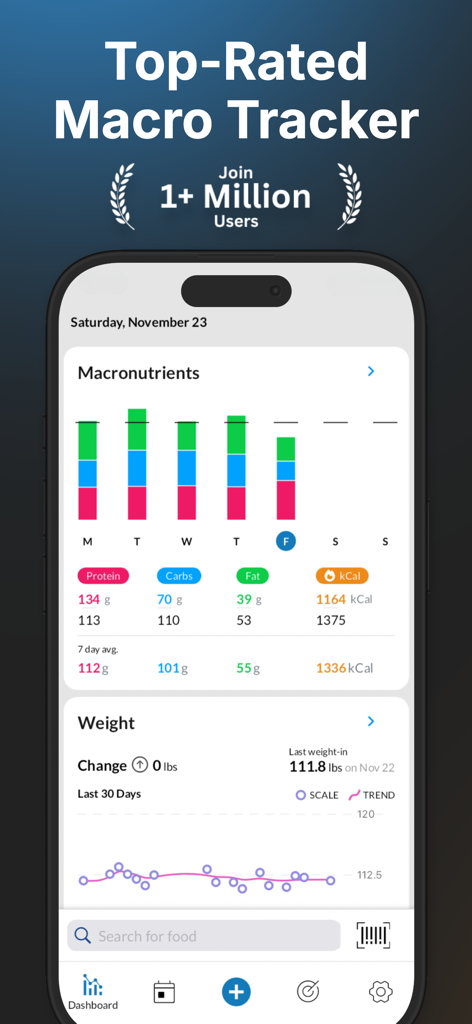
MacrosFirst app dashboard showing macronutrient charts and weight tracking trends
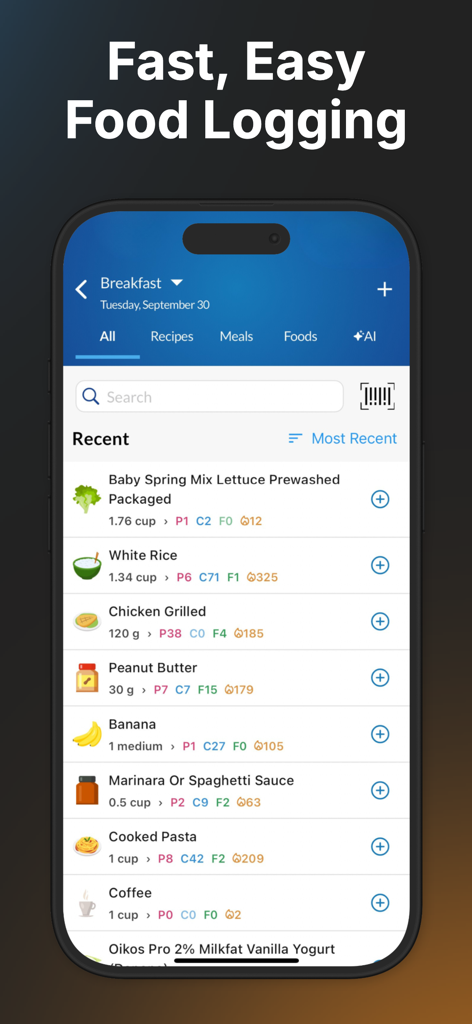
MacrosFirst app interface showing a list of recently logged foods with macro breakdowns for protein carbs and fats
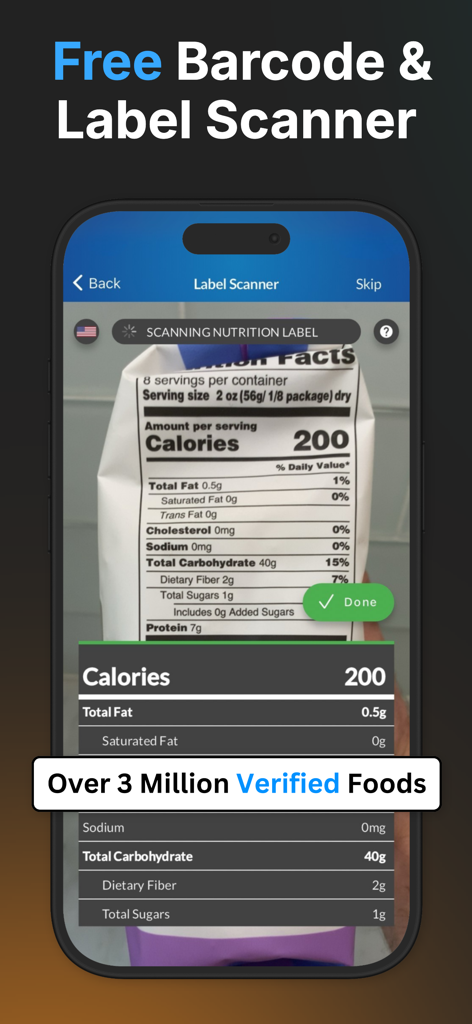
MacrosFirst app interface scanning a nutrition facts label for calorie and macro tracking
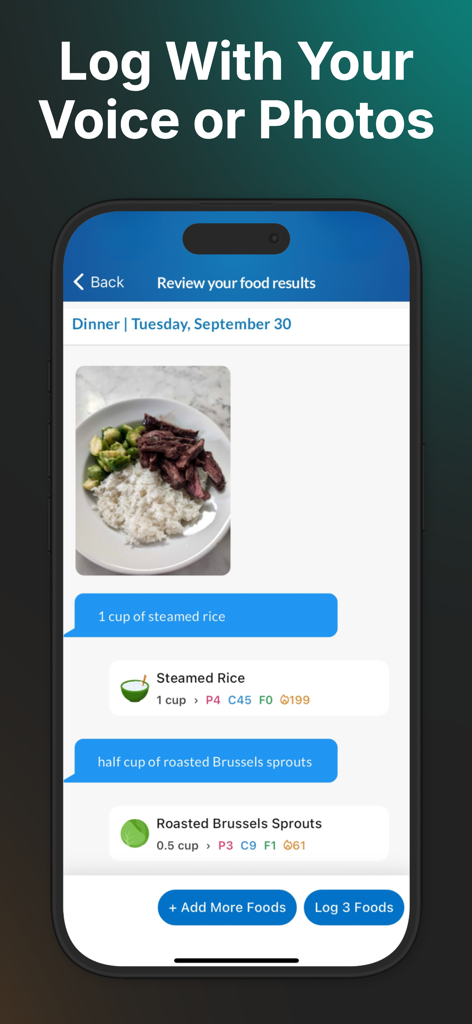
MacrosFirst app interface showing AI food logging via voice and photo recognition for precise macro tracking
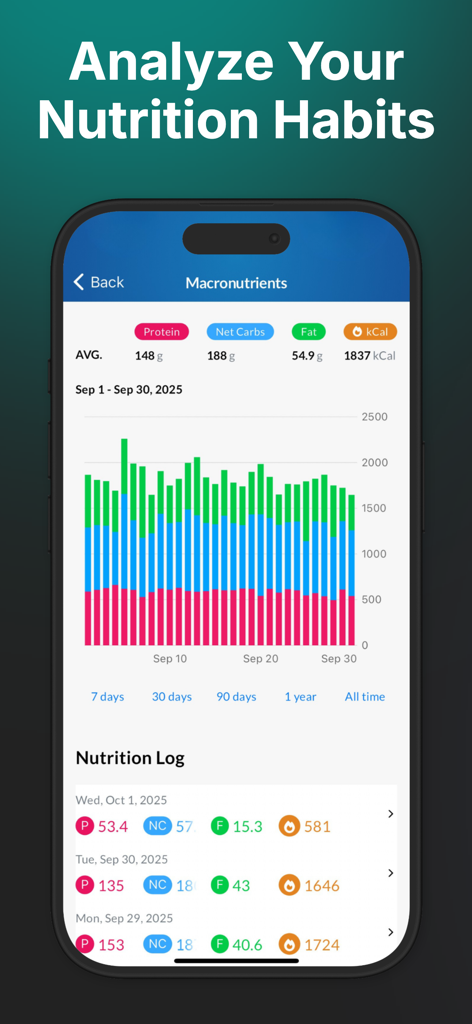
MacrosFirst app dashboard showing macronutrient analysis charts and daily nutrition logs
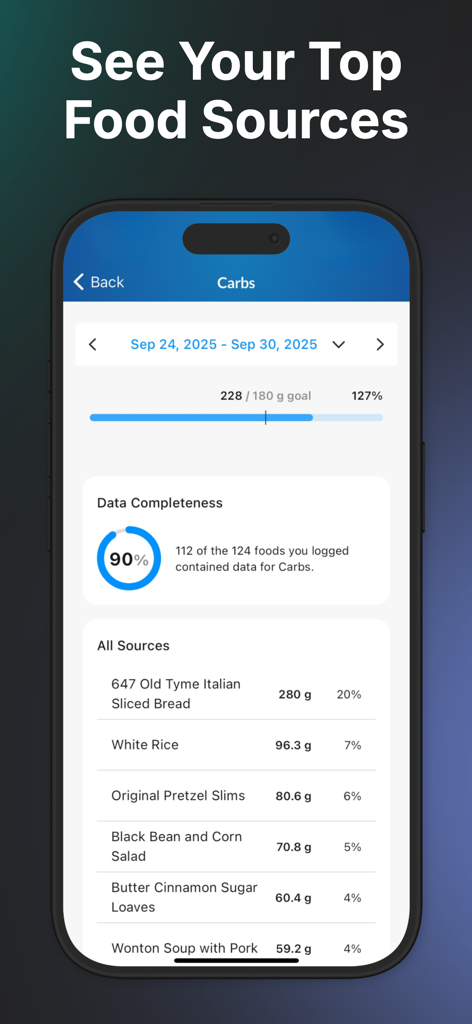
MacrosFirst app screen showing a detailed breakdown of carbohydrate food sources and weekly goal progress
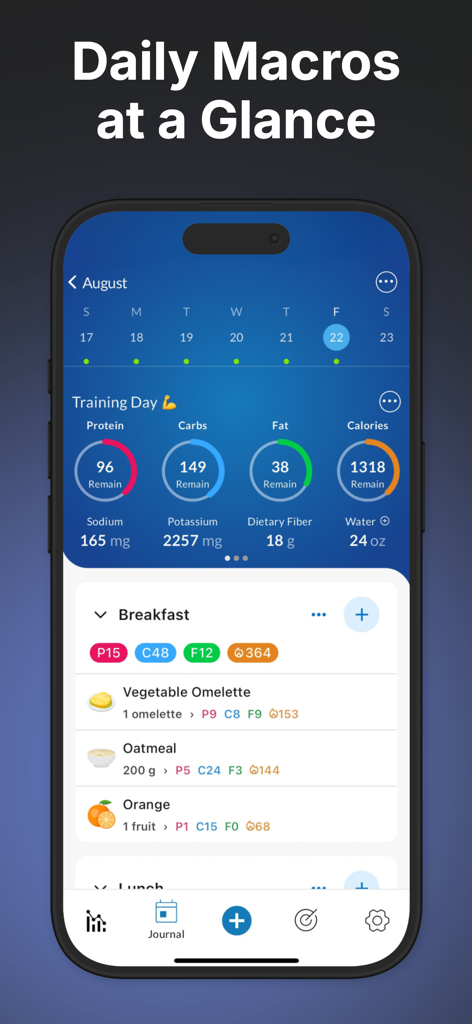
MacrosFirst app dashboard showing daily macro targets and food logs for a training day
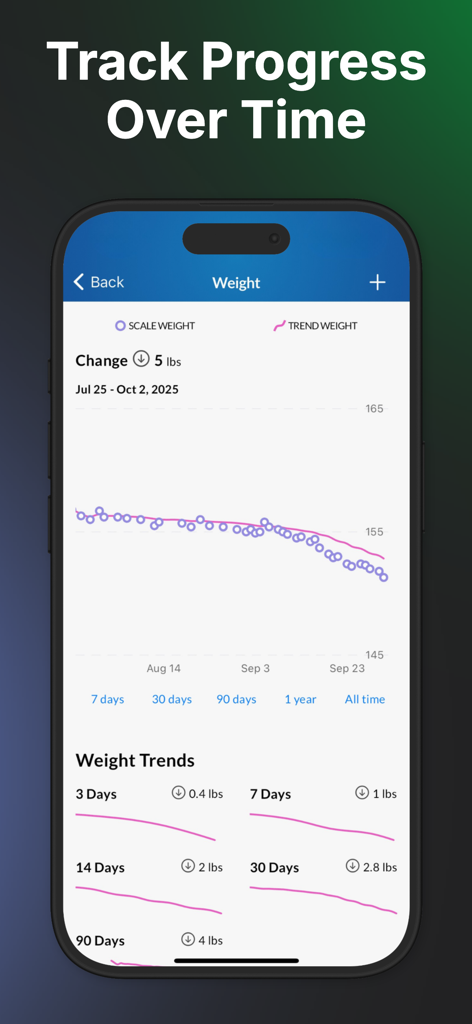
MacrosFirst weight tracking screen displaying progress charts and body weight trends
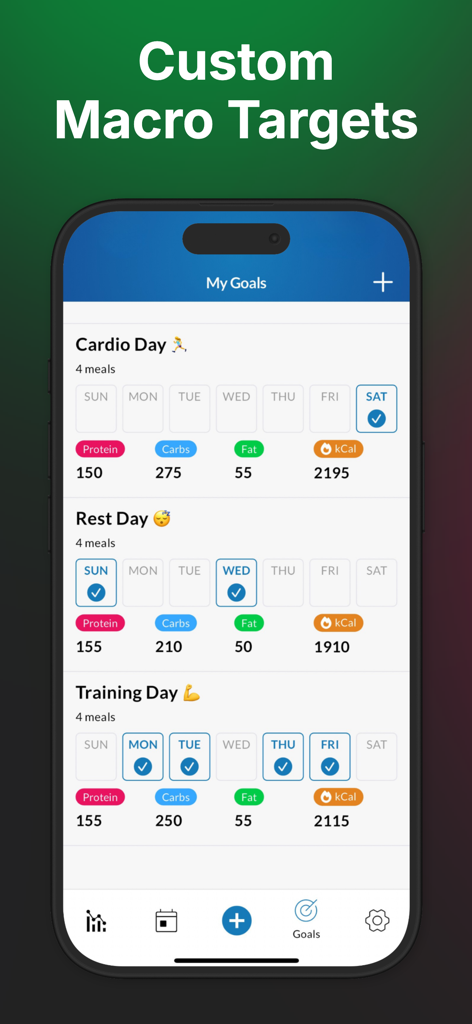
MacrosFirst app screen displaying custom nutrient targets for cardio, rest, and training days.
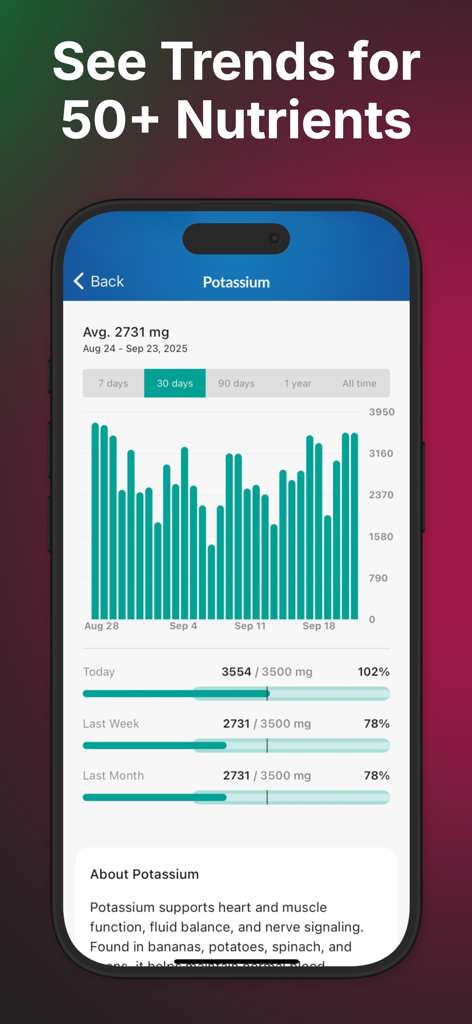
A bar chart in the MacrosFirst app displaying 30 day trends for potassium intake compared to daily goals
Description
Download
More Like This
Apps with similar features and user experience

Cal AI - Calorie Tracker
Viral Development LLC

Cronometer: Calorie Counter
Cronometer Software Inc
MacroFactor - Macro Tracker
Stronger By Science Technologies LLC

Wao - Food & Calorie Counter
BEWAO CORPORATION

SnapCal: AI Calorie Counter
DENZAM INC
AI Calorie Tracker by CalSnap
Trinh Muoi

CalScan - AI Calorie Tracker
Shanghai Mimi Pig Network Technology Co., Ltd
Счетчик калорий: Худеем вместе
Shamil Berdiev

Mezan ميزان
AI World LLC
This page is not an official page of the app or its developer, but an independent editorial publication created for informational and commentary purposes. Unless expressly stated otherwise, neither the app nor its developer is affiliated with, endorsed by, sponsored by, authorized by, or otherwise officially connected with MWM, Apple, Google Play, the app publisher, or the app's developer, and nothing on this page implies that the app was developed using MWM's services. Any trademarks, logos, screenshots, and other content remain the property of their respective owners.