
This page is not an official page of the app or its developer, but an independent editorial publication created for informational and commentary purposes. Unless expressly stated otherwise, neither the app nor its developer is affiliated with, endorsed by, sponsored by, authorized by, or otherwise officially connected with MWM, Apple, Google Play, the app publisher, or the app's developer, and nothing on this page implies that the app was developed using MWM's services. Any trademarks, logos, screenshots, and other content remain the property of their respective owners.


MakeupPlus- AI Portrait
Flaws are obsolete. This app hands users a master key to their visual persona, delivering instant, AI-driven aesthetic command.
Downloads
12.5M+User Rating
Total Ratings
149.8KPublisher
Category
Photo & VideoLocales
14Latest Version
6.8.5Size
401.0 MBFirst Released
May 7, 2015MakeupPlus- AI Portrait: Core Features Analysis
An evaluation of key functionalities enhancing user self-expression and digital appearance.
Natural Skin Airbrushing
It allows users to diminish skin flaws quickly with natural-looking airbrushing, ensuring an optimized self-image.
Advanced Facial Reshaping
This tool features the ability to adjust facial shape, nose, eyes, and mouth with ease, providing natural-looking detail enhancement for personal customization.
Popular Makeup Styles
The app provides an easy way to try out various popular makeup styles, fostering self-expression and trend participation for social media sharing.
Diverse Foundation Shades
It offers multiple foundation shades, from dark to fair, to seamlessly blend with various skin tones and enhance confidence.
Virtual Contact Lenses
This tool features dozens of playful, elegant, and textured contact lenses that significantly enhance virtual makeup looks and allow for new aesthetic experiments.
Professional Photo Filters
The app provides new professional filters primarily for portraits, helping users achieve a polished look suitable for their online presence.
Frequently Asked Questions
Everything you need to know about MakeupPlus- AI Portrait
What is MakeupPlus- AI Portrait?
MakeupPlus- AI Portrait is an app that allows users to try various makeup styles, apply professional filters, airbrush skin, adjust foundation shades, and edit facial features.
Does MakeupPlus- AI Portrait offer makeup looks?
Yes, MakeupPlus- AI Portrait allows users to easily try out various popular makeup styles, supporting those who share their lives.
Can MakeupPlus- AI Portrait remove skin flaws?
Yes, MakeupPlus- AI Portrait provides natural airbrushing features for simple operation to quickly diminish skin flaws with natural-looking results.
Does MakeupPlus- AI Portrait include professional filters?
Yes, MakeupPlus- AI Portrait introduces new professional filters suitable for portraits, yoga, and landscape scenes.
What foundation shades are available in MakeupPlus- AI Portrait?
MakeupPlus- AI Portrait offers multiple foundation shades, from dark to fair, suitable for adjusting to various skin tones and blending naturally.
Can I change eye color with MakeupPlus- AI Portrait?
Yes, MakeupPlus- AI Portrait provides dozens of playful, elegant, and textured colorful contact lenses that enhance makeup looks.
How can I edit facial features in MakeupPlus- AI Portrait?
MakeupPlus- AI Portrait allows users to adjust facial shape, nose shape, eyes, mouth, and other areas with easy operation for natural-looking detail enhancement.
Does MakeupPlus- AI Portrait offer a premium subscription?
Yes, MakeupPlus Premium is a subscription that provides monthly or annual auto-renewable access to all premium features within the MakeupPlus- AI Portrait app.
How does MakeupPlus Premium renewal work?
MakeupPlus Premium subscriptions automatically renew unless turned off at least 24 hours before the current period ends. Charges occur within 24 hours prior to renewal.
Where can I find the privacy policy for MakeupPlus- AI Portrait?
The privacy policy for MakeupPlus- AI Portrait is available at: https://pro.meitu.com/makeup/agreements/privacy-policy/?lang=en.
Can MakeupPlus- AI Portrait remove acne?
Yes, MakeupPlus- AI Portrait includes a "Beautify" function that allows users to remove acne from photos.
Can MakeupPlus- AI Portrait eliminate double chins?
Yes, MakeupPlus- AI Portrait provides a "Beautify" option to eliminate double chins, as demonstrated in the app interface.
Does MakeupPlus- AI Portrait offer hair color changes?
Yes, MakeupPlus- AI Portrait features "VIBRANT HAIR COLORS," allowing users to choose from various hair dye options like Orange, Ashy Pink, and Icy Blue.
The following screenshots and description are sourced directly from the app's official store listing and are the property of the app developer.
App Store
Screenshots
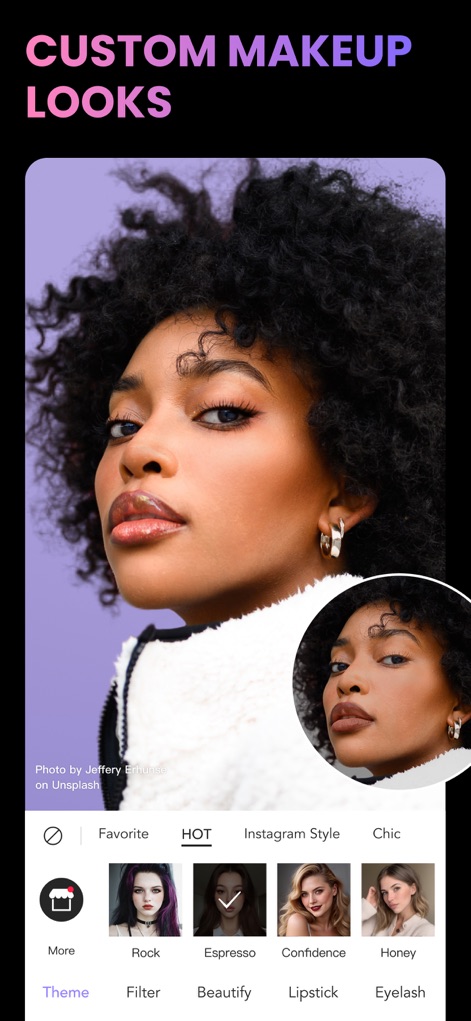
Curated Style Palettes
The app empowers users to explore a diverse range of popular makeup styles, showcasing customizable categories like 'Hot' selections and options for adjusting lip colors under 'Lipstick'.

Instant Lip Transformations
Users can experiment with various lipstick options like '3D lip' for enhanced volume, with the real-time visual comparison in the inset demonstrating instant cosmetic changes.

Dynamic Hair Hues
This tool allows for instant hair color changes, demonstrating the 'Hair Dye' feature with a vivid 'Orange' selection and a clear before-and-after comparison.
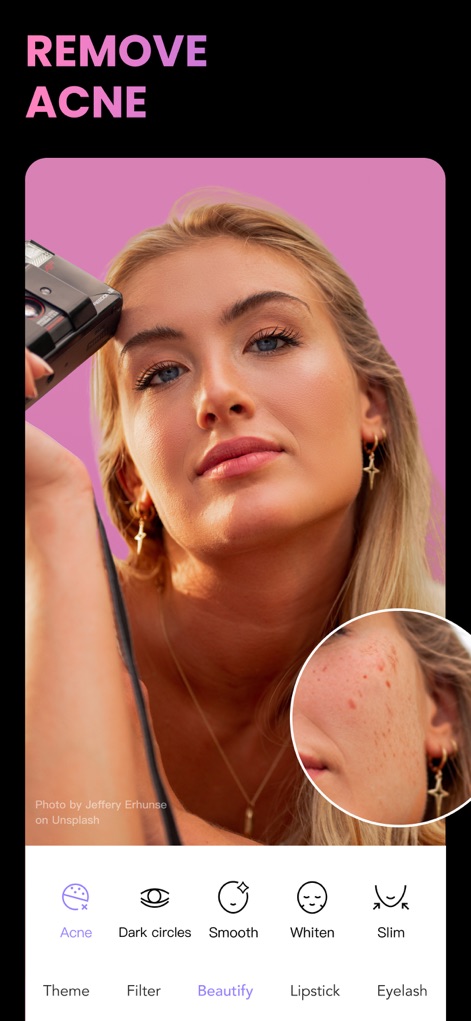
Flawless Skin Refinement
The app features precise skin enhancement tools within the 'Beautify' section, offering one-tap solutions like the 'Acne' removal feature for a smoother complexion.

Contour Perfection
Users can effortlessly refine facial contours using the app's 'Beautify' functions, specifically targeting areas like 'Double chin' removal and applying 'Slim' adjustments for a sculpted profile.
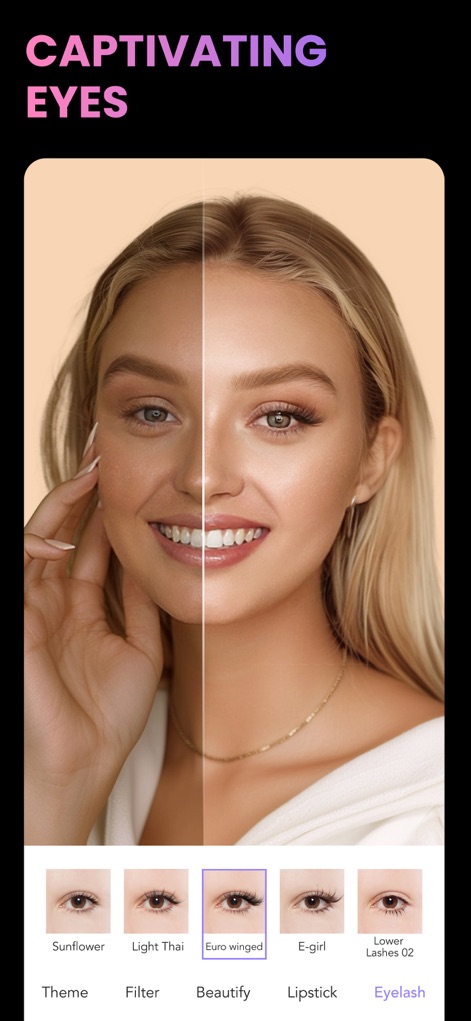
Enchanting Eye Enhancements
This tool offers a comprehensive 'Eyelash' customization suite, allowing users to apply diverse styles like 'Euro winged' lashes and instantly visualize transformations with a dynamic split-screen comparison.
Description
Download
More Like This
Apps with similar features and user experience

Meitu- AI Photo & Video Editor
Xiamen Meitu Technology Co., Ltd.

BeautyCam-AI Photo Editor
Xiamen Meitu Technology Co., Ltd.

BeautyPlus-Selfie Photo Editor
PIXOCIAL TECHNOLOGY (SINGAPORE) PTE. LTD.

Peachy - AI Face & Body Editor
SHANTANU PTE. LTD.

Airbrush: Face Photo Editor
PIXOCIAL TECHNOLOGY (SINGAPORE) PTE. LTD.
YouCam Perfect AI Photo Editor
PERFECT MOBILE CORP.

Persona: AI Beauty Editor
TICKET TO THE MOON, INC.

Wuta Camera - Nice Shot Always
Shanghai Benqumark Network Tech Co., Ltd.

Perfect365 Makeup Photo Editor
Perfect365, Inc.
This page is not an official page of the app or its developer, but an independent editorial publication created for informational and commentary purposes. Unless expressly stated otherwise, neither the app nor its developer is affiliated with, endorsed by, sponsored by, authorized by, or otherwise officially connected with MWM, Apple, Google Play, the app publisher, or the app's developer, and nothing on this page implies that the app was developed using MWM's services. Any trademarks, logos, screenshots, and other content remain the property of their respective owners.