
This page is not an official page of the app or its developer, but an independent editorial publication created for informational and commentary purposes. Unless expressly stated otherwise, neither the app nor its developer is affiliated with, endorsed by, sponsored by, authorized by, or otherwise officially connected with MWM, Apple, Google Play, the app publisher, or the app's developer, and nothing on this page implies that the app was developed using MWM's services. Any trademarks, logos, screenshots, and other content remain the property of their respective owners.


Microsoft Translator
Global dialogue is often fragmented by language. This tool demolishes those walls, providing instant, confident communication across any border.
Downloads
12.5M+User Rating
Total Ratings
578.4KPublisher
Category
ProductivityLocales
24Latest Version
25.10.2Size
28.8 MBFirst Released
Aug 6, 2015Microsoft Translator: Core Capabilities
An Analytical Overview of Key Features for Global Communication
Comprehensive Multi-Modal Translation
The app provides extensive translation capabilities for text, spoken words, and images, enabling users to understand and communicate in various formats.
Dynamic Group Conversation Translation
This tool facilitates real-time translation within group discussions, fostering instant cross-lingual understanding among multiple participants.
Extensive Language Support
It allows users to access translation services in over 100 languages, significantly widening the scope of global communication.
Real-Time Accurate Translations
The app delivers real-time and accurate translations, ensuring effective and reliable communication without significant delays.
Frequently Asked Questions
Everything you need to know about Microsoft Translator
What is Microsoft Translator?
Microsoft Translator is a free application that breaks language barriers by translating text, speech, images, and group conversations in over 100 languages. It connects people globally for travel, work, or school.
Is Microsoft Translator a free application?
Yes, Microsoft Translator is a free application. It offers translation of text, speech, images, and group conversations without charge to help users communicate across language barriers.
How many languages does Microsoft Translator support?
Microsoft Translator supports over 100 languages for translation. Users can view the full list of supported languages and features via a provided link within the app.
Can Microsoft Translator translate images?
Yes, Microsoft Translator can translate text from images. The app features a camera icon allowing users to capture and translate text found in images, such as signs or menus.
Does Microsoft Translator save conversation transcripts?
Yes, Microsoft Translator saves conversation transcripts directly on your phone. The app also summarizes conversations and organizes them into chapters for easy navigation and future reference or sharing.
Can Microsoft Translator translate spoken conversations in real-time?
Yes, Microsoft Translator provides real-time accurate translations for speech. It allows users to communicate verbally with others using different languages by translating spoken words.
How does Microsoft Translator help with group conversations?
Microsoft Translator facilitates group conversations by providing live transcription and translation. It saves transcripts on your phone, summarizes them, and breaks them into chapters for easy navigation and reference.
The following screenshots and description are sourced directly from the app's official store listing and are the property of the app developer.
App Store
Screenshots

Extensive Language Support
This tool provides a comprehensive list of supported languages and clear icons indicating speech and group conversation capabilities.

Seamless Group Dialogues
Users can engage in dynamic group conversations with real-time live transcription and automatic chapter breakdowns for easy navigation.
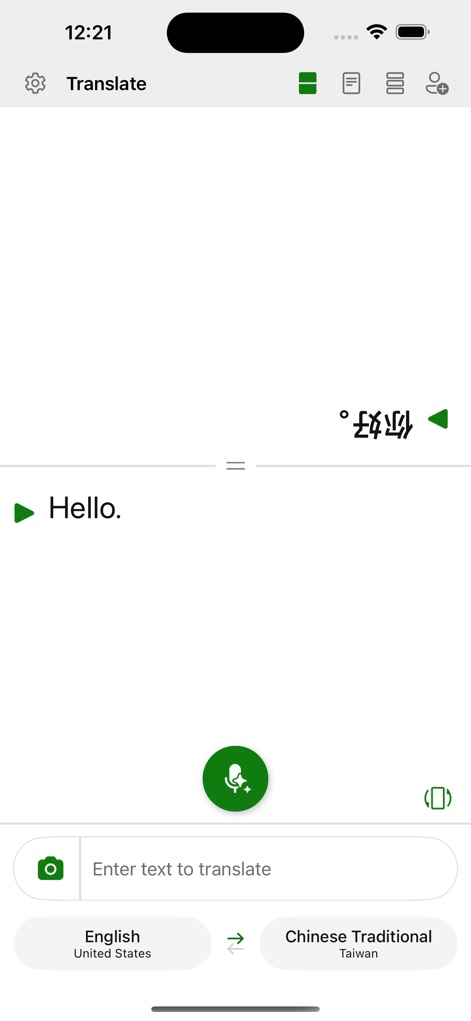
Instant Translation Power
The app offers intuitive text input for translation and a prominent microphone button for instant speech recognition.
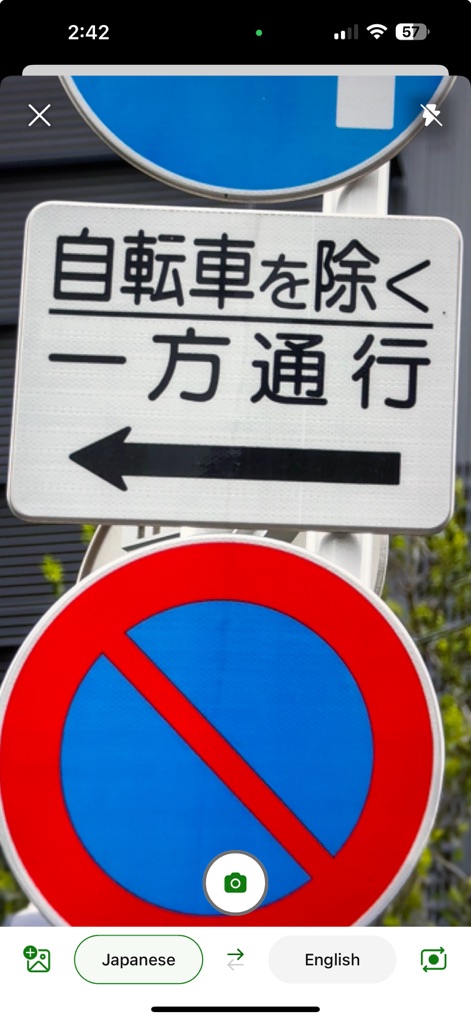
Visual Translation On-the-Go
This tool allows users to effortlessly translate text from images by using the camera icon and selecting source and target languages.

Crystal Clear Speech Translation
Users can accurately translate spoken phrases, displaying both the original input ('Can you tell me how to get to the museum?') and the translated output.
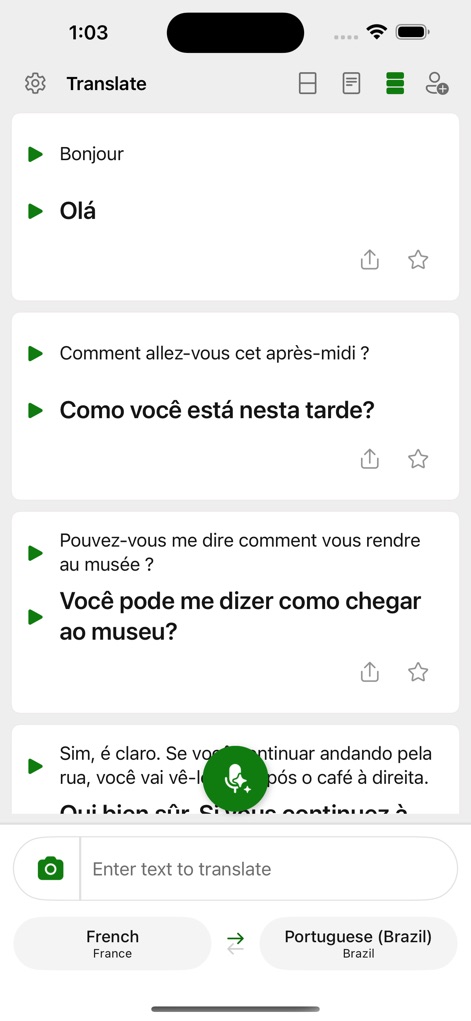
Conversation History & Flow
The app effectively displays a history of translated phrases in conversational cards and includes options to share or save favorite translations.
Description
Download
More Like This
Apps with similar features and user experience

DeepL Translate
DeepL SE

腾讯翻译君-多语言翻译
Tencent Technology (Shenzhen) Company Limited

出国翻译官- 多语言语音翻译聊天交友
Beijing Qicai Muzhi Technology Co.,Ltd.

Translate Voice:Ai Chat
TINY BOLT (HK) CO., LIMITED

GO Translate・AI Translator App
INNOVAPP LLC

翻译全能王-中文日文图片扫描翻译器
Shanghai Baowu Network Technology Co., Ltd.

translation-Global translation
Hebei jiudao network technology co., ltd

Photo Translator: Camera OCR
Son Hoang

Voice Translator : Language +
AmazinPro Technology Solutions And Training Company Limited
This page is not an official page of the app or its developer, but an independent editorial publication created for informational and commentary purposes. Unless expressly stated otherwise, neither the app nor its developer is affiliated with, endorsed by, sponsored by, authorized by, or otherwise officially connected with MWM, Apple, Google Play, the app publisher, or the app's developer, and nothing on this page implies that the app was developed using MWM's services. Any trademarks, logos, screenshots, and other content remain the property of their respective owners.