
This page is not an official page of the app or its developer, but an independent editorial publication created for informational and commentary purposes. Unless expressly stated otherwise, neither the app nor its developer is affiliated with, endorsed by, sponsored by, authorized by, or otherwise officially connected with MWM, Apple, Google Play, the app publisher, or the app's developer, and nothing on this page implies that the app was developed using MWM's services. Any trademarks, logos, screenshots, and other content remain the property of their respective owners.

Mirror&BeforeAfter-BA mirror
Experience the 'True Self' reversal mirror, check every angle with 360° visibility, and capture flawless before-and-after progress with professional alignment tools.
Downloads
475K+User Rating
Total Ratings
3K+Publisher
Category
Health & FitnessLocales
2Latest Version
3.2.6Size
58.2 MBFirst Released
Jun 28, 2019Your All-in-One Beauty & Transformation Tool
From instant 4K checks to professional-grade progress tracking, experience the mirror app that goes beyond the reflection to help you look and feel your best.
See Yourself How Others Do
Switch to 'True View' to see your un-flipped, real reflection. Combined with 4K resolution and night mode, you will never miss a detail, even in the dimmest lighting.
Pro-Grade Before & Afters
Track your skincare, fitness, or hair journey with precision. Use transparent overlays to align every shot and create side-by-side comparisons or transition videos instantly.
Frequently Asked Questions
Everything you need to know about Mirror&BeforeAfter-BA mirror
What is the Mirror&BeforeAfter-BA mirror app?
Mirror&BeforeAfter-BA mirror is a free app offering mirror functions, brightness adjustment, and camera shake correction, supporting up to 4K image quality. It includes features like a reversal mirror and before-after image creation.
Does Mirror&BeforeAfter-BA mirror support 4K resolution?
Yes, Mirror&BeforeAfter-BA mirror supports 4K resolution, utilizing the camera's full capabilities for high image quality. This feature is particularly available for iPhone 11 series or later models.
How quickly does the Mirror&BeforeAfter-BA mirror app start?
Mirror&BeforeAfter-BA mirror starts immediately, within 1 second. This allows users to quickly access the mirror function for immediate appearance checks.
Can users adjust brightness in the Mirror&BeforeAfter-BA mirror app?
Yes, Mirror&BeforeAfter-BA mirror allows users to easily adjust brightness levels up or down. This ensures visibility even in dark environments like offices or schools.
What is the Reversal mirror feature in Mirror&BeforeAfter-BA mirror?
The Reversal mirror function in Mirror&BeforeAfter-BA mirror displays the user's reflection as others see it. This popular feature is switchable with one tap and is available for free.
Can Mirror&BeforeAfter-BA mirror create before and after comparison images?
Yes, Mirror&BeforeAfter-BA mirror allows users to easily create before and after comparison images. Users can place two photos side by side, zoom, and move them for detailed comparison.
Does Mirror&BeforeAfter-BA mirror offer a grid view for photos?
Yes, Mirror&BeforeAfter-BA mirror provides a grid view function. These grid lines assist users in aligning positions for shooting and creating accurate comparison photos.
How can users remove ads in Mirror&BeforeAfter-BA mirror?
Users can remove all ads within the Mirror&BeforeAfter-BA mirror app by purchasing the designated paid feature. This removes advertisements while retaining full access to app functions.
Can Mirror&BeforeAfter-BA mirror be used in dark environments?
Yes, Mirror&BeforeAfter-BA mirror includes a night mode feature that brightly projects images even in dark areas. This allows convenient use in low-light environments.
Does Mirror&BeforeAfter-BA mirror have a 360-degree mirror function?
Yes, Mirror&BeforeAfter-BA mirror features a 360-degree mirror that allows users to check angles from their back and sides. Users can take pictures and review them carefully.
The following screenshots and description are sourced directly from the app's official store listing and are the property of the app developer.
App Store
Screenshots
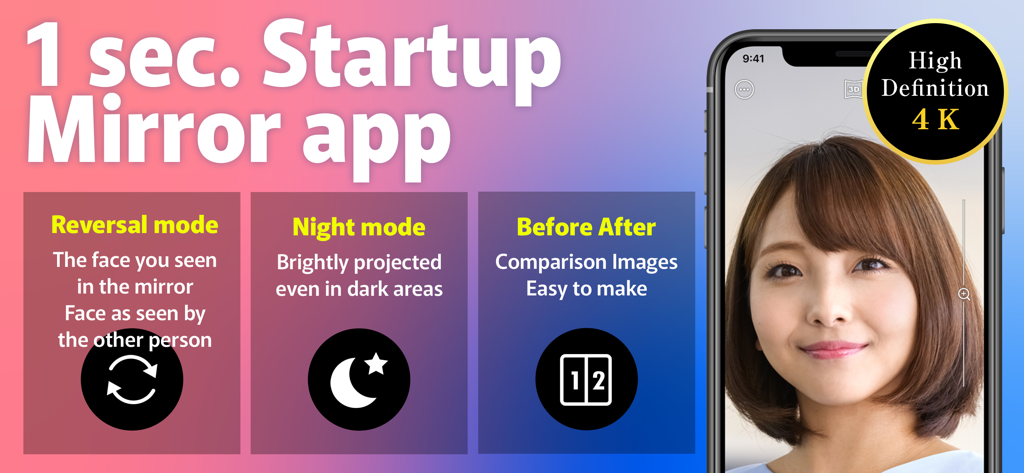
Mirror app interface highlighting 4K high definition quality with reversal mode night mode and before after comparison features
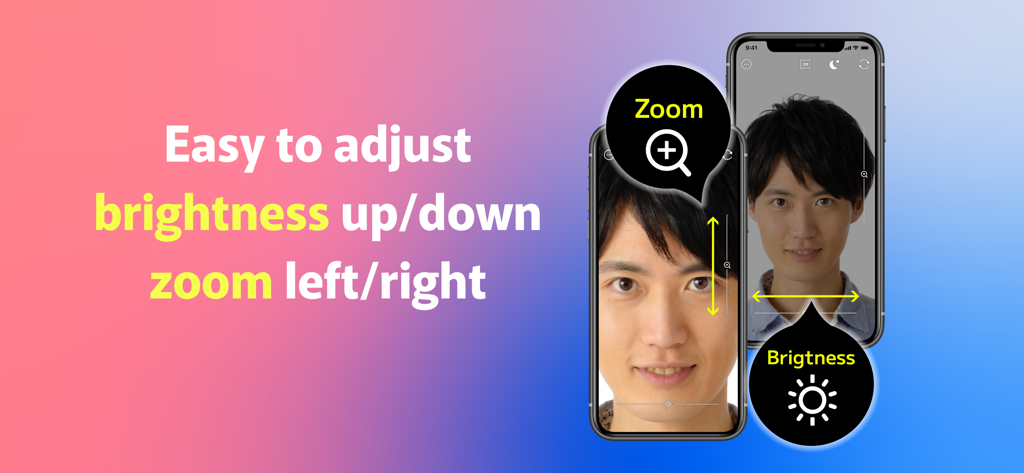
Interface of the mirror app demonstrating how to adjust zoom and brightness with swipe gestures while viewing a reflection
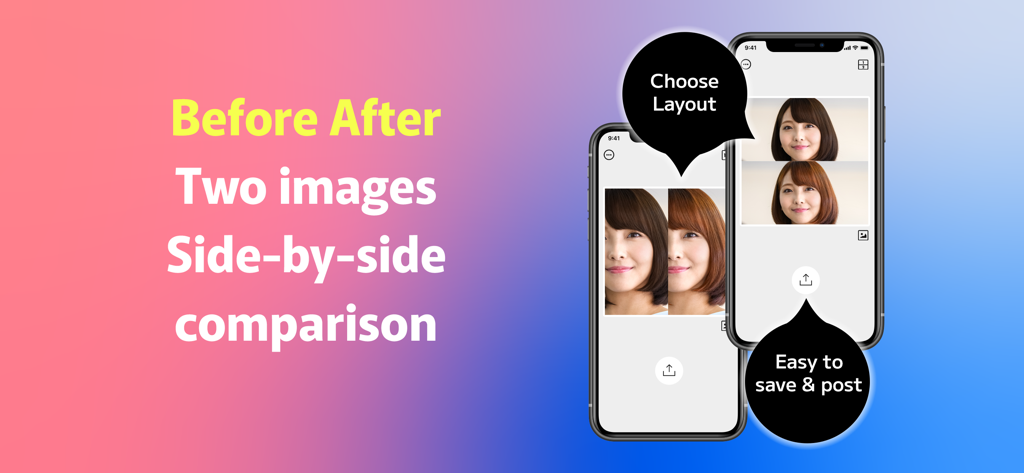
Before and after photo comparison with side by side and vertical layouts
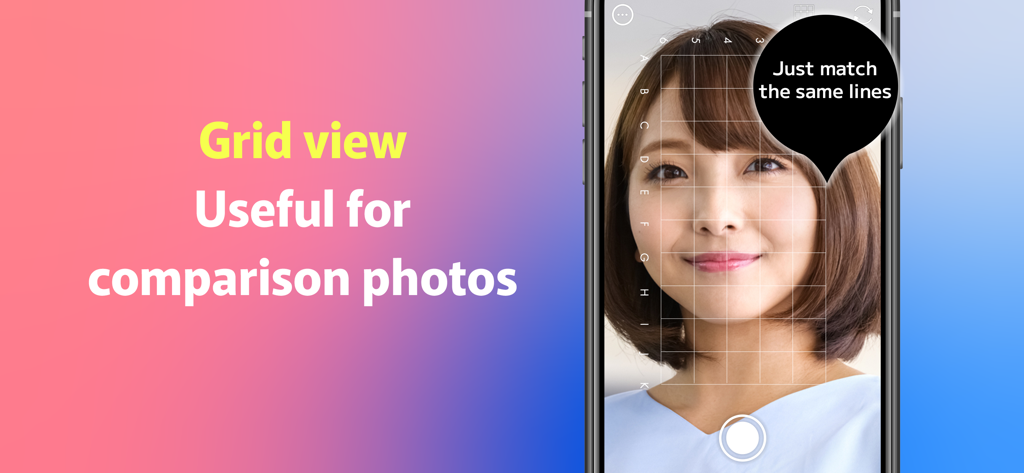
A smartphone screen displaying a grid overlay on a face to help align comparison photos in the mirror app
Description
Download
More Like This
Apps with similar features and user experience





This page is not an official page of the app or its developer, but an independent editorial publication created for informational and commentary purposes. Unless expressly stated otherwise, neither the app nor its developer is affiliated with, endorsed by, sponsored by, authorized by, or otherwise officially connected with MWM, Apple, Google Play, the app publisher, or the app's developer, and nothing on this page implies that the app was developed using MWM's services. Any trademarks, logos, screenshots, and other content remain the property of their respective owners.