
This page is not an official page of the app or its developer, but an independent editorial publication created for informational and commentary purposes. Unless expressly stated otherwise, neither the app nor its developer is affiliated with, endorsed by, sponsored by, authorized by, or otherwise officially connected with MWM, Apple, Google Play, the app publisher, or the app's developer, and nothing on this page implies that the app was developed using MWM's services. Any trademarks, logos, screenshots, and other content remain the property of their respective owners.


MuniMobile
No cash, no cards, no problem. This app gives users instant transit power, eliminating the scramble for fares.
Downloads
750k+User Rating
Total Ratings
306Publisher
Category
TravelLocales
6Latest Version
1.6.8Size
190.9 MBFirst Released
Dec 4, 2023An analytical overview of key functionalities for urban transit users.
MuniMobile App Evaluation
Instant Mobile Ticketing
The app enables users to buy and activate transit fares directly from their smartphone, eliminating the need for physical tickets or cash.
Offline Ticket Activation
It allows users to activate purchased tickets even without an active internet connection, ensuring continuous service availability.
Cashless & Paperless Transactions
It offers a fully digital payment solution, removing the necessity of carrying cash, handling exact change, or searching for ticket vending machines.
Diverse Secure Payment Options
The app supports various secure payment methods, including debit/credit cards, PayPal, and Apple Pay, enhancing accessibility for purchases.
Stored Tickets for Future Use
This tool allows commuters to purchase and store multiple tickets within the app for activation and use at a later time.
Group Fare Management
It facilitates the purchase and management of fares for multiple passengers simultaneously from a single device, ideal for families or groups.
Personalized Fare Selection
The app provides options for users to select specific rider types and fare products, ensuring they purchase the correct and most appropriate ticket.
Account-Based Ticket Transfer
This functionality enables the transfer of unused tickets to a new device through a user account, safeguarding purchased fares.
The following screenshots and description are sourced directly from the app's official store listing and are the property of the app developer.
App Store
Screenshots

This introductory screen visually highlights the app's core functions, such as comprehensive "Trip Planning and Mobile Ticketing" and the availability of "Routes, Stops and Fares at Your Fingertips" for immediate access.
Effortless Transit Control

Users can customize their travel search by enabling or disabling specific transit types like "Rail" and "Cable Car," alongside refining Points of Interest categories.
Tailored Transit Options
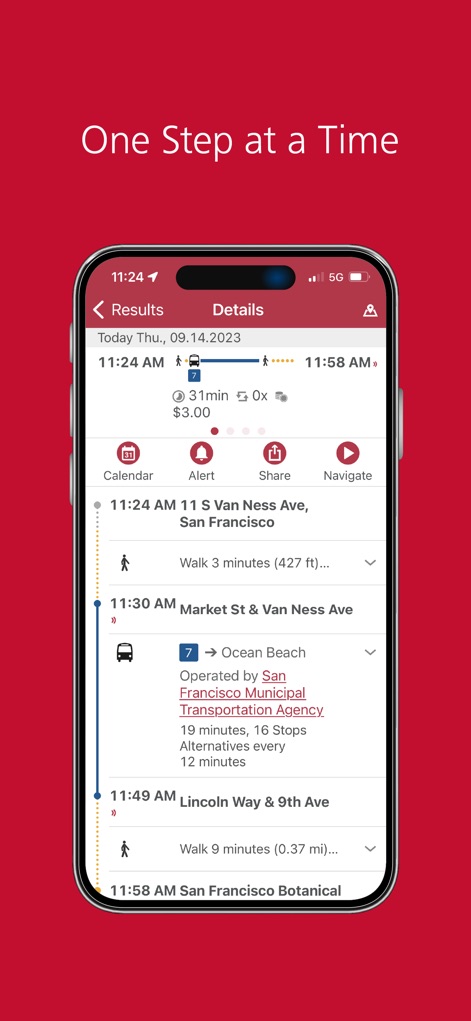
This view provides a step-by-step itinerary, detailing both "walking segments" with estimated times and specific "Muni Bus & Rail" connections, including stops and travel duration.
Detailed Route Insights

The app facilitates direct fare purchases, presenting clear options for an "Adult Single Ride" or a "California Cable Car Line All Day Pass" with quantities easily adjustable.
Seamless Ticket Acquisition

This interface offers real-time route planning on an interactive "Map," allowing users to input their starting point like "11th St 86, San Francisco" and visualize transit options directly.
Dynamic Map Navigation
Description
Download
More Like This
Apps with similar features and user experience

China Southern Airlines
China Southern Airlines Company Limited

United Airlines
United Air Lines

Fly Delta
Delta Air Lines, Inc

Southwest Airlines: Travel App
Southwest Airlines

Air China
Air China Limited

easyJet: Travel App
easyJet Airline Company Limited

Turkish Airlines: Book Flights
Turkish Airlines

Aeroméxico
Aerovias de Mexico, S.A. de C.V.

LATAM: Flights, Hotels, Cars
LATAM Airlines Group S.A.
This page is not an official page of the app or its developer, but an independent editorial publication created for informational and commentary purposes. Unless expressly stated otherwise, neither the app nor its developer is affiliated with, endorsed by, sponsored by, authorized by, or otherwise officially connected with MWM, Apple, Google Play, the app publisher, or the app's developer, and nothing on this page implies that the app was developed using MWM's services. Any trademarks, logos, screenshots, and other content remain the property of their respective owners.