
This page is not an official page of the app or its developer, but an independent editorial publication created for informational and commentary purposes. Unless expressly stated otherwise, neither the app nor its developer is affiliated with, endorsed by, sponsored by, authorized by, or otherwise officially connected with MWM, Apple, Google Play, the app publisher, or the app's developer, and nothing on this page implies that the app was developed using MWM's services. Any trademarks, logos, screenshots, and other content remain the property of their respective owners.


Southwest Airlines: Travel App
This app streamlines the entire travel flow. It grants users immediate control over every segment of their journey, transforming spontaneous ideas into reality.
Downloads
25M+User Rating
Total Ratings
7.0MPublisher
Category
TravelLocales
1Latest Version
13.6.1Size
238.6 MBFirst Released
Dec 18, 2009Key Features of the Southwest Airlines Travel App
An Analytical Overview of Core Functionalities for Travelers
Flight Booking & Management
The app provides comprehensive tools for booking, modifying, and managing flights, offering real-time updates on gate information, boarding positions, and flight status.
Mobile Boarding Passes
It allows users to access and store mobile boarding passes for all passengers on a trip, including detailed flight information and the option to save to digital wallets.
Rapid Rewards Integration
This tool features full integration with the Rapid Rewards program, enabling members to earn points on qualifying purchases and redeem them for flights, hotels, and vacation packages.
Vacation Package Booking (Getaways)
The app facilitates the booking of comprehensive vacation packages, including flights, hotels, and rental cars, with flexible cancellation and modification options.
Inflight Entertainment Access
It provides convenient access to the Inflight Entertainment Portal, offering free live TV, on-demand episodes, and movies on Wi-Fi enabled flights.
Hotel & Rental Car Booking
The app enables direct booking of hotels and rental cars, allowing users to explore deals and manage reservations for complete trip planning.
Frequently Asked Questions
Everything you need to know about Southwest Airlines: Travel App
Can users book flights using the Southwest Airlines app?
Yes, users can book flights in just a few easy steps directly within the Southwest Airlines app. It supports both round trip and one-way bookings.
What flight management options are available in the Southwest Airlines app?
The Southwest Airlines app allows users to check in for flights, change existing bookings, cancel flights, and add extras like EarlyBird Check-In®.
Does the Southwest Airlines app support fast booking features?
Yes, the Southwest Airlines app offers super-fast shopping and booking. Users can book a trip with quick taps, use Face ID® for expedited booking, and store credit cards securely.
What travel information does the Southwest Airlines app provide on its home screen?
The Southwest Airlines app provides essential travel information on its home screen. This includes gate information, current boarding position, and real-time flight status updates.
Can I get mobile boarding passes through the Southwest Airlines app?
Yes, the Southwest Airlines app provides mobile boarding passes for all passengers 24 hours in advance. These passes are designed with rich color and bold font for clarity and can be added to Apple Wallet.
What payment options are available in the Southwest Airlines app?
The Southwest Airlines app offers multiple payment options. Users can pay using Apple Pay®, PayPal®, or traditional Credit/Debit Cards for their bookings and purchases.
Can users apply travel funds like flight credits or gift cards in the Southwest Airlines app?
Yes, users can apply travel funds in the Southwest Airlines app. This includes flight credits, Southwest LUV Vouchers, and gift cards, especially when changing a flight. Unused credits appear in 'My Account'.
Does the Southwest Airlines app offer in-flight entertainment?
Yes, the Southwest Airlines app provides access to an Inflight Entertainment Portal. On WiFi-enabled aircraft, users can watch free live TV, listen to iHeartRadio, and view free on-demand TV episodes and movies.
How can I contact customer service through the Southwest Airlines app?
Users can contact customer representatives via Live Chat in the Southwest Airlines app. Navigate to "Contact Us" in the navigation drawer, then tap on the "Chat" option to start a conversation.
Can the Southwest Airlines app assist with airport ground transportation?
Yes, the Southwest Airlines app helps with airport ground transportation. Through a partnership with Lyft®, users can request rides and see estimated times/prices. Rental cars are also bookable within the app.
Can I book hotels and rental cars using the Southwest Airlines app?
Yes, the Southwest Airlines app allows users to quickly book various travel needs beyond flights. This includes booking hotels, rental cars, and entire vacation packages directly within the application.
How does the Rapid Rewards program integrate with the Southwest Airlines app?
The Southwest Airlines app fully integrates with Rapid Rewards. Users can sign up, earn points on flights, add their Rapid Rewards number after booking, and redeem points for future flights directly.
Can users upgrade their boarding position using the Southwest Airlines app?
Yes, the Southwest Airlines app allows users to upgrade their boarding position. The app displays options like "Upgrade to A1-A15", enabling passengers to improve their boarding group.
Can passengers select their seats in the Southwest Airlines app?
Yes, passengers can select their seats using the Southwest Airlines app. The "Seats" screen displays available seating options, including pricing for specific seats or upgrades.
The following screenshots and description are sourced directly from the app's official store listing and are the property of the app developer.
App Store
Screenshots

Travel Inspiration Unlocked
The app showcases diverse travel destinations and the iconic Southwest aircraft, inspiring users to plan their next getaway.
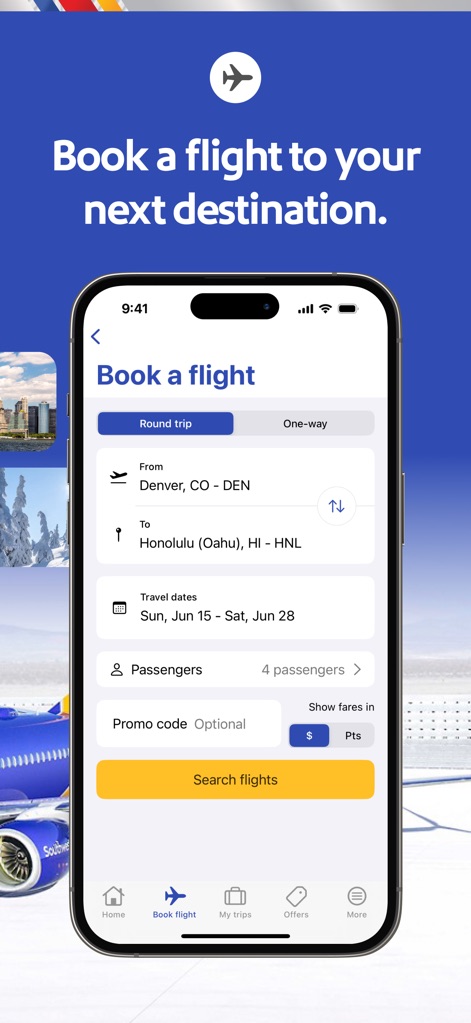
Seamless Flight Booking
This tool provides a streamlined flight booking interface, allowing users to easily select departure and arrival cities, and specify travel dates.

Comprehensive Travel Solutions
Users can access a versatile menu for booking flights, hotels, and car rentals, alongside managing vacation packages directly from the app.
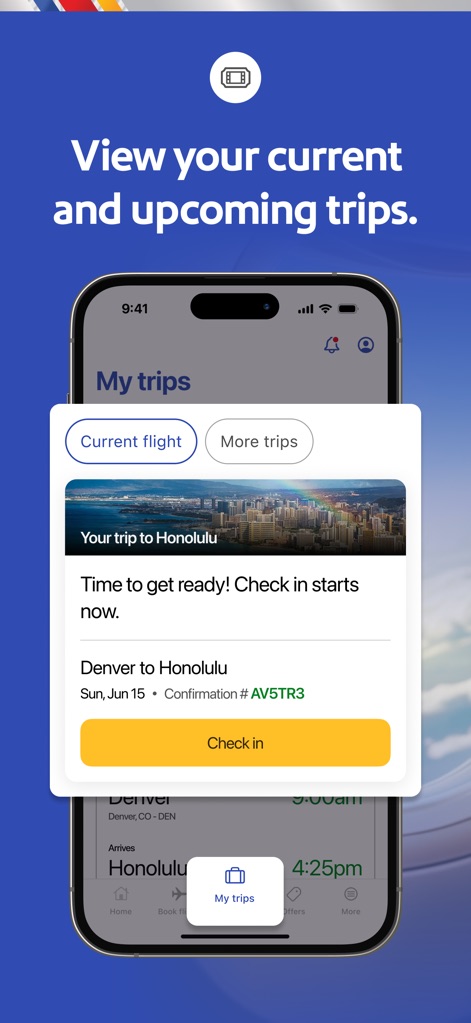
Effortless Trip Management
The app offers a clear overview of current and upcoming trips, displaying essential details like confirmation numbers and a prominent check-in button.

Enhance Your Journey
Users can easily upgrade their travel experience with Priority Boarding options, clearly presented with flight details and a direct purchase prompt.

Organized Travel Details
This tool categorizes trip information into 'Current flight' and 'More trips' tabs, providing quick access to confirmation numbers and flight schedules.

Customized Seating Options
The app provides a detailed seat selection interface, allowing users to choose preferred seating with visual indicators for availability and associated costs.

Rapid Rewards Overview
Users are presented with a clear dashboard of their Rapid Rewards membership, showcasing current points and progress towards A-List and Companion Pass benefits.
Description
Download
More Like This
Apps with similar features and user experience
China Southern Airlines
China Southern Airlines Company Limited

United Airlines
United Air Lines

Fly Delta
Delta Air Lines, Inc
Air China
Air China Limited

easyJet: Travel App
easyJet Airline Company Limited

Turkish Airlines: Book Flights
Turkish Airlines

Aeroméxico
Aerovias de Mexico, S.A. de C.V.

LATAM: Flights, Hotels, Cars
LATAM Airlines Group S.A.

Alaska Airlines
Alaska Airlines, Inc.
This page is not an official page of the app or its developer, but an independent editorial publication created for informational and commentary purposes. Unless expressly stated otherwise, neither the app nor its developer is affiliated with, endorsed by, sponsored by, authorized by, or otherwise officially connected with MWM, Apple, Google Play, the app publisher, or the app's developer, and nothing on this page implies that the app was developed using MWM's services. Any trademarks, logos, screenshots, and other content remain the property of their respective owners.