
This page is not an official page of the app or its developer, but an independent editorial publication created for informational and commentary purposes. Unless expressly stated otherwise, neither the app nor its developer is affiliated with, endorsed by, sponsored by, authorized by, or otherwise officially connected with MWM, Apple, Google Play, the app publisher, or the app's developer, and nothing on this page implies that the app was developed using MWM's services. Any trademarks, logos, screenshots, and other content remain the property of their respective owners.


My Thrustmaster
Fine-tune your gear in real-time, save custom profiles for every car, and analyze your stats to shave seconds off your lap times without ever leaving the cockpit.
Downloads
1K+User Rating
Total Ratings
0Publisher
Category
EntertainmentLocales
2Latest Version
1.0.91Size
45.5 MBFirst Released
Oct 15, 2023Dominate the Track with Precision Control
Fine-tune your Force Feedback, manage custom profiles, and analyze your performance in real-time—all without ever leaving your racing seat.
Instant Real-Time Tuning
Adjust Force Feedback, damper, and rotation angle on the fly. See your changes reflected instantly in-game without ever hitting pause.
Custom Pro-Racing Profiles
Create and save dedicated settings for every car, game, or track. Swap profiles instantly to stay perfectly calibrated for the next green flag.
Frequently Asked Questions
Everything you need to know about My Thrustmaster
What is the My Thrustmaster app?
The My Thrustmaster app fine-tunes your racing devices for optimal performance. It manages settings like Force Feedback, damper, and rotation angle, allowing adjustments during gameplay for an improved experience.
Can I save custom settings profiles in the My Thrustmaster app?
Yes, the My Thrustmaster app allows users to save dedicated settings profiles for different games, cars, or wheels. You can swap between these profiles instantly for racing.
How do I adjust racing wheel settings with the My Thrustmaster app?
The My Thrustmaster app connects to your racing device, allowing you to manage Force Feedback, damper, and rotation angle. Settings update instantly while playing, without exiting the game.
Can I see real-time inputs with My Thrustmaster app?
Yes, the My Thrustmaster app allows you to view device buttons and axis inputs in real-time. This feature helps ensure your racing controls are functioning as expected.
Does My Thrustmaster app work on game consoles?
No, the My Thrustmaster app is compatible only on PC. It requires a Wi-Fi connection and the latest Thrustmaster PC drivers to function correctly with your racing devices.
Which Thrustmaster devices are compatible with the My Thrustmaster app?
The My Thrustmaster app is compatible with specific PC-connected Thrustmaster racing wheels: T598, T818, T-GT, TS-XW, TS-PC, T300, TX, T248, T128, T150, TMX, and T-LCM.
What are the system requirements for My Thrustmaster app?
To use the My Thrustmaster app, you need a PC-compatible Thrustmaster racing device, a Wi-Fi connection, and the latest Thrustmaster PC drivers installed on your system.
The following screenshots and description are sourced directly from the app's official store listing and are the property of the app developer.
App Store
Screenshots

My Thrustmaster simracing companion app splash screen with racing wheel graphics
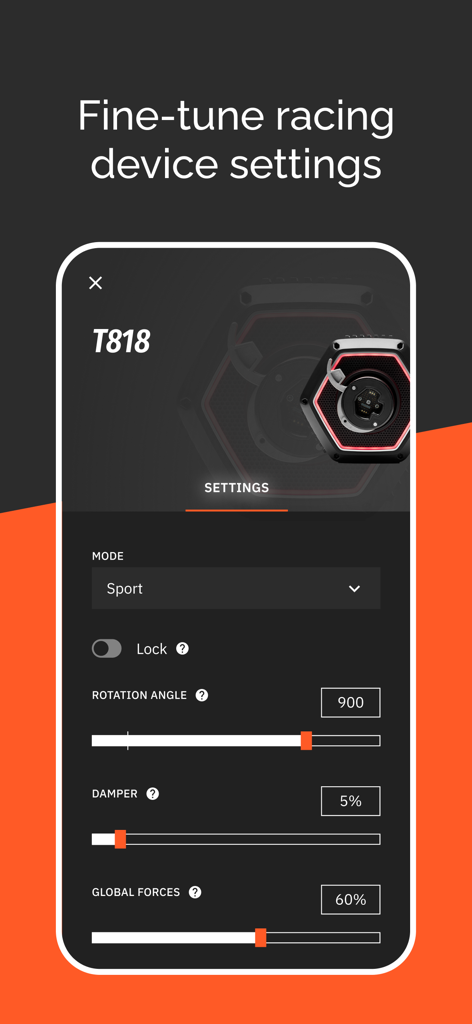
Interface of the My Thrustmaster app showing settings for the T818 racing wheel base
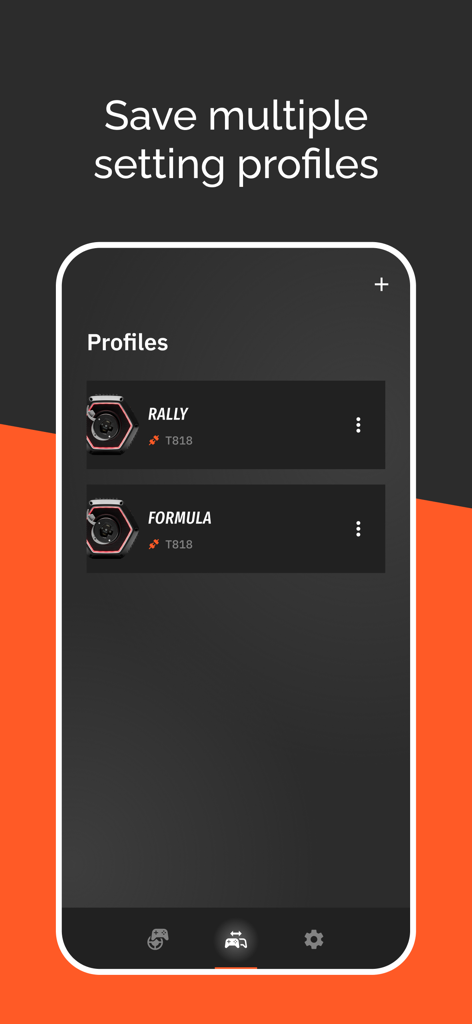
My Thrustmaster app interface showing saved profiles for Rally and Formula racing on a T818 wheel base.
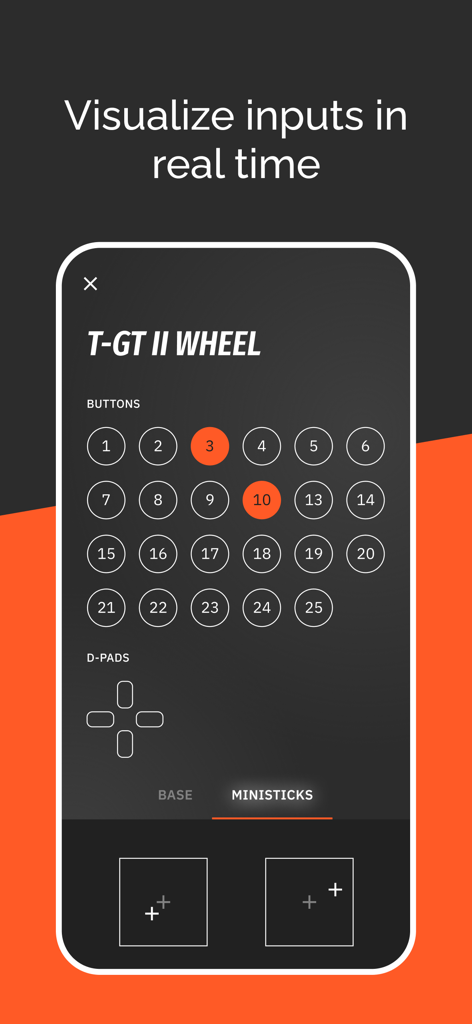
Real-time input visualization for the T-GT II wheel showing button and stick status
Description
Download
More Like This
Top-ranked apps in the same category

TikTok - Videos, Shop & LIVE
TIKTOK PTE. LTD.

Freecash - Get Paid Real Money
256 REWARDS LTD

Netflix
Netflix, Inc.

HBO Max: Stream Movies & TV
WarnerMedia Global Digital Services, LLC

DramaBox - Stream Drama Shorts
STORYMATRIX PTE. LTD

Amazon Prime Video
AMZN Mobile LLC

Disney+
Disney Electronic Content, Inc.

NetShort - Popular Dramas & TV
NETSTORY PTE. LTD.

Ticketmaster-Buy, Sell Tickets
Ticketmaster L.L.C
This page is not an official page of the app or its developer, but an independent editorial publication created for informational and commentary purposes. Unless expressly stated otherwise, neither the app nor its developer is affiliated with, endorsed by, sponsored by, authorized by, or otherwise officially connected with MWM, Apple, Google Play, the app publisher, or the app's developer, and nothing on this page implies that the app was developed using MWM's services. Any trademarks, logos, screenshots, and other content remain the property of their respective owners.