
This page is not an official page of the app or its developer, but an independent editorial publication created for informational and commentary purposes. Unless expressly stated otherwise, neither the app nor its developer is affiliated with, endorsed by, sponsored by, authorized by, or otherwise officially connected with MWM, Apple, Google Play, the app publisher, or the app's developer, and nothing on this page implies that the app was developed using MWM's services. Any trademarks, logos, screenshots, and other content remain the property of their respective owners.


myCOMPASS PA
No longer tethered to a government office, users gain immediate mastery over their benefits. The app offers a direct channel to essential aid management.
Downloads
1M+User Rating
Total Ratings
71.0KPublisher
Category
Health & FitnessLocales
1Latest Version
11.5.0Size
46.2 MBFirst Released
Nov 28, 2016An evaluation of essential functionalities for Pennsylvania health and human service benefit recipients.
myCOMPASS PA: Key Features Analysis
Real-time Status Updates
The app provides instant access to the current status of applications and active benefits, allowing users to stay informed without needing to contact an office.
Secure Document Handling
It allows users to securely upload, send, and view necessary documents directly from their mobile device, streamlining the application and renewal processes.
Renewal Information and Reminders
This tool features clear information on benefit renewal deadlines, helping users avoid interruptions in their aid.
Personal Information Updates
The app facilitates easy reporting of changes to personal contact information, ensuring accurate communication and up-to-date records.
The following screenshots and description are sourced directly from the app's official store listing and are the property of the app developer.
App Store
Screenshots

Users can easily begin their journey with the clear 'Welcome.' message and prominent 'Log In' and 'Create Account' options.
Seamless Access Initiated

The app provides immediate support with a dedicated 'Help' button and guides new applicants through an 'Apply now' link for convenience.
First Steps Defined

This intuitive dashboard offers a quick glance at essential information, displaying current 'SNAP Balance' and crucial 'Reminders' for timely action.
Dashboard Overview

Users can monitor all their services on one screen, detailing 'SNAP, Medical, and CHIP' benefits alongside the clear 'Active' status and renewal date.
Comprehensive Benefits View

The app streamlines administrative tasks, allowing users to efficiently '+ UPLOAD DOCUMENT' and clearly view any 'Requested Verifications'.
Effortless Document Management
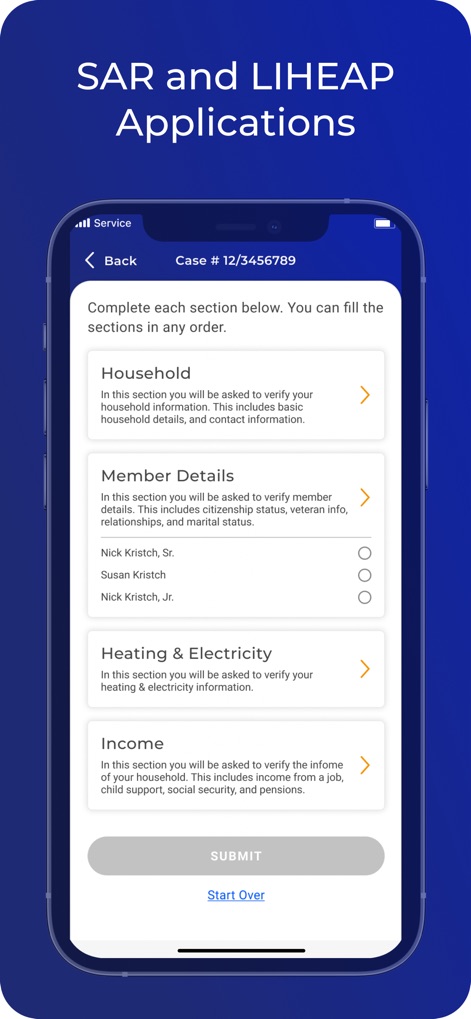
This tool simplifies complex forms by breaking down applications into manageable sections like 'Household' and 'Income' for a clear progression towards submission.
Streamlined Application Process
Description
Download
More Like This
Top-ranked apps in the same category

Strava: Run, Bike, Walk
Strava Inc.

Flo Cycle & Period Tracker
FLO HEALTH UK LIMITED

AI Calorie Tracker by Yazio
YAZIO GmbH

MyFitnessPal: Calorie Counter
MyFitnessPal, Inc.

Mi Fitness (Xiaomi Wear Lite)
Beijing Xiaomi Co., Ltd

美柚 - 经期·备孕·怀孕·育儿&亲友版
Xiamen Meet You Co., Ltd.

Cal AI - Calorie Tracker
Viral Development LLC

Yuka - Food & Cosmetic Scanner
Yuca

BitePal: Food Tracker Pet
REFACE LITHUANIA UAB
This page is not an official page of the app or its developer, but an independent editorial publication created for informational and commentary purposes. Unless expressly stated otherwise, neither the app nor its developer is affiliated with, endorsed by, sponsored by, authorized by, or otherwise officially connected with MWM, Apple, Google Play, the app publisher, or the app's developer, and nothing on this page implies that the app was developed using MWM's services. Any trademarks, logos, screenshots, and other content remain the property of their respective owners.