
This page is not an official page of the app or its developer, but an independent editorial publication created for informational and commentary purposes. Unless expressly stated otherwise, neither the app nor its developer is affiliated with, endorsed by, sponsored by, authorized by, or otherwise officially connected with MWM, Apple, Google Play, the app publisher, or the app's developer, and nothing on this page implies that the app was developed using MWM's services. Any trademarks, logos, screenshots, and other content remain the property of their respective owners.


Navy Federal Credit Union
Financial freedom, delivered. This app grants users total command over their money, wherever duty calls.
Downloads
10M+User Rating
Total Ratings
822.3KPublisher
Category
FinanceLocales
1Latest Version
2026.3.2Size
143.8 MBFirst Released
May 7, 2010An analytical evaluation highlighting critical functionalities for military personnel and their families.
Key Features of Navy Federal Credit Union App
Secure 24/7 Account Access
The app provides continuous, secure access to financial accounts, essential for managing finances across different time zones and locations.
Advanced Card Management
It allows users to activate new cards, sign up for purchase notifications, and instantly freeze misplaced credit or debit cards, offering robust security and peace of mind.
Remote Check Deposit
This tool features the ability to deposit checks directly using a mobile device, eliminating the need to visit a branch or ATM.
Integrated Bill & Loan Payments
The app facilitates payments to Navy Federal consumer loans, mortgages, credit cards, and other companies via an integrated Bill Pay system.
Convenient P2P Payments
It allows users to send money to other individuals quickly and securely using Zelle® or member-to-member transfers.
Seamless Account Transfers
This tool enables users to effortlessly move funds between their various Navy Federal accounts.
Enhanced Security Features
The app includes security tips and tools for managing usernames and passwords, reinforcing account protection.
Scheduled Transaction Visibility
It provides a clear overview of all scheduled transactions, including pending deposits, upcoming transfers, and bill payments, aiding in financial organization.
Branch and ATM Locator
This tool helps users quickly find the nearest Navy Federal branch or ATM, crucial for those who are frequently relocating or traveling.
In-App Financial Applications
The app allows users to conveniently apply for new credit cards, auto loans, or personal loans, and even become a Navy Federal member directly within the application.
Frequently Asked Questions
Everything you need to know about Navy Federal Credit Union
Is the Navy Federal mobile app safe and secure for managing accounts?
Yes, the Navy Federal mobile app allows users to access their accounts 24 hours a day. The app description highlights that it is both safe and secure for all users.
How can I send money to others using the Navy Federal app?
The Navy Federal mobile app enables members to pay people using Zelle® or by initiating member-to-member transfers. It also supports moving money between your own accounts.
Can I deposit checks using the Navy Federal mobile app?
Yes, the Navy Federal mobile app facilitates check deposits without requiring a visit to a branch or ATM. This feature streamlines banking operations for members.
What kind of transactions can I view in the Navy Federal app?
The Navy Federal app allows users to view scheduled transactions including pending deposits, upcoming transfers, and bill payments, providing a clear overview of financial activity.
Can I pay my Navy Federal loans and credit cards using the app?
Yes, you can make payments to Navy Federal consumer loans, mortgages, and credit cards directly through the app. It also supports payments to other companies via Bill Pay.
How do I apply for loans or new accounts with Navy Federal through the app?
The Navy Federal app allows users to apply for new credit cards, auto loans, or personal loans. Prospective members can also apply to become a Navy Federal member through the app.
Does the Navy Federal app offer card management features?
Yes, Navy Federal app users can manage their credit or debit cards. This includes activating new cards, signing up for purchase notifications, and freezing misplaced cards for security.
How can I locate a Navy Federal branch or ATM using the app?
Users can find the nearest Navy Federal branch or ATM directly within the app. This feature helps members locate physical banking services conveniently.
Does the Navy Federal app include a credit score checker?
Yes, the Navy Federal mobile app provides a feature called 'My MakingCents' which allows users to check their credit score and view financial tips. This feature is also accessible from the 'More' menu.
Can I view my statements in the Navy Federal mobile app?
Yes, the Navy Federal app allows you to view and manage statements. This includes account and tax statements, which can be accessed from the 'More' menu.
The following screenshots and description are sourced directly from the app's official store listing and are the property of the app developer.
App Store
Screenshots
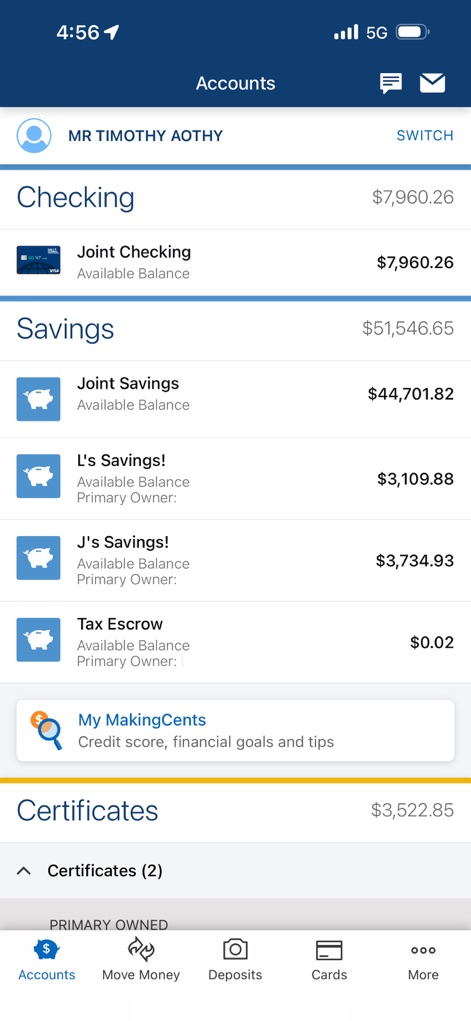
Users can effortlessly track their checking and savings balances, alongside quick access to financial insights via 'My MakingCents'.
Account Overview
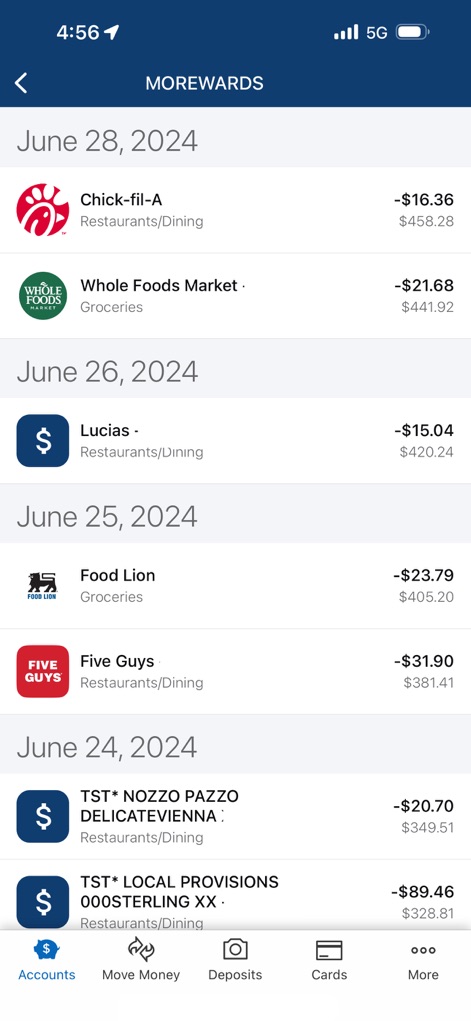
This app provides a detailed view of recent transactions, clearly showing merchant names and expenditure amounts for effective budget tracking.
Transaction History
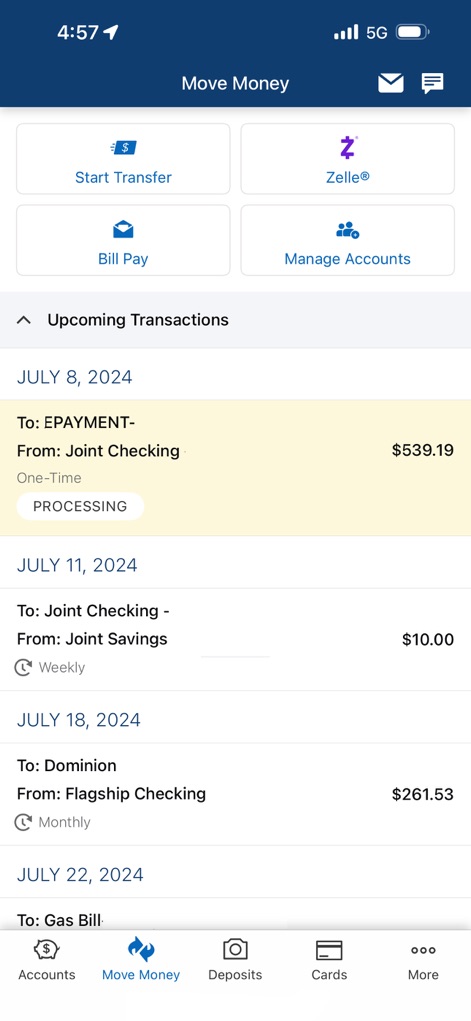
The app simplifies money movement with options like Zelle® and Bill Pay, and clearly displays upcoming transactions with their scheduled dates.
Manage Transfers
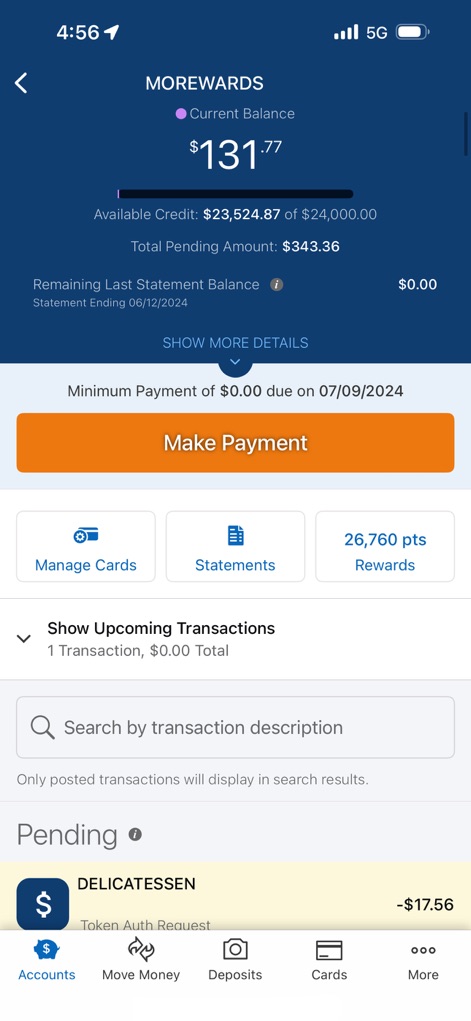
Users can monitor their MOREWARDS balance and available credit, alongside an intuitive 'Make Payment' button and a searchable transaction history.
Card Management
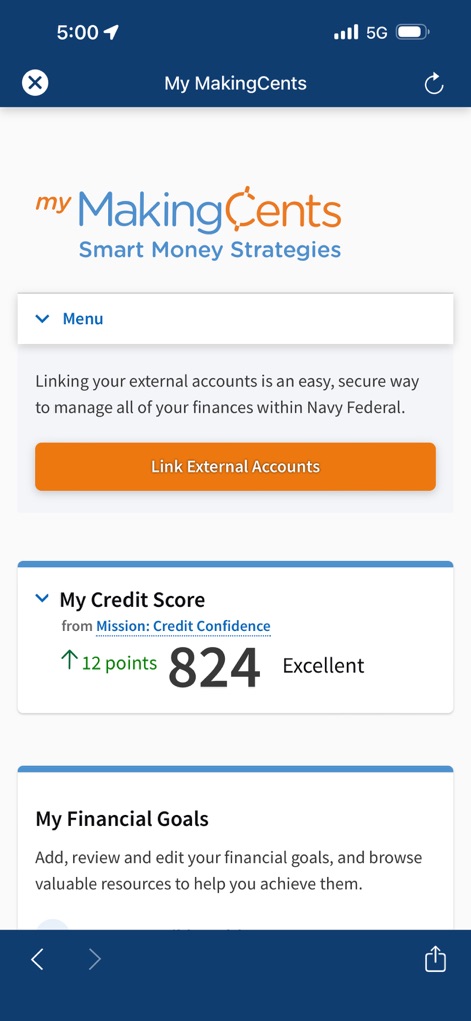
This tool provides a clear view of the user's credit score and allows for linking external accounts for comprehensive financial management.
Financial Planning
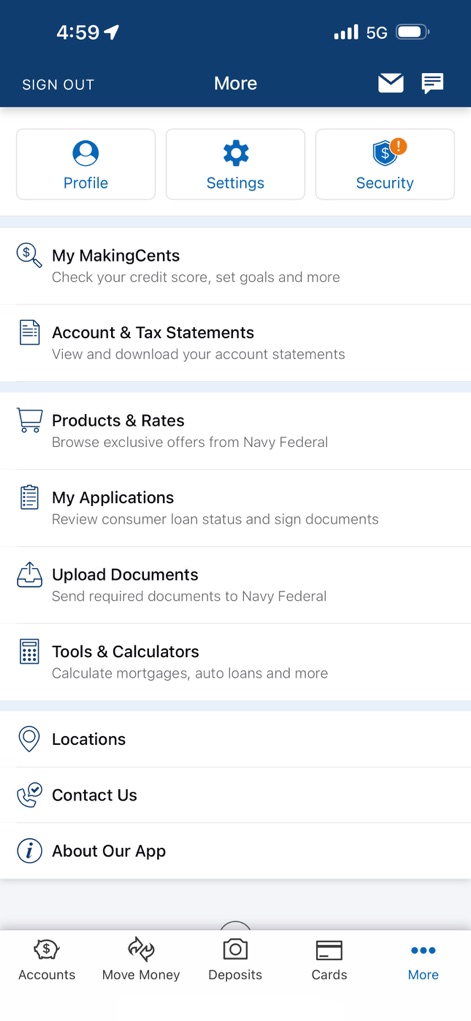
The 'More' menu offers extensive options, including access to 'Tools & Calculators' and the ability to manage 'Account & Tax Statements' for complete control.
Extended Features

The app highlights connected third-party services for security review and allows users to manage remembered devices for enhanced account protection.
Security Overview
Description
Download
More Like This
Apps with similar features and user experience

PayPal - Pay, Send, Save
PayPal, Inc.

中国农业银行
AGRICULTURAL BANK OF CHINA LIMITED

Mercado Pago: cuenta digital
MercadoLibre S.A.

中国工商银行
Industrial and Commercial Bank of China

Revolut: Send, spend and save
Revolut Ltd

HDFC Bank App (Early Access)
HDFC Bank Ltd

Zalopay - Quét Mọi QR
ZION JOINT STOCK COMPANY

Cash App
Block, Inc.

招商银行
CHINA MERCHANTS BANK CO.,LTD.
This page is not an official page of the app or its developer, but an independent editorial publication created for informational and commentary purposes. Unless expressly stated otherwise, neither the app nor its developer is affiliated with, endorsed by, sponsored by, authorized by, or otherwise officially connected with MWM, Apple, Google Play, the app publisher, or the app's developer, and nothing on this page implies that the app was developed using MWM's services. Any trademarks, logos, screenshots, and other content remain the property of their respective owners.