NoteSub
NoteSub
Download on App Store

This page is not an official page of the app or its developer, but an independent editorial publication created for informational and commentary purposes. Unless expressly stated otherwise, neither the app nor its developer is affiliated with, endorsed by, sponsored by, authorized by, or otherwise officially connected with MWM, Apple, Google Play, the app publisher, or the app's developer, and nothing on this page implies that the app was developed using MWM's services. Any trademarks, logos, screenshots, and other content remain the property of their respective owners.


Logo of NoteSub
Download on App Store

NoteSub

Experience radical simplicity with 8 essential note types designed to be as enjoyable as your social feed. No accounts required, no data collection—just a beautiful, local-first space for your thoughts, tasks, and sketches.

Key Figures

Downloads

0

User Rating

1.0/5

Total Ratings

0

Publisher

ZAHIR MIRZA

Category

Social Networking

Locales

1

Latest Version

1.15

Size

2.6 MB

First Released

Jul 3, 2025
Features

Your Thoughts, Beautifully Organized

Ditch the clutter. Experience a native iOS workspace where 8 specialized note types meet a familiar, distraction-free feed designed for your privacy.

8 Versatile Note Types

From Kanban boards and structured databases to voice memos and sketches—capture every idea in the specific format it deserves.

Privacy by Default

No accounts, no tracking, and no data mining. Your notes stay on your device and your private iCloud—exactly where they belong.

The following screenshots and description are sourced directly from the app's official store listing and are the property of the app developer.

App Store

Screenshots
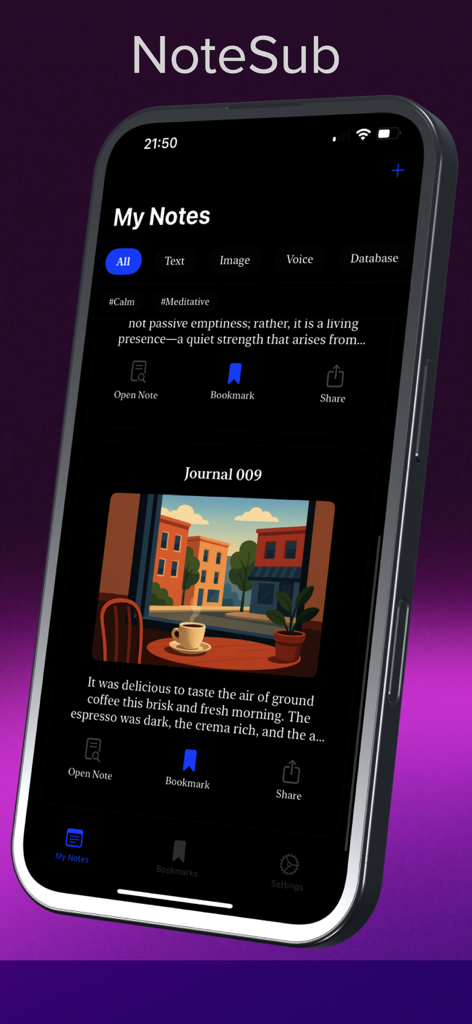
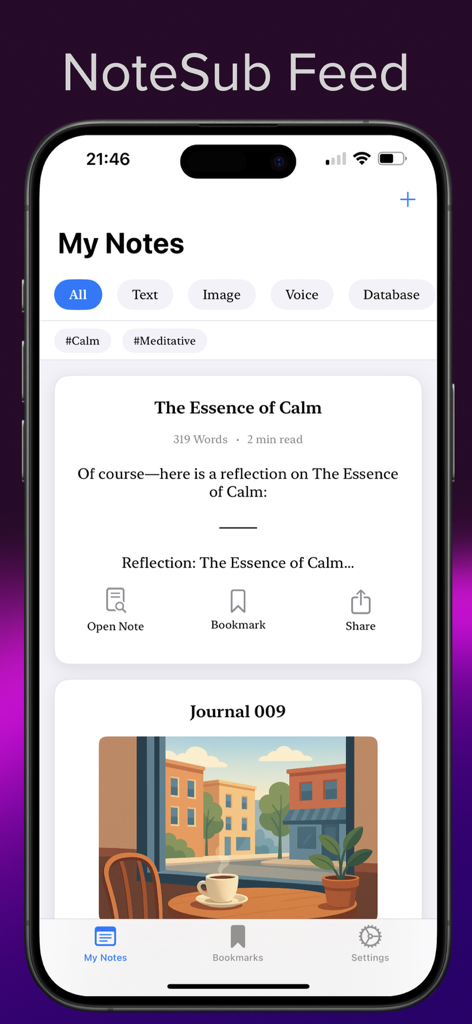
NoteSub - Screenshot of the NoteSub app showing the My Notes social feed layout with text and image entries on an iPhone.
Screenshot of the NoteSub app showing the My Notes social feed layout with text and image entries on an iPhone.

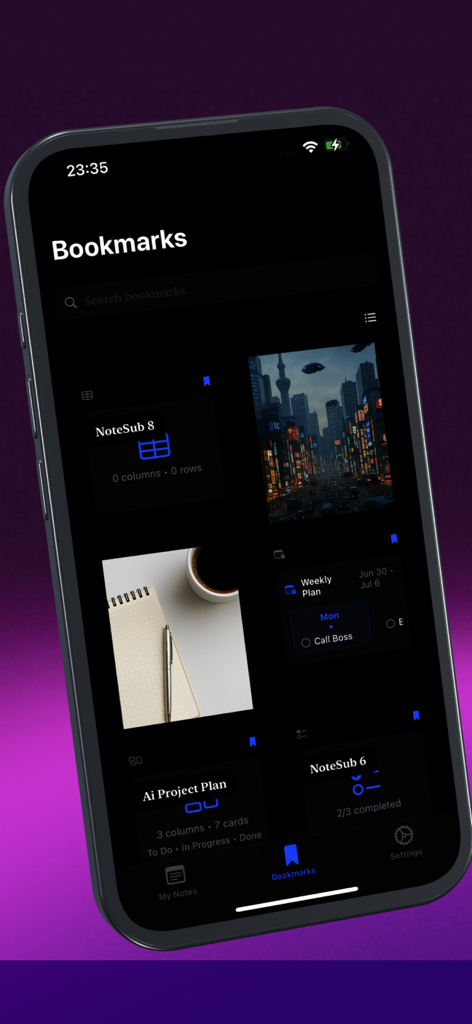
NoteSub - NoteSub app bookmarks screen showing a grid of different note types like kanban boards and weekly planners in a dark mode interface
NoteSub app bookmarks screen showing a grid of different note types like kanban boards and weekly planners in a dark mode interface

NoteSub - A screenshot of the NoteSub app interface showing a social media style feed of personal notes including text and image entries on an iPhone
A screenshot of the NoteSub app interface showing a social media style feed of personal notes including text and image entries on an iPhone

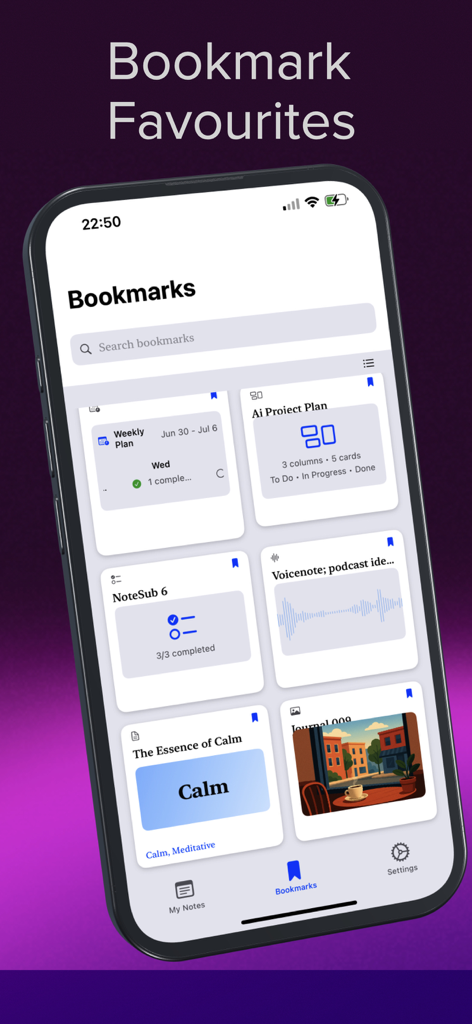
NoteSub - NoteSub app bookmarks screen showing a feed of saved notes including kanban boards voice recordings and weekly planners
NoteSub app bookmarks screen showing a feed of saved notes including kanban boards voice recordings and weekly planners

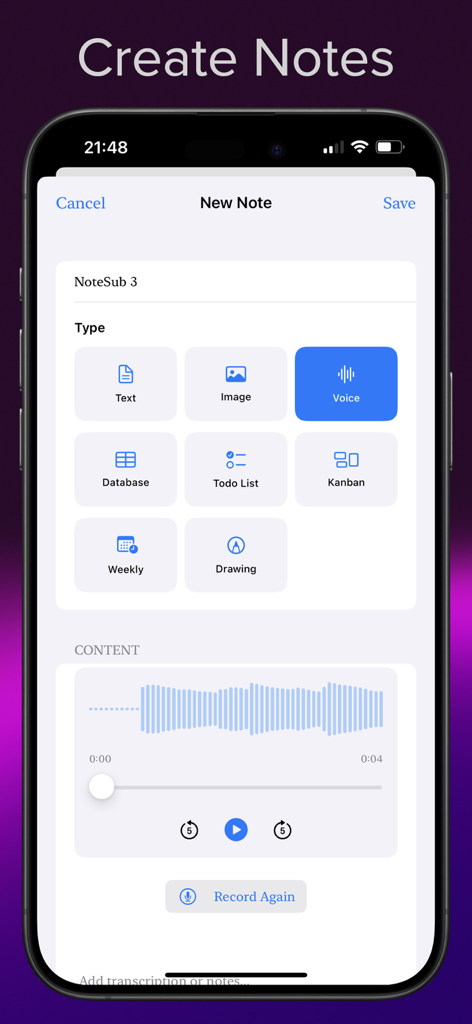
NoteSub - NoteSub app interface showing different note creation options including text, voice, image, database, and kanban boards on an iPhone.
NoteSub app interface showing different note creation options including text, voice, image, database, and kanban boards on an iPhone.

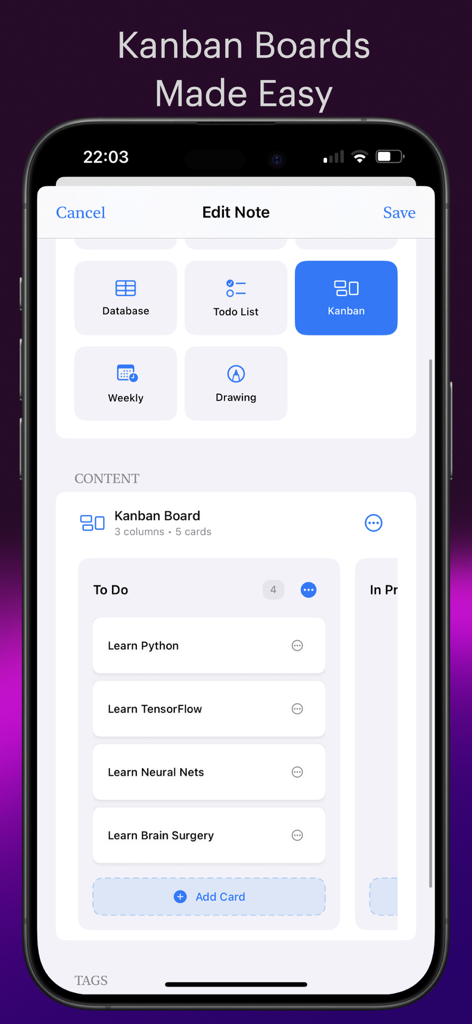
NoteSub - A screenshot of the NoteSub app showing the edit note screen with a selected Kanban note type and a preview of a project board with task cards.
A screenshot of the NoteSub app showing the edit note screen with a selected Kanban note type and a preview of a project board with task cards.

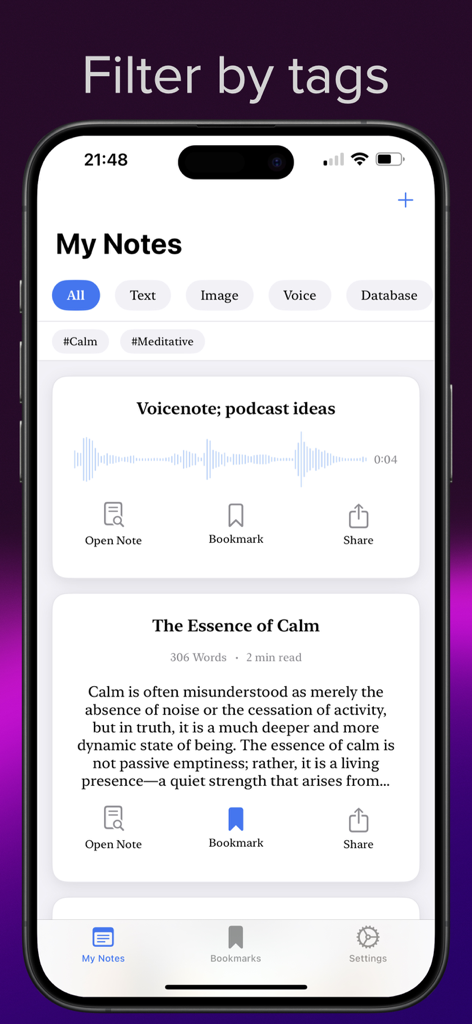
NoteSub - NoteSub app interface showing a chronological feed of notes with category and tag filters on an iPhone
NoteSub app interface showing a chronological feed of notes with category and tag filters on an iPhone

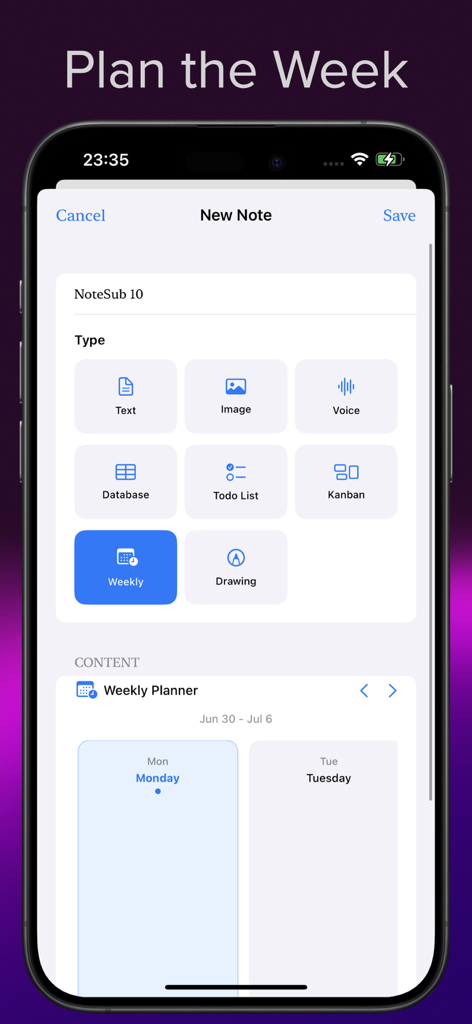
NoteSub - NoteSub app interface showing the selection of note types with the Weekly Planner option highlighted and a calendar preview below
NoteSub app interface showing the selection of note types with the Weekly Planner option highlighted and a calendar preview below

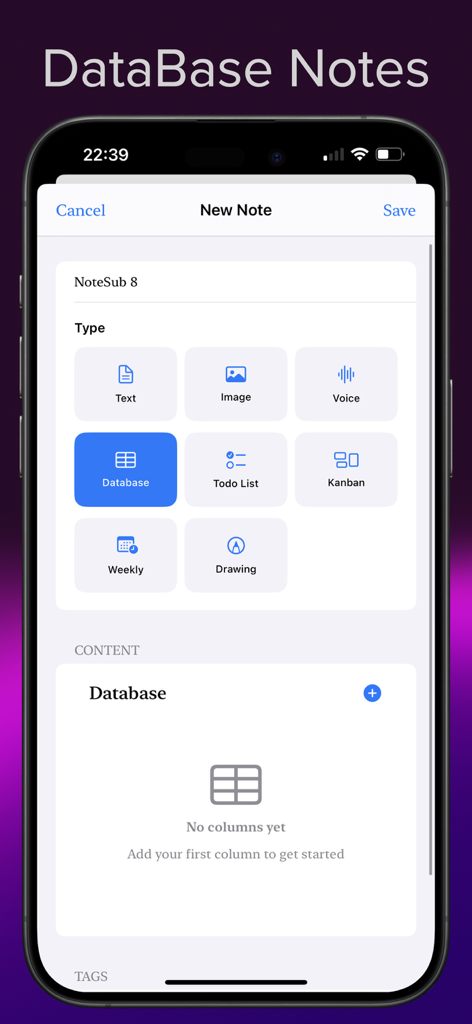
NoteSub - Interface of the NoteSub app showing the creation of a new database note with options for different note types like text, voice, and kanban.
Interface of the NoteSub app showing the creation of a new database note with options for different note types like text, voice, and kanban.

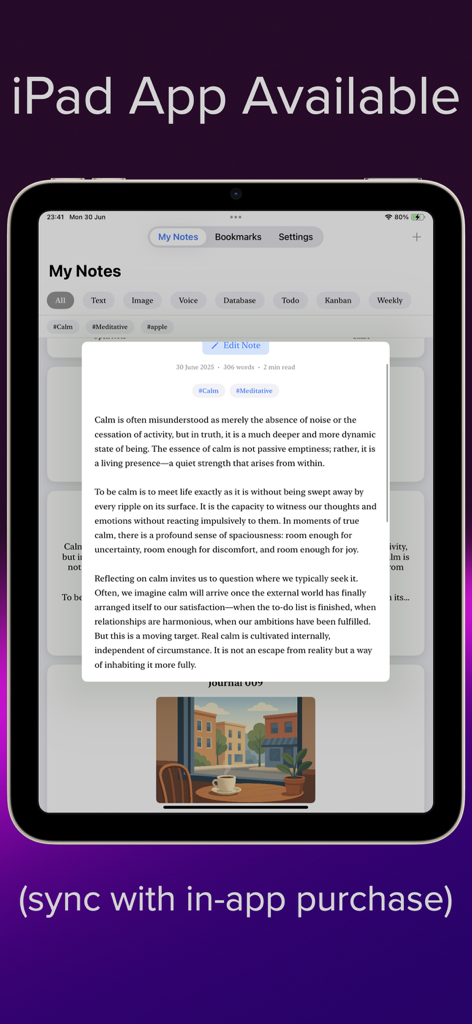
NoteSub - NoteSub app interface displayed on an iPad showing note categories and a text entry about calm

NoteSub app interface displayed on an iPad showing note categories and a text entry about calm

Description

NoteSub brings radical simplicity to note-taking with five essential note types that match how you naturally think. Best of all, it is designed to make your notes as enjoyable as scrolling through your social feeds. Why You'll Love NoteSub Local Notes First - Your True Second Brain Eight note types so you can be in control: - Text for thoughts and ideas - Image notes for visual memories - Voice recordings for quick capture - Database Notes for structured information - Todo Lists for actionable items - Kanban boards for visual project management - Weekly planners for time organization - Drawings Distraction-Free Design Clean interface with beautiful typography Your Data Stays Yours - Local storage by default—notes stay on your device - No NoteSub account required, no data collection. - iCloud sync available as in-app purchase to access notes across your Apple devices (via iCloud Sync, devices need to be signed in to the same account) - Full offline functionality - Search across notes with Tags Made for Mobile Built iOS-first with native performance, Apple Pencil integration on the iPad, and intuitive touch interactions optimized for iPhone and iPad. Perfect For Students: Capture notes quickly without setup overhead. Keep personal journals private. Plan your week. Professionals: Manage projects with simple Kanban boards. Organise take homes from meetings. Creatives: Sketch ideas and dump visuals. Gorgeous Notes Feed. Anyone who values privacy: Keep your thoughts local and secure, with optional iCloud sync. We do not collect your data. What Makes NoteSub Different - While other apps try to do everything, NoteSub excels at the fundamentals: capturing thoughts quickly, organizing them simply, and finding them easily. - No complex structures to configure. No paid for templates to choose from. No overwhelming feature lists. Just beautiful, private note-taking that respects your time and attention. Download NoteSub and rediscover the joy of simple, powerful note-taking. Features: - Eight versatile note types (Text, Image, Voice, Database, Todo List, Kanban, Weekly, Drawing) - Voice recording capabilities - Structured database notes - Offline search - Local storage (with iCloud sync available as in-app purchase) - Beautiful, distraction-free design - Native iOS performance 

NoteSub User Guide Welcome to NoteSub – the elegant note-taking app designed for privacy, simplicity, and beautiful functionality. Getting Started First Launch When you open NoteSub for the first time, you'll see a clean, minimal interface. No account creation required – just start capturing your thoughts immediately. Creating Your First Note - Tap the + button to create a new note - Choose from eight note types (see detailed explanations below) - Start your note Interface Overview - Main Feed: All your notes in chronological order - Bookmarks: Group your favourite notes - Create Note: Eight specialized types for different thinking styles - Settings: Access sync options and app preferences iCloud Sync Setup NoteSub stores all your notes locally by default for privacy and performance. iCloud sync is available as an optional in-app purchase. Enabling iCloud Sync - Open NoteSub Settings - Complete the in-app purchase - Your notes will sync across devices that you have signed into your Apple ID and chosen to sync. How iCloud Sync Works - Your Apple Account: Uses your existing iCloud account, not our servers - Offline First: You can always access local notes and edit them without internet Your Data, Your Control - Device Storage: Notes are stored in your device's secure storage - iCloud Optional: Sync only if you choose to purchase and enable it - Export Anytime: Share or export notes as PDF Welcome to a more thoughtful way of capturing and organizing your ideas. Terms of Use (EULA) https://www.apple.com/legal/internet-services/itunes/dev/stdeula/

Download

Download on App Store

This page is not an official page of the app or its developer, but an independent editorial publication created for informational and commentary purposes. Unless expressly stated otherwise, neither the app nor its developer is affiliated with, endorsed by, sponsored by, authorized by, or otherwise officially connected with MWM, Apple, Google Play, the app publisher, or the app's developer, and nothing on this page implies that the app was developed using MWM's services. Any trademarks, logos, screenshots, and other content remain the property of their respective owners.