On Shelf
On Shelf
Download on App Store

This page is not an official page of the app or its developer, but an independent editorial publication created for informational and commentary purposes. Unless expressly stated otherwise, neither the app nor its developer is affiliated with, endorsed by, sponsored by, authorized by, or otherwise officially connected with MWM, Apple, Google Play, the app publisher, or the app's developer, and nothing on this page implies that the app was developed using MWM's services. Any trademarks, logos, screenshots, and other content remain the property of their respective owners.


Logo of On Shelf
Download on App Store

On Shelf

Stop wasting money on products that don't sell. Identify your 'hot' items at a glance, scan barcodes with ease, and manage your entire stock from your iPad with our visual inventory command center.

Key Figures

Downloads

79K+

User Rating

4.4/5

Total Ratings

100

Publisher

Dawn Malsbury

Category

Business

Locales

1

Latest Version

8.4.0

Size

10.7 MB

First Released

Apr 9, 2012
Features

Turn Your Inventory into a Profit Machine

On Shelf is the intuitive iPad solution designed for hands-on owners who need to stop wasting money on dead stock and start focusing on what actually sells.

Spot 'Hot' Trends Instantly

Visualize your sales performance with color-coded insights. Identify high-movement products at a glance and optimize your stock levels to maximize every dollar.

Scan and Sell Effortlessly

Ditch the manual entry. Use your iPad camera to scan barcodes for lightning-fast inventory updates, sales invoices, and stock checks right from the shop floor.

The following screenshots and description are sourced directly from the app's official store listing and are the property of the app developer.

App Store

Screenshots
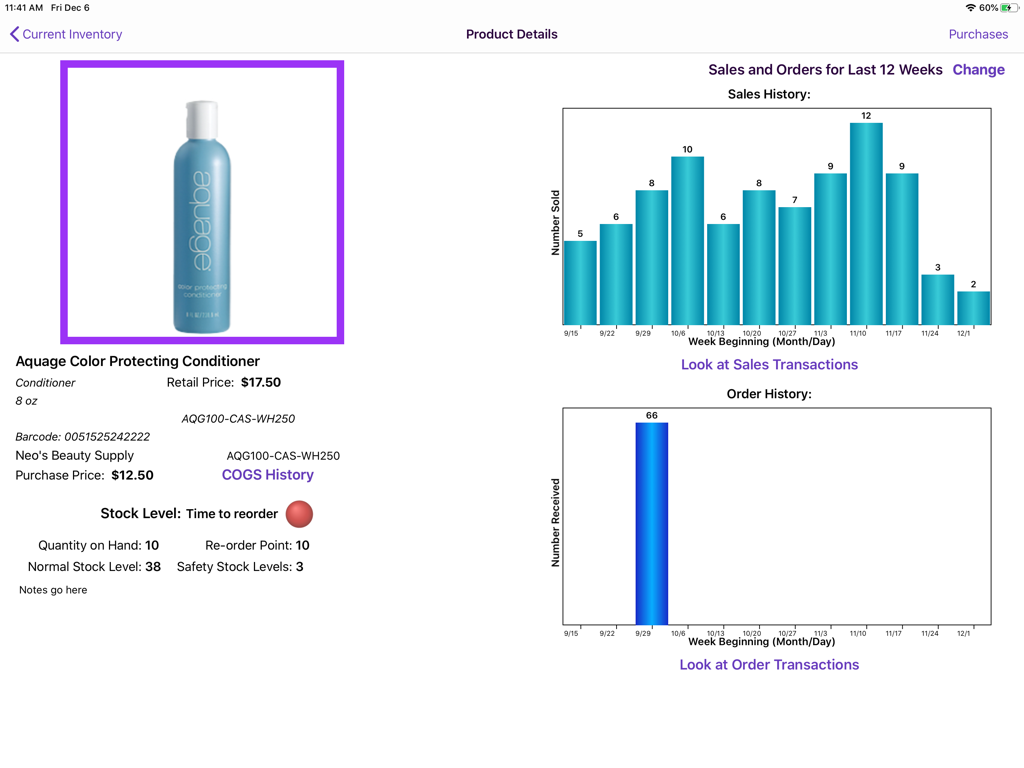
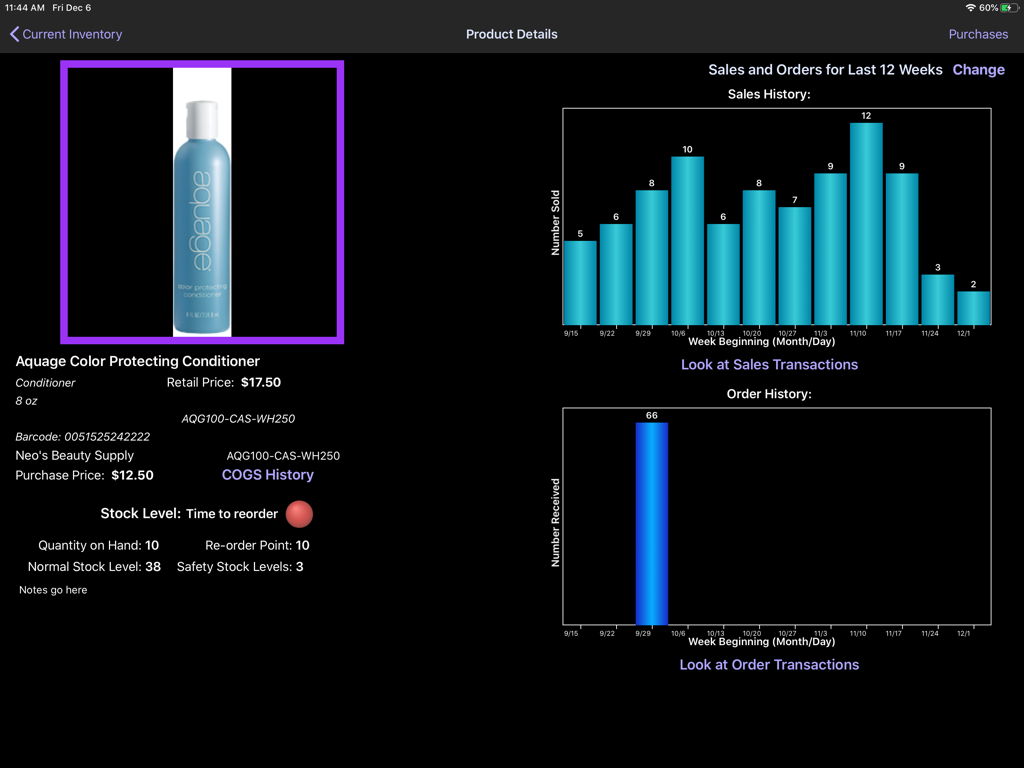
On Shelf - On Shelf iPad app product details page showing inventory stock levels and sales history charts
On Shelf iPad app product details page showing inventory stock levels and sales history charts

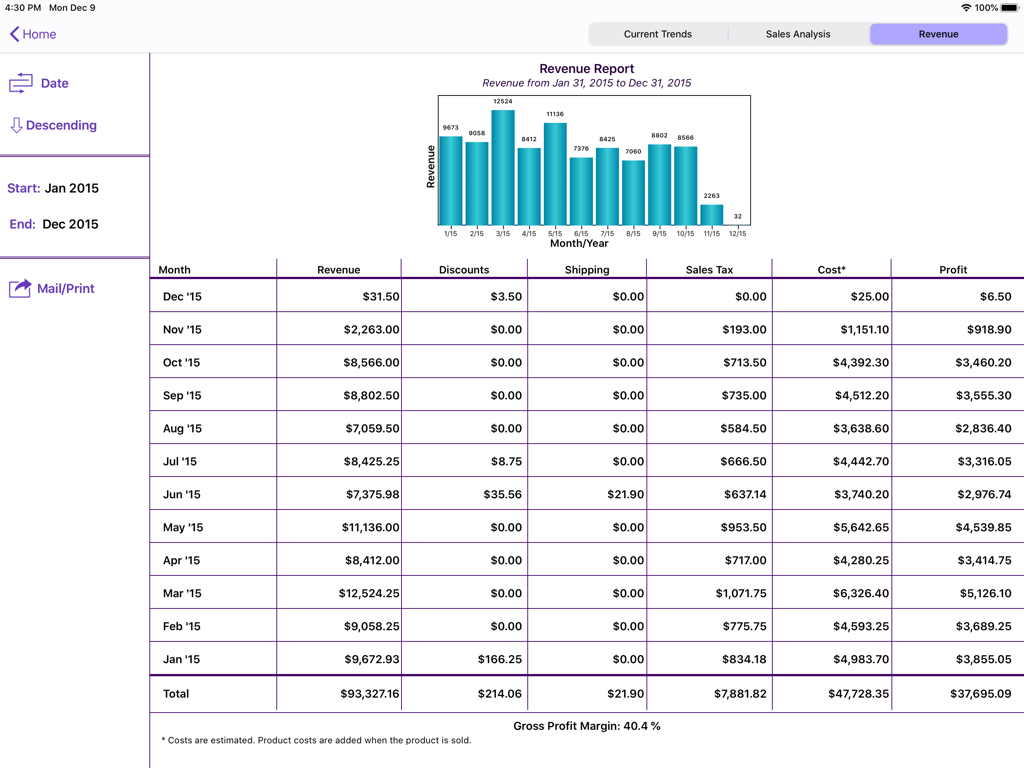
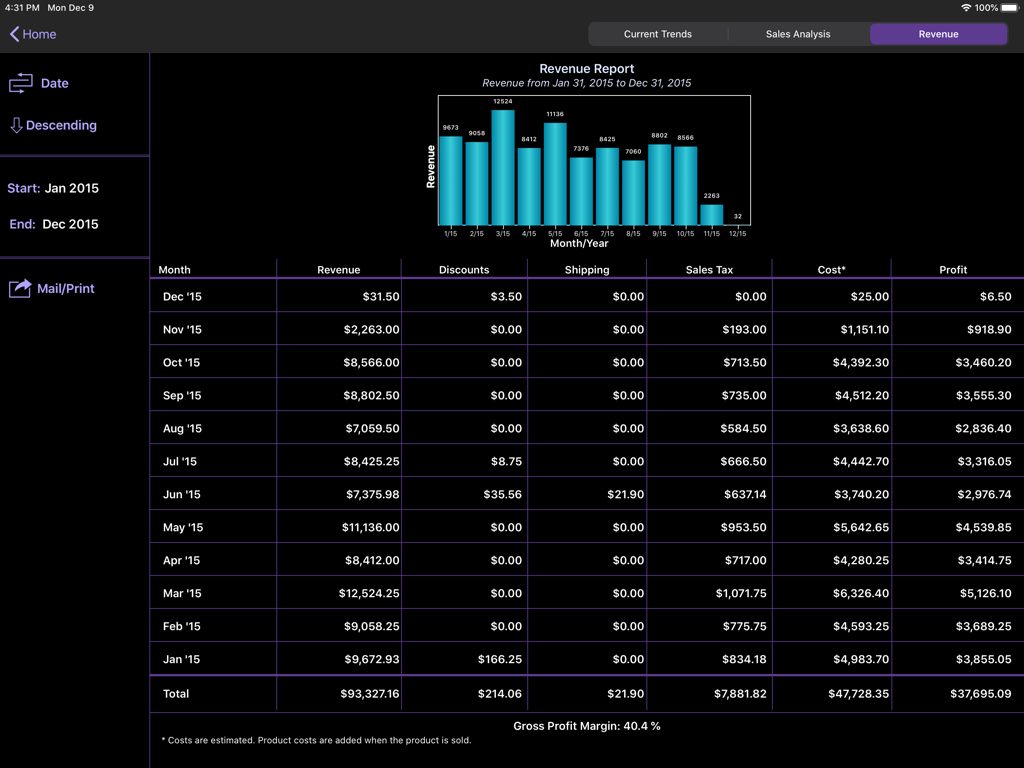
On Shelf - Revenue report dashboard on iPad showing monthly sales bar chart and detailed financial profit table
Revenue report dashboard on iPad showing monthly sales bar chart and detailed financial profit table

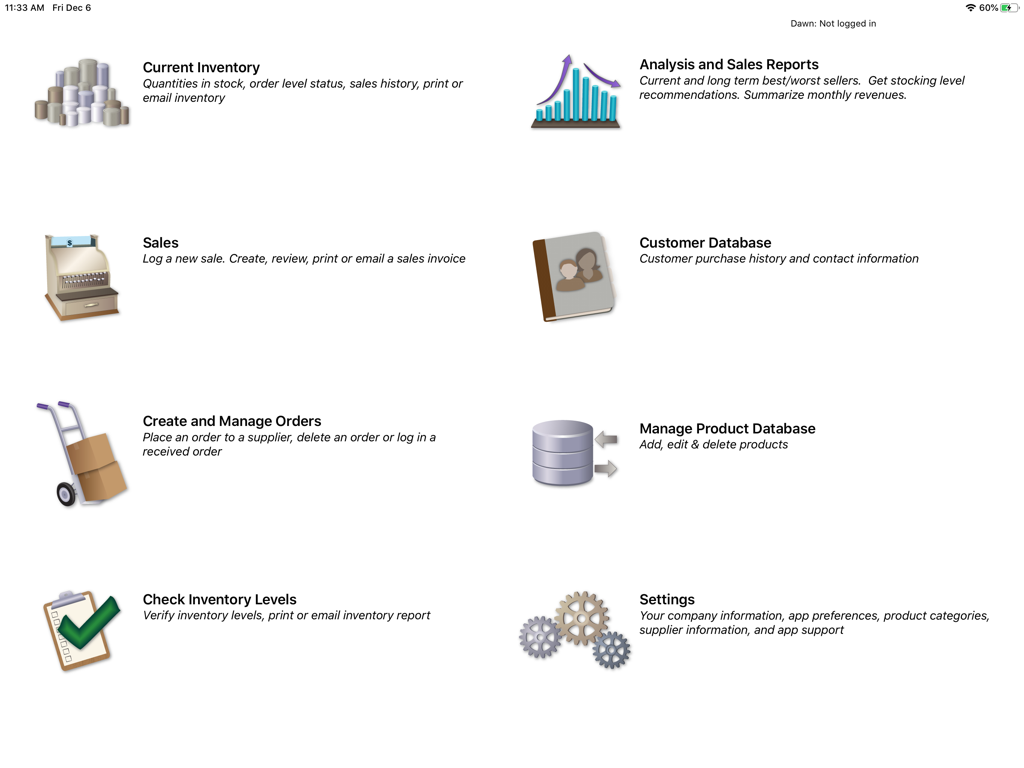
On Shelf - Main dashboard of the On Shelf inventory management app on iPad showing features like inventory sales reports and customer database
Main dashboard of the On Shelf inventory management app on iPad showing features like inventory sales reports and customer database

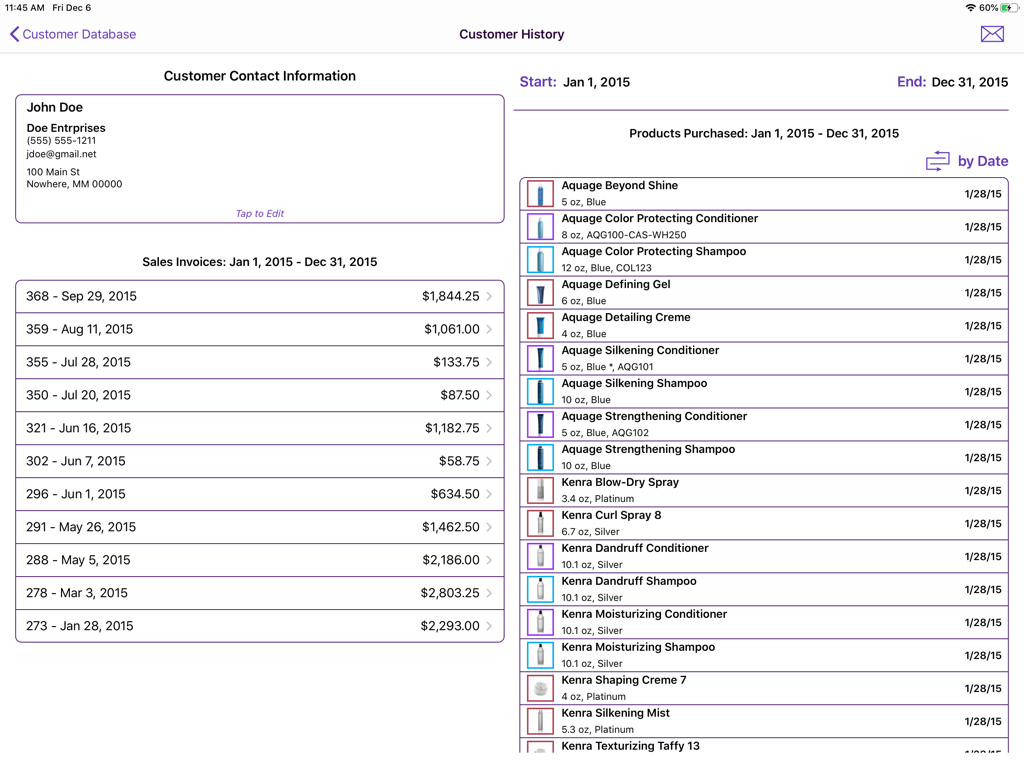
On Shelf - Customer history screen in On Shelf app showing contact info, invoices, and purchased products.
Customer history screen in On Shelf app showing contact info, invoices, and purchased products.

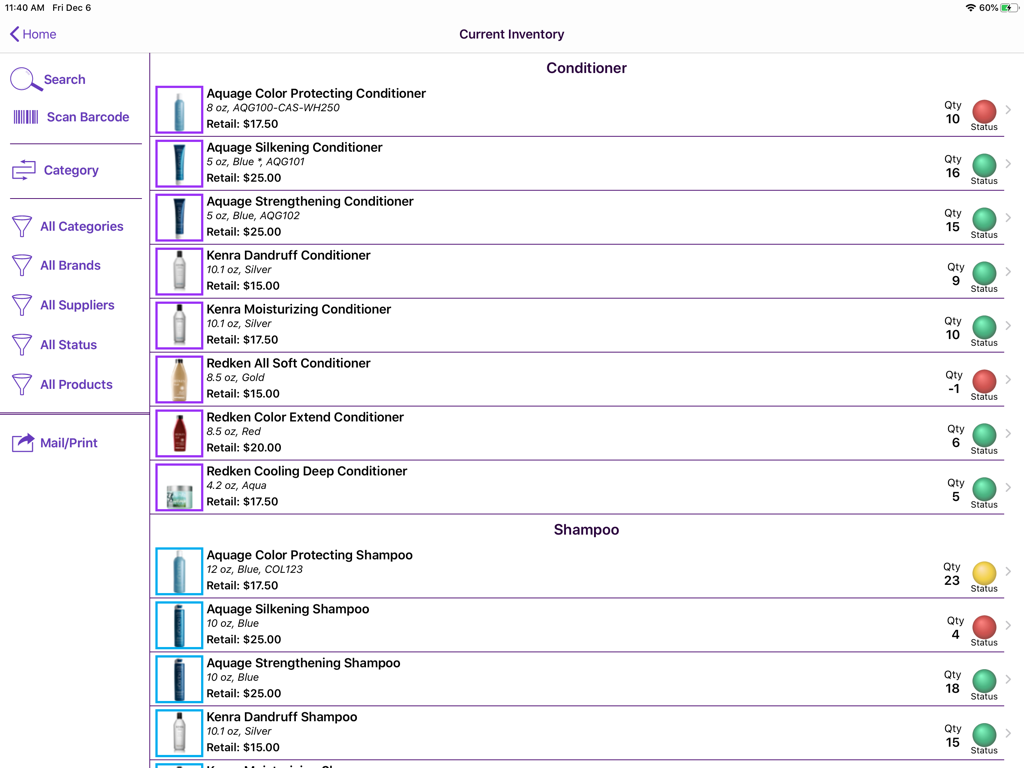
On Shelf - iPad screen showing the On Shelf app current inventory list with stock status indicators
iPad screen showing the On Shelf app current inventory list with stock status indicators

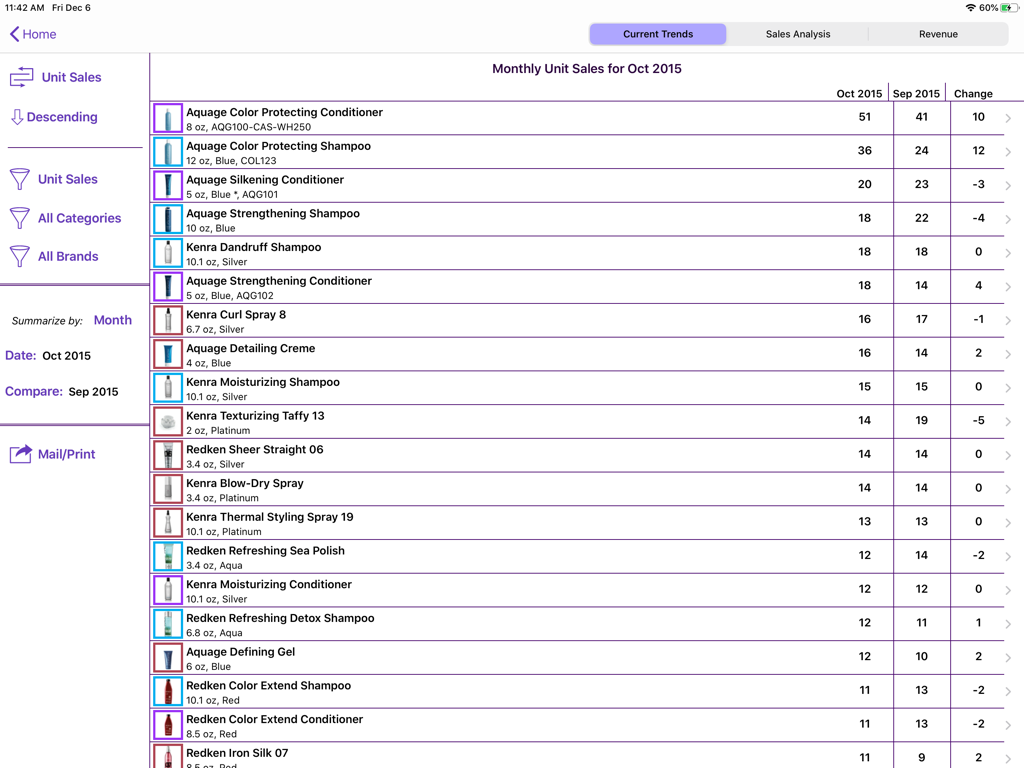
On Shelf - iPad screen showing the Monthly Unit Sales report in the On Shelf app with a list of salon products and sales trends
iPad screen showing the Monthly Unit Sales report in the On Shelf app with a list of salon products and sales trends

On Shelf - Inventory product details screen on the On Shelf iPad app showing sales history graphs and stock alerts
Inventory product details screen on the On Shelf iPad app showing sales history graphs and stock alerts

On Shelf - iPad app screen displaying a detailed monthly revenue report with a bar chart and financial data table for a small business
iPad app screen displaying a detailed monthly revenue report with a bar chart and financial data table for a small business

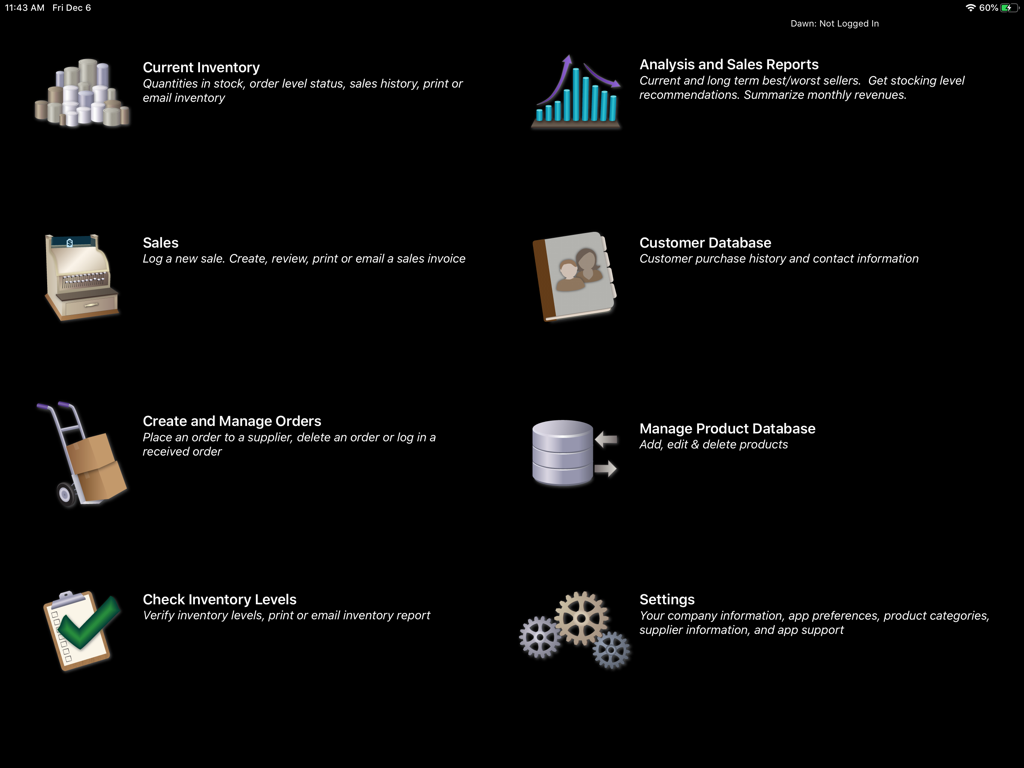
On Shelf - Main menu of the On Shelf iPad app showing icons and descriptions for inventory sales reports customer database and order management.
Main menu of the On Shelf iPad app showing icons and descriptions for inventory sales reports customer database and order management.

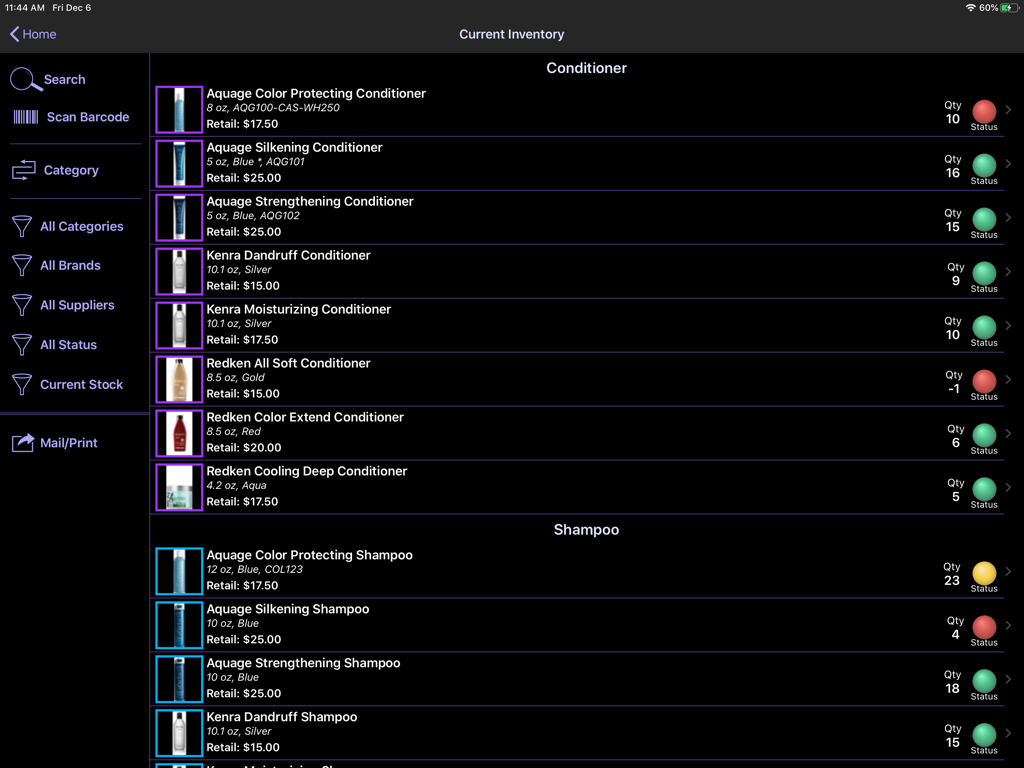
On Shelf - Current inventory screen in the On Shelf app showing salon products with stock quantities and color coded status indicators.

Current inventory screen in the On Shelf app showing salon products with stock quantities and color coded status indicators.

Description

Maximize your retail business by using On Shelf to help optimize your inventory levels. Don’t waste money on items that just sit on your shelves. Easily see which items are “hot” and those that are not. On Shelf is versatile - users include salons, bars, lounges and small stores. Note: On Shelf will leave the app store on 1 May 2026 OPTIMIZE YOUR INVENTORY LEVELS - On Shelf recommends the correct inventory levels for each product to maximize your potential sales. - Minimize the money wasted on items that are not selling well. - Determine which products are the most profitable - Inventory items with the most and the least movement are highlighted on a short-term and long-term basis. - Select the time periods that you wish to examine. SYNC YOUR DATA BETWEEN MULTIPLE USERS/DEVICES - Your first month is free for the first user - Your data is stored on each iPad and in the cloud - You can work offline, your data will sync when you log back into your account - Ability to sync between multiple users – no need to share your password! - Syncing with an iPhone requires the purchase of On Shelf for iPhone - Note: A sync account is only required if you wish to sync data between different devices. Your data may be deleted from the sync server six months after your subscription expires. SCAN BARCODES - Quickly scan products to add to a sales invoice, adjust the order quantity, check the amount of inventory in stock or to edit the product information. - Note this feature only works for 3rd Generation and later models (i.e., not the original iPad or the iPad 2). - Reads UPC-E, Code 39, Code 39 mod 43, EAN-13 (including UPC-A), EAN-8, Code 93, Code 128, and PDF417 barcodes. VIEW CUSTOMER HISTORY - Review your customers’ purchase history. - Mail customers who have purchased a specific product. - Import your customer information from the contacts app. - Email all of your customers TRACK ITEMS CURRENTLY IN STOCK - Identifies products with low inventory levels. - Graphs show the weekly and monthly sales trends for each product. - A glance tells you if demand for a product is increasing or decreasing QUICKLY DETERMINE WHAT ITEMS ARE LOW IN STOCK -Place an order with a supplier at a touch of a button. The order can be printed or sent directly to your supplier. - Check an order into inventory quickly. - Inventory levels are automatically updated. TRACK INVENTORY MOVEMENT - Use the sales screen to log an individual or daily sales - Or, use the check inventory screen to enter sales - Inventory levels are tracked with integers, not fractional, units - Choose whether or not you want to display the sales transaction amounts IMPORT/EXPORT PRODUCT DESCRIPTIONS - Edit your product descriptions using the export/import feature (New Feature) - Save time by importing your product descriptions into On Shelf - Enter your product information in your favorite spreadsheet program - Save it as a tab-delimited file and import it into On Shelf SEND AND PRINT REPORTS - Email tab-delimited attachments that are easily imported into spreadsheets - Reports include current inventory levels, order history, recent sales history, and the best and worst selling products - Sales invoices can be printed out or sent to customers using your business logo For more information, please see our website: littletandog.com. SUPPORT If you have any questions, we’d love to hear from you. Contact us by e-mail at support@littletandog.com.

Download

Download on App Store

This page is not an official page of the app or its developer, but an independent editorial publication created for informational and commentary purposes. Unless expressly stated otherwise, neither the app nor its developer is affiliated with, endorsed by, sponsored by, authorized by, or otherwise officially connected with MWM, Apple, Google Play, the app publisher, or the app's developer, and nothing on this page implies that the app was developed using MWM's services. Any trademarks, logos, screenshots, and other content remain the property of their respective owners.








