
This page is not an official page of the app or its developer, but an independent editorial publication created for informational and commentary purposes. Unless expressly stated otherwise, neither the app nor its developer is affiliated with, endorsed by, sponsored by, authorized by, or otherwise officially connected with MWM, Apple, Google Play, the app publisher, or the app's developer, and nothing on this page implies that the app was developed using MWM's services. Any trademarks, logos, screenshots, and other content remain the property of their respective owners.


Onion Browser
Online activity leaves a trail. The app empowers users to vanish, offering true internet anonymity.
Downloads
2.5M+User Rating
Total Ratings
9.5KPublisher
Category
UtilitiesLocales
38Latest Version
3.3.6Size
79.5 MBFirst Released
Apr 25, 2012An in-depth analysis of the core functionalities prioritizing anonymity, security, and digital freedom for privacy-conscious users.
Key Features of Onion Browser: A Technical Evaluation
Tor Network Integration
The app routes internet traffic through the Tor network, obscuring the user's IP address and protecting online activity from surveillance and tracking.
.onion Site Accessibility
It enables users to securely access websites on the deep web (dark web) that are only reachable via the Tor network, crucial for accessing alternative information sources.
Advanced Anti-Fingerprinting Controls
It provides granular control over privacy settings, allowing users to block scripts and automatically clear cookies and tabs to prevent browser fingerprinting and persistent tracking.
Anti-Tracking Mechanisms
The app helps prevent websites from tracking user behavior, enhancing privacy by limiting data collection by advertisers and other third parties.
Encrypted Traffic Protection
This tool secures internet traffic, even on public or insecure wireless networks, safeguarding user data from interception by ISPs or malicious actors.
Open-Source Transparency
Being open-source, the app's code can be publicly audited, fostering trust and ensuring there are no hidden backdoors or malicious functionalities.
Frequently Asked Questions
Everything you need to know about Onion Browser
What is Onion Browser?
Onion Browser is the original free and open-source Tor-powered web browser for iOS. It helps users access the internet with enhanced safety and privacy at no additional cost.
Is Onion Browser a free application?
Yes, Onion Browser is free and open-source software. It provides Tor-powered web browsing on iOS without any charge to the user.
How does Onion Browser enhance user privacy?
Onion Browser protects privacy by browsing over Tor, securing traffic from insecure networks, blocking scripts, and automatically clearing cookies and tabs. It also accesses .onion sites.
Can Onion Browser access .onion sites?
Yes, Onion Browser allows users to access .onion sites, which are only accessible through the Tor network.
Does Onion Browser require Orbot for a secure connection?
Yes, Onion Browser relies on the Orbot app for a secure connection to Tor. Users must install Orbot to continue using the browser.
Does Onion Browser help against online tracking?
Onion Browser fights online tracking by blocking scripts and automatically clearing cookies and tabs, based on user preferences.
Is browsing with Onion Browser slower than other browsers?
Yes, web browsing through Onion Browser is much slower than with a normal web browser or VPN because traffic is encrypted and relayed via the Tor network.
What are the security levels available in Onion Browser?
Onion Browser offers three default security levels: Gold, Silver, and Bronze. Silver is the recommended default, providing good security while maintaining website functionality.
Can Onion Browser be used on restricted networks?
Onion Browser might not work on networks with advanced restrictions. If connection fails, users can try using bridges, force-quitting, and restarting the app.
What is the default search engine in Onion Browser?
The default search engine in Onion Browser is DuckDuckGo. This setting is configurable within the app's settings menu.
Can users customize security settings in Onion Browser?
Yes, users can customize security settings in Onion Browser, including allowing JavaScript, persistent cookies, and access to device motion data or microphone/video.
The following screenshots and description are sourced directly from the app's official store listing and are the property of the app developer.
App Store
Screenshots
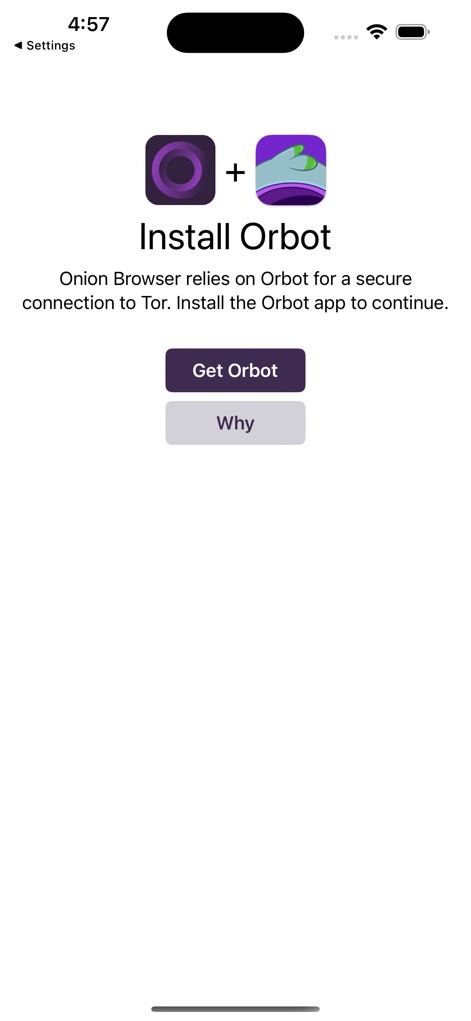
This initial setup screen highlights the app's reliance on Orbot for a secure Tor connection, guiding users to "Get Orbot" and understand the "Why" behind this critical dependency.
Secure Connection Setup
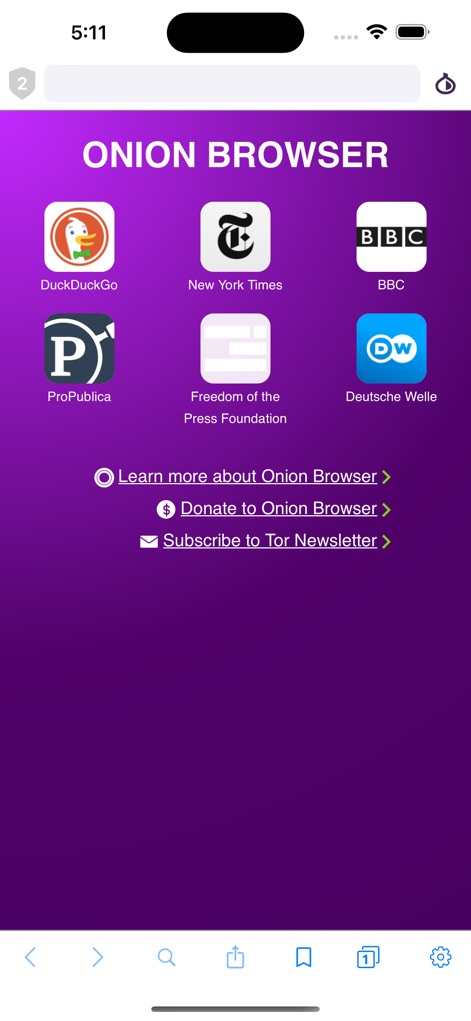
The main interface provides quick access to trusted information sources like "New York Times" and "DuckDuckGo", alongside prominent links to "Learn more about Onion Browser" and "Donate to Onion Browser".
Curated Gateway Access
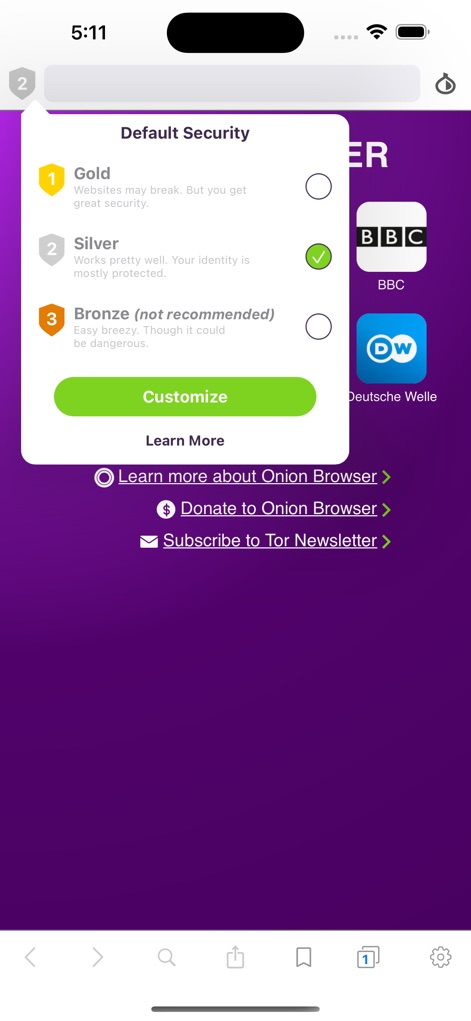
Users can effortlessly select their preferred security posture, choosing between "Gold", "Silver", or "Bronze" protection levels, each with a clear explanation of its impact on browsing functionality.
Adaptive Security Levels

This detailed settings panel allows precise management of user privacy, including toggles for "Stop Auto-Complete at First Dot" and options for "Tab Security" to enhance digital anonymity.
Granular Privacy Controls

The app offers in-depth control over website interactions, featuring toggles to "Allow JavaScript" and options for "Universal Link Protection", empowering users to fine-tune their security profile.
Advanced Configuration Options

This overview demonstrates the app's intuitive multi-tab browsing, allowing users to navigate various content like "The New York Times" and "BBC" within a secure environment.
Efficient Tab Management
Description
Download
More Like This
Apps with similar features and user experience
Brave Browser & Search Engine
Brave Software, Inc.

DuckDuckGo, Duck.ai (optional)
Duck Duck Go, Inc.

Red Onion - Darknet Browser
Omar Mody

AI Security: Breach Defender
DBR SERVICE SRL SEMPLIFICATA
AdBlock Pro for Safari
Crypto Inc.

TOR Browser: OrNET Onion + VPN
Stronger Apps

VPN - Fast VPN Proxy
Mobile Jump Pte Ltd

Aloha Browser - Private VPN
Aloha Mobile Ltd.

VPN US using Free VPN .org™
VPN LLC US
This page is not an official page of the app or its developer, but an independent editorial publication created for informational and commentary purposes. Unless expressly stated otherwise, neither the app nor its developer is affiliated with, endorsed by, sponsored by, authorized by, or otherwise officially connected with MWM, Apple, Google Play, the app publisher, or the app's developer, and nothing on this page implies that the app was developed using MWM's services. Any trademarks, logos, screenshots, and other content remain the property of their respective owners.