
This page is not an official page of the app or its developer, but an independent editorial publication created for informational and commentary purposes. Unless expressly stated otherwise, neither the app nor its developer is affiliated with, endorsed by, sponsored by, authorized by, or otherwise officially connected with MWM, Apple, Google Play, the app publisher, or the app's developer, and nothing on this page implies that the app was developed using MWM's services. Any trademarks, logos, screenshots, and other content remain the property of their respective owners.


Open Library Reader
The essential iPad companion for the curious mind. Manage your digital shelves and enjoy an immersive, distraction-free reading experience from the world’s largest open archive.
Downloads
182K+User Rating
Total Ratings
100Publisher
Category
BooksLocales
1Latest Version
1.0.16+23Size
26.1 MBFirst Released
Aug 5, 2021Your Personal Portal to Millions of Volumes
Designed for the dedicated reader, our app brings the power of Open Library to your fingertips with a refined, distraction-free interface optimized for your iPad.
Visual Library Management
Effortlessly sort, track, and manage your saved books across custom shelves that sync instantly with your Open Library account.
Distraction-Free Immersion
Enter full-screen mode with a single tap to remove all digital noise, expanding every page to the limits of your screen for deep reading.
Frequently Asked Questions
Everything you need to know about Open Library Reader
What is the Open Library Reader app?
The Open Library Reader is an app serving as an interface to openlibrary.org. It allows users to browse, check out, track, and read millions of books directly from the Open Library platform.
Does the Open Library Reader app require an internet connection?
Yes, Open Library Reader requires an active internet connection. All user data and books are hosted online on openlibrary.org, not within the app itself.
How can I track books using the Open Library Reader app?
Yes, the Open Library Reader app enables users to track books by managing 'Reading,' 'To Read,' and 'Have Read' shelves. It also tracks the remaining time on checked-out, limited-access books.
What book management features does Open Library Reader provide?
Open Library Reader offers built-in search, shelf management (move/remove books, change editions), related title search, and customization for shelves and book display.
Is the Open Library Reader app optimized for iPad users?
Yes, Open Library Reader is optimized for iPad, providing the best user experience on that device. It also functions on smaller screens.
How do users search for books in Open Library Reader?
Users find books via the built-in search feature or by browsing their saved collections. The app also supports a related title search to discover similar books directly from a chosen title.
How does Open Library Reader display books?
Open Library Reader displays books saved on the Open Library website, arranged on the screen. Users can sort these books by title, author, publication date, and date saved.
Does Open Library Reader offer a full-screen reading mode?
Yes, after opening a book in Open Library Reader's reading interface, a tap at the top of the screen activates full-screen mode. This maximizes the reading area and removes distractions.
The following screenshots and description are sourced directly from the app's official store listing and are the property of the app developer.
App Store
Screenshots
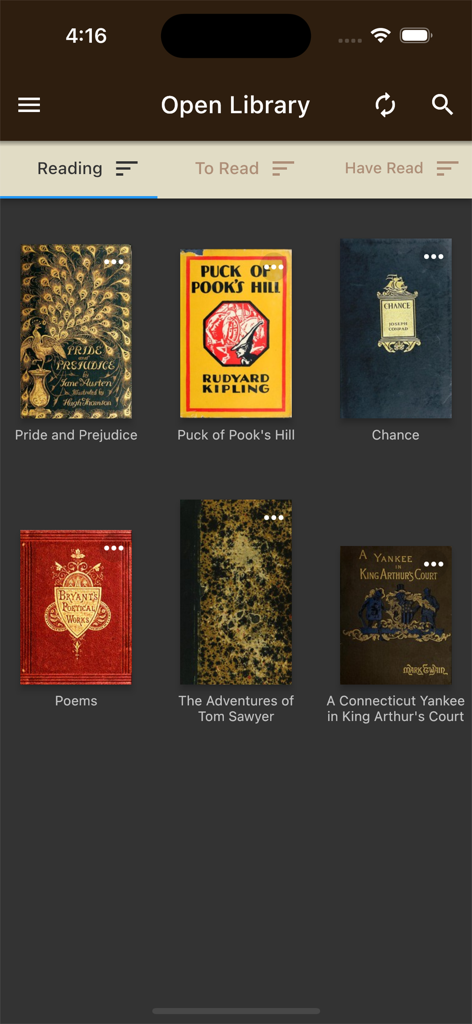
Digital bookshelf interface of the Open Library Reader app with classic book covers.
Description
Download
More Like This
Apps with similar features and user experience

CloudLibrary
OCLC

The Palace Project
LYRASIS, Inc.

Biblio
BookBites A/S
Onleihe 3
ekz.bibliotheksservice GmbH

Sora, by OverDrive Education
OverDrive, Inc.
online Bibliotheek
Koninklijke Bibliotheek

NLB Mobile
National Library Board

移动图书馆
Chengdu Superstar Digital Library Information Technology Co.,Ltd

교보문고 전자도서관
KYOBO BOOK CENTRE CO,.LTD
This page is not an official page of the app or its developer, but an independent editorial publication created for informational and commentary purposes. Unless expressly stated otherwise, neither the app nor its developer is affiliated with, endorsed by, sponsored by, authorized by, or otherwise officially connected with MWM, Apple, Google Play, the app publisher, or the app's developer, and nothing on this page implies that the app was developed using MWM's services. Any trademarks, logos, screenshots, and other content remain the property of their respective owners.