
This page is not an official page of the app or its developer, but an independent editorial publication created for informational and commentary purposes. Unless expressly stated otherwise, neither the app nor its developer is affiliated with, endorsed by, sponsored by, authorized by, or otherwise officially connected with MWM, Apple, Google Play, the app publisher, or the app's developer, and nothing on this page implies that the app was developed using MWM's services. Any trademarks, logos, screenshots, and other content remain the property of their respective owners.


OpenWeather
Get ad-free, scientific weather data from the source trusted by millions of developers. Experience hyperlocal accuracy and minimalistic design built for the tech-savvy professional.
Downloads
372K+User Rating
Total Ratings
300Publisher
Category
WeatherLocales
1Latest Version
1.1.9Size
19.1 MBFirst Released
Nov 13, 2020Scientific Precision for Your Daily Routine
Get your weather report directly from the source. OpenWeather provides a minimalist, ad-free experience powered by the same professional-grade data used by millions of developers worldwide.
Minute-by-Minute Accuracy
Never get caught in the rain again. Our high-precision 60-minute chart tracks precipitation and intensity for your exact coordinates with surgical reliability.
Professional Meteorological Data
Go beyond temperature. Access a full suite of scientific metrics including UV index, atmospheric pressure, visibility, and wind speed in one clean, distraction-free view.
Frequently Asked Questions
Everything you need to know about OpenWeather
What is the OpenWeather App?
OpenWeather App provides scientific yet simple weather forecasts. It is a free, ad-free application offering minute-precision precipitation alerts, hourly forecasts, and detailed weather information to help plan activities effectively.
Is the OpenWeather App free to use?
Yes, the OpenWeather App is free to use and ad-free. Users access comprehensive weather forecasts without any cost or interruptions from advertisements.
Can I customize weather units in the OpenWeather App?
Yes, the OpenWeather App allows customization of weather measurement units. Users can choose preferred units for temperature (°C/°F), distance (km/mi), precipitation (mm/in), wind speed, pressure, and time format.
Does the OpenWeather App provide a detailed precipitation forecast?
Yes, the OpenWeather App offers a 60-minute chart indicating precipitation intensity with minute precision. It alerts users to rain or snow within the hour, helping them avoid unexpected weather.
What kind of weather information does the OpenWeather App display?
The OpenWeather App displays comprehensive weather information including Feels Like temperature, wind speed and direction, atmospheric pressure, humidity, UV index, visibility, and dew point.
Can users add multiple locations to OpenWeather App for forecasts?
Yes, users can add up to 6 cities to their favorites in the OpenWeather App. This allows for accurate weather forecasts for multiple desired locations globally.
How far in advance does OpenWeather App provide forecasts?
The OpenWeather App provides an hourly weather chart for the first 2 days and then every 3 hours for the subsequent 6 days. This totals an 8-day forecast with varying granularity.
Does the OpenWeather App have a dark mode?
Yes, the OpenWeather App includes a dark-mode feature. This offers an energy-efficient display option for users, enhancing readability and reducing eye strain in low-light conditions.
Where does the OpenWeather App get its weather data?
The OpenWeather App obtains its data from One Call API™. It aggregates and processes meteorological data from tens of thousands of weather stations, on-ground radars, and satellites, ensuring accurate and hyperlocal forecasts.
The following screenshots and description are sourced directly from the app's official store listing and are the property of the app developer.
App Store
Screenshots
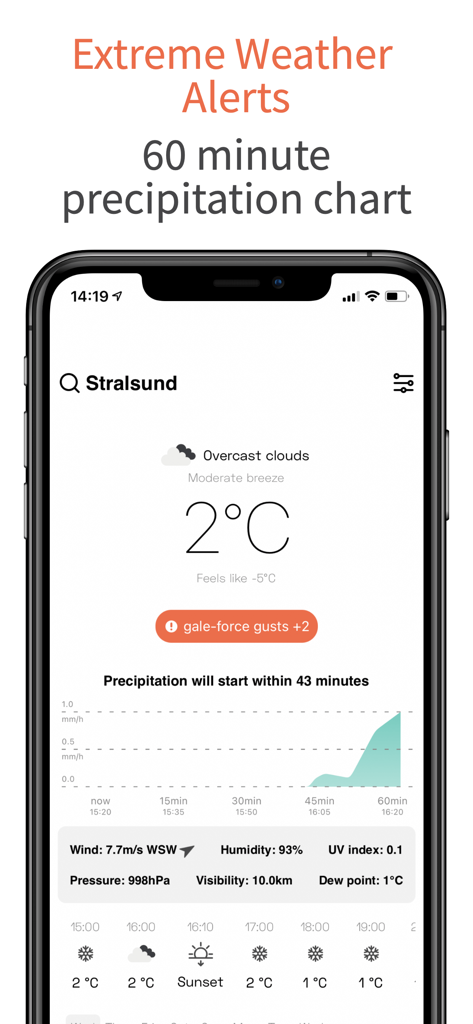
OpenWeather app screenshot featuring a 60-minute precipitation chart and weather alerts.
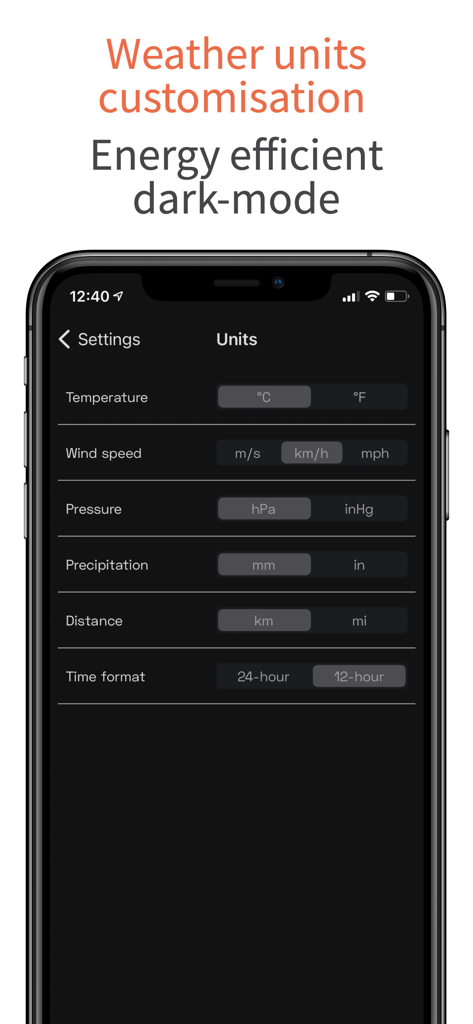
OpenWeather app units customization settings in dark mode
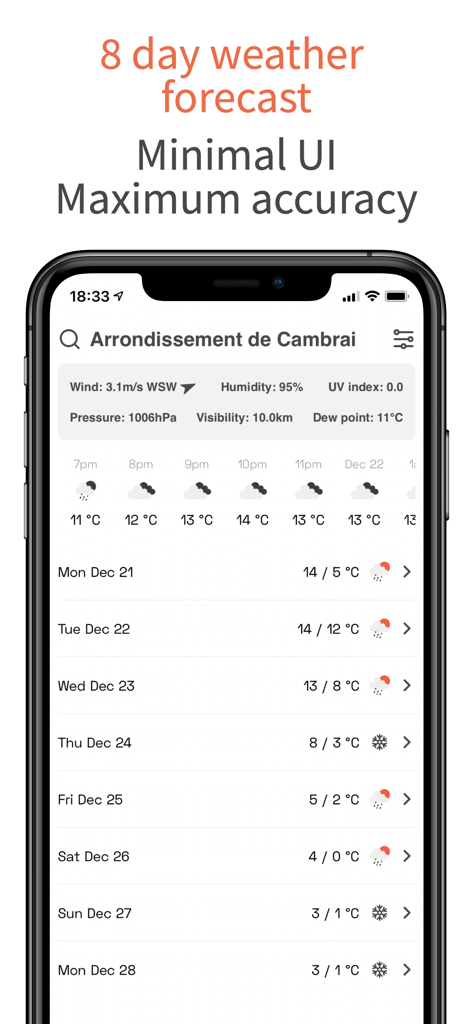
OpenWeather app screen showing a detailed 8 day weather forecast and meteorological data
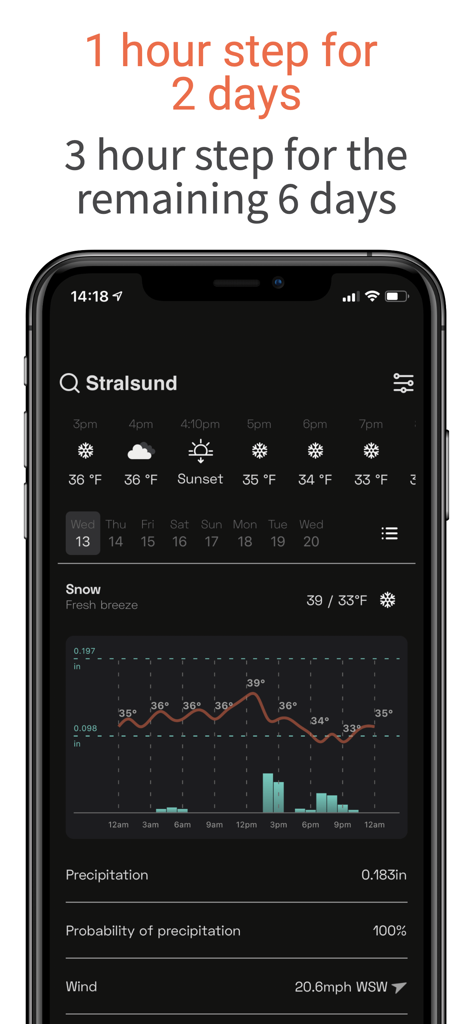
OpenWeather app screen showing detailed hourly forecast data and temperature graphs in dark mode
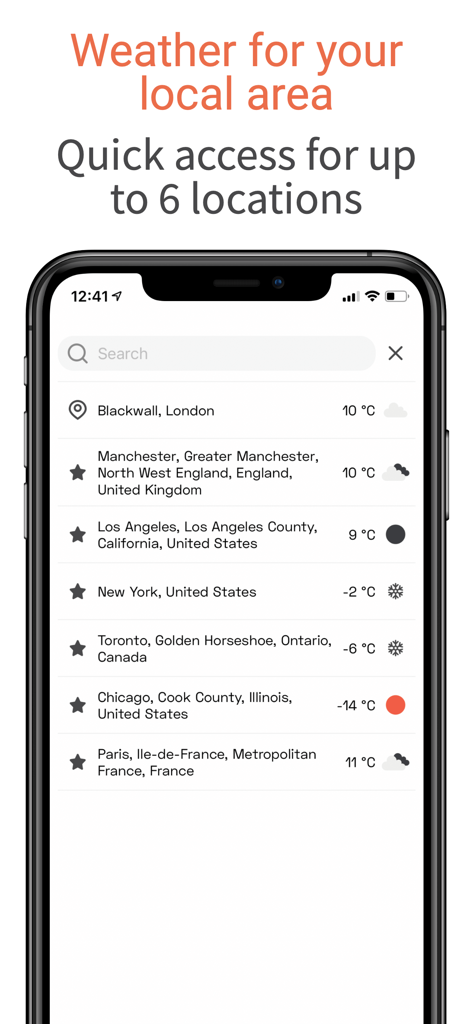
OpenWeather app screen showing weather for multiple saved city locations
Description
Download
More Like This
Apps with similar features and user experience

墨迹天气-MojiWeather
Beijing MojiFengyun Technology Co.,Ltd.

Windy.com
Windyty, SE

天气通
Weibo Internet Technology (China) Co.Ltd.

Zoom Earth - Weather Forecast
Neave Interactive Limited
实时天气-40日精准天气实时预报
犇 牛
MyRadar Accurate Weather Radar
Aviation Data Systems, Inc

Ventusky: Weather & Live Radar
Ventusky s.r.o.

FOX Weather: Daily Forecasts
Fox News Network, LLC
2345天气王-天气和空气质量查询小组件
Shanghai 2345 Network Technology Co., Ltd.
This page is not an official page of the app or its developer, but an independent editorial publication created for informational and commentary purposes. Unless expressly stated otherwise, neither the app nor its developer is affiliated with, endorsed by, sponsored by, authorized by, or otherwise officially connected with MWM, Apple, Google Play, the app publisher, or the app's developer, and nothing on this page implies that the app was developed using MWM's services. Any trademarks, logos, screenshots, and other content remain the property of their respective owners.