
This page is not an official page of the app or its developer, but an independent editorial publication created for informational and commentary purposes. Unless expressly stated otherwise, neither the app nor its developer is affiliated with, endorsed by, sponsored by, authorized by, or otherwise officially connected with MWM, Apple, Google Play, the app publisher, or the app's developer, and nothing on this page implies that the app was developed using MWM's services. Any trademarks, logos, screenshots, and other content remain the property of their respective owners.


O'Reilly Pro
Stop guessing. This app puts the auto parts ecosystem in your pocket, turning every repair into a direct hit.
Downloads
750k+User Rating
Total Ratings
344Publisher
Category
BusinessLocales
2Latest Version
1.18.0Size
47.6 MBFirst Released
Dec 2, 2024An analytical overview of its core functionalities for automotive professionals.
Key Features of O'Reilly Pro App
Seamless Parts Lookup and Ordering
This tool offers comprehensive search options (keywords, part numbers, catalog) and instant access to its vast catalog and real-time inventory, ensuring quick and accurate part sourcing.
Efficient Vehicle Identification
The app provides VIN scanner and license plate decoder tools to simplify and efficiently identify vehicles, decode information, order parts, and sync with desktop systems.
Order Placement and Tracking
The app enables users to submit orders for delivery or pickup, check local store availability and delivery times, and track order status or review past orders.
Parts Interchangeability
It allows users to cross-reference part numbers from OEMs, other brands, or superseded numbers to consistently find the correct part.
Customer Quote Generation
It allows users to quickly generate and send quotes to customers via text message or email, streamlining communication and minimizing repair wait times.
Multilingual Interface
The app supports both English and Spanish, automatically adjusting content based on phone settings or allowing manual toggling between languages.
Frequently Asked Questions
Everything you need to know about O'Reilly Pro
What is the O'Reilly Auto Parts Professional Mobile App?
The O'Reilly Auto Parts Professional Mobile App streamlines vehicle service and parts management for auto repair professionals. It enhances efficiency and simplifies work for shop owners, service writers, and mechanics.
Who is the O'Reilly Pro app designed for?
The O'Reilly Pro app is designed exclusively for the professional repair business. It targets auto repair shop owners, service writers, mechanics, and other automotive repair professionals. It is not for retail or DIY customers.
Is an O'Reilly Auto Parts Professional Account required to use the O'Reilly Pro app?
Yes, an O'Reilly Auto Parts Professional Account is required to use the O'Reilly Pro app. Users can request access from the app login screen or contact their local O'Reilly Auto Parts store for assistance.
Can the O'Reilly Auto Parts Professional Mobile App identify vehicles?
Yes, the O'Reilly Auto Parts Professional Mobile App identifies vehicles efficiently. It includes VIN scanner and license plate decoder tools to quickly decode vehicle information, order parts, and sync with desktop.
How can users find parts in the O'Reilly Professional App?
Users find parts in the O'Reilly Professional App by searching with keywords, part numbers, or navigating the catalog. It provides instant access to a comprehensive catalog and real-time inventory for accurate part selection.
Does the O'Reilly Pro app support part number interchange?
Yes, the O'Reilly Pro app supports interchange. Users cross-reference part numbers from OEMs, other brands, or superseded numbers to find the correct part for any job, ensuring accuracy.
Can I track orders placed through the O'Reilly Auto Parts Professional Mobile App?
Yes, users track orders placed via the O'Reilly Auto Parts Professional Mobile App. Features include viewing local store, hub, and DC availability, delivery times, order status, and past orders in the order history.
Can the O'Reilly Pro app send quotes to customers?
Yes, the O'Reilly Pro app sends quotes to customers. Users quickly and easily send quotes via text message or email, simplifying service and minimizing customer wait times before repairs begin.
What languages does the O'Reilly Auto Parts Professional Mobile App support?
The O'Reilly Auto Parts Professional Mobile App supports both English and Spanish. The app automatically downloads content in Spanish if phone settings are defaulted to Spanish. Users can also toggle languages in the 'More' tab.
How do I contact support for the O'Reilly Auto Parts Professional Mobile App?
Users contact support for the O'Reilly Auto Parts Professional Mobile App via email at OReillyProSupport@oreillyauto.com or by calling (800) 934-2451. Support assists with questions and account help.
Can I manage my account in the O'Reilly Pro app?
Yes, users manage their account within the O'Reilly Pro app. Features include customizing the experience, tracking orders, viewing billing statements, and applying for credit.
The following screenshots and description are sourced directly from the app's official store listing and are the property of the app developer.
App Store
Screenshots

The app clearly communicates its dedication to professional repair businesses, emphasizing its exclusive design and expert-level utility for mechanics.
Professional Business Focus
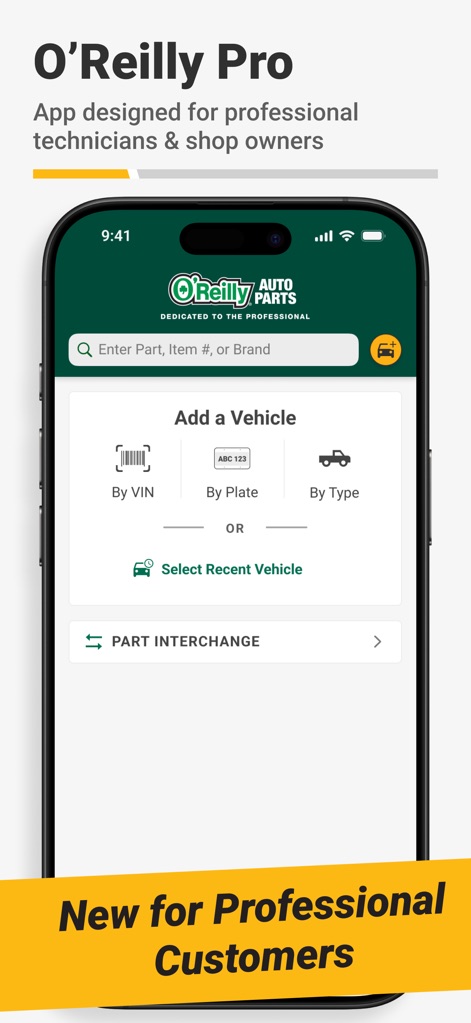
This tool streamlines vehicle identification through its VIN scanner and license plate decoder, alongside a convenient part interchange feature for accurate sourcing.
Precise Vehicle Identification
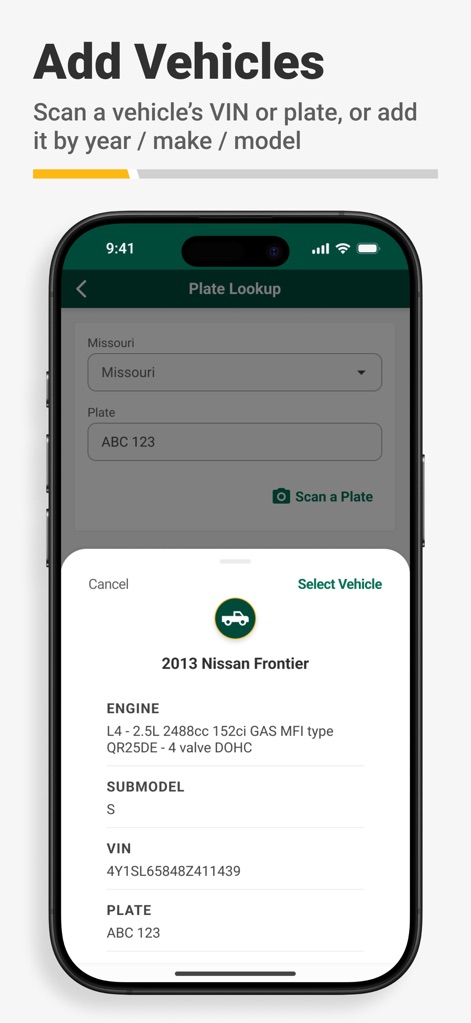
Users can quickly access comprehensive vehicle data, including engine specifications and VIN, directly from a simple plate lookup to ensure accurate part matching.
Instant Vehicle Details
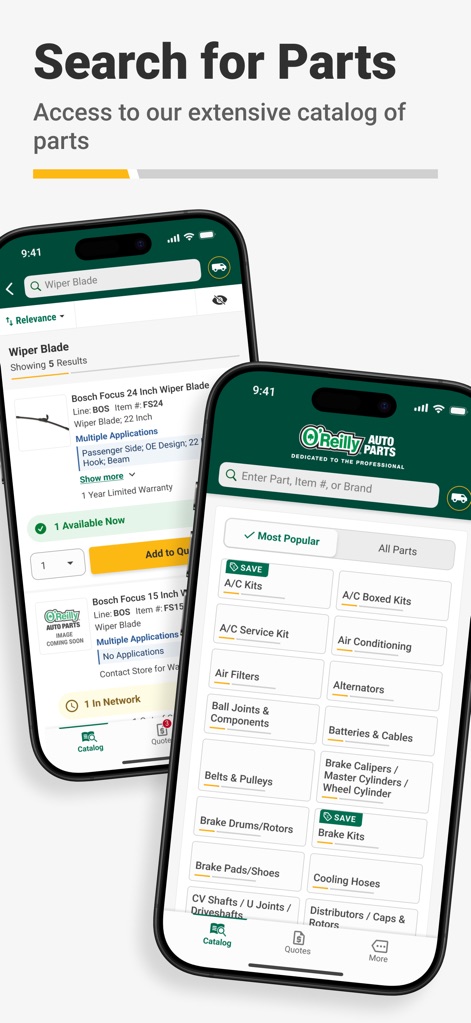
The app offers robust search functionality for specific parts and an organized catalog, allowing users to browse by category or view popular items with ease.
Extensive Parts Lookup
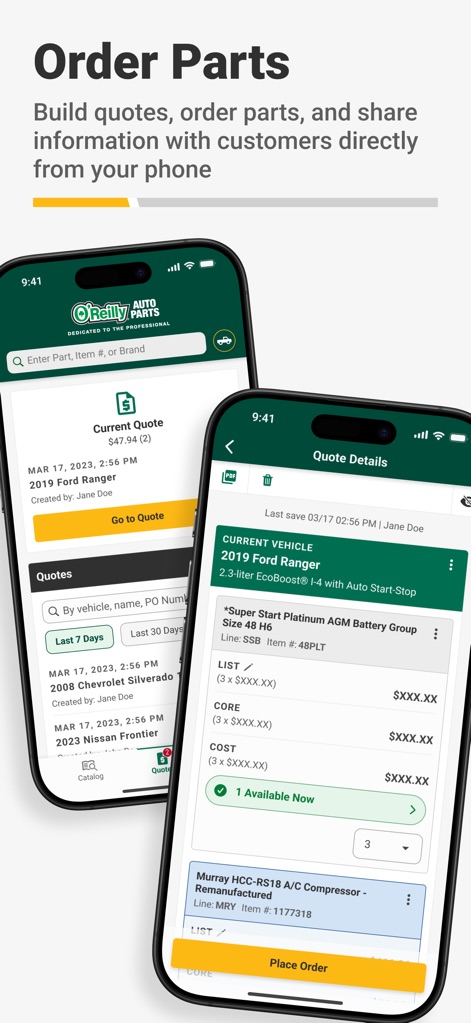
This tool facilitates customer communication by enabling quick quote generation via text or email, and simplifies operations with clear order tracking features.
Streamlined Quoting & Ordering
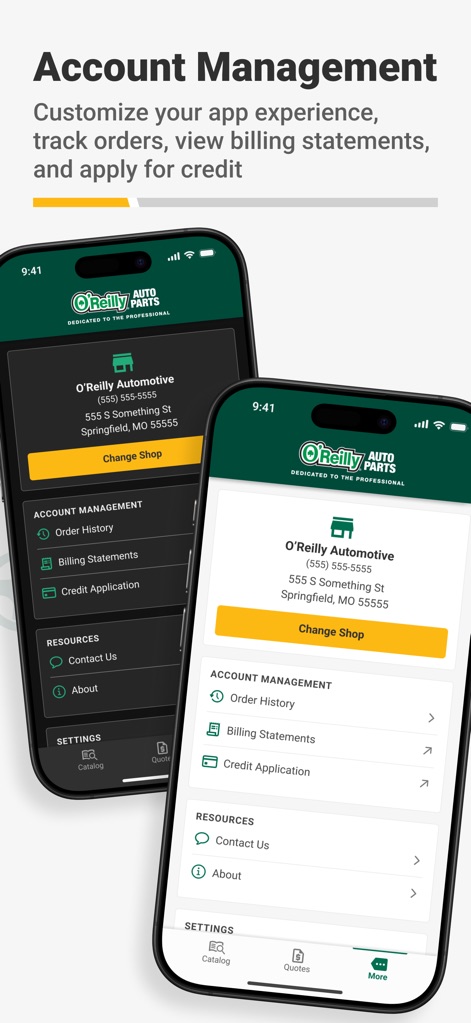
Users gain full control over their operations with access to detailed order history and the ability to view billing statements and apply for credit directly.
Business Account Management
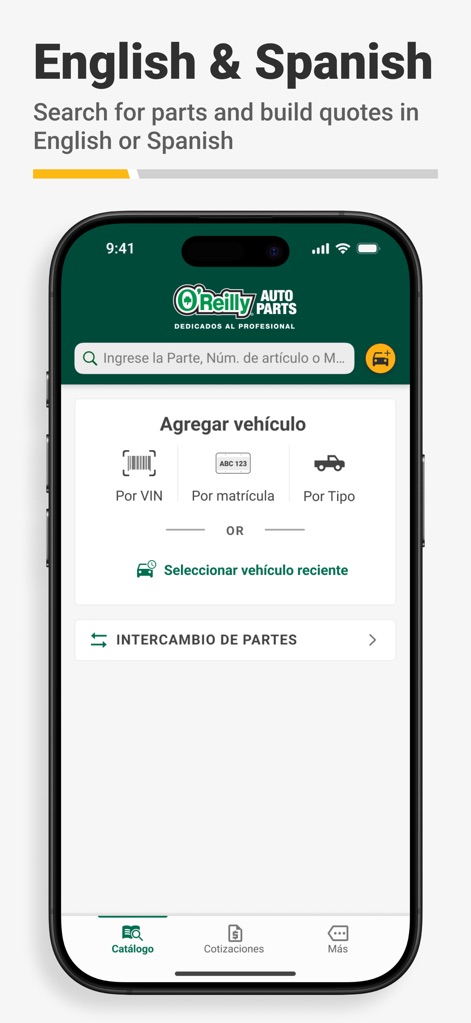
The app provides flexible language options, offering a seamless experience with features like VIN and plate lookup fully translated into Spanish for diverse users.
Multilingual App Support
Description
Download
More Like This
Apps with similar features and user experience

汽修宝-汽车数据之家
Guangzhou Qian Shi Network Technology Co., Ltd.

车300专业版-维保出险记录评估车辆历史车况
Nanjing Sanbaiyun Information Technology Co., Ltd.

Carmin
Chuan Nguyen Van

F6智慧门店-专业维修厂管理软件
F6 Digital Intelligence Automotive Technology (Nanjing) Co.,Ltd.

Shell Advantage Rewards(SHARE)
PRM MARKETING SERVICES PTE. LTD.

TopGuru
HK TOPDON TECHNOLOGY Co., LIMITED

Manheim (Legacy)
Manheim

VAG service - Audi, Porsche, Seat, Skoda, VW.
Vladimir Susoykin

Mercedes-Benz Car Parts
Ruslan Balkarov
This page is not an official page of the app or its developer, but an independent editorial publication created for informational and commentary purposes. Unless expressly stated otherwise, neither the app nor its developer is affiliated with, endorsed by, sponsored by, authorized by, or otherwise officially connected with MWM, Apple, Google Play, the app publisher, or the app's developer, and nothing on this page implies that the app was developed using MWM's services. Any trademarks, logos, screenshots, and other content remain the property of their respective owners.