
This page is not an official page of the app or its developer, but an independent editorial publication created for informational and commentary purposes. Unless expressly stated otherwise, neither the app nor its developer is affiliated with, endorsed by, sponsored by, authorized by, or otherwise officially connected with MWM, Apple, Google Play, the app publisher, or the app's developer, and nothing on this page implies that the app was developed using MWM's services. Any trademarks, logos, screenshots, and other content remain the property of their respective owners.


Parallel Space - Dual Account
The app unlocks digital omnipresence. It grants users the power to run multiple app instances, simultaneously.
Downloads
1M+User Rating
Total Ratings
12.8KPublisher
Category
ProductivityLocales
12Latest Version
1.3Size
49.9 MBFirst Released
Nov 28, 2022An Analytical Overview for Multi-Account Mobile Users
Key Features of Parallel Space - Dual Account
Simultaneous Multi-Account Operation
The app enables users to run multiple instances of the same application concurrently, each with a different account logged in, ensuring all accounts remain online simultaneously without manual switching.
Data Isolation and Independence
This tool ensures that data from different cloned accounts operates independently, preventing interference and maintaining the privacy and separation of personal and professional information.
Enhanced Work-Life Balance Management
It allows users to keep personal and work-related accounts active side-by-side on a single device, promoting efficient management and a clearer separation between professional and personal digital lives.
Broad Application Compatibility
The app provides extensive support for almost all social media and messaging applications, ensuring users can clone and manage multiple accounts across a wide range of popular platforms.
Consolidated Device Management
This feature eliminates the necessity of using multiple physical devices or constantly logging in and out of accounts, offering a streamlined approach to managing all digital identities from one smartphone.
Flexible Account Cloning
It allows users to clone applications multiple times, supporting an array of accounts simultaneously to cater to extensive multi-account management needs for power users and professionals.
Frequently Asked Questions
Everything you need to know about Parallel Space - Dual Account
How does Parallel Space - Dual Account enable multiple app accounts?
Parallel Space - Dual Account creates a dedicated parallel space on the phone. This allows users to run multiple instances of the same app simultaneously, keeping all accounts online without data interference.
Does Parallel Space - Dual Account support multiple social media accounts?
Yes, Parallel Space - Dual Account supports multiple social accounts. It allows logging into platforms like Instagram, Facebook, and WhatsApp simultaneously, balancing personal and work accounts efficiently.
Does Parallel Space - Dual Account separate data for cloned apps?
Yes, Parallel Space - Dual Account ensures data independence for all cloned apps. Messages and data from different accounts operate independently, preventing any interference between them.
Does Parallel Space - Dual Account offer privacy features?
Yes, Parallel Space - Dual Account protects user privacy. The app includes a passcode lock feature, allowing users to set a password to secure access to their multiple accounts within the app.
Which specific apps can Parallel Space - Dual Account clone?
Parallel Space - Dual Account clones popular social and messaging applications. Users can add apps like Instagram, Facebook, WhatsApp, TikTok, Gmail, Messenger, Telegram, Twitter, Pinterest, Skype, Snapchat, and Viber.
The following screenshots and description are sourced directly from the app's official store listing and are the property of the app developer.
App Store
Screenshots

See how Parallel Space - Dual Account simplifies managing multiple digital identities by showcasing the intuitive 'Add app' interface and a wide array of popular social media platform icons.
Multi-Account Setup
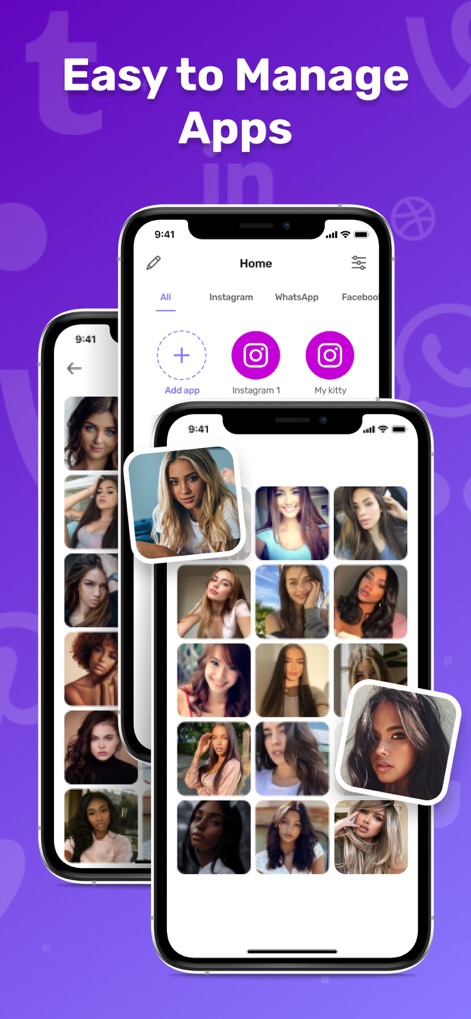
Users can efficiently organize their cloned applications through the categorized 'Home' screen, which prominently displays distinct app instances like 'Instagram 1' and 'My kitty' in a layered interface.
Seamless App Management

This tool ensures user data security by featuring a dedicated 'Set password' interface for app access and visually reinforcing privacy with a background grid of locked profile pictures.
Enhanced Privacy Control
Description
Download
More Like This
Apps with similar features and user experience

Dual Messenger, Whats Web Chat
中华 阳

Parallel Space: Dual Account
Huong Le Thi
WA Web - Dual Messenger ⁺
雨双 柯
WA Web - Dual Chat
碧 郑
Dual Web Chat for WhatsWA
SEAMOBI TECH PTE LTD

Parallel App ~ Dual Accounts
Shobhaben Ukani
Dual Messenger-Duo Web Chatapp
Changsha Liangchao Technology Co., Ltd.

Multiple Accounts: Dual Spaces
Kokila Ukani

Clone App - Multiple Accounts
Siddharth bhadani
This page is not an official page of the app or its developer, but an independent editorial publication created for informational and commentary purposes. Unless expressly stated otherwise, neither the app nor its developer is affiliated with, endorsed by, sponsored by, authorized by, or otherwise officially connected with MWM, Apple, Google Play, the app publisher, or the app's developer, and nothing on this page implies that the app was developed using MWM's services. Any trademarks, logos, screenshots, and other content remain the property of their respective owners.