
This page is not an official page of the app or its developer, but an independent editorial publication created for informational and commentary purposes. Unless expressly stated otherwise, neither the app nor its developer is affiliated with, endorsed by, sponsored by, authorized by, or otherwise officially connected with MWM, Apple, Google Play, the app publisher, or the app's developer, and nothing on this page implies that the app was developed using MWM's services. Any trademarks, logos, screenshots, and other content remain the property of their respective owners.


ParkChicago®
Chicago's streets demand smart parking; this app delivers exactly that power to your palm.
Downloads
2.5M+User Rating
Total Ratings
15.5KPublisher
Category
TravelLocales
3Latest Version
7.1.2Size
48.4 MBFirst Released
Apr 11, 2014An analysis of core functionalities and their impact on urban parking management.
ParkChicago® App Evaluation: Key Features
Mobile Parking Payments
The app provides the ability to initiate and pay for parking sessions directly from a smartphone, eliminating the need for physical meters or cash.
Remote Session Extension
It allows users to prolong their active parking sessions from any location using their mobile device, preventing parking violations.
Parking Session Reminders
This tool features timely alerts that notify users when their parking session is nearing expiration, helping them avoid tickets.
Integrated Parking Map & Search
The app links to an interactive map within the ParkChicago®Map app, enabling users to locate available parking spaces and compare prices within Chicago.
Parking History Tracking
It enables users to view and manage a detailed record of their past parking sessions directly through the mobile application.
Digital Receipts
This tool automatically sends email receipts for each completed parking session, simplifying record-keeping for users.
The following screenshots and description are sourced directly from the app's official store listing and are the property of the app developer.
App Store
Screenshots

This initial screen clearly outlines the app's core benefits with distinct green checkmarks and offers immediate access via prominent "Get Started" and "Log In" buttons.
App Introduction Overview

Users can quickly begin a new parking session by entering a 6-digit zone number in the designated input field or selecting from a list of recent zone options.
Initiate Parking Easily

The app features an organized side menu, allowing users to easily access critical functions such as "My Parking History" and manage their "Wallet Details".
Comprehensive Navigation

This screen enables users to select from previously added vehicles, such as "678 (IL)", and provides a convenient "Add Vehicle" button for new additions.
Vehicle Management

An active parking session is clearly displayed with a real-time countdown timer and a transparent breakdown of all parking fees and charges.
Session Tracking
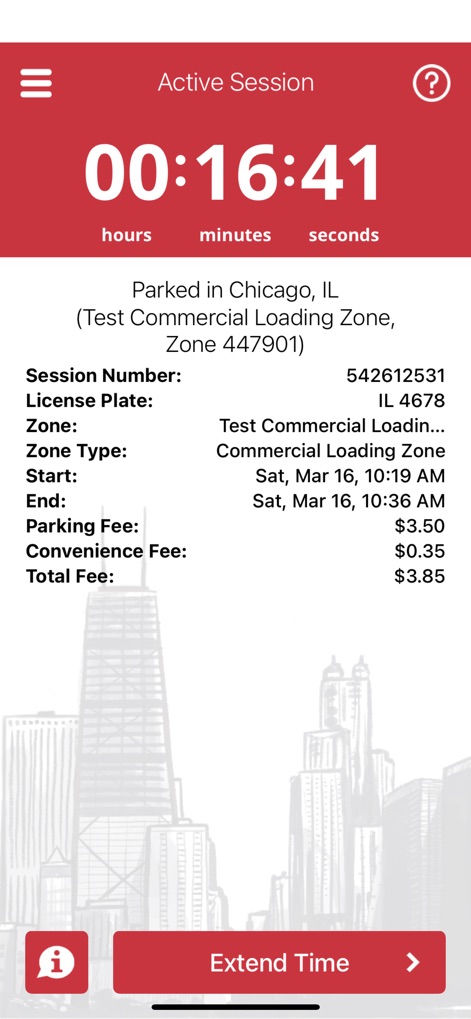
This view provides a complete overview of an active parking session, detailing the specific "Zone Type" and the overall "Total Fee" for transparency.
Detailed Session Overview
Description
Download
More Like This
Apps with similar features and user experience

ParkMobile: Park. Pay. Go.
Parkmobile USA, Inc

EasyPark - Parking made easy
Easy Park AS

SpotHero: #1 Rated Parking App
SpotHero, Inc.

ParkWhiz - #1 Parking App
ParkWhiz, Inc.

RingGo: Mobile Car Parking App
RingGo Ltd

Metropolis: Remarkable Parking
Metropolis Technologies, Inc.

Mobicité
Agence de mobilite durable de Montreal

Parking Kitty
City of Portland

HandyParken München
SWM Services GmbH
This page is not an official page of the app or its developer, but an independent editorial publication created for informational and commentary purposes. Unless expressly stated otherwise, neither the app nor its developer is affiliated with, endorsed by, sponsored by, authorized by, or otherwise officially connected with MWM, Apple, Google Play, the app publisher, or the app's developer, and nothing on this page implies that the app was developed using MWM's services. Any trademarks, logos, screenshots, and other content remain the property of their respective owners.