
This page is not an official page of the app or its developer, but an independent editorial publication created for informational and commentary purposes. Unless expressly stated otherwise, neither the app nor its developer is affiliated with, endorsed by, sponsored by, authorized by, or otherwise officially connected with MWM, Apple, Google Play, the app publisher, or the app's developer, and nothing on this page implies that the app was developed using MWM's services. Any trademarks, logos, screenshots, and other content remain the property of their respective owners.


pCloud - Cloud Storage
No more digital clutter. This app gives users the power to command their files, everywhere, instantly.
Downloads
1M+User Rating
Total Ratings
32.3KPublisher
Category
ProductivityLocales
13Latest Version
3.8.7Size
107.0 MBFirst Released
Sep 13, 2013An analytical overview of capabilities tailored for secure and accessible digital asset management.
Key Features of pCloud - Cloud Storage
Client-Side Encryption (pCloud Crypto)
It features military-grade, client-side encryption (pCloud Crypto) to ensure maximum file privacy and security, crucial for privacy-conscious users and compliance.
Cross-Device Synchronization & Multi-Platform Access
The app ensures immediate synchronization of file changes across all user devices and is accessible on multiple platforms, enhancing productivity and accessibility.
Unlimited File Size Uploads
This tool supports uploading files of any size, including large media, without limitations, which is vital for content creators and professionals.
Automatic Media Backup
It allows users to automatically back up photos and videos, thereby freeing up device storage and ensuring data safety.
High-Speed Large File Sharing
The app enables high-speed sharing of large files (photos, videos, documents) with others, supporting collaboration and distribution efficiency.
Offline File Access
This tool allows users to designate files and folders for offline access, ensuring availability and productivity without an internet connection.
Scalable Storage Plans
The app offers scalable storage plans, including up to 2 TB, catering to extensive digital collections and long-term storage needs.
Secure Upload Links
It provides secure upload links, allowing others to contribute files without granting full account access, which enhances collaborative security.
Frequently Asked Questions
Everything you need to know about pCloud - Cloud Storage
Does pCloud offer free cloud storage?
Yes, pCloud offers up to 10 GB of free cloud storage when you sign up. This allows users to store photos, videos, and documents without immediate cost.
Can pCloud automatically back up photos and videos?
Yes, pCloud automatically backs up your photos and videos, freeing up space on your device. You can configure automatic uploads in the app's settings.
Does pCloud offer file encryption for sensitive data?
Yes, pCloud offers military-grade file encryption with pCloud Encryption. This service provides client-side encryption and zero-knowledge privacy for sensitive files.
Can I access my pCloud files without an internet connection?
Yes, pCloud allows offline access for files and folders. Users can mark specific content to be available offline, ensuring access without an internet connection.
How much does a pCloud Premium 500 GB Lifetime plan cost?
A pCloud Premium 500 GB Lifetime plan costs 174.99 USD, billed as a one-time payment. Lifetime plans have a duration of 99 years or the account holder's lifetime.
How can I share large files using pCloud?
You can share large files using pCloud by generating Download links. You can also allow others to upload files to your account using Upload links, without granting full access.
Is pCloud available across multiple devices and operating systems?
Yes, pCloud is available for iPhone, iPad, Mac, Windows, and Linux devices. This ensures users can access their files from virtually any platform.
How do I turn off auto-renewal for my pCloud subscription?
To avoid pCloud subscription renewal, you must turn off auto-renew at least 24 hours before your subscription ends. You can manage this from your iTunes account settings.
What storage capacities does pCloud offer for Premium plans?
pCloud offers Premium plans with 500 GB and 2 TB storage capacities. These can be purchased monthly, yearly, or as a one-time lifetime payment option.
Can I scan documents directly with the pCloud app?
Yes, the pCloud app allows users to scan anything with ease. This feature enables digitizing physical documents directly into your cloud storage.
The following screenshots and description are sourced directly from the app's official store listing and are the property of the app developer.
App Store
Screenshots
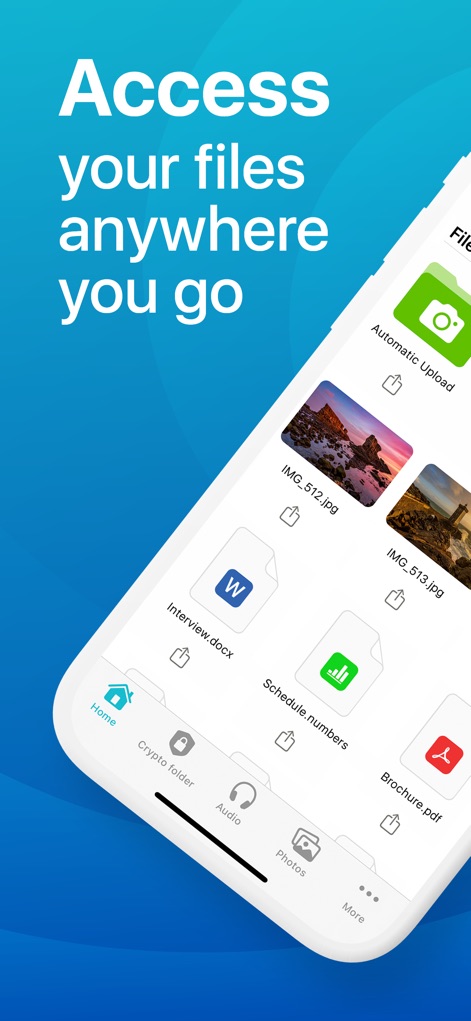
This app displays organized files like "Interview.docx" and "Schedule.numbers", accessible through the intuitive bottom navigation bar featuring "Home" and "Crypto folder" tabs.
Universal File Access
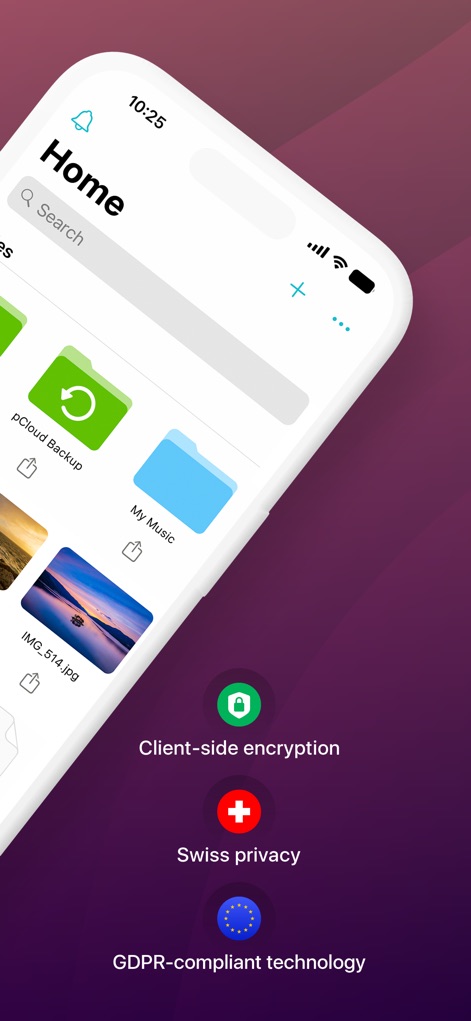
The screenshot emphasizes robust security, highlighting "Client-side encryption" and "Swiss privacy" alongside organized folders like "pCloud Backup" on the home screen.
Advanced Security Overview

Users can configure automatic uploads for photos and videos, customizing settings like "File type" and toggling "Automatic Upload" directly from this detailed preferences screen.
Automated Backup Settings
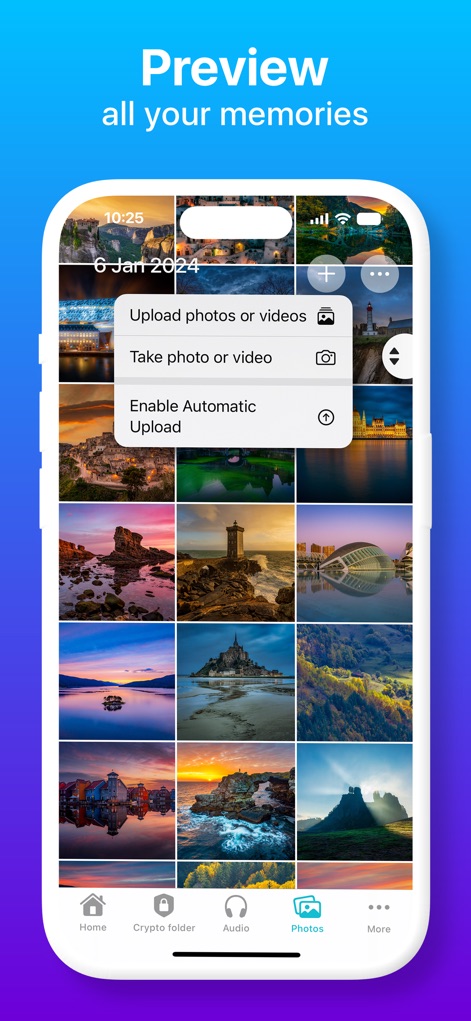
The app provides a visual grid for previewing all memories, with a convenient pop-up menu offering options to "Upload photos or videos" or "Take photo or video".
Visual Memory Preview

Users can share large files easily, utilizing the "Share Link" option or inviting collaborators via "Invite to Folder" from the contextual menu.
Collaborative Sharing Options

This view demonstrates the ability to access files offline, featuring a floating image preview and a clear download icon for saved content.
Offline Access Convenience

The app offers robust security with "Client-side encryption" and "Zero-knowledge Privacy", clearly presented alongside options to "Buy Crypto" or initiate a "Free Trial".
Secure File Encryption

This screenshot showcases the integrated document scanning feature, allowing users to capture documents with a grid overlay and easily "Save" them to their cloud storage.
Integrated Document Scanner
Description
Download
More Like This
Apps with similar features and user experience



This page is not an official page of the app or its developer, but an independent editorial publication created for informational and commentary purposes. Unless expressly stated otherwise, neither the app nor its developer is affiliated with, endorsed by, sponsored by, authorized by, or otherwise officially connected with MWM, Apple, Google Play, the app publisher, or the app's developer, and nothing on this page implies that the app was developed using MWM's services. Any trademarks, logos, screenshots, and other content remain the property of their respective owners.