
This page is not an official page of the app or its developer, but an independent editorial publication created for informational and commentary purposes. Unless expressly stated otherwise, neither the app nor its developer is affiliated with, endorsed by, sponsored by, authorized by, or otherwise officially connected with MWM, Apple, Google Play, the app publisher, or the app's developer, and nothing on this page implies that the app was developed using MWM's services. Any trademarks, logos, screenshots, and other content remain the property of their respective owners.

Picsew - Screenshot Stitching
No more fractured narratives. This app grants users the power to see the whole picture, instantly.
Downloads
5M+User Rating
Total Ratings
57.3KPublisher
Category
Photo & VideoLocales
4Latest Version
3.16.1Size
55.9 MBFirst Released
Feb 28, 2017An evaluation of core functionalities and their impact for iOS users.
Key Features Analysis: Picsew - Screenshot Stitching
Smart Auto-Stitching
This tool features an advanced algorithm that ensures smooth and seamless integration of multiple screenshots, crucial for professional presentation.
Integrated Annotation & Editing
It allows users to add watermarks, blur sensitive content, annotate, and frame screenshots directly within the application, enhancing privacy and clarity.
High-Resolution Output
It ensures that stitched images retain high resolution, preserving every detail perfectly for clarity and professional quality output.
Scrollshot Recording
The app provides automated scrollshot generation by screen recording, eliminating the need for multiple manual screenshots and significantly boosting efficiency.
Batch Image Processing
This tool facilitates the stitching of up to 300 images simultaneously, significantly enhancing efficiency for large projects and extensive documentation.
Full Webpage Capture
This extension enables the capture of entire web pages with a single tap, streamlining web content preservation for research and sharing.
Versatile Export Options
The app provides diverse export formats, including PDF and image slices, for flexible sharing and further editing within various workflows.
Widget Quick Stitch
The widget allows for direct stitching of recent screenshots without needing to open the main application, significantly enhancing convenience and speed.
Frequently Asked Questions
Everything you need to know about Picsew - Screenshot Stitching
What is Picsew?
Picsew is an award-winning screenshot stitching tool that seamlessly stitches various scrollable content, including chat logs, articles, and web pages. It simplifies the process of combining multiple screenshots.
How does Picsew stitch screenshots automatically?
Yes, Picsew utilizes an advanced auto-stitching algorithm for smart stitching, producing smooth and seamless results. It also offers Scrollshot Recording to automatically generate scrollshots by recording the screen.
Does Picsew allow both vertical and horizontal stitching?
Yes, Picsew supports both vertical and horizontal stitching. This feature provides the flexibility to handle complex scenarios and diverse content layouts effectively.
Can Picsew combine photos other than screenshots?
Yes, Picsew offers Photo Stitching to seamlessly stitch regular photos into a large image. This extends its functionality beyond just combining screenshots.
How many images can Picsew process at once?
Picsew supports batch processing, allowing users to stitch up to 300 images at once. This ensures fast and efficient handling of large sets of screenshots.
Does Picsew allow editing and annotations on stitched images?
Yes, Picsew includes annotations and editing features. Users can add watermarks, blur sensitive information, annotate, and frame their screenshots with ease.
Can Picsew capture entire web pages?
Yes, Picsew provides a Web Snapshot Extension that captures full-length web pages with a single tap. This feature simplifies saving complete web content.
Does Picsew support accessibility features like VoiceOver?
Yes, Picsew fully supports VoiceOver, providing an accessible experience for more users. This demonstrates its commitment to inclusive design.
Does the Picsew app display advertisements?
No, Picsew features a minimalist design with no ads. It offers smooth operation and a clean, simple interface for an uninterrupted user experience.
Can Picsew automatically remove status bars from screenshots?
Yes, Picsew includes Smart Optimization to automatically remove status bars from screenshots. This creates cleaner and more professional images without manual editing.
The following screenshots and description are sourced directly from the app's official store listing and are the property of the app developer.
App Store
Screenshots

Discover how Picsew automatically generates seamless scrollshots from chat threads and easily applies editing tools from the intuitive bottom toolbar.
Seamless Scrollshot Creation

Witness the app's versatility in stitching both vertical and horizontal content, with precise control available through the 'Crop' and 'Tools' headers.
Flexible Stitching Options
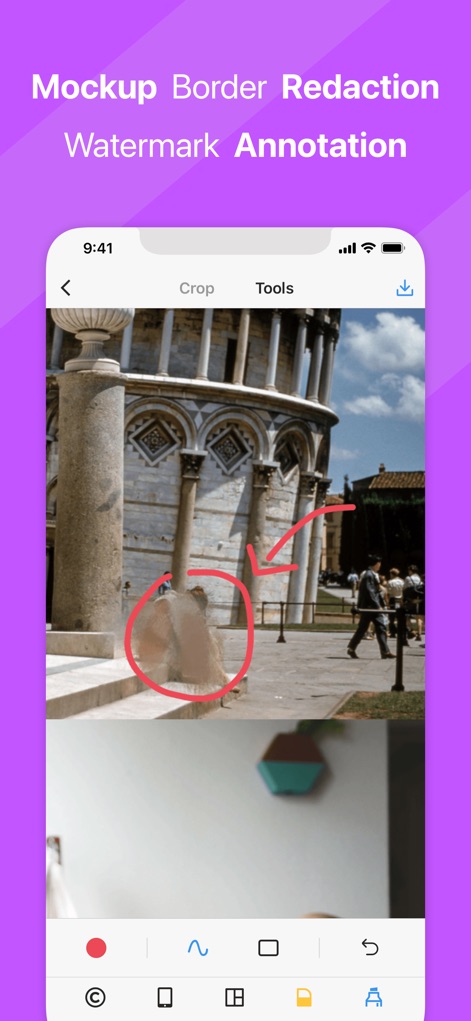
Explore Picsew's robust annotation capabilities, allowing users to blur sensitive information and highlight key areas with intuitive drawing tools from the comprehensive editing menu.
Enhance & Protect
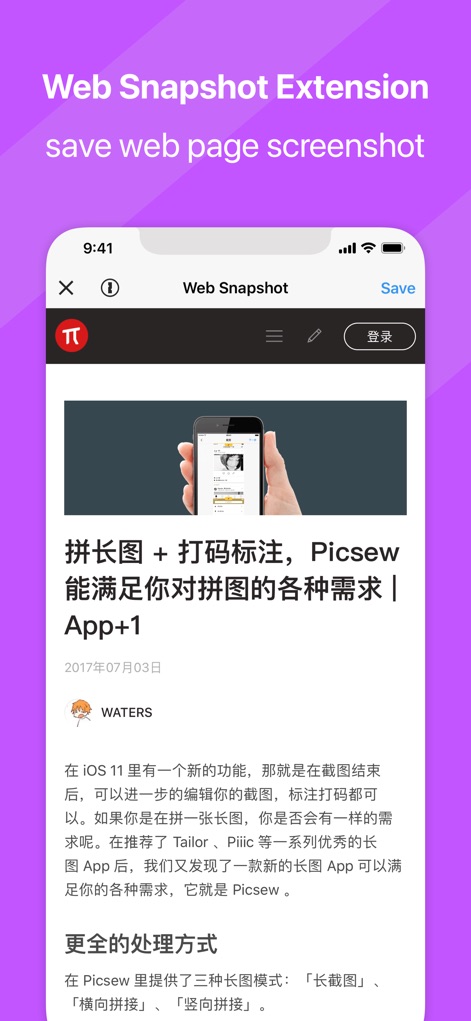
Experience the convenience of the Web Snapshot Extension, allowing users to capture entire web pages effortlessly and save them directly from the dedicated interface.
Full Web Capture

Leverage the power of the Today Widget, enabling users to quickly merge recent screenshots and instantly save or edit detected scrollshots without opening the main app.
Instant Widget Access
Description
Download
More Like This
Apps with similar features and user experience

Photo Stitch!
Thanh Hai Le

StitchPics-Stitch Screenshots
磊 马
Pic Stitch:stitch long image
Hangzhou Keyi Network Technology Co., Ltd

ScreenShot-Webpage Snapshoot
潇 罗

Frame Grabber
Appcano LLC

Castly+
HONGKONG BLUE WHALE AND OCEAN TECHNOLOGY CO., LIMITED

Panorama 360 Camera
松滔 袁

Auto Screenshots Stitch Tailor
Xiamen Dehui Chengzhen Network Technology Co., Ltd.

Tailor - Screenshot Stitching
Foundry 63, LLC
This page is not an official page of the app or its developer, but an independent editorial publication created for informational and commentary purposes. Unless expressly stated otherwise, neither the app nor its developer is affiliated with, endorsed by, sponsored by, authorized by, or otherwise officially connected with MWM, Apple, Google Play, the app publisher, or the app's developer, and nothing on this page implies that the app was developed using MWM's services. Any trademarks, logos, screenshots, and other content remain the property of their respective owners.