
This page is not an official page of the app or its developer, but an independent editorial publication created for informational and commentary purposes. Unless expressly stated otherwise, neither the app nor its developer is affiliated with, endorsed by, sponsored by, authorized by, or otherwise officially connected with MWM, Apple, Google Play, the app publisher, or the app's developer, and nothing on this page implies that the app was developed using MWM's services. Any trademarks, logos, screenshots, and other content remain the property of their respective owners.


Pitch Checker
Get real-time pitch detection, frequency analysis, and scale feedback. Whether you're training for karaoke, correcting tone deafness, or tuning your instrument, achieve perfect pitch with professional precision.
Downloads
952K+User Rating
Total Ratings
7K+Publisher
Category
MusicLocales
2Latest Version
9.1.0Size
52.9 MBFirst Released
Dec 7, 2019Master Your Pitch & Range
Visualize your voice, measure your limits, and perfect your performance with professional-grade pitch detection designed for the modern musician.
Discover Your Vocal Range
Pinpoint your exact limits from lowlow A to hihi A. Perfect for tracking your growth or hitting those viral vocal challenges with confidence.
Real-Time Visual Feedback
See your pitch, frequency, and waveform instantly. Use the pause feature to freeze the data and analyze your vibrato or note accuracy in detail.
Frequently Asked Questions
Everything you need to know about Pitch Checker
What is the primary function of the Pitch Checker app?
The Pitch Checker app analyzes real-time audio from your device's microphone. It displays information including musical scale, pitch, octave, frequency, and waveform.
What are some common uses for the Pitch Checker app?
Pitch Checker helps measure vocal range, practice absolute pitch, detect musical scales, perform vocal exercises, practice karaoke, correct tone deafness, and tune instruments.
Does the Pitch Checker app provide real-time audio analysis?
Yes, the Pitch Checker app analyzes real-time audio captured from your microphone. It continuously displays musical information such as pitch, frequency, and waveform.
Can I pause the audio analysis in Pitch Checker to review results?
Yes, you can pause the audio analysis in Pitch Checker by tapping the screen. This feature allows you to review the displayed musical results at your preferred pace.
How can I prevent the Pitch Checker app from picking up small sounds or noise?
To prevent Pitch Checker from picking up small sounds or noise, slide the "Microphone Sensitivity" bar upward. This ignores small sounds and provides a cleaner pitch detection.
Can Pitch Checker be used as an instrument tuner?
Yes, Pitch Checker can function as a basic instrument tuner. For convenience, users can change the display notation from "Do, Re, Mi" to "CDEFGAB" in the app's settings.
What notation types does Pitch Checker support for musical display?
Pitch Checker supports notations like low A, mid 2 A, hihi A, and allows switching between CDEFGAB and Do, Re, Mi (Solfege) displays. It also supports flat notations.
How do I change the display notation in the Pitch Checker app?
To change the display notation in Pitch Checker, tap the gear icon in the top right corner. Then, select "Note Name Display" to switch between CDEFGAB and Do, Re, Mi notations.
Can I adjust the reference pitch in Pitch Checker?
Yes, you can adjust the reference pitch within the Pitch Checker app. Access the settings menu via the gear icon to change the default A4 (440 Hz) value.
What permissions does the Pitch Checker app require to function?
The Pitch Checker app requires microphone permission for audio analysis. It also uses Siri & Search and Mobile Data permissions for Admob advertisements.
Does the Pitch Checker app help in measuring vocal range?
Yes, Pitch Checker displays ranges such as hihi A or lowlow A, making it suitable for measuring and analyzing vocal range effectively.
Can Pitch Checker display a graph of past detected pitches?
Yes, Pitch Checker can display a graph of past detected pitches. This feature allows users to visually review their pitch history and progression.
Does Pitch Checker support flat notations for musical notes?
Yes, Pitch Checker supports flat (b) notations for musical notes. Users can toggle this option in the app's settings menu for their preferred display.
Does Pitch Checker offer a minimal user interface?
Yes, Pitch Checker offers a minimal user interface. Users can switch to this new UI design through the app's settings for a streamlined experience.
Does Pitch Checker have a quick launch option from the lock screen?
Yes, Pitch Checker provides a quick launch option. Users can add a Lock Screen widget for fast access to the app's pitch checking functionality.
The following screenshots and description are sourced directly from the app's official store listing and are the property of the app developer.
App Store
Screenshots
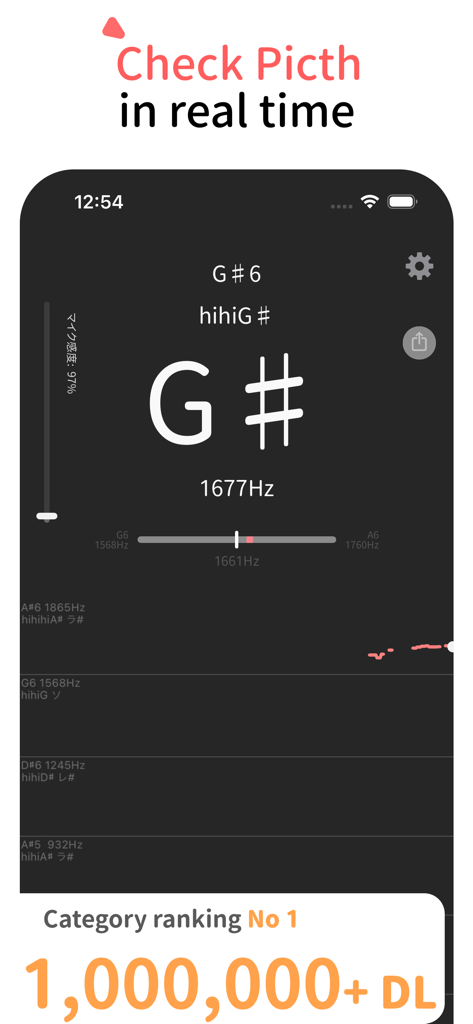
A smartphone interface of Pitch Checker showing real-time musical pitch detection and frequency measurement for singers.
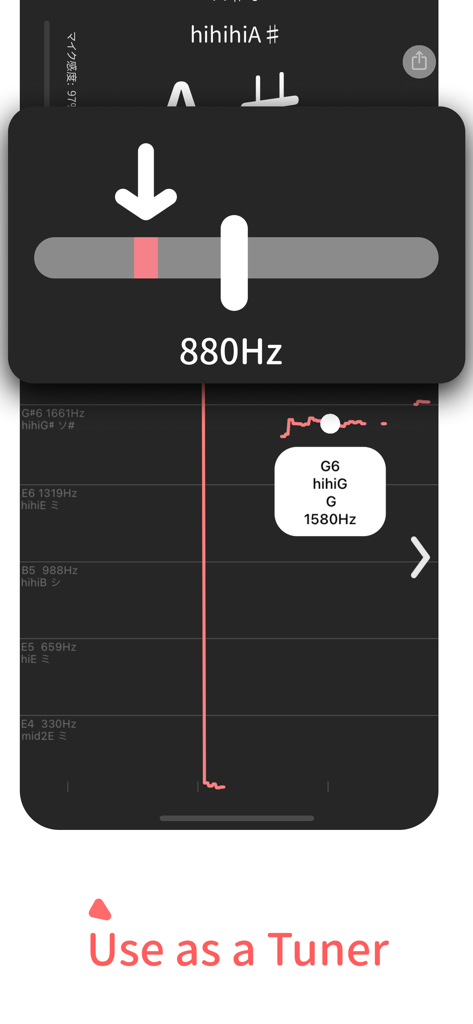
Pitch Checker app interface showing the instrument tuner mode with 880Hz frequency display
Description
Download
More Like This
Apps with similar features and user experience

开嗓练声-学声乐唱歌练习伴奏软件
梦莹 张

Simply Sing: My Singing App
Simply Ltd

Vocalista: Learn to Sing
Julian Boehm-Tettelbach
Nail the Pitch - Vocal Monitor
Qiushi Jiang
Voice Tools
DevExtras Ltd
Voice Training - Learn to Sing
Learn To Master Ltd

Vocal Workout: Singing lessons
PRIVET LIMITED LLC

The Vocal Coach
Annabel Williams Music Ltd

EasySing by StarMaker
SKYWORK AI PTE LTD
This page is not an official page of the app or its developer, but an independent editorial publication created for informational and commentary purposes. Unless expressly stated otherwise, neither the app nor its developer is affiliated with, endorsed by, sponsored by, authorized by, or otherwise officially connected with MWM, Apple, Google Play, the app publisher, or the app's developer, and nothing on this page implies that the app was developed using MWM's services. Any trademarks, logos, screenshots, and other content remain the property of their respective owners.