
This page is not an official page of the app or its developer, but an independent editorial publication created for informational and commentary purposes. Unless expressly stated otherwise, neither the app nor its developer is affiliated with, endorsed by, sponsored by, authorized by, or otherwise officially connected with MWM, Apple, Google Play, the app publisher, or the app's developer, and nothing on this page implies that the app was developed using MWM's services. Any trademarks, logos, screenshots, and other content remain the property of their respective owners.


PlayScore 2
It grants instant auditory access to printed music. Users gain an unparalleled practice partner.
Downloads
1M+User Rating
Total Ratings
8.2KPublisher
Category
MusicLocales
8Latest Version
3.66Size
93.1 MBFirst Released
Jan 23, 2019An analytical overview of key features enabling efficient music learning, practice, and sharing.
PlayScore 2: Core Capabilities for Modern Musicians
Score Recognition and Playback
The app provides the ability to digitize and play back music directly from various sources like photos, images, and PDF scores, making physical scores interactive.
MusicXML and MIDI Export
It allows users to export scores into standard formats like MusicXML and MIDI, facilitating integration with other music notation software for advanced editing, arranging, and sharing.
Individual Staff Customization
This tool features comprehensive control over each staff, including individual volume, instrument assignment, and transposition, which is vital for focused practice and analysis of specific parts.
Playable Score Document Creation & Sharing
It allows users to create interactive Playable Score Documents that can be shared, enabling others to experience the score with full playback capabilities even without a premium subscription.
Practice Accompaniment with Count-in
The app provides a smart count-in and accompaniment feature, enabling musicians to practice along with their scores effectively, simulating an ensemble experience.
Intelligent Playback and Tempo Control
This tool features a smart metronome that understands time signatures and allows for dynamic tempo adjustments, aiding in rhythmic accuracy and focused learning.
Instrument-Specific Transposition
The app provides automatic transposition for transposing instruments, simplifying score reading for musicians playing instruments like clarinets or trumpets.
Score Management & Editing Tools
This tool features capabilities for organizing and editing scores, including page rearrangement, selection of PDF page ranges, clipping, and masking, enhancing workflow efficiency for musicians.
Frequently Asked Questions
Everything you need to know about PlayScore 2
What is PlayScore 2?
PlayScore 2 is an application that plays music directly from photos, images, and PDF scores. Users can capture sheet music with their camera, import files, and hear compositions played back with interactive features.
How can I input music into the PlayScore 2 app?
PlayScore 2 accepts music input by snapping photos with your device's camera. You can also import existing image files or PDF scores directly into the application for playback and interaction.
Can PlayScore 2 export music scores to other formats?
Yes, PlayScore 2 can export music scores. It supports exporting as MusicXML for full notation, which is compatible with score editors. MIDI file export is also available, particularly with a Professional subscription.
Does PlayScore 2 allow tempo and instrument adjustments?
Yes, PlayScore 2 allows extensive customization. You can adjust the volume, instrument, and transposition for each individual staff. The application also permits changing the tempo while the music is playing.
What are Playable Score Documents in PlayScore 2?
Playable Score Documents are a unique feature of PlayScore 2. They are shareable files that anyone with the app can open and interact with, enabling individual part practice for choirs or ensembles.
What features are available in PlayScore 2 without a paid subscription?
Without a subscription, PlayScore 2 users can play and interact with any existing Playable Score. They can also play pages of music with unlimited staves from a photo, and create or share single-page playable documents.
What features does the PlayScore 2 Productivity subscription unlock?
The Productivity subscription enables creating and playing multi-staff, multi-page scores from camera captures or imported images. It also allows exporting documents for others, score interaction, auto-transposition, and MIDI file exports.
What specific capabilities does a PlayScore 2 Professional subscription provide?
The Professional subscription allows creating Playable Score documents directly from PDF scores. It also provides the advanced capability to export any score as MIDI and MusicXML, including full notation details and text.
How do PlayScore 2 subscriptions handle renewal and billing?
PlayScore 2 subscriptions are auto-renewing, available monthly or annually. Payment is charged to your iTunes Account upon purchase. Subscriptions automatically renew unless cancelled at least 24 hours before the current period ends.
Can I use PlayScore 2 to capture and play copyrighted music?
PlayScore 2 explicitly states that capturing copyrighted music without proper permission from the copyright holder is illegal. Users are responsible for adhering to copyright laws.
The following screenshots and description are sourced directly from the app's official store listing and are the property of the app developer.
App Store
Screenshots

See how the app empowers users to digitize sheet music with its integrated camera interface and instantly 'Hear it play' through real-time audio playback.
Instant Score Scan
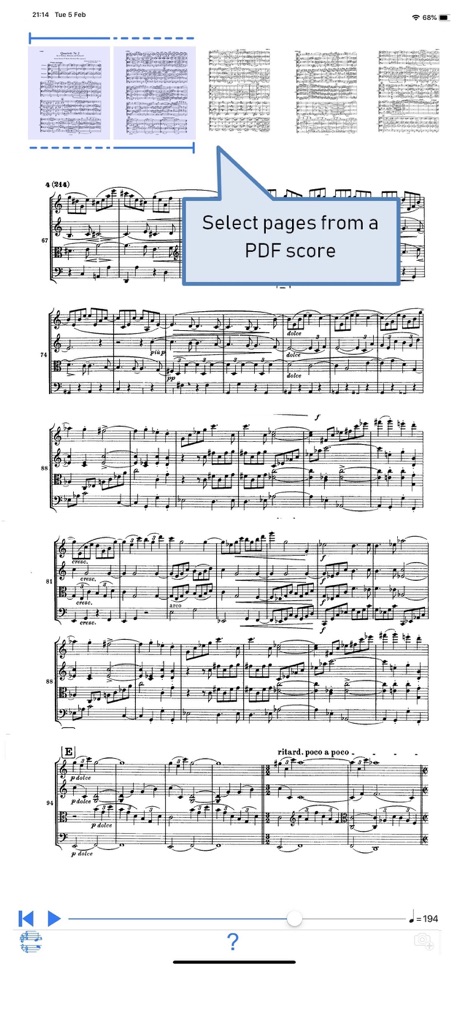
Observe how the app facilitates robust document handling, allowing users to precisely 'Select pages from a PDF score' and navigate efficiently via the clear page thumbnails at the top.
PDF Score Management
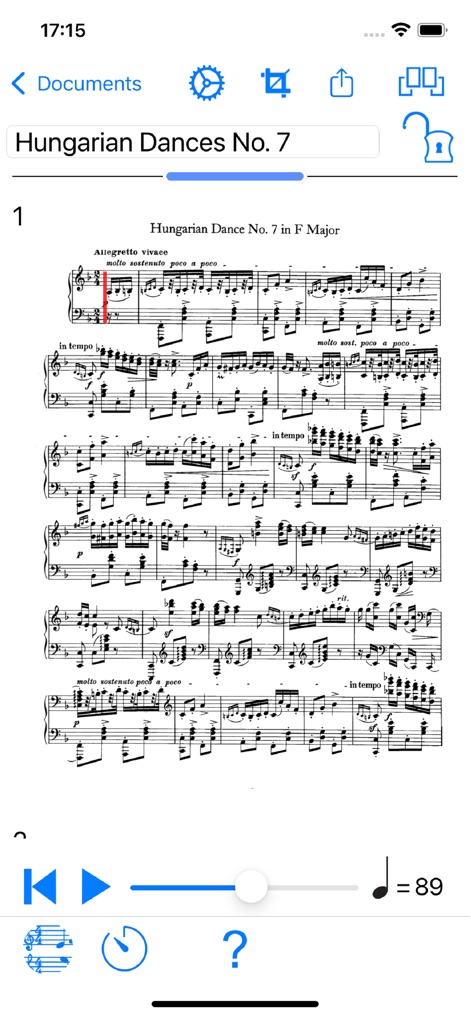
Explore the app's precise playback functionality, highlighted by the red vertical line indicating current position and the interactive tempo slider, which displays the beats per minute 'J = 89'.
Dynamic Playback Controls
Description
Download
More Like This
Apps with similar features and user experience

Cifra Club
Studio Sol Comunicacao Digital LTDA

Musicnotes: Sheet Music Reader
Musicnotes

Spark: Chords, Backing Tracks
Positive Grid Inc

iReal Pro
Technimo LLC

懂音律-钢琴吉他谱共享学习平台
梦莹 张

Jamzone - Sing & Play Along
Recisio

MuseScore: sheet music
MuseScore Limited

Songsterr Tabs & Chords
Guitar Tabs LLC

弹琴吧-钢琴吉他学习平台
Beijing Qule Technology Co., Ltd.
This page is not an official page of the app or its developer, but an independent editorial publication created for informational and commentary purposes. Unless expressly stated otherwise, neither the app nor its developer is affiliated with, endorsed by, sponsored by, authorized by, or otherwise officially connected with MWM, Apple, Google Play, the app publisher, or the app's developer, and nothing on this page implies that the app was developed using MWM's services. Any trademarks, logos, screenshots, and other content remain the property of their respective owners.