
This page is not an official page of the app or its developer, but an independent editorial publication created for informational and commentary purposes. Unless expressly stated otherwise, neither the app nor its developer is affiliated with, endorsed by, sponsored by, authorized by, or otherwise officially connected with MWM, Apple, Google Play, the app publisher, or the app's developer, and nothing on this page implies that the app was developed using MWM's services. Any trademarks, logos, screenshots, and other content remain the property of their respective owners.


PostNL
No more delivery guesswork. This app grants users total command over their PostNL shipments, bringing clarity to every delivery.
Downloads
2.5M+User Rating
Total Ratings
735.9KPublisher
Category
LifestyleLocales
3Latest Version
7.0.0Size
40.2 MBFirst Released
Apr 4, 2012An evaluation of core functionalities driving user convenience and efficiency in postal services.
PostNL App Feature Analysis
Real-time Package Tracking
The app provides a comprehensive overview of all incoming packages, enabling users to monitor their delivery status in real time and anticipate arrivals.
Instant Notifications & Widget
It offers push notifications for immediate status updates and a home screen widget, ensuring users are always informed about their shipments without opening the app.
Streamlined Shipping Label Creation
This tool allows users to effortlessly create shipping labels directly within the app, which can then be printed at a PostNL point for convenient package dispatch.
Digital Mail Overview (My Mail)
For users in the Netherlands, the app features My Mail, which provides a complete digital overview of all incoming traditional mail, enhancing organization and information access.
PostNL Service Point Finder
It enables users to easily locate the nearest PostNL service points, facilitating convenient package drop-offs, collections, and other postal services.
Convenient Digital Stamp Purchase
The app provides the option to purchase digital stamps, allowing users to write them directly on letters, thereby simplifying the mailing process for individual correspondence.
Frequently Asked Questions
Everything you need to know about PostNL
How can I track packages using the PostNL app?
The PostNL app allows users to easily track packages and provides a complete overview of all items on their way. Enabling notifications ensures users stay informed of the latest status.
Can I send packages with the PostNL app?
Yes, the PostNL app allows users to send packages by creating shipping labels directly within the app. Users can also have a QR code scanned at a PostNL point for confirmation.
Does the PostNL app provide notifications for package status?
Yes, the PostNL app provides notifications. Users enabling notifications are always informed of the latest status of their package. A widget can also be installed for continuous updates.
What is the 'My Mail' feature in the PostNL app?
The 'My Mail' feature in the PostNL app provides a complete overview of all mail on its way to the user. This feature is exclusively available within the Netherlands.
How do I create a shipping label using the PostNL app?
To create a shipping label, users utilize the PostNL app to generate the label. This label can then be printed at a PostNL point after scanning the generated barcode.
Can I purchase a digital stamp in the PostNL app?
Yes, the PostNL app allows users to buy a digital stamp. After purchase, users write the provided stamp code directly onto the letter for postage.
What is the cost of a digital stamp purchased through the PostNL app?
A digital stamp purchased via the PostNL app costs €1.75. This price is clearly displayed on the screen when acquiring a stamp code.
Can I locate PostNL service points using the app?
Yes, the PostNL app allows users to easily find PostNL points. This feature helps users locate nearby service locations for various shipping needs.
The following screenshots and description are sourced directly from the app's official store listing and are the property of the app developer.
App Store
Screenshots

This visual metaphor highlights the app's capability to centralize all mail and parcels, showing a package icon moving on a route and abstract package representations around the phone.
Unified Delivery Hub
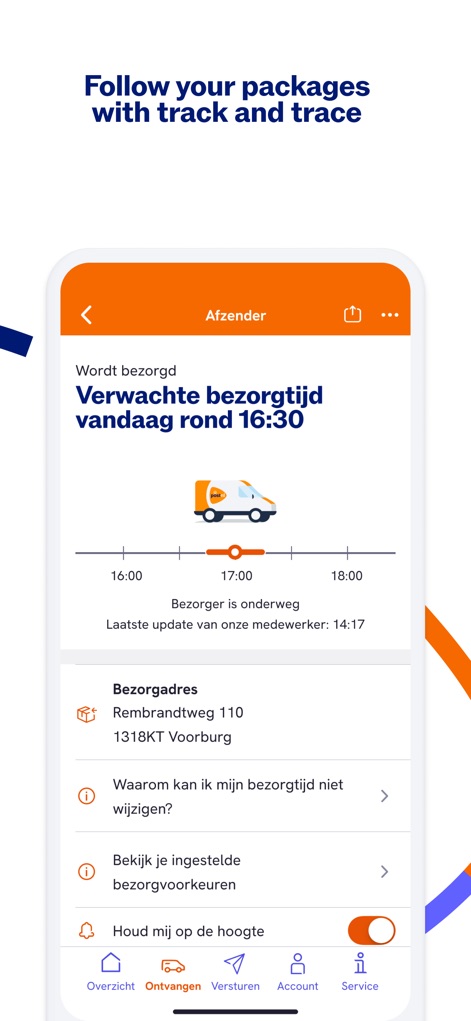
Users can track their packages in real-time, observing the detailed delivery timeline with a truck icon and viewing the specific "Bezorgadres" (delivery address) information.
Real-time Tracking
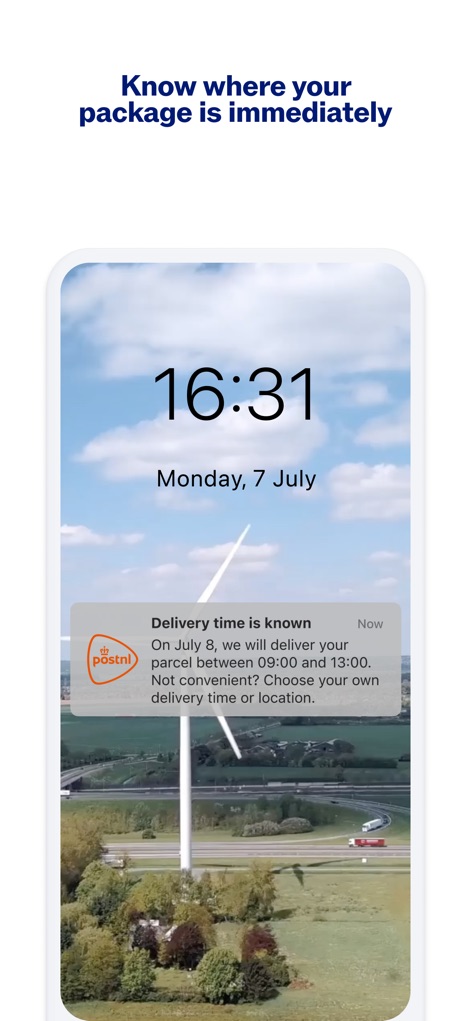
The app provides users with immediate delivery updates via lock screen notifications, clearly stating the expected delivery window and offering the flexibility to choose an alternative delivery time or location.
Timely Delivery Alerts
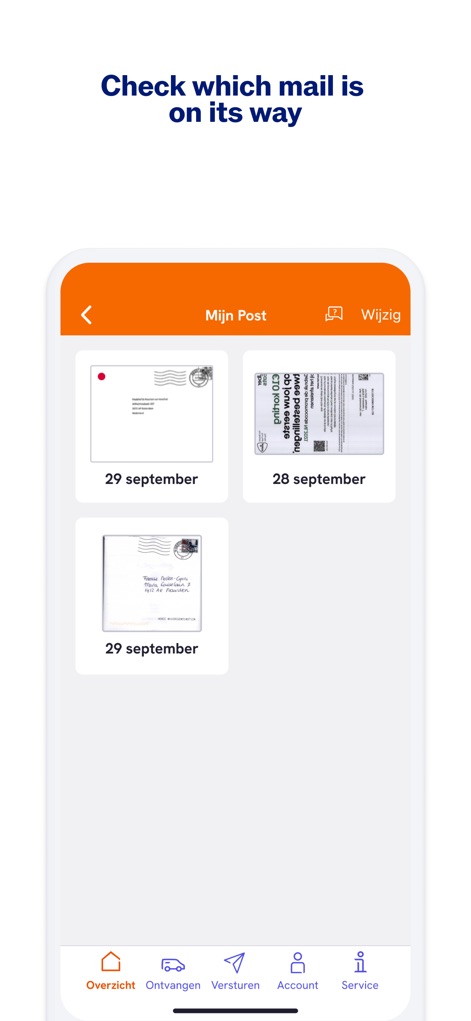
Users gain a comprehensive overview of their incoming physical mail through digital previews of envelopes with dates and access to the dedicated "Mijn Post" (My Mail) section.
Digital Mail Preview
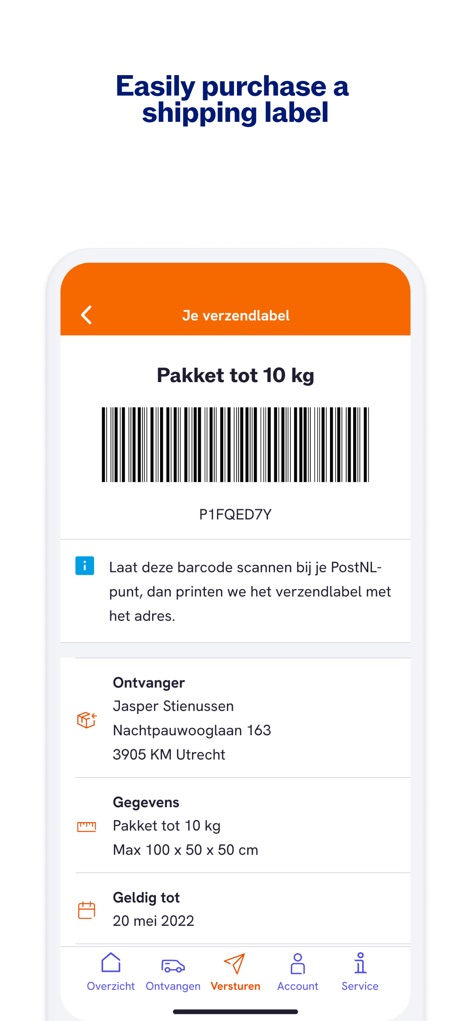
The app simplifies shipping by generating a scannable shipping label barcode and clearly displaying all necessary "Ontvanger" (recipient) and package "Gegevens" (details).
Effortless Shipping Labels
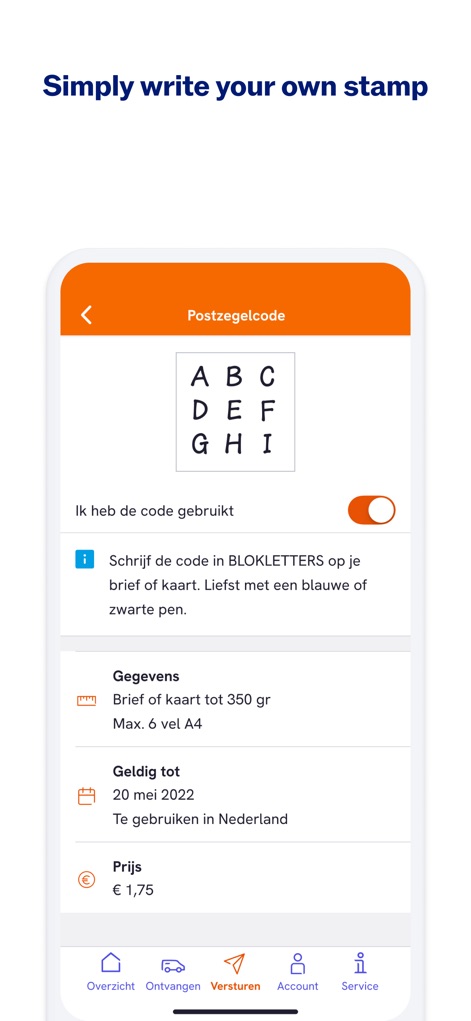
This feature introduces the ease of digital stamps, presenting a unique "Postzegelcode" (stamp code) as a grid of letters and offering clear instructions to write it directly on the letter.
Digital Stamp Convenience
Description
Download
More Like This
Apps with similar features and user experience

CDEK: Delivery & Shopping
SDEK-DS, OOO

Почта России
Federal State Unitary Enterprise Russian Post

InPost Mobile
InPost Paczkomaty Sp. z o.o.

USPS Mobile®
United States Postal Service

Australia Post
Australia Post

快递100
Shenzhen Qianhai Baidi Network Co., Ltd.
Mój DHL
DHL eCommerce (Poland) sp. z o.o.

Packeta
Zasilkovna s.r.o.

iBoxen
iBoxen Infrastruktur Sverige AB
This page is not an official page of the app or its developer, but an independent editorial publication created for informational and commentary purposes. Unless expressly stated otherwise, neither the app nor its developer is affiliated with, endorsed by, sponsored by, authorized by, or otherwise officially connected with MWM, Apple, Google Play, the app publisher, or the app's developer, and nothing on this page implies that the app was developed using MWM's services. Any trademarks, logos, screenshots, and other content remain the property of their respective owners.