
This page is not an official page of the app or its developer, but an independent editorial publication created for informational and commentary purposes. Unless expressly stated otherwise, neither the app nor its developer is affiliated with, endorsed by, sponsored by, authorized by, or otherwise officially connected with MWM, Apple, Google Play, the app publisher, or the app's developer, and nothing on this page implies that the app was developed using MWM's services. Any trademarks, logos, screenshots, and other content remain the property of their respective owners.


Previvale
No more guesswork. Previvale gives users total command over their card balances and transactions, making managing benefits painless.
Downloads
25k+User Rating
Total Ratings
157Publisher
Category
FinanceLocales
1Latest Version
4.1.2Size
40.0 MBFirst Released
Sep 3, 2015An evaluation of core functionalities designed for beneficiaries of welfare and corporate card programs.
Previvale App: Key Feature Analysis
Real-time Balance Inquiry
The app provides instant access to the current balance across all associated Previvale cards, enabling users to stay informed about their available funds.
Secure Temporary Card Blocking
It enables users to temporarily block their Previvale cards if lost or misplaced, offering immediate security and peace of mind without needing to cancel the card permanently.
Comprehensive Transaction History
This tool allows users to review detailed transaction records for all their cards, facilitating budget tracking and expenditure monitoring.
Streamlined Multi-Card Management
The app facilitates the association of multiple Previvale cards to a single account and allows users to assign personalized aliases, simplifying the management of various benefits.
The following screenshots and description are sourced directly from the app's official store listing and are the property of the app developer.
App Store
Screenshots

See the app's initial branding with the distinct Previvale logo and the welcoming message that greets users upon launch.
Welcome Screen
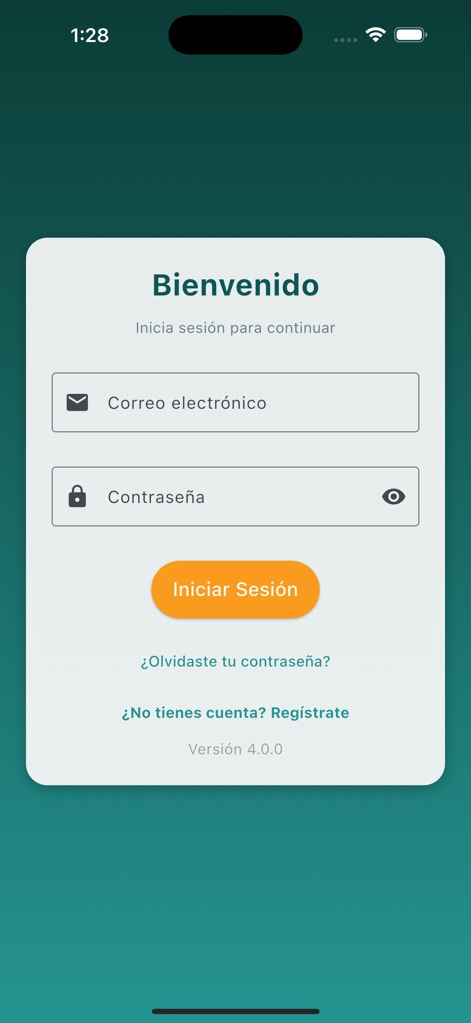
This screenshot displays the secure login interface with clear fields for email and password, alongside convenient options for password recovery.
Secure Access

Observe the streamlined password recovery process, where users simply input their email address to receive a temporary password.
Password Recovery

This screen details the comprehensive account creation process, allowing users to enter personal information and associate their card number.
Account Creation

The app presents a clear overview of multiple associated cards, prominently displaying current balances and distinct card types at a glance.
Card Overview

Explore the intuitive side navigation menu, providing quick access to essential features like the user's profile and legal notices.
Navigation Menu

This view provides a detailed transaction history for a specific card, showcasing individual spending entries and the current monthly balance.
Transaction Details

Users can easily locate establishments by entering a postal code and viewing a clear list of nearby stores, simplifying where to use their benefits.
Merchant Locator

This interactive map interface visually guides users to specific establishments, highlighting the exact location and offering seamless navigation.
Map Integration
Description
Download
More Like This
Top-ranked apps in the same category

电子税务局
State Administration of Taxation

UnionPay APP
China Unionpay Co.,Ltd.

养基宝 - 年轻人的养基神器
Shenzhen Xiaoduotou Information Technology Co.,Ltd.

PayPal - Pay, Send, Save
PayPal, Inc.

中国农业银行
AGRICULTURAL BANK OF CHINA LIMITED

Mercado Pago: cuenta digital
MercadoLibre S.A.

Kalshi: Trade on the Big Game
KALSHI INC.

中国工商银行
Industrial and Commercial Bank of China

个人所得税
State Administration of Taxation
This page is not an official page of the app or its developer, but an independent editorial publication created for informational and commentary purposes. Unless expressly stated otherwise, neither the app nor its developer is affiliated with, endorsed by, sponsored by, authorized by, or otherwise officially connected with MWM, Apple, Google Play, the app publisher, or the app's developer, and nothing on this page implies that the app was developed using MWM's services. Any trademarks, logos, screenshots, and other content remain the property of their respective owners.