
This page is not an official page of the app or its developer, but an independent editorial publication created for informational and commentary purposes. Unless expressly stated otherwise, neither the app nor its developer is affiliated with, endorsed by, sponsored by, authorized by, or otherwise officially connected with MWM, Apple, Google Play, the app publisher, or the app's developer, and nothing on this page implies that the app was developed using MWM's services. Any trademarks, logos, screenshots, and other content remain the property of their respective owners.


Q-Net 큐넷 (국가자격/디지털배지/전자지갑)
Conquer certifications. This app puts your professional future in your pocket.
Downloads
750k+User Rating
Total Ratings
417Publisher
Category
EducationLocales
1Latest Version
1.0.12Size
44.8 MBFirst Released
Apr 1, 2024An analytical overview of the core functionalities enabling efficient professional qualification processes for career-driven individuals.
Key Features of Q-Net: Digital Certification Management
Official Certificate & Confirmation Issuance
This tool features the ability to apply for, inquire about, and issue official national certificates and confirmation documents, ensuring authenticated proof of qualifications.
Digital Application & Management
It allows users to seamlessly apply for national technical and professional certifications, manage their applications, and track submission history directly from their mobile device.
Personalized My Page Dashboard
This tool features a comprehensive 'My Page' dashboard where users can manage personal information, check application/exam status, view exemption details, and track all their certification activities.
Instant Exam Results & Answer Keys
The app provides quick access to exam results, provisional answer keys, and final confirmed answer keys, enabling candidates to promptly review their performance and check eligibility.
Electronic Wallet for Credentials
The app provides an electronic wallet service to securely store and manage various digital credentials, simplifying access and verification of qualifications.
Digital Badge Integration
It allows users to view and issue digital badges for their acquired certifications, offering a modern and verifiable way to showcase professional achievements online.
Frequently Asked Questions
Everything you need to know about Q-Net 큐넷 (국가자격/디지털배지/전자지갑)
What is the Q-Net app?
Q-Net is an official Korean app for national qualifications, digital badges, and e-wallet services. It allows users to apply for exams, check results, issue certificates, and manage personal information related to national qualification examinations.
What services does the Q-Net app offer?
The Q-Net app provides core functions including exam application, test result viewing, certificate issuance, provisional/final answer lookup, and management of My Page information. It also offers digital badge and e-wallet services.
Can I apply for national qualification exams using the Q-Net app?
Yes, users can submit exam applications directly through the Q-Net app. This is a primary feature, prominently displayed on the app's main screen with specific application periods.
How can I check my test results in the Q-Net app?
Yes, you can view your test results within the Q-Net app. This feature is listed among the main functions and is accessible from the home screen's '합격자 발표' section.
Does the Q-Net app support digital badges?
Yes, the Q-Net app supports digital badges. Users can view and issue digital badges directly through the application, as stated in its main features and name.
Can I use the Q-Net app for all professional qualification exams?
No, the Q-Net app does not support professional qualification exams, excluding certified real estate agents. For these services, users must access www.Q-net.or.kr via PC.
How do I apply for a qualification certificate using the Q-Net app?
Yes, you can apply for certificate issuance through the Q-Net app. This is a primary function accessible directly from the app's main screen.
Can I view exam schedules on the Q-Net app?
Yes, you can view national technical and professional qualification exam schedules in the Q-Net app. This feature is available through the main screen and side menu.
What is the e-wallet service in the Q-Net app?
The Q-Net app provides an e-wallet service as one of its main features. This service likely manages digital credentials and related transactions within the application.
Is mobile public certificate login available in the Q-Net app?
No, mobile public certificate login is not available in the Q-Net app. This information is clearly stated in an announcement on the app's main screen.
What should I do if a rooting error occurs when using the Q-Net app?
If a rooting error occurs when running the Q-Net app, users must delete and then reinstall the application. This resolves the execution issue.
How can I access and manage my personal information in the Q-Net app?
Yes, you can access your personal information in the Q-Net app through the 'My Page' section. This includes managing contact details, academic/career history, and withdrawal information.
The following screenshots and description are sourced directly from the app's official store listing and are the property of the app developer.
App Store
Screenshots
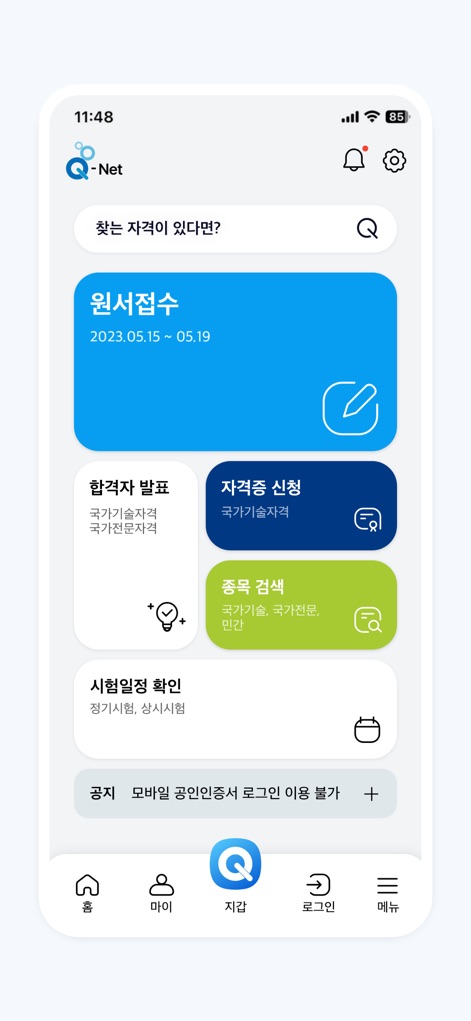
The app's intuitive dashboard provides immediate access to essential features like the prominent "Application Submission" card with its key dates and the direct "Certificate Application" link.
Dashboard Overview

The comprehensive side menu clearly outlines all available services, from detailed "Exam Schedule/Requirements" information to the granular options within "My Page" for personalized user management.
Comprehensive Navigation
Description
Download
More Like This
Apps with similar features and user experience

هيئة الاتصالات
Communications, Space and Technology Commission

mKraków
URZAD MIASTA KRAKOWA

UPUPocket
JABATAN DIGITAL NEGARA (JDN)

Резерв+
MINISTERSTVO OBORONY UKRAINY

1365자원봉사
Ministry of the Interior and Safety

mobiWAWA
Urzad m.st. Warszawy

e-병무지갑
Military Manpower Administration

예비군앱
Ministry of National Defense - Republic of Korea

병무청
Military Manpower Administration
This page is not an official page of the app or its developer, but an independent editorial publication created for informational and commentary purposes. Unless expressly stated otherwise, neither the app nor its developer is affiliated with, endorsed by, sponsored by, authorized by, or otherwise officially connected with MWM, Apple, Google Play, the app publisher, or the app's developer, and nothing on this page implies that the app was developed using MWM's services. Any trademarks, logos, screenshots, and other content remain the property of their respective owners.