
This page is not an official page of the app or its developer, but an independent editorial publication created for informational and commentary purposes. Unless expressly stated otherwise, neither the app nor its developer is affiliated with, endorsed by, sponsored by, authorized by, or otherwise officially connected with MWM, Apple, Google Play, the app publisher, or the app's developer, and nothing on this page implies that the app was developed using MWM's services. Any trademarks, logos, screenshots, and other content remain the property of their respective owners.


Quiver - 3D Coloring App
It grants users the power to make static art leap into a dynamic digital world.
Downloads
2.5M+User Rating
Total Ratings
426Publisher
Category
EntertainmentLocales
1Latest Version
6.32Size
265.2 MBFirst Released
May 30, 2013An evaluation of core functionalities blending traditional creativity with augmented reality for young learners.
Quiver - 3D Coloring App: Key Feature Analysis
Augmented Reality Coloring
The app transforms traditional colored pages into interactive 3D animations using augmented reality technology, bringing children's artwork to life.
Integrated Educational Content
This tool features a wide array of educational coloring pages covering subjects like ABCs, space, math, and science, enhancing learning through interactive play and including quizzes and educational tools.
Interactive 3D Creations
It allows users to engage, interact, and play simple games directly with their animated 3D creations, fostering dynamic and sustained enjoyment.
Classroom Management Dashboard
The Quiver Education dashboard enables efficient deployment across multiple devices in a classroom with a single subscription, providing educators with comprehensive content access.
Curriculum-Aligned Lesson Plans
The app provides a range of free, teacher-created lesson and activity plans designed to complement the coloring pages and support various learning styles and educational objectives.
Diverse Printable Content
It offers a diverse and readily accessible collection of printable coloring pages from its website, encompassing both educational themes and pure entertainment.
Shareable AR Creations
It allows users to capture photos and videos of their personalized AR creations, enabling them to easily share their artwork and interactive experiences with others.
Dynamic Sound Integration
The app enhances the augmented reality experience with different sound effects associated with each interactive page, adding an immersive auditory dimension to the visual content.
Frequently Asked Questions
Everything you need to know about Quiver - 3D Coloring App
What is the Quiver - 3D Coloring App?
The Quiver app combines physical coloring with augmented reality technology. It creates an engaging, educational, and magical experience by bringing colored pages to life as 3D animations on smart devices.
How does the Quiver app work?
Users download the Quiver app, print pages from the website, color them, then scan the QR code and the colored page with their device's camera. The Quiver app then makes the creation leap from the page with augmented reality.
Does the Quiver - 3D Coloring App offer free content?
Yes, the Quiver app offers free pages available for download from its website. These free pages allow users to test the augmented reality coloring experience before considering a subscription.
What kind of educational content does Quiver provide?
Quiver provides a wide range of educational content including subjects like ABCs, space, math, science, and geography. It also offers lesson and activity plans created by educators to help students visualize and understand various topics.
Do I need a subscription for the Quiver app?
A subscription for the Quiver app unlocks all paid premium augmented reality content and lesson plans. While free pages are available, in-app purchases and subscriptions give access to additional content.
Can multiple devices use one Quiver app subscription in a classroom?
Yes, the Quiver Education dashboard allows deployment of the Quiver app across multiple classroom devices using a single subscription. All these devices can then access and use the available Quiver app content during the subscription term.
Does the Quiver - 3D Coloring App collect personal data?
No, the Quiver app does not collect any personally identifiable data. It collects only anonymous, aggregated analytics data to improve the app experience, adhering to its privacy policy.
What are the technical requirements for using the Quiver app?
The Quiver app requires physically printed coloring pages to enjoy the full experience, an Internet connection to download new content, and it only works with QuiverVision pages, identifiable by the Quiver Butterfly logo.
Where can I find Quiver coloring pages to print?
Users can find and download Quiver coloring pages from the Quiver app's website, specifically at quivervision.com/coloring-packs. These pages are then printed to be colored and used with the app.
The following screenshots and description are sourced directly from the app's official store listing and are the property of the app developer.
App Store
Screenshots

Observe how the app transforms traditional coloring pages into immersive augmented reality experiences, showcasing vibrant educational scenes like the erupting volcano and interactive cell models.
Dynamic 3D Worlds
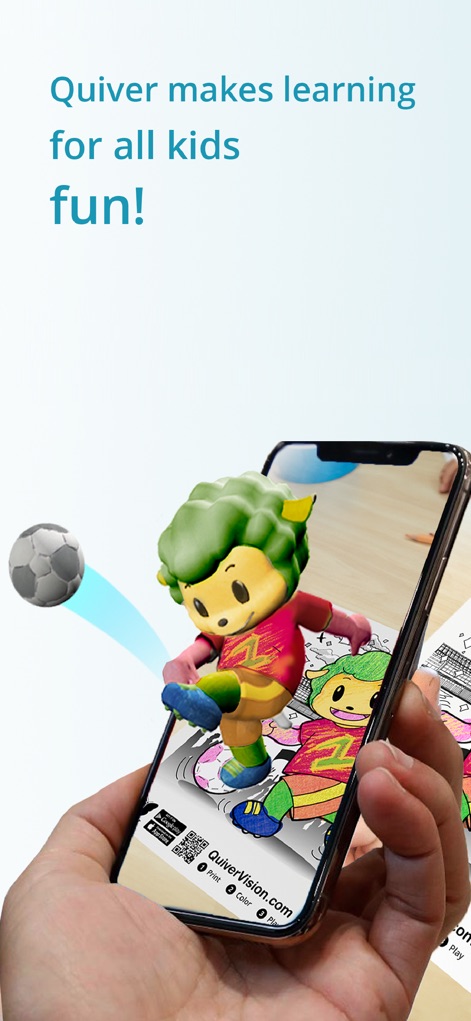
See how colored artwork leaps from the page, featuring an engaging 3D animated character and an interactive soccer ball for playful engagement.
Interactive Animated Fun

Explore supplementary learning materials, including ready-to-use lesson plans and informative activity sheets like the "Sustainable Goals" worksheet.
Educational Resources

Discover the app's rich collection of AR coloring packs, offering diverse themes such as "Quiver Ocean Animals" and "Quiver Dinosaurs" for endless exploration.
Extensive Content Library
Description
Download
More Like This
Apps with similar features and user experience
Project Aqua: Adobe for Kids
Adobe Labs, Inc.

The Magical Mix-Up AR
King Studio, LLC

Plugo by PlayShifu
MOBILIZAR TECHNOLOGIES PRIVATE LIMITED

Animopus: kids drawing 2+
Animopus Inc.

My Very Hungry Caterpillar AR
StoryToys Limited

Discover Dairy
Center for Dairy Excellence
Elf Studio
North Pole Command Centre Limited

Orboot Earth AR by PlayShifu
MOBILIZAR TECHNOLOGIES PRIVATE LIMITED
Kids Drawing, Doodle Painting
Hue Hoang Thi
This page is not an official page of the app or its developer, but an independent editorial publication created for informational and commentary purposes. Unless expressly stated otherwise, neither the app nor its developer is affiliated with, endorsed by, sponsored by, authorized by, or otherwise officially connected with MWM, Apple, Google Play, the app publisher, or the app's developer, and nothing on this page implies that the app was developed using MWM's services. Any trademarks, logos, screenshots, and other content remain the property of their respective owners.