RapidExposure

RapidExposure

Download on App Store
Logo of RapidExposure

RapidExposure: The Ultimate Precision Light Meter for Analog Photography

Turn your iPhone into a professional-grade exposure tool. Instantly calculate ISO, Aperture, and Shutter Speed to capture perfect manual shots on your vintage or film camera without the expensive hardware.

Download on App Store

Publisher

HIROFUMI MARUO

Category

Lifestyle

Downloads

4K+

User Rating

3.4/5

Total Ratings

0

Locales

2

Precision in Sight

Discover the interface used by 4K+ users.
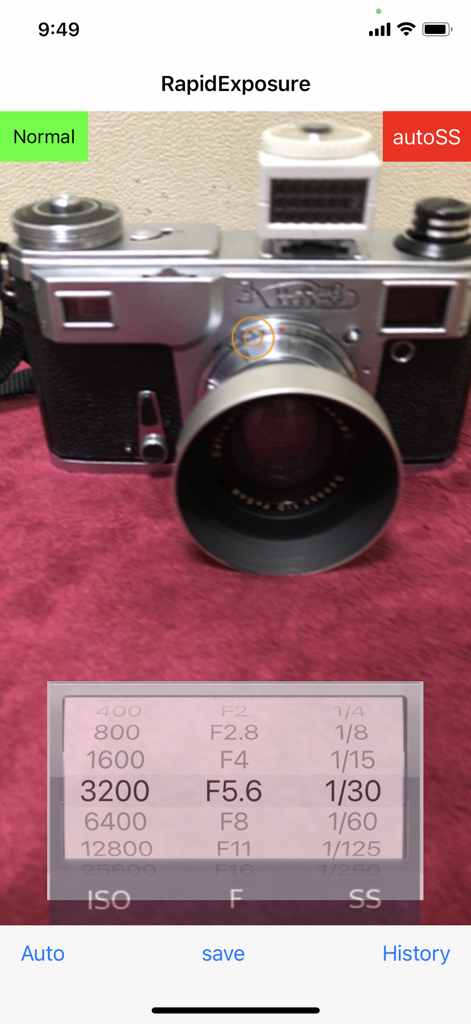
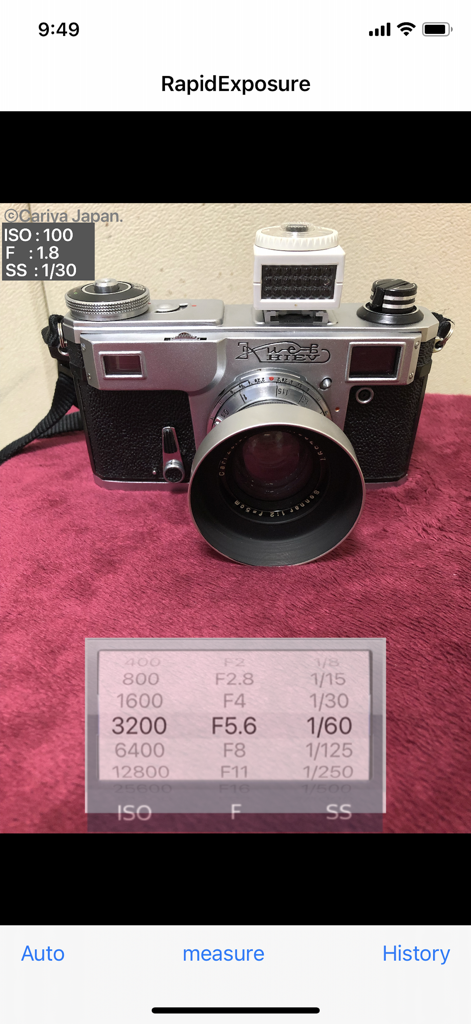
RapidExposure mobile app interface showing real-time light meter settings for ISO aperture and shutter speed with a vintage camera in the background

RapidExposure mobile app interface showing real-time light meter settings for ISO aperture and shutter speed with a vintage camera in the background

RapidExposure app interface showing ISO aperture and shutter speed settings for a vintage camera

RapidExposure app interface showing ISO aperture and shutter speed settings for a vintage camera

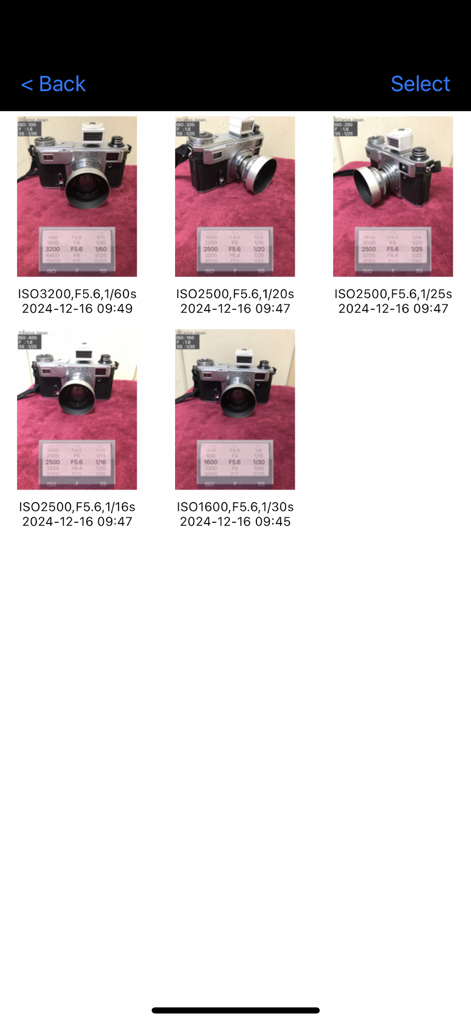
History log of photos with exposure settings including ISO aperture and shutter speed

History log of photos with exposure settings including ISO aperture and shutter speed

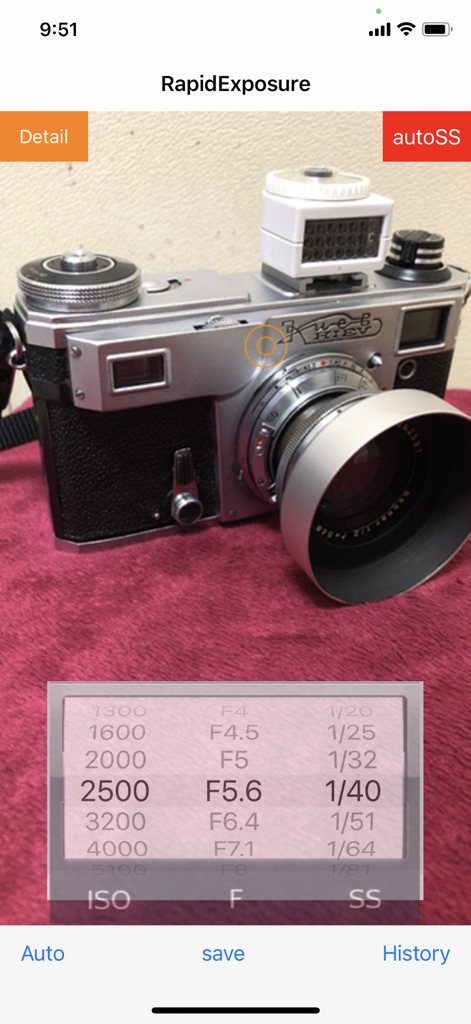
RapidExposure app interface showing ISO aperture and shutter speed settings while metering a vintage camera

RapidExposure app interface showing ISO aperture and shutter speed settings while metering a vintage camera

Master Every Shot with Precision Metering

The tools that make this app stand out, trusted by 4K+ users.

⚙️

Dynamic Exposure Calculation

Seamlessly toggle between Aperture or Shutter priority. The app instantly recalculates your variables with 1/3 stop precision to match your manual camera’s capabilities.

📓

Digital Exposure Notebook

Never forget your settings again. Save reference photos with logged metadata to review your technical choices once your film has been developed.

🔦

Pro-Grade Sensor Accuracy

Replace bulky, expensive handheld meters. Leverage your iPhone’s advanced optics to get reliable light readings in any environment, from street scenes to studio setups.

About the app

Everything you need to know about RapidExposure.

Description

This app will turn iPhone into exposure meter for cameras. It can continuously measure exposure value and indicate the information without releasing the shutter. It allows you to recalculate and indicate the shutter speed together with other ISO values and F values even during the measurement. The measurement is interrupted by the save button, and then write a row exposure value which iPhone automatically set into the image that iPhone had been taking, The image with the row exposure value is saved as a sample and displayed. It also displays the exposure value that the user has set. You can see the saved images on a list of images in the history window. You can adjust and rock the exposure on the tapped point of the preview screen. The exposure rock can be cancelled by the 'Auto' button. The shutter sound can be reduced by the volume button. However, it becomes the normal volume if it is set mute. At first the app puts high priority on ISO and F in exposure calculation. Under the exposure measurement, it indicates variable aperture stops (F-number) at a fixed shutter speed when you manually change the shutter speeds. Or, when you manually change the aperture stops (F-numbers), it indicates variable shutter speeds at a fixed aperture stop. If you change the ISO value, shutter speed or F-value changes depending on the mode at the time. The range of ISO vales, F values and shutter speeds are as follows. (In the new version, detail display mode is added in which F,ISO,SS values are changed by 1/3 step) ISO vales: "25","50","100","200","400","800","1600","3200","6400","12800","25600","51200" F values: "F0.7", "F1", "F1.4", "F2", "F2.8","F4", "F5.6", "F8", "F11", "F16","F22", "F32" shutter speeds: "60","30","15","8","4","2","1","1/2","1/4","1/8","1/15","1/30","1/60","1/125","1/250","1/500","1/1000","1/2000","1/4000","1/8000" ******** How to use: (1) Immediately after start-up, this application starts the exposure calculation automatically and it displays the values of ISO, F and SS in the wheel. (2) Exposure is recalculated in accordance with the subject that is reflected in the camera, the value of the SS will change accordingly. When you point the camera toward bright, the value of SS is reduced. Turning the camera to darker, the value of the SS will increase. (3) If you change the value of the ISO in the wheel, the value of the SS will change accordingly. Changing the value of F in the same manner, the value of the SS will change. Further, changing the value of the SS, the value of F will change. (4) If you tap the "Save" button, the exposure value displayed at that time is locked and a photo is taken. A reference exposure value that iPhone camera set to itself is written in the photo. (The reference value is different from that displayed in the wheel. It is not possible to set exposure value in the wheel to iPhone camera itself.) (5) If you tap the "measure" button, it restarts the exposure calculation and re-displays the values ​​of ISO, F and SS. (6) If you tap the "History" button, the History window appears and the contents saved are listed. They are save date and time , photos and the exposure values you had set by the wheel when you save. (7) You can enlarge the photo by tapping it. (8) It changes to delete mode when you tap the "trash", delete mark appears in the photo that you tap. If you tap "Done", photos marked for deletion will be deleted. (9) **** This app uses OSS:AQGridView(Copyright(c) 2010-2011, Kobo Inc.) NOTE: However this app calculates ISO vale, F value and shutter speed based on the photos taken with the built-in camera, we are not able to guarantee the accuracy of these values.

Latest Version

2.2

Size

8.9 MB

First Released

Apr 4, 2014

Master Your Exposure, Frame by Frame

Stop guessing and start creating. Turn your iPhone into a professional-grade light meter and capture the perfect shot with your manual or vintage camera today.

Download on App Store

App information, icons, screenshots, and descriptions displayed on this page are sourced from the Apple App Store and are the property of their respective developers. Download estimates and rankings are based on MWM's proprietary models and may not reflect actual figures. This page is provided for informational and analytical purposes only.

Believe this page infringes your intellectual property? File a dispute