
This page is not an official page of the app or its developer, but an independent editorial publication created for informational and commentary purposes. Unless expressly stated otherwise, neither the app nor its developer is affiliated with, endorsed by, sponsored by, authorized by, or otherwise officially connected with MWM, Apple, Google Play, the app publisher, or the app's developer, and nothing on this page implies that the app was developed using MWM's services. Any trademarks, logos, screenshots, and other content remain the property of their respective owners.


Xiaomi Home
Device chaos ends now. The app gives users absolute mastery over every Xiaomi gadget, transforming a house into a responsive, personal domain.
Downloads
100M+User Rating
Total Ratings
462.2KPublisher
Category
LifestyleLocales
28Latest Version
11.3.201Size
706.5 MBFirst Released
Jan 27, 2015Key Features of Xiaomi Home
An Analytical Review for Smart Home Enthusiasts
Anytime, Anywhere Device Control
It allows users to manage and operate their smart home devices remotely, offering convenience whether they are at home or away.
Intelligent Task Automation
It allows users to set up automated routines and intelligent tasks based on various triggers, enhancing convenience and energy efficiency.
Simplified Device Onboarding
The app provides a straightforward process to add new Xiaomi smart home devices, ensuring quick integration into the user's ecosystem.
Real-time Device Status
This tool features instant updates on the operational status of all connected devices, providing peace of mind and control.
Family Device Sharing
The app enables users to securely share control of their smart devices with family members and friends, fostering a collaborative smart home environment.
Integrated Cloud Storage
The app offers options for cloud storage services, primarily for camera footage, providing secure offsite data retention for surveillance and historical records.
Frequently Asked Questions
Everything you need to know about Xiaomi Home
What is the primary function of the Xiaomi Home app?
The Xiaomi Home app is a professional application designed to help users manage their intelligent devices, add new devices, control them remotely, and monitor their real-time status.
Can I control my devices remotely using the Xiaomi Home app?
Yes, the Xiaomi Home app allows users to control their intelligent devices wherever they are. It also provides real-time status updates for all connected devices.
Does the Xiaomi Home app support sharing devices with others?
Yes, the Xiaomi Home app enables users to share their intelligent devices with friends and family members. This feature allows multiple users to manage smart home devices.
Can users set up intelligent tasks with the Xiaomi Home app?
Yes, the Xiaomi Home app allows users to set up and perform intelligent tasks. It also supports creating and customizing smart scenes for automation, such as turning on lights automatically.
What is the monthly cost for the 7-day overwriting Mi Cloud Storage Renewal plan?
The monthly renewal price for the 7-day overwriting Mi Cloud Storage plan is 10 yuan. This service charges via your Apple ID account after confirming the subscription.
How much does the 30-day overwriting Mi Cloud Storage Renewal plan cost per month?
The monthly renewal price for the 30-day overwriting Mi Cloud Storage plan is 24 yuan. Your Apple ID account is debited after subscription confirmation.
How do I cancel the Mi Cloud Storage automatic renewal service?
To cancel, manually turn off automatic renewal in iTunes/Apple ID settings 24 hours before expiration. The path is "settings" > "iTunes store and AppStore" > "Apple ID" > "View Apple ID" > "Account Settings" > "subscribe" > "Mi Cloud Storage unsubscribe".
Does the Xiaomi Home app integrate with Apple Health?
Yes, the Xiaomi Home app integrates with Apple Health via HealthKit. It shares BMI, body fat percentage, weight, and lean body mass after each weighing.
What home security features does the Xiaomi Home app provide?
The Xiaomi Home app offers "Smart Guard For Home Security" with ultra-clear picture quality, multi-screen real-time monitoring, and smart alarm notifications from devices like the Xiaomi Smart Camera.
Does continuous use of the Xiaomi Home app affect iPhone battery life?
Yes, continued use of GPS running in the background by the Xiaomi Home app can dramatically decrease battery life. Users should be aware of this potential impact.
The following screenshots and description are sourced directly from the app's official store listing and are the property of the app developer.
App Store
Screenshots
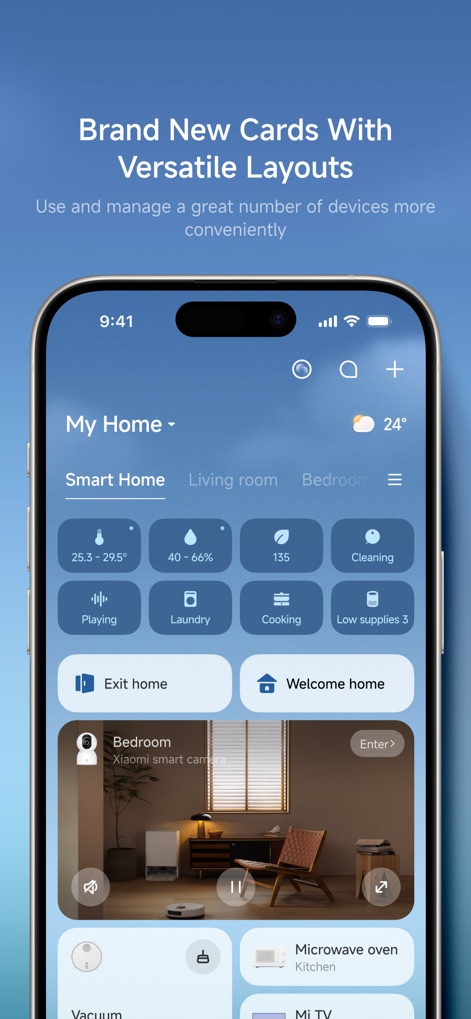
Unified Device Dashboard
The app features versatile card layouts for managing smart devices, showcasing quick actions like "Welcome home" and real-time device status indicators for temperature and humidity.
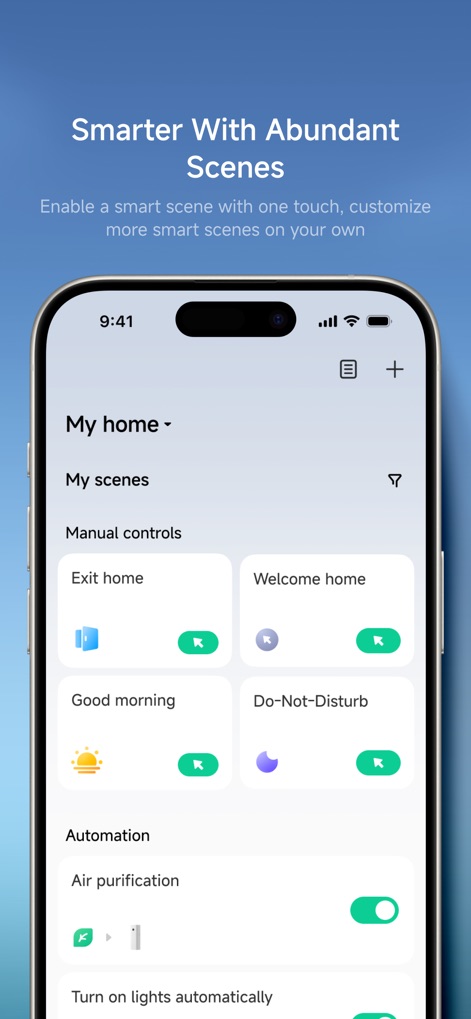
Smart Scene Automation
This tool empowers users to personalize their smart home experience with abundant scenes, offering convenient "Manual controls" and automated tasks like "Air purification."

Vigilant Home Security
For home security, the app delivers ultra-clear camera monitoring, providing real-time video feeds and critical event alerts such as "Person moved" for proactive surveillance.
Description
Download
More Like This
Apps with similar features and user experience

TP-Link Tapo
TP-Link Systems Inc.

Дом с Алисой
DIRECT CURSUS COMPUTER SYSTEMS TRADING LLC

VeSync
Vesync Technology Corporation

Kasa Smart
TP-Link Systems Inc.

ecobee
ecobee Ltd.

Hubspace
Afero, Inc.

ADT Control ®
ADT LLC

First Alert by Resideo
Resideo Technologies, Inc.

Mibo Smart: Casa Inteligente
Intelbras S.A. Ind. de Telecom. Elet. Brasileira
This page is not an official page of the app or its developer, but an independent editorial publication created for informational and commentary purposes. Unless expressly stated otherwise, neither the app nor its developer is affiliated with, endorsed by, sponsored by, authorized by, or otherwise officially connected with MWM, Apple, Google Play, the app publisher, or the app's developer, and nothing on this page implies that the app was developed using MWM's services. Any trademarks, logos, screenshots, and other content remain the property of their respective owners.