
This page is not an official page of the app or its developer, but an independent editorial publication created for informational and commentary purposes. Unless expressly stated otherwise, neither the app nor its developer is affiliated with, endorsed by, sponsored by, authorized by, or otherwise officially connected with MWM, Apple, Google Play, the app publisher, or the app's developer, and nothing on this page implies that the app was developed using MWM's services. Any trademarks, logos, screenshots, and other content remain the property of their respective owners.


RBC Mobile
Money management just got an upgrade. This app gives users unparalleled command over their finances, turning complex banking into effortless control.
Downloads
5M+User Rating
Total Ratings
220.5KPublisher
Category
FinanceLocales
2Latest Version
6.62Size
489.1 MBFirst Released
Aug 22, 2014An Analytical Overview for the Modern User
Key Features of RBC Mobile
Comprehensive Everyday Banking
It allows users to manage account balances, initiate money transfers, pay bills, and deposit cheques directly from their mobile device, covering essential financial transactions.
Enhanced Biometric Security
This tool features advanced biometric identification technologies, such as Touch ID and Face ID, providing secure and convenient access to accounts without the need for traditional passwords.
NOMI Insights for Financial Management
The app provides personalized financial tips and insights into spending trends, helping users effectively manage their day-to-day finances and understand their money habits.
NOMI Find & Save for Automated Savings
It leverages artificial intelligence to analyze spending habits and automatically identify small amounts to save, making wealth accumulation effortless and integrated into daily life.
Temporary Card Lock
The app allows users to temporarily lock a misplaced credit or debit card, offering immediate security and peace of mind, and can be easily unlocked if found.
Intuitive User Interface and Navigation
This tool features a fresh, intuitive design with improved navigation, including personalized Action Buttons and Manage Menus, ensuring easy access to all banking functionalities.
Frequently Asked Questions
Everything you need to know about RBC Mobile
What is the RBC Mobile app?
The RBC Mobile app is a banking application that offers convenient everyday banking, money management tools, and secure access to accounts. It helps users manage finances easily.
What banking features does the RBC Mobile app offer?
The RBC Mobile app offers account balances, money transfers, bill payments, cheque deposits, and ATM locations. It provides comprehensive everyday banking services.
Does the RBC Mobile app include NOMI features?
Yes, the RBC Mobile app includes NOMI features like NOMI Insights for personalized tips and spending trends, and NOMI Find & Save for automated savings.
Can I use biometric identification to log in to the RBC Mobile app?
Yes, the RBC Mobile app supports biometric identification technology such as Touch ID or Face ID for secure login without needing a password.
How can I manage my credit card in the RBC Mobile app?
The RBC Mobile app allows users to temporarily lock their credit card if misplaced. It also supports reporting lost/damaged cards and managing automatic payments.
Does the RBC Mobile app allow bill payments?
Yes, the RBC Mobile app supports bill payments. Users can pay bills, add payees, and manage past or upcoming payments directly within the app.
Can I trade stocks using the RBC Mobile app?
Yes, the RBC Mobile app integrates with RBC Direct Investing, allowing users to trade stocks, view market data, and manage investments.
What kind of security features are in the RBC Mobile app's Security Centre?
The Security Centre in the RBC Mobile app includes options for 2-step verification, Face ID, changing passwords, and managing trusted devices.
Can I send money to other RBC clients with the RBC Mobile app?
Yes, the RBC Mobile app allows users to send money directly to other RBC clients, as well as perform Interac e-Transfers and international money transfers.
Is the RBC Mobile app available outside of Canada?
No, the RBC Mobile app's financial services and products are not available outside of Canada. Users must be residents of Canada to access it.
How do NOMI Insights work in the RBC Mobile app?
NOMI Insights in the RBC Mobile app help manage finances by providing personalized tips and analyzing spending trends. This feature is also available for business clients.
Can I pay back purchases with points using the RBC Mobile app?
Yes, the RBC Mobile app allows users to redeem points towards eligible credit card transactions through the "Pay Back Purchases with Points" feature.
How can I contact support or get help within the RBC Mobile app?
The RBC Mobile app includes a Help section where users can chat with a virtual assistant, book appointments, or find branches and ATMs.
The following screenshots and description are sourced directly from the app's official store listing and are the property of the app developer.
App Store
Screenshots

The app's clear dashboard showcases account balances and quick action buttons for daily banking tasks.
Home Screen Overview

Users can monitor stock performance with an interactive chart and execute trades using clear buy and sell buttons.
Investing Made Easy

This tool provides a detailed financial snapshot and a clear overview of various payment requests.
Business Financial Tools

The Security Centre allows users to manage sign-in preferences like 2-step verification and biometric options such as Face ID.
Secure Your Finances

The Help section offers a search bar for quick answers and direct contact options like chat support.
Instant Support Access

The app simplifies bill management by displaying frequently paid bills and offering options to cancel or stop payments.
Streamlined Bill Payments

Users can easily manage their cards by locking them and adding them to Apple Pay directly from the app.
Card Management Controls

The "Move Money" menu presents diverse options for transferring funds and depositing cheques.
Effortless Money Movement

NOMI provides personalized spending trends with percentage breakdowns and a concise account overview.
NOMI Financial Insights
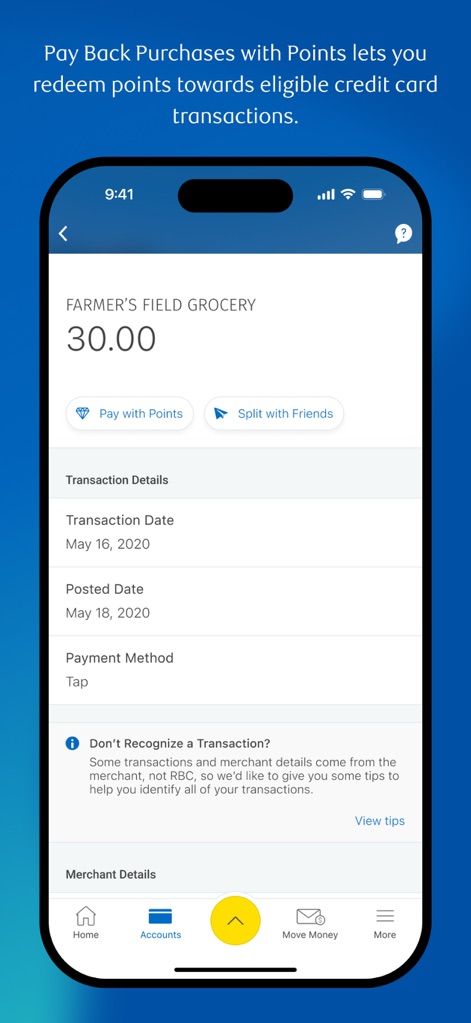
This feature allows users to redeem points towards transactions and split purchases with friends.
Redeem & Split Payments
Description
Download
More Like This
Apps with similar features and user experience

PayPal - Pay, Send, Save
PayPal, Inc.

中国农业银行
AGRICULTURAL BANK OF CHINA LIMITED

Mercado Pago: cuenta digital
MercadoLibre S.A.

中国工商银行
Industrial and Commercial Bank of China

Revolut: Send, spend and save
Revolut Ltd

HDFC Bank App (Early Access)
HDFC Bank Ltd

Zalopay - Quét Mọi QR
ZION JOINT STOCK COMPANY

Cash App
Block, Inc.

招商银行
CHINA MERCHANTS BANK CO.,LTD.
This page is not an official page of the app or its developer, but an independent editorial publication created for informational and commentary purposes. Unless expressly stated otherwise, neither the app nor its developer is affiliated with, endorsed by, sponsored by, authorized by, or otherwise officially connected with MWM, Apple, Google Play, the app publisher, or the app's developer, and nothing on this page implies that the app was developed using MWM's services. Any trademarks, logos, screenshots, and other content remain the property of their respective owners.