
This page is not an official page of the app or its developer, but an independent editorial publication created for informational and commentary purposes. Unless expressly stated otherwise, neither the app nor its developer is affiliated with, endorsed by, sponsored by, authorized by, or otherwise officially connected with MWM, Apple, Google Play, the app publisher, or the app's developer, and nothing on this page implies that the app was developed using MWM's services. Any trademarks, logos, screenshots, and other content remain the property of their respective owners.


Read AI: Transcripts and Notes
Meetings are no longer lost conversations. Users gain an undeniable edge in recall and productivity.
Downloads
75k+User Rating
Total Ratings
706Publisher
Category
ProductivityLocales
19Latest Version
2.8.0Size
37.0 MBFirst Released
Oct 21, 2024An analytical overview of Read AI's core functionalities for enhancing professional and academic efficiency.
Key AI-Powered Productivity Features
Real-time Transcription and Summarization
The app provides accurate, real-time transcripts and concise summaries, enabling users to focus on discussions without the distraction of manual note-taking.
Cross-Platform and Virtual Meeting Sync
This tool features cross-platform synchronization and integrates with major virtual meeting platforms like Zoom, Google Meet, and Microsoft Teams, ensuring accessibility and consistency of notes.
Workflow Integration
The app provides seamless integration with popular communication and CRM platforms, simplifying the sharing and review of meeting notes.
Intelligent Speaker Identification
This tool features unique speaker identification, automatically attributing contributions to individuals for clearer and more organized meeting records.
Actionable Report Generation
The app generates comprehensive, shareable reports after conversations, providing a structured record for follow-up and collaboration.
In-Person Meeting Capture
It allows users to capture and summarize face-to-face discussions and brainstorming sessions, expanding its utility beyond virtual platforms.
Frequently Asked Questions
Everything you need to know about Read AI: Transcripts and Notes
What is Read AI: Transcripts and Notes?
Read AI: Transcripts and Notes is an app that instantly captures audio from your iPhone, providing real-time AI-generated transcripts and summaries. It records in-person conversations and syncs notes with virtual meetings.
Can Read AI transcribe in-person meetings?
Yes, Read AI records and transcribes in-person conversations like lectures, client meetings, and brainstorming sessions. It generates real-time transcripts and summaries, then provides a comprehensive report.
Does Read AI provide real-time transcription?
Yes, Read AI provides accurate, real-time transcriptions and concise summaries during both in-person and virtual meetings. This feature helps users stay focused and quickly review content.
How does Read AI handle multiple speakers?
Read AI includes Unique Speaker Detection, which recognizes each speaker as a distinct contributor. This allows the AI to differentiate between individuals in the transcript and reports.
What platforms does Read AI integrate with?
Read AI integrates seamlessly with communication channels such as Gmail, Outlook, Slack, Microsoft Teams, Zoom, Google Meet, and CRM systems. It also supports cross-platform sync.
Can I get meeting summaries with Read AI?
Yes, Read AI generates real-time AI summaries of audio recordings and conversations. After a meeting, it produces a comprehensive report with summaries that can be kept private or shared.
Does Read AI offer notifications for meetings?
Yes, Read AI provides iOS notifications for upcoming meetings, new meeting reports, and pre-meeting recaps. This ensures users do not miss recording a conversation or taking notes.
Can Read AI analyze meeting performance?
Yes, Read AI provides meeting insights. Reports show metrics like "Meeting Score," "Engagement," and "Sentiment," as well as "Filler Words" and "Avg WPM" for mobile recordings.
How can I search past meeting notes in Read AI?
Read AI features an "Ask Search Copilot" function, allowing users to query their meetings and connected apps. Users can ask questions like "What are the major takeaways from last week's meetings?"
Can Read AI be added to calendar events?
Yes, Read AI integrates with your calendar. You can add Read AI to any calendar event with a tap, and select "Flexible" recording options as shown in the app interface.
The following screenshots and description are sourced directly from the app's official store listing and are the property of the app developer.
App Store
Screenshots
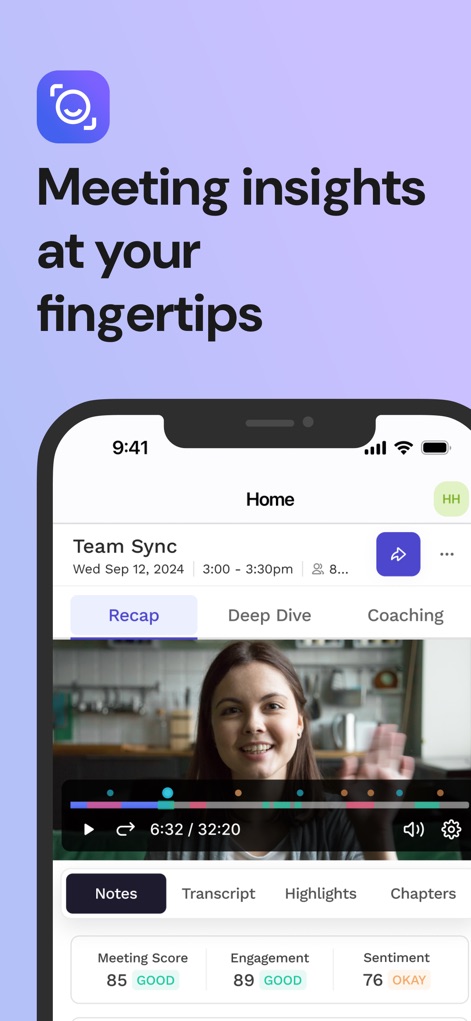
See how Read AI: Transcripts and Notes provides a comprehensive meeting overview with an integrated video player and key metrics like engagement and sentiment scores.
Meeting Insights Dashboard
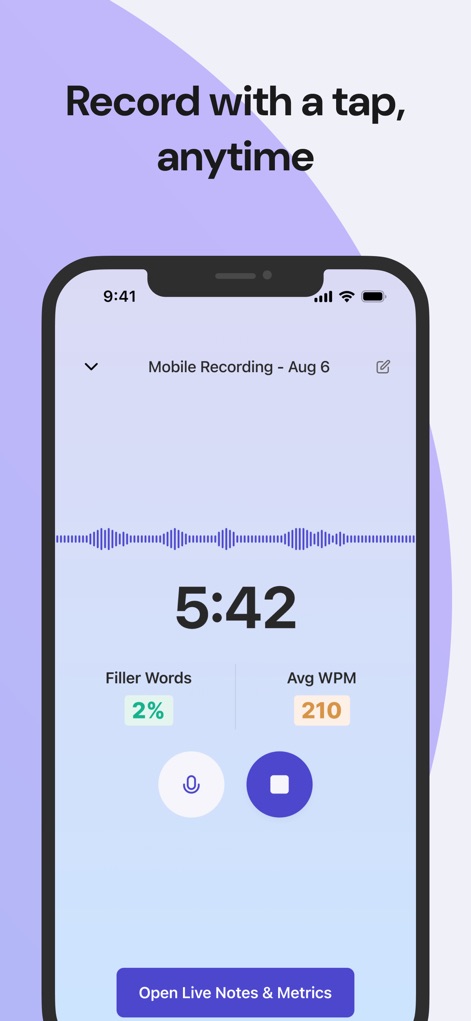
This tool demonstrates instant audio recording with a clear waveform visualization and on-the-fly metrics such as filler word detection and average words per minute.
Real-time Audio Capture
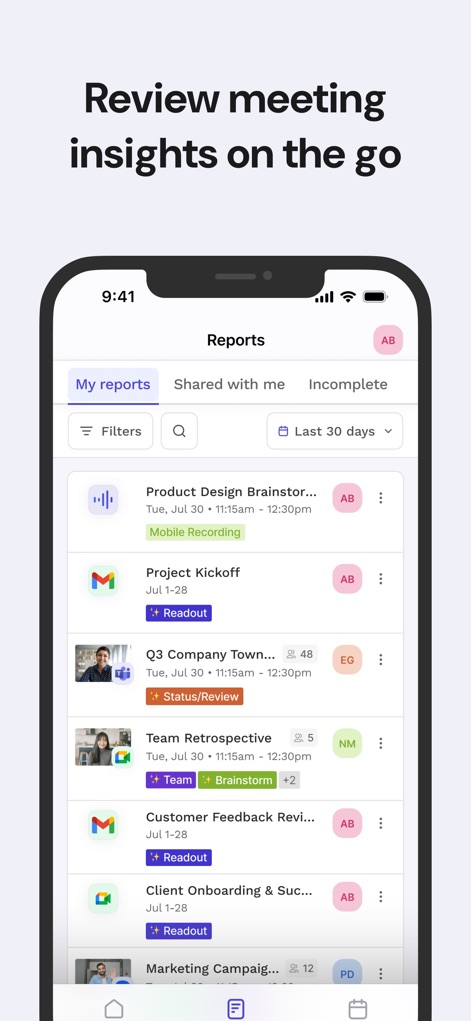
Users can easily navigate through a detailed list of past meetings, featuring filter options and clear indicators for mobile recordings and readout statuses.
Organized Meeting Reports
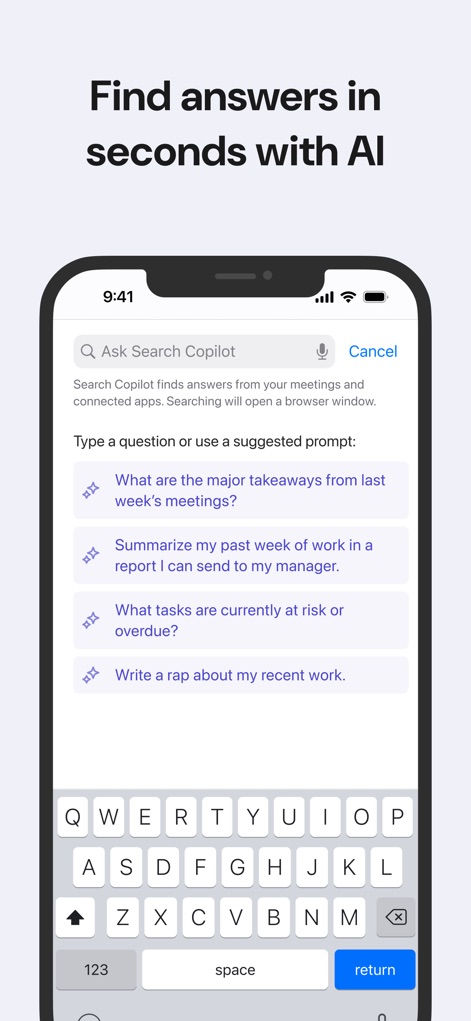
Discover how the app's Copilot feature allows users to ask natural language questions and provides suggested prompts for quick information retrieval.
AI-Powered Search
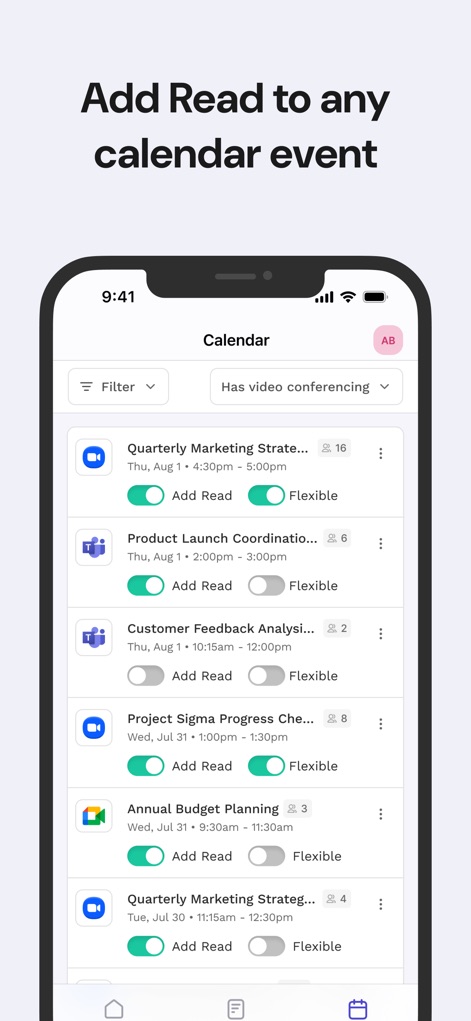
The app seamlessly integrates with calendar events, offering direct options to "Add Read" to meetings and toggle flexible recording settings.
Seamless Calendar Integration
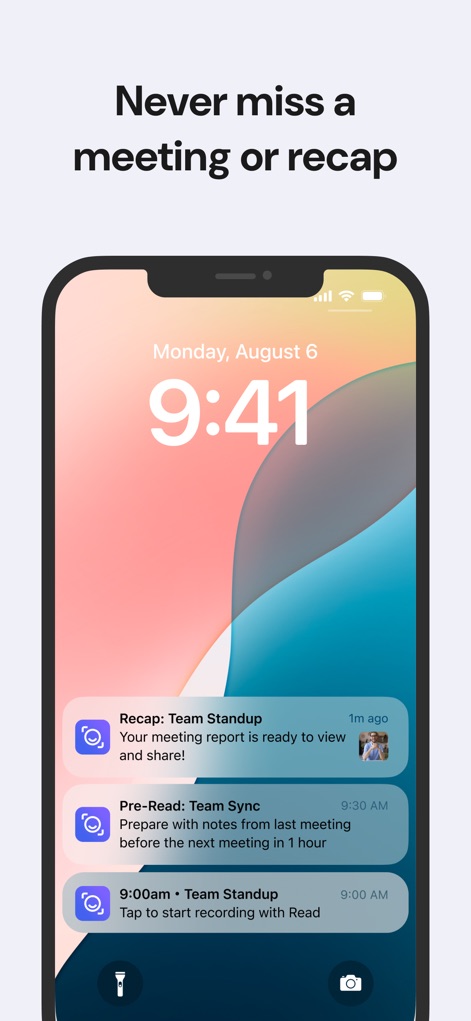
This tool ensures users stay informed with timely iOS notifications for meeting recaps and pre-meeting reminders, preventing missed recording opportunities.
Proactive Meeting Notifications
Description
Download
More Like This
Apps with similar features and user experience

Plaud: AI Note Taker
PLAUD LLC

Notee: AI Note Taker
GM UniverseApps Limited

클로바노트 - 음성 그 이상의 기록
NAVER Corp.

录音专家-专业录音转文字助手
Chongqing Yeyuegua Technology Co., Ltd

听脑AI - 实时录音转文字总结助手
Shanghai Xiuyu Network Technology Co., Ltd

Granola - AI Meeting Notes
Granola inc

Transkriptor - Speech to Text
Textintel FZE

Minutes: AI Meeting Note Taker
Minutes AI, LLC

Fireflies: AI notetaker
FIREFLIES.AI CORP.
This page is not an official page of the app or its developer, but an independent editorial publication created for informational and commentary purposes. Unless expressly stated otherwise, neither the app nor its developer is affiliated with, endorsed by, sponsored by, authorized by, or otherwise officially connected with MWM, Apple, Google Play, the app publisher, or the app's developer, and nothing on this page implies that the app was developed using MWM's services. Any trademarks, logos, screenshots, and other content remain the property of their respective owners.