This page is not an official page of the app or its developer, but an independent editorial publication created for informational and commentary purposes. Unless expressly stated otherwise, neither the app nor its developer is affiliated with, endorsed by, sponsored by, authorized by, or otherwise officially connected with MWM, Apple, Google Play, the app publisher, or the app's developer, and nothing on this page implies that the app was developed using MWM's services. Any trademarks, logos, screenshots, and other content remain the property of their respective owners.
RPGEmu for RPG Maker MV
Experience the best of RPG Maker MV and MZ on your iPhone or iPad. Download games directly from Safari and play instantly with our custom virtual keyboard—no PC required.
RPGEmu is the ultimate bridge for indie gaming, allowing you to run RPG Maker MV and MZ games natively on your iOS devices without the hassle of a computer.
Instant Safari Imports
Forget your laptop. Download indie game .zip files directly in Safari and launch them in seconds with zero PC syncing.
Seamless Virtual Controls
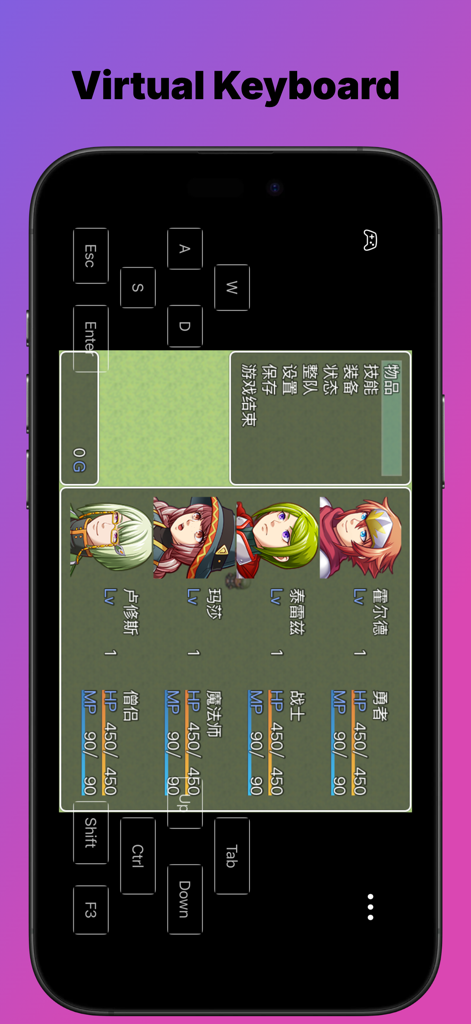
Never get stuck on a 'Press Z' screen again. Our custom virtual keyboard is optimized for Visual Novels and RPG mechanics.
The following screenshots and description are sourced directly from the app's official store listing and are the property of the app developer.
App Store
Screenshots
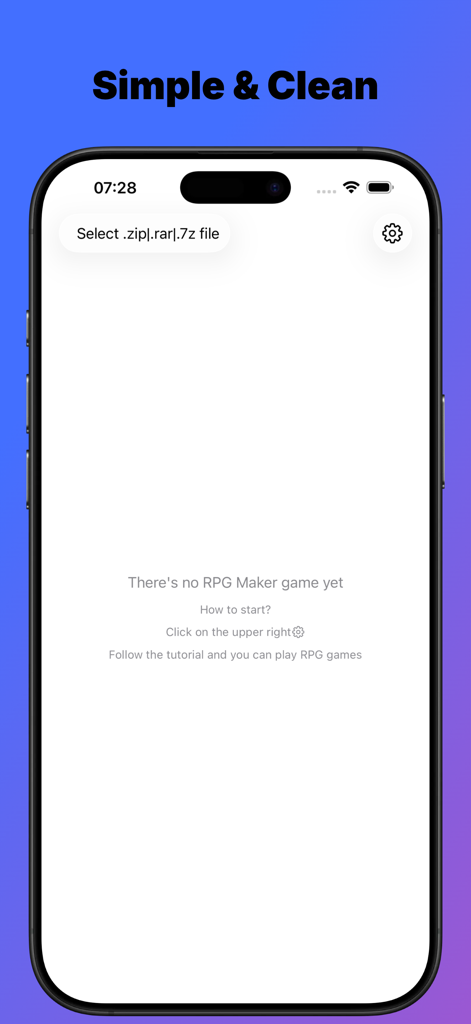
Main interface of RPGEmu app showing the option to import RPG Maker game files on iPhone.
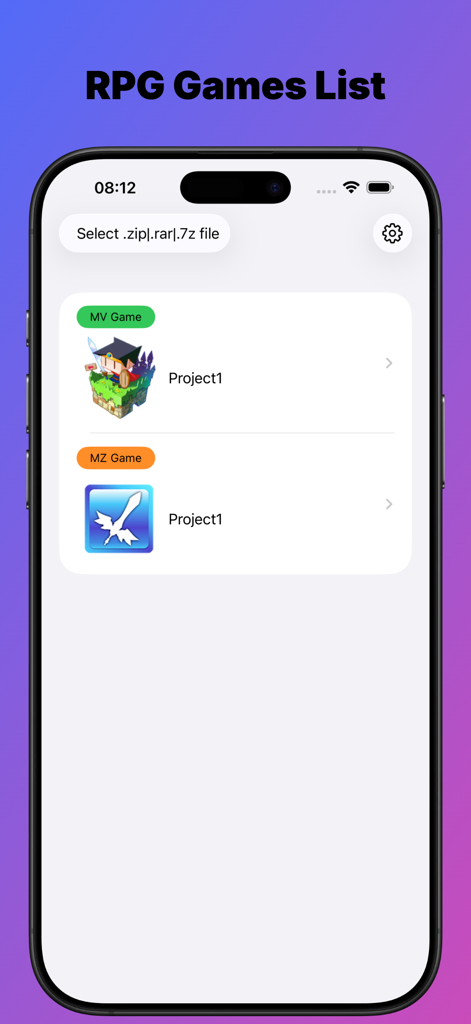
A list of imported RPG Maker MV and MZ games within the RPGEmu app interface
Smartphone screen showing the RPGEmu app with a virtual keyboard overlay on top of an RPG Maker game menu.
Description
Why RPGEmu not others?
1.SwiftUI design, to play or not to play the RPG Maker MV games is easier than ever
2.Support zip files downloaded by Safari directly, that means you do not need to have any windows pc
3.Virtual keyboard, sometimes it is not a plus but a must, if you want to go on playing the visual novels
Notes:
To get the RPG maker MV games, it is really very easy.
You could search "rpg maker mv game free download" by Google.
One of the search result maybe:
https://itch.io/games/tag-rpg-maker-mv
There're many free those games to download, most of them should be ok to play with this app, if it does not, let me know.
RPG maker MV is game framework, so one is ok, another is ok too, as both of them are made with the same tool.
Maybe you have encountered such situation:
When you downloaded a wonderful Visual Novel game from website, you do not want to play it on your windows pc, while you want to play it on your iPhone or iPad.
If the visual novel game is made with RPG Maker MV, you are good to go with this app then.
RPGEmu gives your a new chance to play those windows games which made by RPG Maker MV tool on your iPhone or iPad.
Though RPGEmu itself does not supply any games, it is not very hard to get "RPG Maker MV Games".
I have tried it by myself, just search google, it is really too easy to get many visual novel games which made with "RPG Maker MV".
If you could play those games on your windows pc, it should be ok to play them on your iPhone or iPad.
I noted such kind of visual novel games do heavily depends on keyboard, so I made a virtual keyboard.
Notes: when you see "Press Z to start", you could press "Enter" to start also.
RPGEmu also supports RPG Maker MZ game.
The game was made with RPG Maker MV tool, we call it RPG Maker MV game, or [MV Game].
The game was made with RPG Maker MZ tool, we call it RPG Maker MZ game, or [MZ Game].
Once you installed RPGEmu, you have the ability to play windows [MV Game] on your iPhone or iPad.
If you also want to play windows [MZ Game] on your iPhone or iPad, you will need to purchase [MZ Function].
[MZ Function] is a non-consume product, once you purchased it, you get the ability to play [MZ Game] on your iPhone or iPad device forever.
You will only need to purchase [MZ Function] when you imported a MZ game file, if no MZ game file, you do not need to pay for [MZ Function].
Note:
When you imported the game zip file, the transfer process may need minutes to finish, please do not leave the app RPGEmu, or else, transfer process will be terminated and app will crash.
Do not leave screen that means you should not go to Home Screen or open another APP, you must keep you are on the RPGEmu's screen.
Of course, if you have to open another app, that's ok, just open the RPGEmu again, and start to transfer the game zip file from beginning again.
This behavior is not a BUG, hope you could understand it.
After transfer process finished, you could leave RPGEmu and back to RPGEmu, only when the file is in transferring, you could not leave RPGEmu.
This page is not an official page of the app or its developer, but an independent editorial publication created for informational and commentary purposes. Unless expressly stated otherwise, neither the app nor its developer is affiliated with, endorsed by, sponsored by, authorized by, or otherwise officially connected with MWM, Apple, Google Play, the app publisher, or the app's developer, and nothing on this page implies that the app was developed using MWM's services. Any trademarks, logos, screenshots, and other content remain the property of their respective owners.