
This page is not an official page of the app or its developer, but an independent editorial publication created for informational and commentary purposes. Unless expressly stated otherwise, neither the app nor its developer is affiliated with, endorsed by, sponsored by, authorized by, or otherwise officially connected with MWM, Apple, Google Play, the app publisher, or the app's developer, and nothing on this page implies that the app was developed using MWM's services. Any trademarks, logos, screenshots, and other content remain the property of their respective owners.


UTM SE: Retro PC emulator
It rewrites history, putting vintage hardware in your pocket. This app delivers raw emulation power, freeing forgotten software and games.
Downloads
750k+User Rating
Total Ratings
1.5KPublisher
Category
EntertainmentLocales
13Latest Version
4.7.5Size
1.6 GBFirst Released
Apr 30, 2024A comprehensive evaluation of key functionalities for tech-savvy users and retro computing enthusiasts.
UTM SE: Retro PC Emulator - In-depth Feature Analysis
Extensive Legacy Software Support
The app enables users to run a broad spectrum of classic software and old-school games, fulfilling the primary desire of retro computing enthusiasts to revisit historical computing environments.
Multi-Architecture Emulation
The app provides extensive compatibility by emulating x86, ARM, PPC, and RISC-V architectures, allowing users to run a vast array of legacy operating systems and applications.
Customizable Machine Configurations
It allows users to either quickly launch pre-built machines or create their own configurations from scratch, offering both convenience and deep technical control over the emulated environment.
Flexible Display Modes
This tool features support for both VGA graphics mode and terminal text-only mode, ensuring authentic visual experiences for diverse retro software, from graphical games to command-line operating systems.
Frequently Asked Questions
Everything you need to know about UTM SE: Retro PC emulator
What is UTM SE?
UTM SE is a PC emulator designed to run classic software and old-school games. It supports various operating systems and CPU architectures.
Which CPU architectures does UTM SE support?
UTM SE supports emulating x86, ARM, PPC, and RISC-V architectures. This broad compatibility allows it to run a wide array of classic systems.
Can I run Windows XP on UTM SE?
Yes, UTM SE runs Windows XP. The app description states it runs classic software, and a screenshot explicitly shows Windows XP emulation with a game running.
Is UTM SE based on QEMU?
Yes, UTM SE is built from QEMU, a powerful and widely used emulator. This provides a robust and versatile foundation for its emulation capabilities.
Does UTM SE support playing old-school games?
Yes, UTM SE enables playing old-school games. Its core purpose is to run classic software, and screenshots show examples like Doom and 3D Pinball.
Does UTM SE support graphical and text-only modes?
UTM SE supports both VGA mode for graphics and terminal mode for text-only operating systems. This versatility allows diverse emulation experiences.
Can I create custom virtual machines in UTM SE?
Yes, UTM SE allows users to create custom virtual machine configurations from scratch. It also offers the option to run pre-built machines.
What pre-built virtual machines are available in UTM SE?
UTM SE includes pre-built virtual machines such as ArchLinux ARM, Debian 11 ARM, FreeDOS, Mac OS 9.2.1 PowerMAC, and Windows XP.
The following screenshots and description are sourced directly from the app's official store listing and are the property of the app developer.
App Store
Screenshots
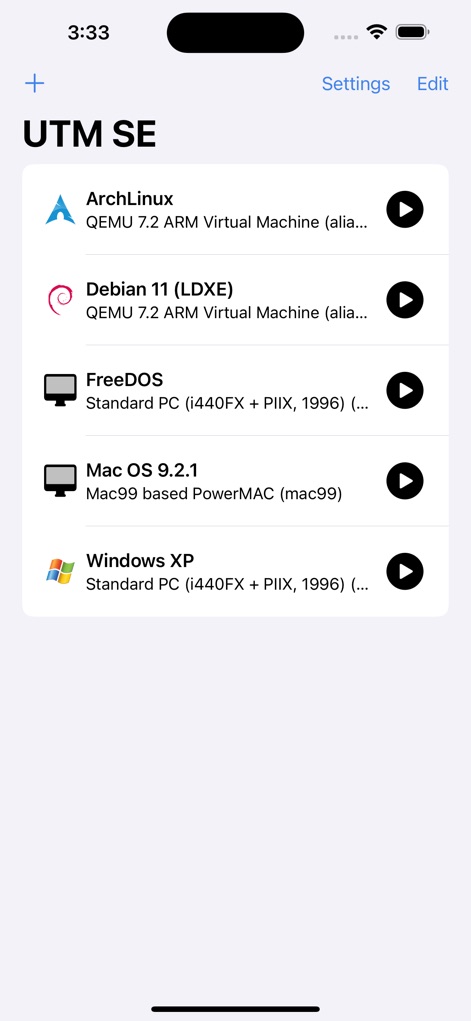
The app's main interface displays a curated list of virtual machines and an instant 'play' button for quick access to diverse operating systems.
Virtual OS Library

This screen provides a deep dive into virtual machine settings, detailing aspects like its Architecture and available Memory.
VM Configuration Details

Experience classic titles like Doom in VGA mode, fully controllable through the app's integrated on-screen virtual controls and full-screen option.
Iconic Retro Gaming

The app faithfully emulates historic software such as The Oregon Trail, complete with period-appropriate graphics and a virtual control bar for interaction.
Historic Software Run

Witness the full functionality of Windows XP, running applications like 3D Pinball for Windows - Space Cadet within its classic desktop environment.
Windows XP Revival

Explore a modern Debian desktop environment, featuring a functional terminal window for command-line operations and system management.
Desktop Environment

Users can engage directly with text-based operating systems like Arch Linux through its console, utilizing a comprehensive on-screen virtual keyboard for input.
Terminal Interaction

The app offers extensive configuration options, allowing users to fine-tune system settings and manage various drives like Floppy Drive and IDE Drive.
Advanced Customization
Description
Download
More Like This
Apps with similar features and user experience


This page is not an official page of the app or its developer, but an independent editorial publication created for informational and commentary purposes. Unless expressly stated otherwise, neither the app nor its developer is affiliated with, endorsed by, sponsored by, authorized by, or otherwise officially connected with MWM, Apple, Google Play, the app publisher, or the app's developer, and nothing on this page implies that the app was developed using MWM's services. Any trademarks, logos, screenshots, and other content remain the property of their respective owners.