
This page is not an official page of the app or its developer, but an independent editorial publication created for informational and commentary purposes. Unless expressly stated otherwise, neither the app nor its developer is affiliated with, endorsed by, sponsored by, authorized by, or otherwise officially connected with MWM, Apple, Google Play, the app publisher, or the app's developer, and nothing on this page implies that the app was developed using MWM's services. Any trademarks, logos, screenshots, and other content remain the property of their respective owners.


Santander Mobile Banking
This app cuts the financial tether. Users gain absolute control, making every banking move instant and effortless.
Downloads
5M+User Rating
Total Ratings
1.3MPublisher
Category
FinanceLocales
1Latest Version
v5.35.0Size
775.2 MBFirst Released
Feb 18, 2013An Analytical Review of Core Functionality and User Impact for Digitally Native Consumers
Santander Mobile Banking: Key Features Evaluation
Advanced Security & Biometrics
The app provides enhanced security through biometrics (Face ID/Touch ID), secure payment authorization, and discreet mode.
Card Management & Freezing
The app provides robust control over debit and credit cards, including the ability to instantly freeze them.
Real-time Balance & Statement Access
It allows users to quickly view their account balances and transaction history.
External Payments
It allows users to send money to other individuals, facilitating bill splitting and transfers.
Financial Insight Tools
This tool features integrated managers for personal finances and home-related expenses, offering insightful analytics.
Instant Transaction Search
This tool features the ability to instantly search and verify past transactions, enhancing financial clarity.
Manage Scheduled Payments
This tool enables users to review and manage their Direct Debits and Standing Orders.
Mobile Cheque Deposit
It allows users to deposit cheques digitally, saving trips to a physical branch.
Frequently Asked Questions
Everything you need to know about Santander Mobile Banking
How do I apply for a new account using the Santander Mobile Banking app?
Yes, you can apply for a new account directly through the Santander Mobile Banking app. Simply download the app, and follow the guided application process provided.
Can I manage my card settings in the Santander Mobile Banking app?
Yes, the Santander Mobile Banking app allows you to control your card settings. You can freeze your card, block contactless or international payments, and manage online or gambling transactions.
Does the Santander Mobile Banking app support biometric login?
Yes, the Santander Mobile Banking app supports biometric authentication for secure access. This feature, along with payment authorization and discreet mode, ensures secure banking.
What is the daily limit for paying in cheques with the Santander Mobile Banking app?
You can pay in cheques up to £5,000 per day using the Santander Mobile Banking app. This feature is available within the 'Pay & Transfer' section.
What are the main features of the Santander Mobile Banking app?
The Santander Mobile Banking app allows you to check balances, search transactions, transfer money, send payments to others, manage Direct Debits/Standing Orders, freeze cards, and pay in cheques.
Can I transfer money between my own Santander accounts using the app?
Yes, you can easily transfer money between your Santander accounts using the Santander Mobile Banking app. This function is available within the 'Pay & Transfer' section.
Is the Santander Mobile Banking app secure?
Yes, the Santander Mobile Banking app is secure. It uses biometrics, payment authorization, and discreet mode for secure banking, along with explicit security warnings in the description.
What iOS version does the Santander Mobile Banking app require?
The Santander Mobile Banking app requires your device to be running iOS version 15 or above. It does not run on jailbroken devices.
Does the Santander Mobile Banking app offer spending insights?
Yes, the Santander Mobile Banking app includes features like My Money Manager and My Home Manager to provide insightful financial management. It also offers handy insights and notifications.
Can I view my card details like CVV and PIN in the Santander Mobile Banking app?
Yes, the Santander Mobile Banking app allows you to see your card details, including the card number, CVV, and PIN. This option is available from your credit card details screen.
Can I manage Direct Debits and Standing Orders using the Santander Mobile Banking app?
Yes, you can check and manage your Direct Debits and Standing Orders directly within the Santander Mobile Banking app. The 'Pay & Transfer' section includes dedicated options for this.
Does the Santander Mobile Banking app allow integration with other bank accounts?
Yes, the Santander Mobile Banking app allows you to see your other bank accounts from institutions like Barclays, BOS, Halifax, and HSBC within the app.
Can I chat with customer support within the Santander Mobile Banking app?
Yes, you can chat with Santander customer support directly within the Santander Mobile Banking app. This feature provides convenient in-app assistance.
The following screenshots and description are sourced directly from the app's official store listing and are the property of the app developer.
App Store
Screenshots
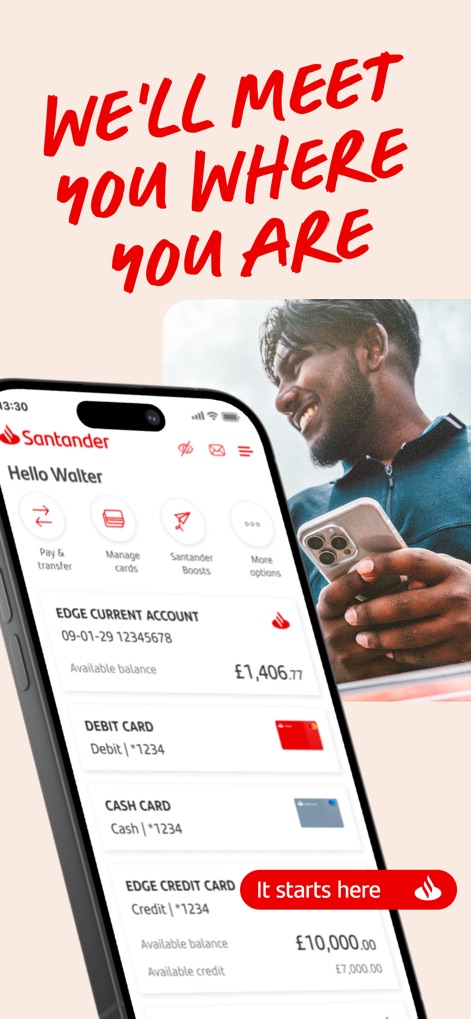
Explore the app's intuitive home screen, showcasing available balances for various accounts and quick access navigation for essential banking tasks.
Financial Dashboard Overview

Discover why millions trust this award-winning app, highlighting its secure FSCS protection and the straightforward onboarding process for new users.
Join the Community
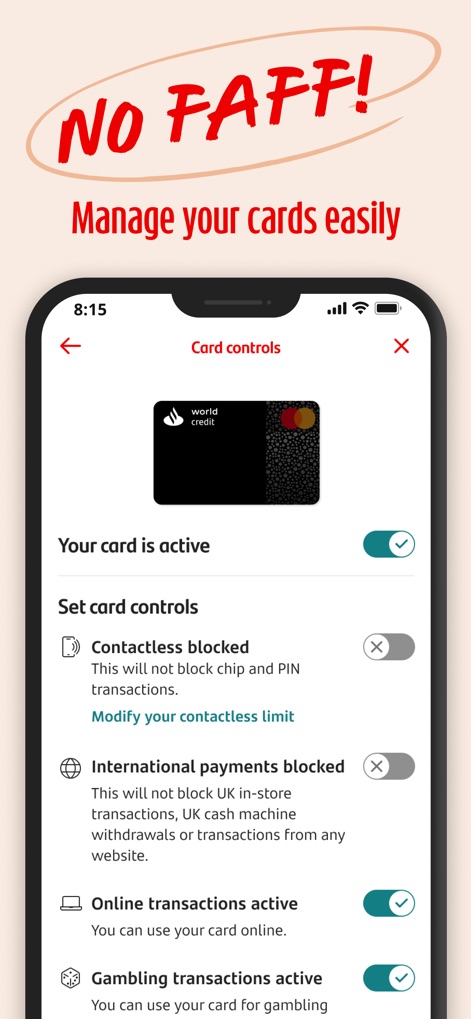
Gain immediate command over card settings, enabling users to easily toggle contactless and international payment restrictions directly within the app.
Smart Card Control

Understand spending habits with proactive notifications and smart category icons, helping users track expenditures and avoid financial surprises.
Insightful Spending Alerts
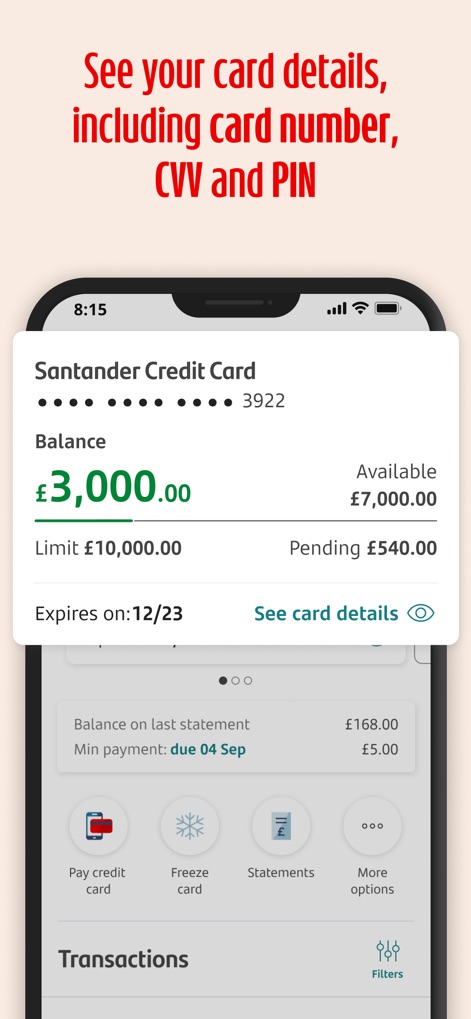
View comprehensive credit card details, including current balance and available credit, alongside convenient options to freeze cards or access statements.
Secure Card Management
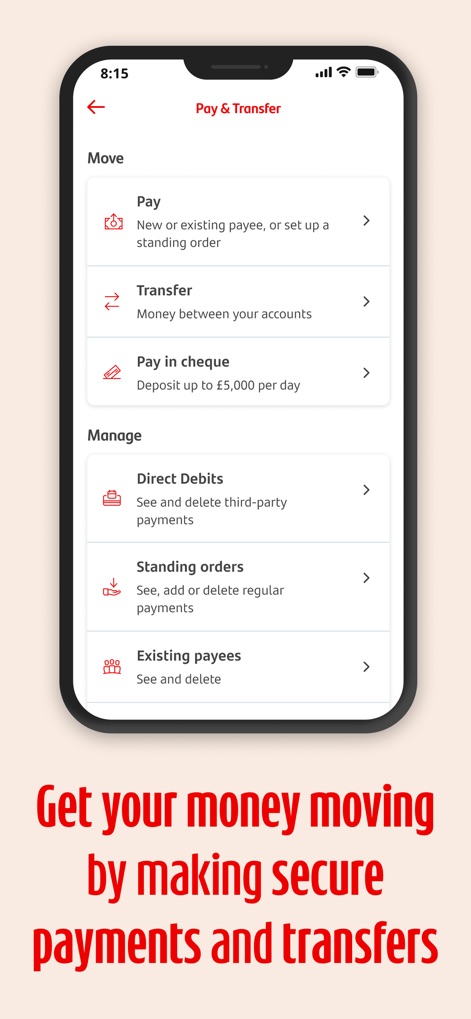
Facilitate swift financial movements through dedicated sections for paying new recipients or transferring between accounts, and efficiently manage recurring direct debits.
Seamless Fund Transfers
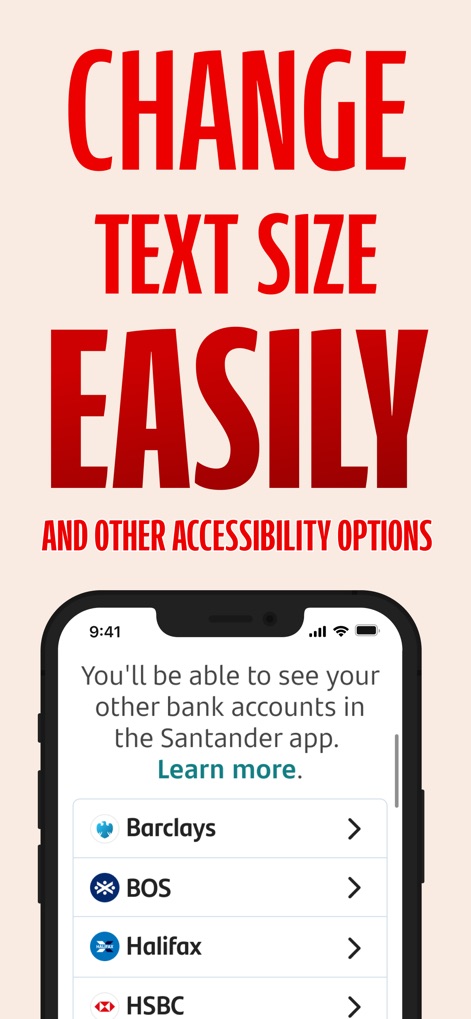
Enhance usability with options to integrate other bank accounts and easily adjust text size, catering to diverse user needs for a personalized experience.
Accessible Banking Features

Connect directly with support via the integrated chat feature, offering immediate assistance and a convenient way to resolve queries within the app.
Instant In-App Support

Effortlessly review recent purchases with clear transaction details and dates, providing users with a transparent overview of their spending history.
Transaction Tracking Insights
Description
Download
More Like This
Apps with similar features and user experience

PayPal - Pay, Send, Save
PayPal, Inc.

中国农业银行
AGRICULTURAL BANK OF CHINA LIMITED

Mercado Pago: cuenta digital
MercadoLibre S.A.

中国工商银行
Industrial and Commercial Bank of China

Revolut: Send, spend and save
Revolut Ltd

HDFC Bank App (Early Access)
HDFC Bank Ltd

Zalopay - Quét Mọi QR
ZION JOINT STOCK COMPANY

Cash App
Block, Inc.

招商银行
CHINA MERCHANTS BANK CO.,LTD.
This page is not an official page of the app or its developer, but an independent editorial publication created for informational and commentary purposes. Unless expressly stated otherwise, neither the app nor its developer is affiliated with, endorsed by, sponsored by, authorized by, or otherwise officially connected with MWM, Apple, Google Play, the app publisher, or the app's developer, and nothing on this page implies that the app was developed using MWM's services. Any trademarks, logos, screenshots, and other content remain the property of their respective owners.