
This page is not an official page of the app or its developer, but an independent editorial publication created for informational and commentary purposes. Unless expressly stated otherwise, neither the app nor its developer is affiliated with, endorsed by, sponsored by, authorized by, or otherwise officially connected with MWM, Apple, Google Play, the app publisher, or the app's developer, and nothing on this page implies that the app was developed using MWM's services. Any trademarks, logos, screenshots, and other content remain the property of their respective owners.


SAP Concur
Corporate hassle is obsolete. The app empowers users with immediate oversight and action over their travel and expenses, turning complex processes into simple taps.
Downloads
12.5M+User Rating
Total Ratings
1.8MPublisher
Category
BusinessLocales
31Latest Version
10.30.0Size
537.8 MBFirst Released
Oct 29, 2009SAP Concur: Mobile-First Efficiency for Business Operations
An analytical overview of key features for managing expenses, travel, and invoices.
Receipt Capture and Expense Integration
It allows users to snap a photo of their receipts and instantly add them to an expense report, significantly reducing manual data entry and improving accuracy.
Expense, Invoice, and Travel Request Approval
The app provides the ability to review and approve expense reports, invoices, and travel requests directly from a mobile device, streamlining critical administrative workflows for managers and employees.
Automatic Mileage Tracking
This tool features automatic mileage capture and tracking, ensuring accurate expense reporting for business travel by car without manual logging.
Travel Booking Capabilities
This tool features the capability to book flights, rail tickets, hotel rooms, and rental cars, offering a comprehensive solution for managing business travel arrangements on the go.
Real-time Travel Alerts via TripIt Integration
The app allows for integration with TripIt to provide real-time travel alerts and updates, keeping users informed about their itineraries and potential disruptions.
Personalized Hotel Suggestions
It provides hotel suggestions tailored to user preferences, simplifying the accommodation selection process and enhancing the travel booking experience.
Frequently Asked Questions
Everything you need to know about SAP Concur
What is the SAP Concur mobile app?
The SAP Concur mobile app is a companion tool for existing Concur Travel, Expense, or Invoice users to manage travel and expenses on an iPhone or iPad while on the go.
How do I add receipts to expense reports using the SAP Concur app?
Users add receipts to expense reports by snapping a photo of the receipt with the SAP Concur mobile app, which then instantly integrates it into the report.
Can I book travel arrangements directly within the SAP Concur app?
Yes, the SAP Concur app allows users to book flights, rail tickets, reserve hotel rooms, and rent cars directly. It also provides hotel suggestions based on preferences.
Does SAP Concur mobile app offer automatic mileage tracking?
Yes, the SAP Concur mobile app automatically captures and tracks mileage, providing accurate distance calculations for expense reporting without manual entry.
What kind of approvals can I manage with the SAP Concur app?
With the SAP Concur app, users can review and approve expense reports, invoices, and travel requests directly from their mobile device.
How does the SAP Concur app integrate with TripIt?
The SAP Concur app integrates user itineraries with TripIt, delivering real-time travel alerts and updates directly to the mobile device for a seamless experience.
Can I view my travel itineraries on the SAP Concur app?
Yes, the SAP Concur app provides access to detailed itineraries for flights, hotels, and rental cars, allowing users to review their travel plans on the go.
Is dark mode available in the SAP Concur mobile app?
Yes, the SAP Concur mobile app includes a feature that allows users to choose between a light and dark mode interface for their viewing preference.
The following screenshots and description are sourced directly from the app's official store listing and are the property of the app developer.
App Store
Screenshots

Home Screen Overview
The app provides a comprehensive overview, displaying an "April Expense Report" summary and quick access to upcoming "Seattle to London" travel plans.

Global Travel Search
Users can efficiently search for destinations using the clear "Location Search" bar and choose from a list of relevant "Seattle" airport options.

Expense Capture Made Easy
This tool streamlines expense reporting, allowing users to snap a photo of their receipt and confirm it's "Ready to capture..." for instant addition to reports.

Itinerary At a Glance
The app presents detailed travel plans, including specific "Flight from SEA - JFK" schedules and convenient "Rental Car" information for a seamless journey.

Manage Your Trips
Users can easily review and manage their travel reservations, viewing "Upcoming" trips and approved entries like "San Francisco Trip".
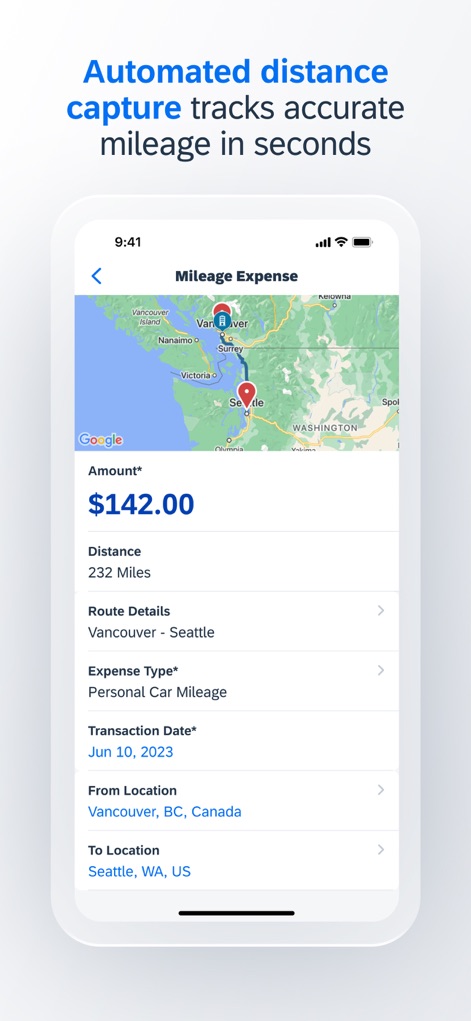
Automated Mileage Tracking
This tool automates mileage tracking, displaying a clear map of the "Vancouver to Seattle" route and instantly calculating the "Amount $142.00" for reimbursement.

Flexible Interface Modes
The app offers a customizable viewing experience, presenting detailed "Expense Report" entries for "Business Meals - Meetings" and "Airfare" in a sleek "dark mode".
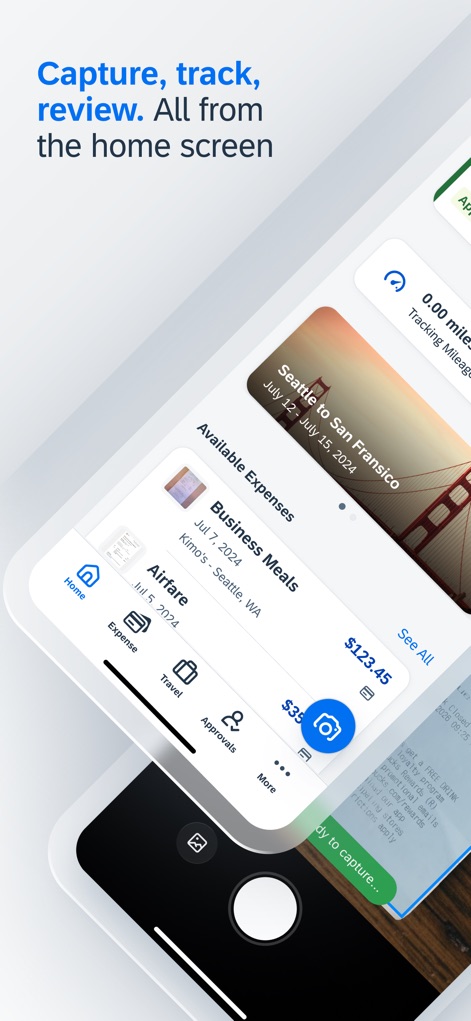
Unified Workflow
The home screen integrates key functionalities, showcasing "Available Expenses" alongside a quick access camera icon for instant receipt capture.

Seamless Interaction
The app facilitates seamless interaction between managing the main "Expense Report" dashboard and the efficient "receipt capture" function.
Description
Download
More Like This
Apps with similar features and user experience

Navan
Navan, Inc

Brex
Brex, Inc

Zoho Expense: Travel & Expense
Zoho Corporation

Egencia
Egencia LLC

Perk
Perk Platform SL

TripSource
BCD Travel Services BV

IndiGo Access
INTERGLOBE AVIATION LIMITED

Amex GBT Mobile
GBT US LLC

Emburse Enterprise
Emburse, Inc.
This page is not an official page of the app or its developer, but an independent editorial publication created for informational and commentary purposes. Unless expressly stated otherwise, neither the app nor its developer is affiliated with, endorsed by, sponsored by, authorized by, or otherwise officially connected with MWM, Apple, Google Play, the app publisher, or the app's developer, and nothing on this page implies that the app was developed using MWM's services. Any trademarks, logos, screenshots, and other content remain the property of their respective owners.