Scriptation: PDF for Film & TV
Download on App Store

This page is not an official page of the app or its developer, but an independent editorial publication created for informational and commentary purposes. Unless expressly stated otherwise, neither the app nor its developer is affiliated with, endorsed by, sponsored by, authorized by, or otherwise officially connected with MWM, Apple, Google Play, the app publisher, or the app's developer, and nothing on this page implies that the app was developed using MWM's services. Any trademarks, logos, screenshots, and other content remain the property of their respective owners.


Logo of Scriptation: PDF for Film & TV
Download on App Store

Scriptation: PDF for Film & TV

Stop manually copying notes to new script drafts. Intelligently transfer your markups in seconds and master your production with the industry-leading digital binder.

Key Figures

Downloads

71K+

User Rating

4.8/5

Total Ratings

4K+

Publisher

Scriptation LLC

Category

Productivity

Locales

4

Latest Version

5.1.10

Size

222.1 MB

First Released

May 1, 2016
Features

Master Every Revision

The Emmy®-winning toolkit designed by industry pros to eliminate manual script updates and keep your production on track.

Intelligent Note Transfer

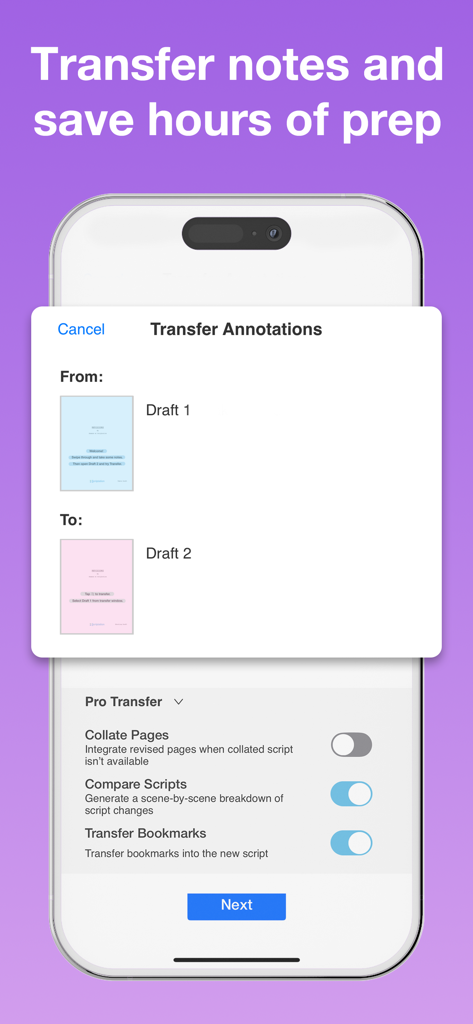
Stop manual copying. Our proprietary algorithm analyzes script changes and moves every note to the new draft in seconds.

Digital Production Binder

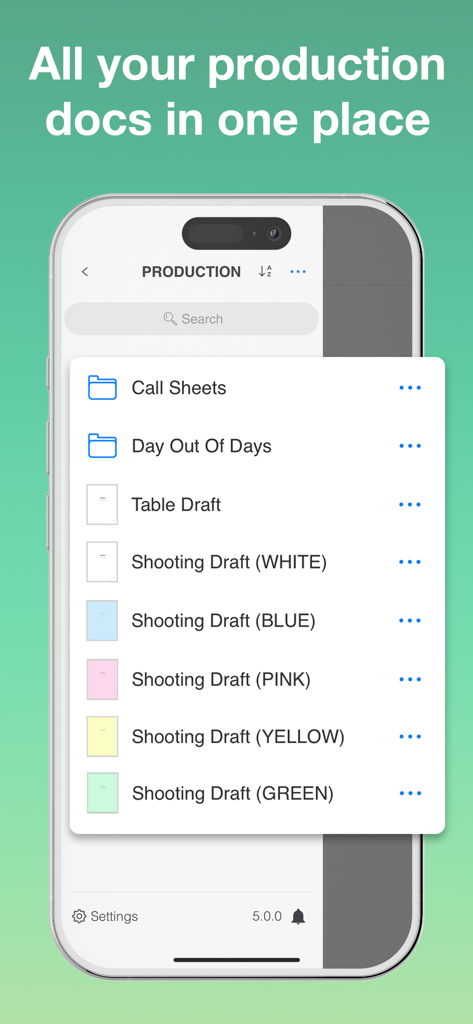
Consolidate scripts, call sheets, and schedules into one organized hub. Ditch the heavy binders for a truly paperless set.

The following screenshots and description are sourced directly from the app's official store listing and are the property of the app developer.

App Store

Screenshots

Scriptation: PDF for Film & TV - Scriptation splash screen highlighting its status as an industry standard app for Film and TV with Emmy Award winning tech.
Scriptation splash screen highlighting its status as an industry standard app for Film and TV with Emmy Award winning tech.

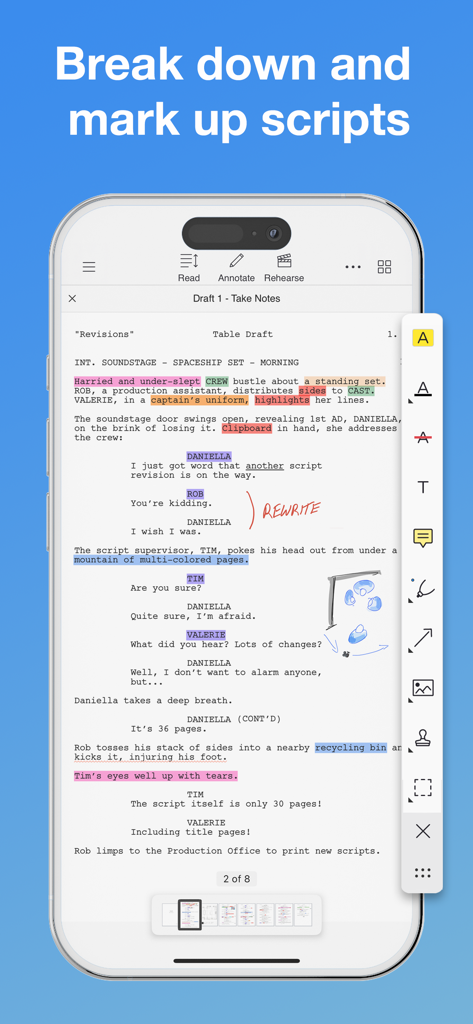
Scriptation: PDF for Film & TV - iPhone screen showing the Scriptation app interface with a script being annotated with highlights and handwritten notes
iPhone screen showing the Scriptation app interface with a script being annotated with highlights and handwritten notes

Scriptation: PDF for Film & TV - Scriptation app interface on an iPhone showing the Transfer Annotations tool between two script drafts with pro transfer options
Scriptation app interface on an iPhone showing the Transfer Annotations tool between two script drafts with pro transfer options

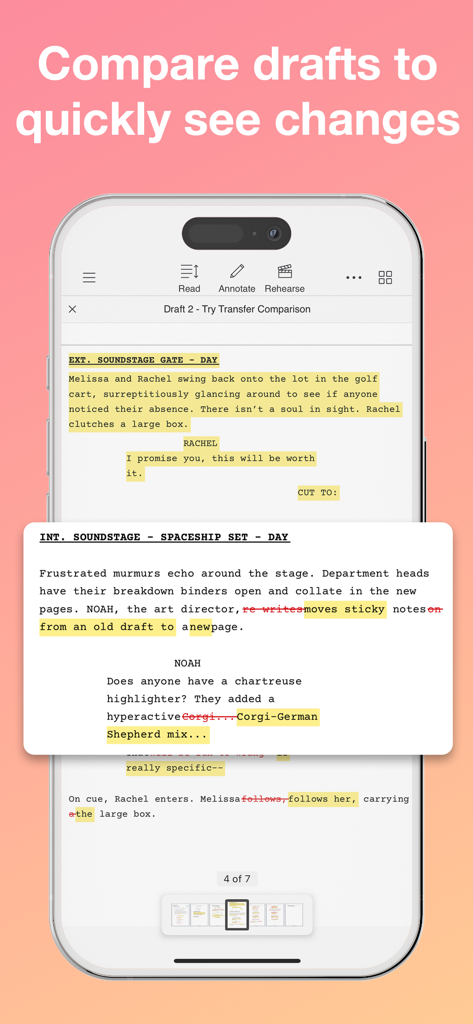
Scriptation: PDF for Film & TV - Scriptation app screenshot on iPhone showing a comparison between two script drafts with highlighted text and strike-throughs to indicate changes.
Scriptation app screenshot on iPhone showing a comparison between two script drafts with highlighted text and strike-throughs to indicate changes.

Scriptation: PDF for Film & TV - Scriptation app screen showing a digital production binder with folders for call sheets and color coded script drafts
Scriptation app screen showing a digital production binder with folders for call sheets and color coded script drafts

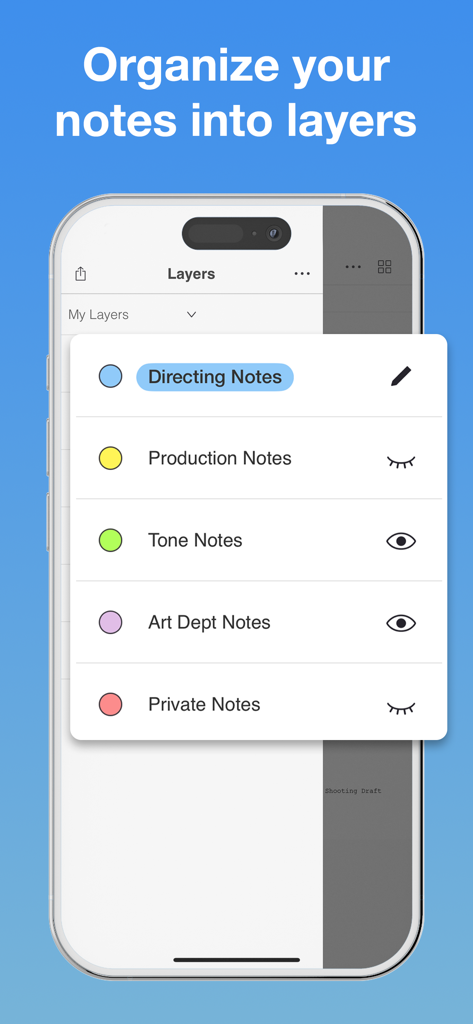
Scriptation: PDF for Film & TV - Scriptation app on iPhone showing organized note layers for film production categories like directing and production
Scriptation app on iPhone showing organized note layers for film production categories like directing and production

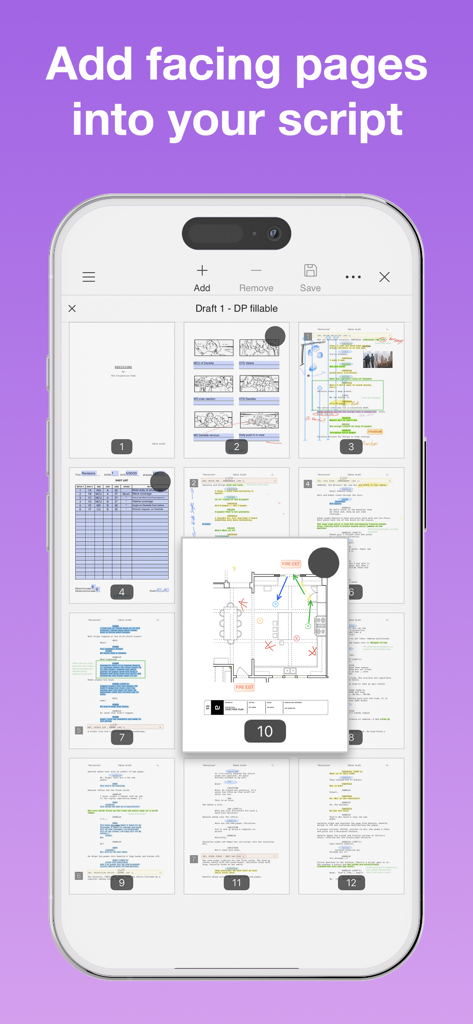
Scriptation: PDF for Film & TV - Interface of the Scriptation app showing the addition of floor plans and facing pages to a digital film script
Interface of the Scriptation app showing the addition of floor plans and facing pages to a digital film script

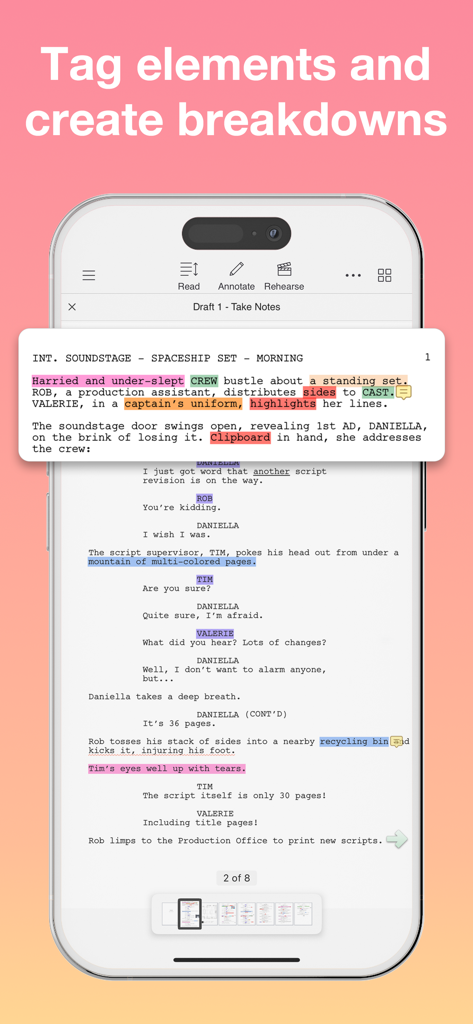
Scriptation: PDF for Film & TV - iPhone screenshot of the Scriptation app interface showing highlighted script elements used for creating production breakdowns
iPhone screenshot of the Scriptation app interface showing highlighted script elements used for creating production breakdowns

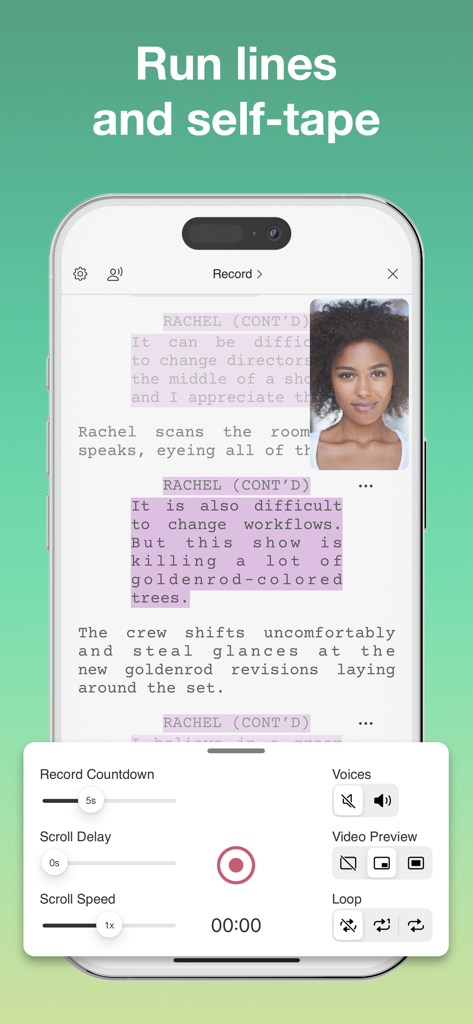
Scriptation: PDF for Film & TV - Scriptation app interface on iPhone showing the run lines and self-tape recording feature with a script and video preview
Scriptation app interface on iPhone showing the run lines and self-tape recording feature with a script and video preview

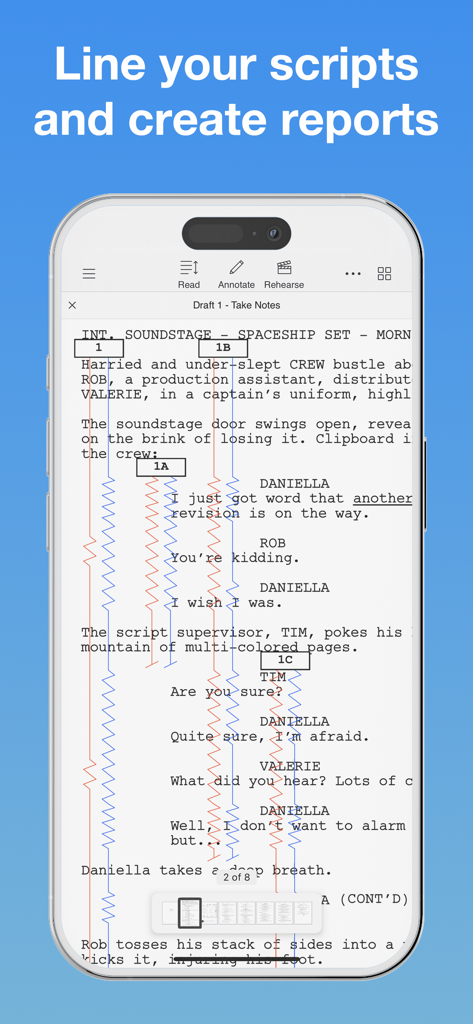
Scriptation: PDF for Film & TV - Scriptation app showing professional script supervisor lining tools with red and blue vertical lines on a digital script

Scriptation app showing professional script supervisor lining tools with red and blue vertical lines on a digital script

Description

"When I mark up my script, I use Scriptation now." - Kathy Bates "Scriptation changed my life. Every time you get a new draft, it transfers all your notes." - Sophia Bush Scriptation, the Emmy® winning PDF annotation app for the film, television, and video industry, is the revolutionary app for production that intelligently transfers your annotations, notes, and markups into new script revisions. NOTE TRANSFER - THE SCRIPTATION DIFFERENCE If you've ever had 30 revision pages on a 40-page script, you know how time consuming it is to copy your notes to new script pages. Scriptation's proprietary note transfer algorithms analyze script changes and transfers every note to its corresponding location in the next draft in literally seconds. ANNOTATE Pen and paper, meet stylus and tablet. Scriptation offers a full set of annotation tools that allow you to highlight text, type notes, add photos, insert stickies, record sound, and more. ORGANIZE You can finally get rid of that 3-ring binder. Scriptation gets you organized by keeping all your scripts, call sheets, schedules, and production documents in a digital production binder. LAYERS Want to separate notes based on meetings? Or share your thoughts with your department? Scriptation's annotation layers makes it easy to navigate between sets of notes. PAGE MAKER Insert facing pages, set plans, photos, diagrams, and more, and transfer them into new script revisions. You can even ditch paper sides by creating your own with all your notes. AUTO HIGHLIGHT That table read script isn't going to highlight itself. Or is it? Built for actors but customized for sound mixers, Scriptation automatically highlights character lines with the tap of a button. READ / REHEARSE / RECORD Elevate your rehearsal process with customizable character voices, line reminders, and scene looping. Use as a read partner or teleprompter for self-tape auditions. Set recording delays for slates and access Auto-Highlight within Reader Mode. TAGGING Break down your script into customizable categories and generate reports. Add scene descriptions, notes, and images to your reports. Export as a formatted PDF or a CSV to integrate the data into other spreadsheets. LINING Professional script supervisor lining tools to streamline your workflow. Easily mark up your script, track coverage, and maintain continuity across scenes and revisions. SCRIPTATION INDUSTRY PRO Scriptation Industry Pro is an auto-renewing subscription service that offers advanced features to optimize the way you work. When you make the jump to Industry Pro, here's what you get across all of your devices. • Pro Note Transfer: Multi-Layer, Collate Pages, Compare Scripts • Tagging: Tag Elements, Generate Reports • Page Maker: Add Facing Pages, Shot Lists • Sides Creator: Generate Daily Sides • Script Supervisor Lining Tools • Layer Upgrades: Show/Hide, Shareable Layers • Reader Upgrades: Read Aloud, Assign Voices, Self-Tape Scriptation Industry Pro has 1 Month and 12 Month subscription options. For offers that include a 14-day free trial, after the free trial period you will be automatically renewed to the current subscription price which you can cancel at any time. Scriptation Industry Pro automatically renews unless auto-renew is turned off at least 24-hours before the end of the current period. Your account will be charged for renewal within 24-hours prior to the end of the current period. Payment will be charged to your iTunes account at confirmation of purchase. You may manage Scriptation Industry Pro subscriptions and turn off auto-renewal by going to your Account Settings after purchase. Any unused portion of a free trial period will be forfeited when you purchase a subscription. Terms of Use: https://scriptation.com/terms Privacy Policy: https://scriptation.com/privacy Facebook: https://facebook.com/scriptationapp Instagram: https://instagram.com/scriptation Twitter: https://twitter.com/scriptation YouTube: https://youtube.com/scriptation

Download

Download on App Store

This page is not an official page of the app or its developer, but an independent editorial publication created for informational and commentary purposes. Unless expressly stated otherwise, neither the app nor its developer is affiliated with, endorsed by, sponsored by, authorized by, or otherwise officially connected with MWM, Apple, Google Play, the app publisher, or the app's developer, and nothing on this page implies that the app was developed using MWM's services. Any trademarks, logos, screenshots, and other content remain the property of their respective owners.