Site24x7
Site24x7
Download on App Store

This page is not an official page of the app or its developer, but an independent editorial publication created for informational and commentary purposes. Unless expressly stated otherwise, neither the app nor its developer is affiliated with, endorsed by, sponsored by, authorized by, or otherwise officially connected with MWM, Apple, Google Play, the app publisher, or the app's developer, and nothing on this page implies that the app was developed using MWM's services. Any trademarks, logos, screenshots, and other content remain the property of their respective owners.

Logo of Site24x7
Download on App Store

Site24x7

Monitor websites, servers, and multi-cloud environments in real-time. Troubleshoot incidents instantly and meet your SLAs without being tethered to your desk.

Key Figures

Downloads

0

User Rating

3.7/5

Total Ratings

0

Publisher

Zoho Corporation

Category

Business

Locales

9

Latest Version

5.1.7

Size

81.0 MB

First Released

Jul 21, 2012
Features

Stay Ahead of Downtime from Anywhere

Empower your DevOps and IT teams with real-time AI insights, instant troubleshooting, and comprehensive observability across your entire tech stack—all from your pocket.

Instant Incident Response

Get real-time push notifications and resolve issues immediately with IT automation, ensuring your SLAs stay green even when you are away from your desk.

AI-Driven Root Cause Analysis

Stop guessing and start fixing. Our AI engine identifies anomalies and provides detailed RCA reports so you can pinpoint failures across 600+ technologies instantly.

The following screenshots and description are sourced directly from the app's official store listing and are the property of the app developer.

App Store

Screenshots
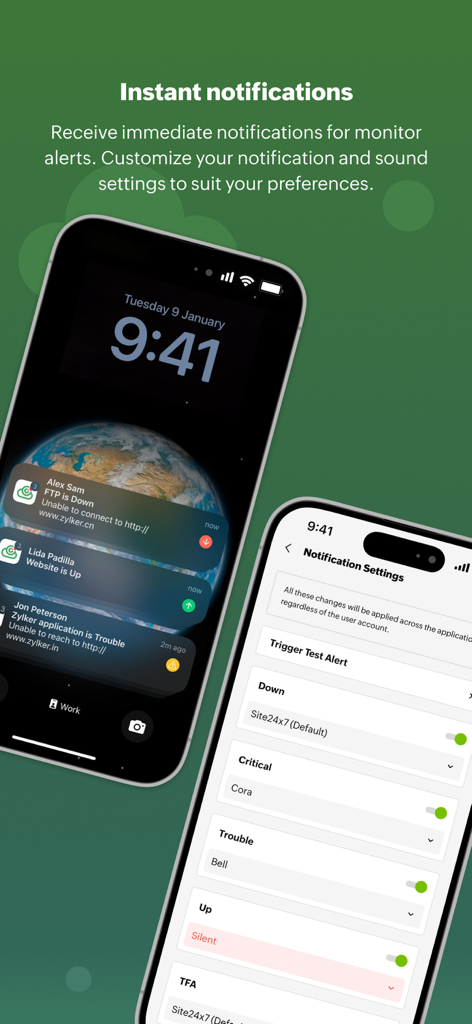
Site24x7 - Site24x7 app interface showing real-time IT monitor alerts on an iPhone lock screen and customizable notification settings.
Site24x7 app interface showing real-time IT monitor alerts on an iPhone lock screen and customizable notification settings.

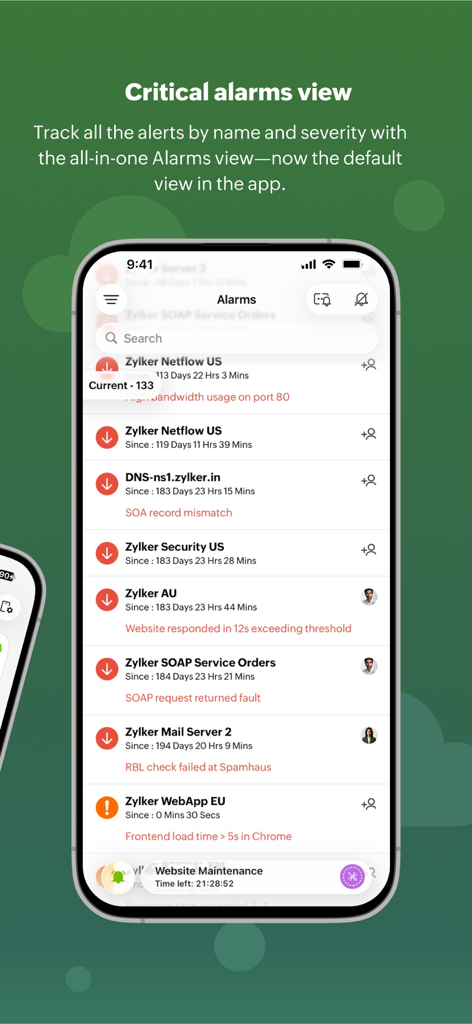
Site24x7 - Site24x7 app critical alarms dashboard showing a list of active system alerts and monitor statuses

Site24x7 app critical alarms dashboard showing a list of active system alerts and monitor statuses
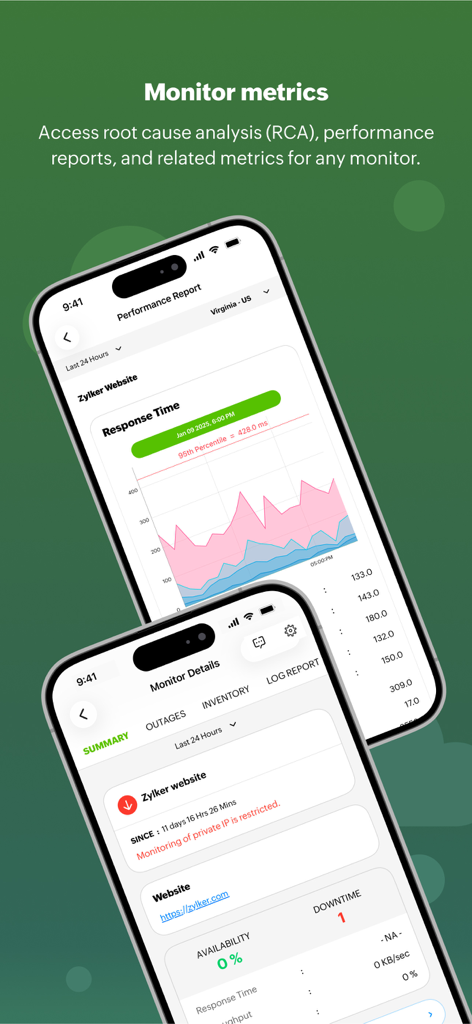
Site24x7 - Site24x7 mobile app interface showing website performance reports and response time metrics
Site24x7 mobile app interface showing website performance reports and response time metrics

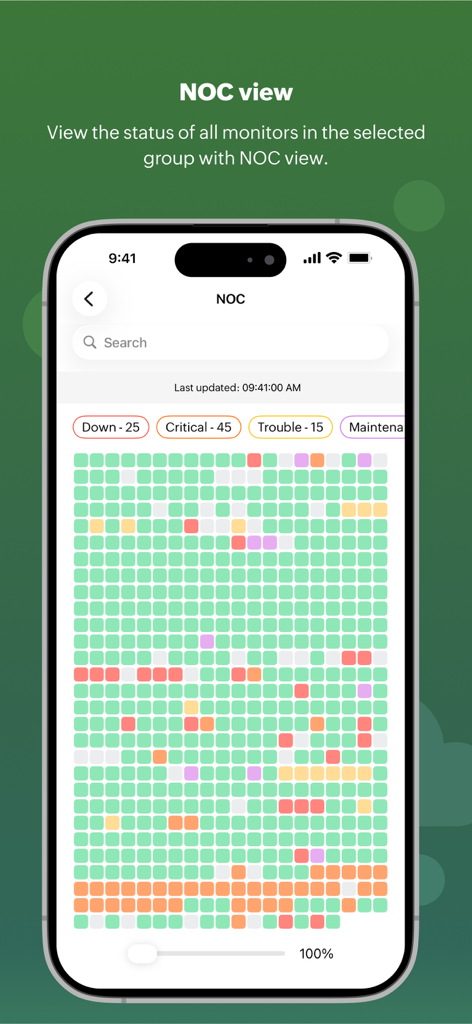
Site24x7 - Site24x7 NOC view displaying a real time color coded grid of IT monitor statuses
Site24x7 NOC view displaying a real time color coded grid of IT monitor statuses

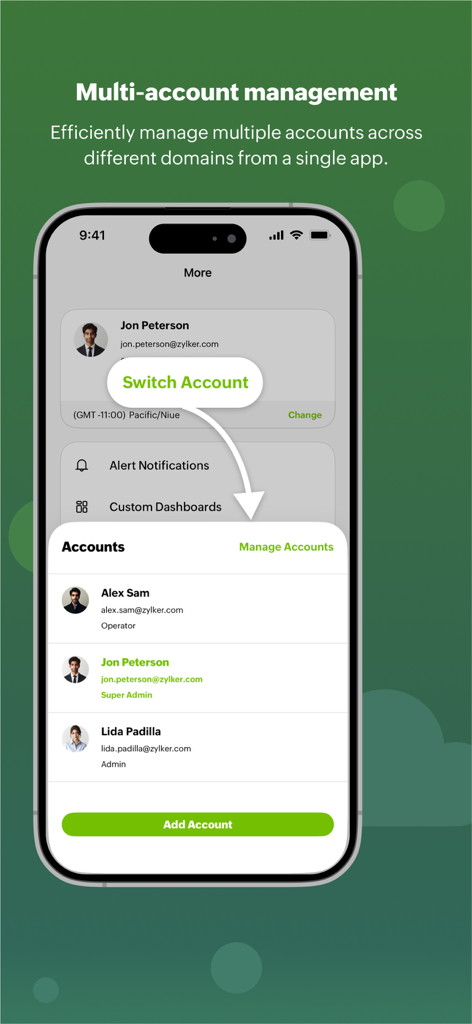
Site24x7 - Site24x7 app interface showing multi-account management and account switching feature for IT professionals.
Site24x7 app interface showing multi-account management and account switching feature for IT professionals.

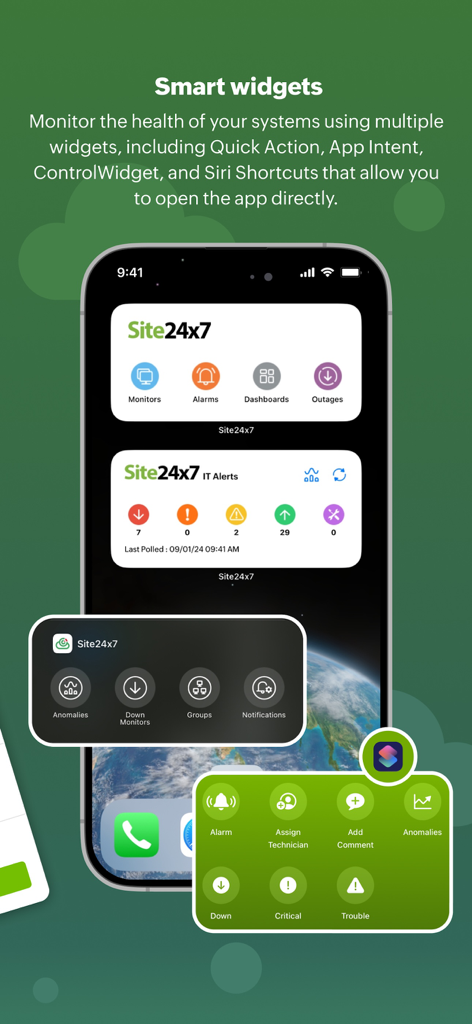
Site24x7 - Site24x7 iOS smart widgets showing real-time IT monitoring data and system health alerts on an iPhone home screen.
Site24x7 iOS smart widgets showing real-time IT monitoring data and system health alerts on an iPhone home screen.

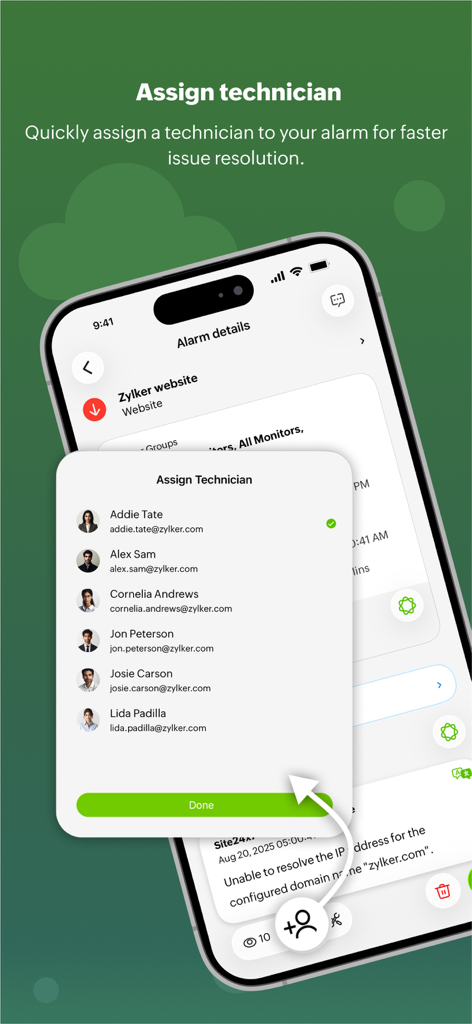
Site24x7 - Site24x7 app interface showing a list of technicians to assign for faster incident resolution
Site24x7 app interface showing a list of technicians to assign for faster incident resolution

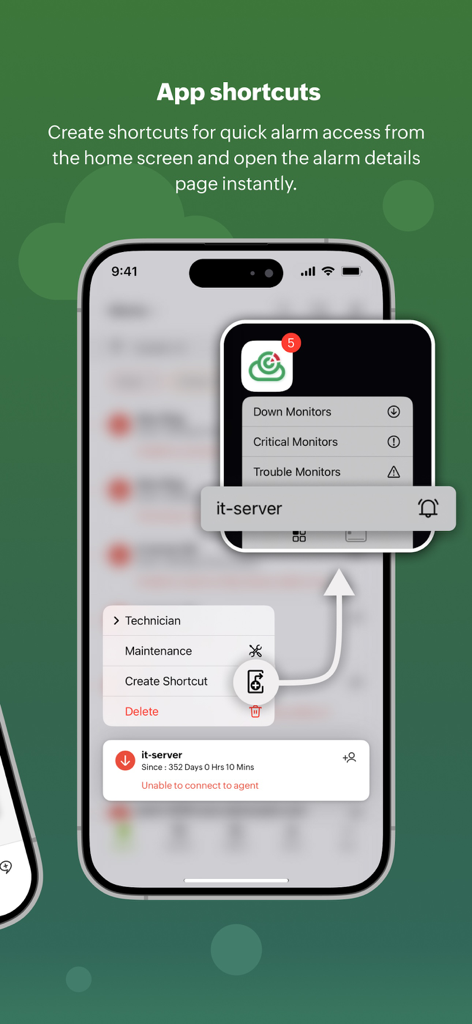
Site24x7 - Site24x7 app interface showing how to create home screen shortcuts for quick IT alarm access.
Site24x7 app interface showing how to create home screen shortcuts for quick IT alarm access.

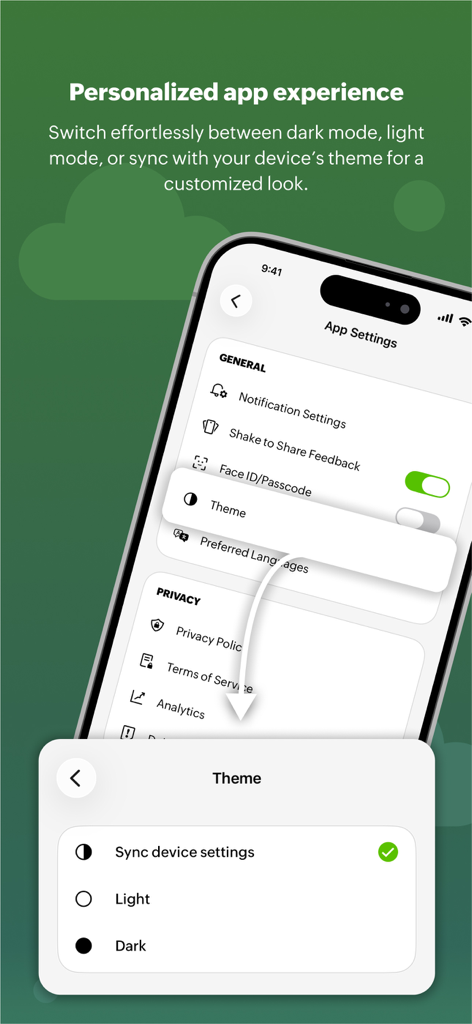
Site24x7 - A mobile interface for Site24x7 showing theme selection options including dark mode light mode and device synchronization

A mobile interface for Site24x7 showing theme selection options including dark mode light mode and device synchronization

Description

About the Site24x7 iOS app ManageEngine Site24x7 is an AI-powered observability platform for DevOps and IT operations. The cloud-based platform’s broad capabilities help you troubleshoot application performance issues and investigate incidents related to websites, servers, networks, and cloud resources in real time. Users can track real-time metrics for over 600 technologies using visual charts and dashboards while on the go—all from a single console. How the Site24x7 iOS app can help Based on your user profile, you can receive instant notifications, add comments, analyze the root causes of incidents, track the KPIs of monitored resources, announce scheduled maintenance for known alerts, and authorize remedial actions—all through the mobile app. The Site24x7 iOS app provides availability and performance reports for all monitored resources along with root cause analysis (RCA), service-level agreement (SLA), and downtime reports. Get outage histories and performance reports for your monitors. Manage multiple accounts across domains and track your system health using widgets like Alarms and Status. Alarm shortcuts help you access the app directly from the app widget. Quickly assign technicians for faster resolution and create shortcuts to monitor multiple alarms with ease. The app supports both light and dark themes for a personalized experience. Keep a close watch on every monitor’s status in real time with the NOC View. Use the Site24x7 iOS app to: Troubleshoot issues instantly * Get instant notifications about performance issues and resolve them with IT automation. Customize status notifications and instantly test alerts using the Test Alert feature. * View monitor statuses (Up, Down, Trouble, or Critical) and RCA reports on downtime. * Get outage and performance reports for monitors with detailed breakdowns. * Detect anomalies in IT performance with the Anomaly Dashboard. * Access MSP or BU dashboards for customer-specific availability insights. * Use the NOC View to check the statuses of monitors in selected groups. * Manage SLAs efficiently with scheduled maintenance and SLA tracking. * Add monitors and perform administrative actions from the Admin tab. * Perform actions like opening alarms, assigning technicians, and accessing reports via AppIntent. Monitor & manage with ease * Log in with multiple accounts to manage all data centers (DCs) effortlessly. * Monitor domains and track your server performance using over 80 metrics. * Set time zones for seamless monitoring and location-based availability views. * Collaborate on resource updates with incident chats * DC-based availability tracking for individual accounts. Personalize your experience * Use status widgets on the home and lock screens for quick monitor access via the control widget. * Enjoy a refreshed interface with light and dark themes. About Site24x7 Site24x7 provides AI-powered, full-stack monitoring specifically designed for DevOps and IT operations. It collects telemetry data from various sources, including servers, containers, networks, cloud environments, databases, and applications, to offer comprehensive observability. Additionally, Site24x7 tracks end-user experiences through both synthetic and real user monitoring capabilities. These features enable DevOps and IT teams to troubleshoot and resolve application downtime, performance issues, and infrastructure challenges, ultimately helping them manage digital user experiences more effectively. Site24x7 offers a wide range of performance monitoring features for your technology stacks, including the following: * Website monitoring * Server monitoring * APM * Network monitoring * AWS, Azure, and GCP monitoring * Hybrid, private, and public cloud monitoring * Container monitoring For any assistance, please get in touch with support@site24x7.com. Privacy Policy: https://www.site24x7.com/privacypolicy.html Terms of Service: https://www.site24x7.com/terms.html

Download

Download on App Store

This page is not an official page of the app or its developer, but an independent editorial publication created for informational and commentary purposes. Unless expressly stated otherwise, neither the app nor its developer is affiliated with, endorsed by, sponsored by, authorized by, or otherwise officially connected with MWM, Apple, Google Play, the app publisher, or the app's developer, and nothing on this page implies that the app was developed using MWM's services. Any trademarks, logos, screenshots, and other content remain the property of their respective owners.