
This page is not an official page of the app or its developer, but an independent editorial publication created for informational and commentary purposes. Unless expressly stated otherwise, neither the app nor its developer is affiliated with, endorsed by, sponsored by, authorized by, or otherwise officially connected with MWM, Apple, Google Play, the app publisher, or the app's developer, and nothing on this page implies that the app was developed using MWM's services. Any trademarks, logos, screenshots, and other content remain the property of their respective owners.


Sonos S1・S2 Speaker Controller
No more fumbling. This app puts the reins of your Sonos audio empire squarely in your hand, turning chaos into command.
Downloads
250k+User Rating
Total Ratings
2.8KPublisher
Category
MusicLocales
1Latest Version
1.1Size
41.7 MBFirst Released
May 24, 2024An analytical overview of the application's core functionalities designed for Sonos users.
Key Features of the Sonos S1・S2 Speaker Controller
Integrated Music Streaming & Casting
This tool enables users to cast music directly from their phone's library or stream their preferred tracks from various popular music platforms to their Sonos speakers.
Hassle-Free Speaker Connection
It allows users to connect their Sonos speakers via Bluetooth or Wi-Fi, ensuring a stable and reliable audio streaming experience.
Frequently Asked Questions
Everything you need to know about Sonos S1・S2 Speaker Controller
What does the Sonos S1・S2 Speaker Controller App do?
The Sonos S1・S2 Speaker Controller App controls Sonos S1 and S2 speakers directly from your phone. It enables connection, music streaming, volume adjustment, and identifies unknown tracks.
What connection types does the Sonos S1・S2 Speaker Controller App support?
The Sonos S1・S2 Speaker Controller App supports both Bluetooth and Wi-Fi connections. These methods ensure a stable audio streaming experience between your phone and Sonos speakers.
Can I stream music from popular platforms with the Sonos Speaker Remote Control?
Yes, the Sonos Speaker Remote Control allows streaming music from popular music platforms and your phone library. You can cast content from services such as YouTube Music and YouTube.
Does the Sonos S1・S2 Speaker Controller App identify unknown music?
Yes, the Sonos S1・S2 Speaker Controller App includes an "IDENTIFY UNKNOWN TRACKS" feature. It detects and identifies music playing around you in seconds, functioning as a personal music detector.
How do I disable auto-renewal for the Sonos S1・S2 Speaker Controller App subscription?
Auto-renewal for the Sonos S1・S2 Speaker Controller App subscription can be disabled via your iTunes Account Settings. This action must be completed at least 24 hours before the current subscription period ends.
When is my iTunes account charged for the Sonos S1・S2 Speaker Controller App?
Your iTunes account is charged for the Sonos S1・S2 Speaker Controller App upon purchase confirmation. For renewals, the account is charged within 24 hours prior to the end of the current subscription period.
The following screenshots and description are sourced directly from the app's official store listing and are the property of the app developer.
App Store
Screenshots

This tool introduces its primary interface, showcasing the essential "Connect" button for device pairing and quick access to the "Detector" and "Music" functionalities.
Seamless Control Hub
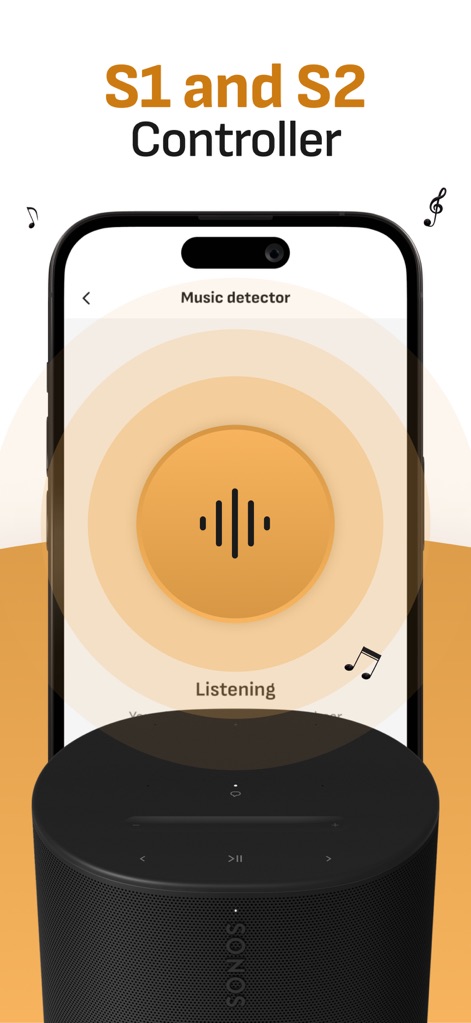
The app reveals its innovative "Music detector" feature, displaying a dynamic soundwave animation as it actively identifies playing tracks around users.
Intelligent Track Detection
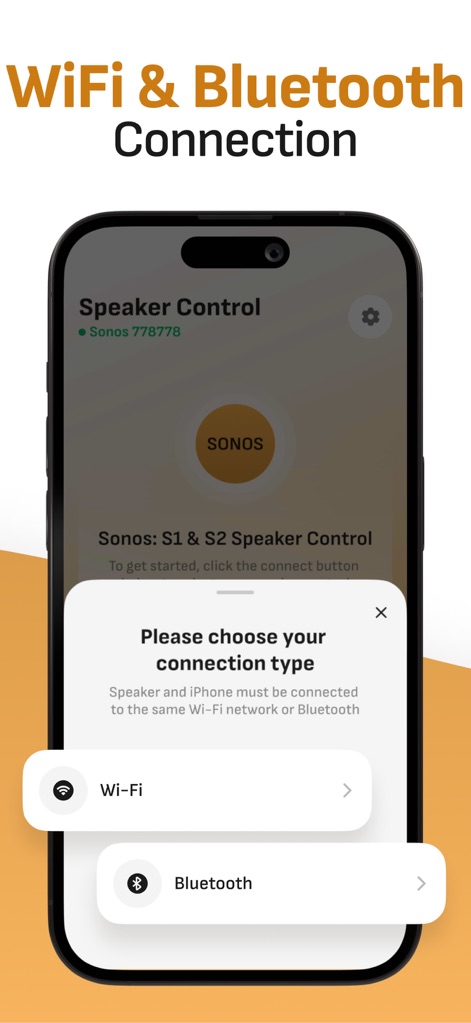
The app streamlines setup with a clear connection prompt, offering users the choice between robust "Wi-Fi" and convenient "Bluetooth" pairing methods.
Flexible Connectivity Options

Users can explore extensive streaming capabilities, with options to cast content directly from popular platforms like "YouTube Music" and through the "Safari" browser.
Stream & Cast Media
Description
Download
More Like This
Apps with similar features and user experience
PianoStream Piano MIDI Player
B&T Entertainment Inc
JBL One
Harman International Industries

Harman Kardon One
Harman International Industries

Sonos S1 Controller
Sonos, Inc.
Bose SoundTouch
Bose Corporation
Connect Speaker & Headphones ‣
BREEZY PATH LTD

Sonos
Sonos, Inc.
Music | Bowers & Wilkins
B&W Group Ltd
Headphones & Speaker connect +
Web Titans Limited
This page is not an official page of the app or its developer, but an independent editorial publication created for informational and commentary purposes. Unless expressly stated otherwise, neither the app nor its developer is affiliated with, endorsed by, sponsored by, authorized by, or otherwise officially connected with MWM, Apple, Google Play, the app publisher, or the app's developer, and nothing on this page implies that the app was developed using MWM's services. Any trademarks, logos, screenshots, and other content remain the property of their respective owners.